
6 Advanced Python Decorator Patterns
Code examples that explain the Python decorator through the development of templates

Coding Experience With Computer Languages
In many ways, my coding experience resembles the sediment layers of ice on an archaeological dig.
The bottom — or oldest — layer is several different assemblers. The following layers are FORTRAN, Lisp (several variations), C, PL/1, SQL, C++, and Java in order of age of layer. The last layers, representing the last eight years, are a mixture of R, Python, Ruby, Scala, and Go.
Using macros in C, C++ are simple substitutions. Using macros in Java is considered a bad practice by many gurus. Are Lisp macros perhaps too powerful?
The most elegant macro, for me, is the Python decorator.
Note: Python would be my hands-down favorite language if it compiled into a static pseudo-code and had hands-free concurrency. To me, using PySpark, a cloud, or trampolining to another language to benefit from multi-core CPUs feels hacky.
I assume going forward that you are comfortable with beginner and advanced Python decorator usage.
If you need a refresher on Python decorator concepts, read the article below. It provides the best explanation of Python decorators that I have encountered:
I will walk through decorator patterns for logging, debugging, displaying function metadata, and enumeration in this article.
1. Basic Decorator Template: Logging
I will start with a general-purpose decorator I use for logging.
log_call is a basic Python decorator. It wraps the logging execution before and after the function call of add_one.
def log_call(fun):
    """
        Decorator @log_call wraps the funtion
        with log events.
    """
    def wrapper(*args, **kwargs):
        #Pre:
        logger.info("before function: {}".format(fun.__name__))
        result = fun(*args, **kwargs)
        #post:
        logger.info("after function: {}, result:
                   {}".format(fun.__name__,result))
        return result
    return wrapper
@log_call
def add_one(x):
x = x+1
return(x)y=0
y = add_one(y)
y
The code is given in and was run in a Jupyter notebook.
The login_call decorator is our first pattern example. You can substitute any before or after boilerplate code or name you want in the login_call decorator pattern.
Decorator with arguments template (wrong)
If a decorator pattern had arguments, it would become even more powerful.
A naive Pythonic method to add arguments is to place *a, **kw after func in the call signature.
def log_call(func,*a, **kw):
"""
Decorator @log_call with arguments wraps the funtion
with log events.
"""
def wrapper(*args, **kwargs):
#Pre
result = func(*args, **kwargs)
#post:
logger.info("function: {}, result:{}".format(func.__name__,result))
return result
return wrapper@log_call(1, ERROR=True)
def add_one(x):
x = x+1
return(x)
y=0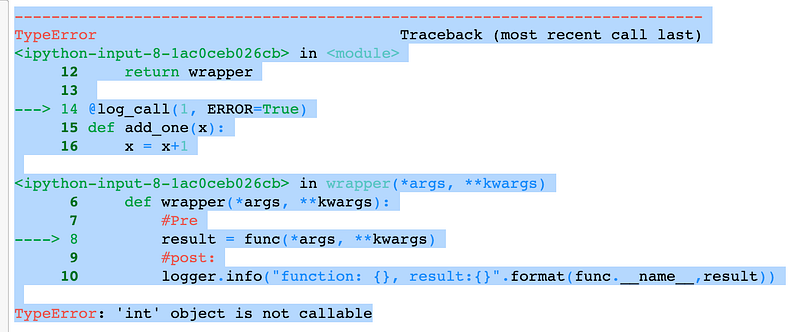
Adding *a, **kw after func in the call signature did not work.
The next section shows one correct way to create a decorator with arguments.
2. Decorator With Arguments: Logging (Correct)
A decorator with arguments needs @wrap and another function layer. I called this new function layer is arbitrarily named decorator.
def log_call(*a, **kw):
"""
Decorator @log_call wraps the funtion
with log events.
"""
def decorator(func):
@wraps(func)
def wrapper(*args, **kwargs):
#Pre:
result = func(*args, **kwargs)
#post:
logger.info("function: {}, result:{}".format(func.__name__,result))
return result
return wrapper
return decorator@log_call(ERROR=True)
def add_one(x):
x = x+1
return(x)
y=0
y = add_one(y)
y
Next, we dig into @wrapand poke around a bit to find out why we need it.
3. @wrap Retains Function Metadata
It is usually not necessary to retain the function object instance metadata. However, we need the function object instance reference to correctly wrap the decorator.
The built-in Python function dir(function-symbol) details the function metadata. In the following example, we use dir(function-symbol) to create a decorator to detail the function's metadata.
def bad_dir(*a, **kw):
    """
        Decorator @bad_dir wraps a call of dir
        on the funtion inefficently.
    """
    def decorator(func):
        @wraps(func)
        def wrapper(*args, **kwargs):
            #Pre:
            result = dir(func)
            #post:
            logger.info("function: {}, a:{},
                       kw()".format('bad_dir',a, kw))
            logger.info("function: {}, args:{}, kwargs()".format(func.__name__,args, kwargs))
            return result
        return wrapper
return decorator@bad_dir(1, ERROR=True)
def add_one(x):
x = x+1
return(x)y=0
add_one(y)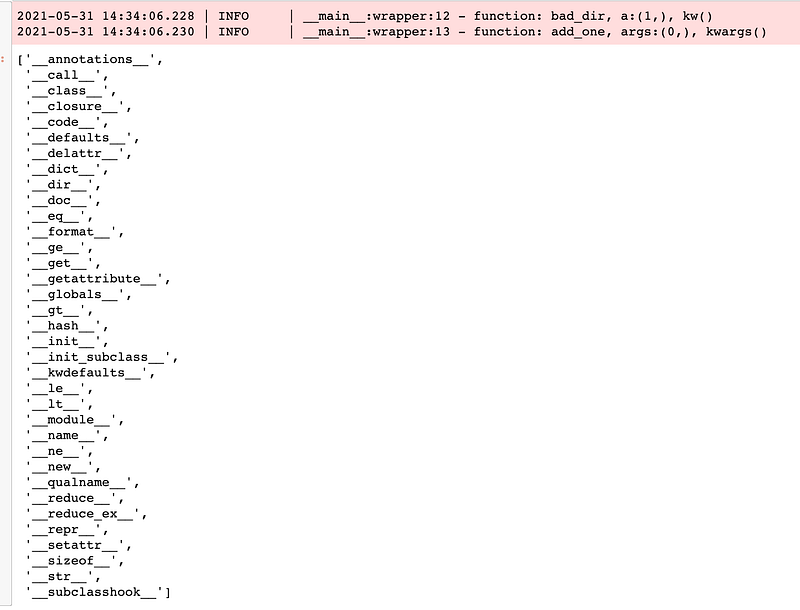
The __name__ function object attribute is used by our log_calldecorator, but you can look through the list to find other useful function object attributes.
Note: @wrap is in the functools package.
4. Decorator With Arguments Template: Logging Uses Arguments
We need encapsulation code for a helper function that uses the log_call decorator's arguments.
What does the log_output function actually do in detail?
from typing import Dict, List, Any
def log_output(fun, result:Any, kw:Dict, check_state:List ) -> None:
    for key in kw:
        keyl = key.lower()
        if  keyl in check_state:
            if kw[key]:
                eval('logger.'+keyl)("function: {}, result:
                                   {}".format(fun.__name__,result))
We next create the log_call decorator to accept arguments using the new decorator pattern.
def log_call(*a, **kw):
    """
        Decorator @log_call wraps the funtion
        with log events.
    """
    def decorator(fun):
        @wraps(fun)
        def wrapper(*args, **kwargs):
            #Pre:
            result = fun(*args, **kwargs)
            #post:
            check_state = ('debug', 'info', 'success',
                           'warning', 'error', 'critical')
            log_output(fun, result, kw, check_state)
            return result
        return wrapper
return decorator@log_call(ERROR=True)
def add_one(x):
x = x+1
return(x)
y=0y = add_one(y)
y
The output shows us that we were successful in changing the logging state with the call @log_call(ERROR=True).
What would the output be with @log_call(ERROR=True, CRITICAL=True, FAIL=True)?
5. Using Two Decorators: add_one
We turn add_one into a decorator that increases the global call_count by one.
#GLOBAL
call_count= 0
def add_one(fun):
    """
            Decorator pre-function call and post-function call of function func.
    """
    def wrapper(*args, **kwargs):
        global call_count
        #Pre action
        result = fun(*args, **kwargs)
        logger.info('call_count:{}'.format(call_count))
        call_count = call_count+1
        logger.info('Increase call_count:{}'.format(call_count))
        return result
    return wrapper
Actually, we use three decorators. @wraps counts as a decorator applied to the function pow.
@log_call(CRITICAL=True)
@add_one
def pow(x,y):
return(x**y)print('',call_count)
print(pow(2,10))The result is:

6. Using Four Decorators: jit
We use four decorators in this pattern. @jit is the acronym for Just-in-Time compilation into a C stub. Remember, @wrap is used inside the function decorator.
To show the effect of @jit, we don't use it at first.
@log_call(ERROR=True)
@add_one
def cum_one(x:int,y:int) -> int:
    total = 1
    for i in range(2,y,1):
        total += 1
return(total))cum_one(2,100_000_000)
Without @jit, it required 7.09 seconds of wall clock time.
Note: jit is part of the numba package.
@add_one
@log_call(ERROR=True)
@jit
def cum_one(x:int,y:int) -> int:
    total = 1
    for i in range(2,y,1):
        total += 1
    return(total)
With @jit, it required 0.24 seconds of wall clock time. A speedup of approximately 30x.
@jit caches each compiled named function, resulting in more speedup in the second call. There is no @jit compilation overhead.

The @jit result is 0.011 seconds of wall clock time. A speedup of approximately 640x.
The order of decorator invocation matters to @jit
What happens when we invoke the log_call result and then add_one?
@log_call(ERROR=True)
@add_one
@jit
def cum_one(x:int,y:int) -> int:
    total = 1
    for i in range(2,y,1):
        total += 1
return(total)cum_one(2,100_000_000)
The log event of log_call comes before the log event of add_one.
Let's find out if we call @jit first.
@jit
@log_call(ERROR=True)
@add_one
def cum_one(x:int,y:int) -> int:
    total = 1
    for i in range(2,y,1):
        total += 1
return(total)cum_one(2,100_000_000)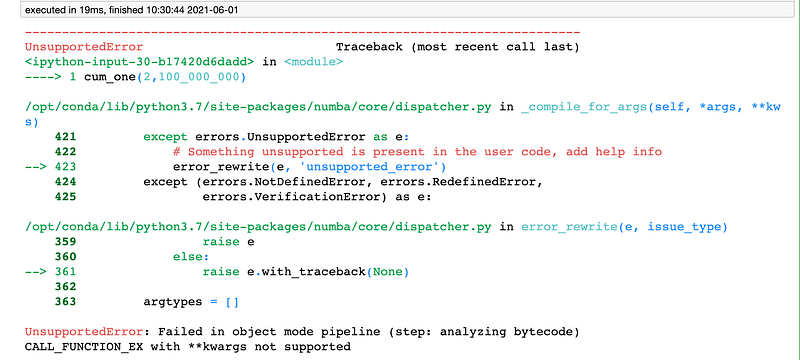
Ouch! It seems @jit needs to be invoked just before the function.
I stay away from philosophy. I am more of a get-er-done type of person. I will let you decide if this is a feature or bug of @jit.
Summary
In this article I discussed:
- Decorators with no arguments for logging.
- Decorators with arguments for logging.
- The value of
@wraps. - Using three decorators.
- The
@add_onedecorator. - Using four decorators.
- What kind of speedup you can obtain with the
@jitdecorator. - The fact that the order of decorators is not transitive.
The code in this article is given in and run in a Jupyter notebook.
In the next article, I will show a package for conveniently logging and using parameters with a YAML file.
Happy coding!


