
Simplifying State Management in Jetpack Compose: Effortless Flow Observation

Jetpack Compose is a modern Android UI toolkit that simplifies the process of building user interfaces. When it comes to state management in Compose, one powerful option is to use Flows, which allow you to handle asynchronous data in a reactive way. Observing Flows is made easy in Compose, making it easier to manage dynamic UI components in your Android app.
Here’s how you can do it: →
Gaining Insight into the Issue:
In Android development, it is common to retrieve data asynchronously using Kotlin Flow. Once you have this data, it needs to be converted to a Compose state to display it in your Compose UI. Handling the lifecycle of this data flow, such as canceling it when it is no longer needed, can present certain complexities.
The Solution:
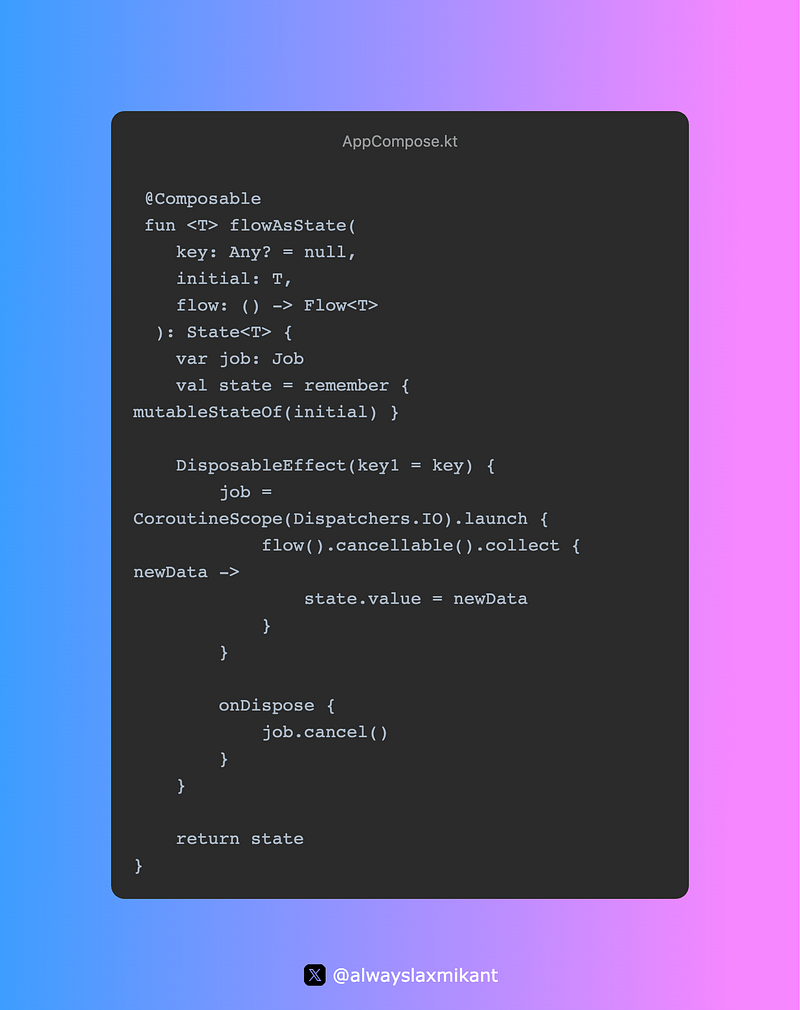
In response to this challenge, I introduce a handy utility function known as `flowAsState`. This function enables you to effortlessly observe a Flow and transform it into a State. Now, let’s delve into the code:
Use: →
- Composable Function:
flowAsStateis a composable function, which means it can be use in your ComposeUI code.
2. Parameters: → key: An optional identity key that enables differentiation between various invocations of this composable. This feature proves useful when you need to trigger data re-fetching in response to changes in this key.
initial: The initial value of the state before the Flow emits any data.
flow: A lambda that provides the Flow you want to observe.
3. State Management:
State Objects: Compose introduces the remember function, which allows you to create and manage state objects within a Composable function. These state objects hold the data that you want to display or manipulate in your UI. When the state changes, Compose automatically recomposes the relevant parts of your UI to reflect the new state.
state: Inside the composable, we use a mutableStateOf to create a Compose State. This state will hold the data emitted by the Flow.
4. DisposableEffect: →
We use DisposableEffect to manage the lifecycle of the Flow observation. When the Composable view is created, it launches a coroutine to collect data from the Flow.
The key parameter helps in automatically canceling the existing observation when it changes, ensuring that the Flow is only observed when the screen is visible.
Generally refers to a way of managing resources that should be cleaned up when they are no longer needed. These resources could include things like database connections, file handles, network requests, or any other resource that should be released to prevent resource leaks and improve the efficiency of your app.
DisposableEffect(key1, key2, ...) {
    // Initialize or set up a resource here

    onDispose {
        // Clean up or release the resource when the composable is removed
    }
}
5. Cancellation:
Cancellation :Refers to the act of terminating or stopping the execution of a task, operation, or piece of code before it has completed its intended purpose. Cancellation can be important for various reasons, such as improving resource management, enhancing user experience, or handling errors gracefully.
We take care of automatically canceling the Flow observation when the Composable view is disposed. This ensures that resources are properly released, preventing memory leaks.
Use:
@Composable
fun SearchResultsScreen() {
    val searchQueryState = // A state that holds the latest search query

    val searchResultsState = observeSearch(searchQueryState.value)

    LazyColumn {
        items(searchResultsState.value.size) { index ->
            SearchResultItem(searchResultsState.value[index])
        }
    }
}
@Composable
fun observeSearch(searchQuery: String): State<List<Movies>> = flowAsState(
key = searchQuery,
initial = emptyList(),
flow = { articleDao.getSearchFlow(searchQuery) },
)Consider that you have a Room database that stores articles in an entity called Movies. The observeSearch Composable function can be used to provide a functionality to search for a list of Movies from the database based on the user’s search query. As the user changes the query, flowAsState can automatically cancel the previous observation and re-fetch the data based on the new query.
Conclusion:
To manage the lifecycle of data observations effortlessly, ensuring that you display the most up-to-date information in your Android app’s UI. By using this utility, you can enhance the user experience of your Jetpack Compose application and make your code more maintainable.
I hope the article was still enjoyable ✌✌.


