
Simplifying Kubernetes Operations with Terraform, ArgoCD and GitOps on AWS: Part 2.
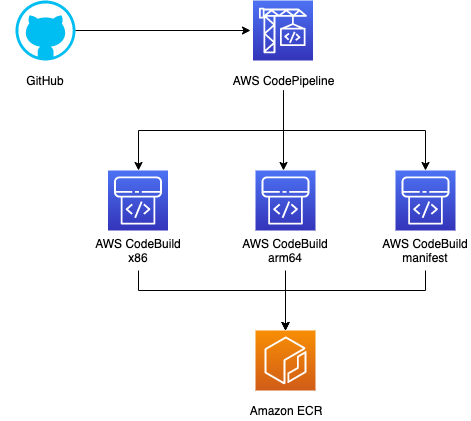
In this we will explore more on AWS CodeCommit, AWS CodeBuild and AWS CodePipeline.
AWS CodeCommit
AWS CodeCommit is a fully-managed source control service provided by Amazon Web Services (AWS) that makes it easy for companies to host secure and scalable private Git repositories. CodeCommit eliminates the need to set up, operate, and scale your own source control infrastructure, making it easier to collaborate on code in a secure and highly scalable environment.
Features
- Secure: CodeCommit uses AWS’s secure infrastructure and offers features such as encryption at rest and in transit, along with various other IAM (Identity and Access Management) capabilities for robust access control.
- Scalable: Being a managed service, it scales automatically with your repository’s requirements, so you don’t have to worry about infrastructure.
- Collaboration: CodeCommit supports pull requests, code reviews, and inline comments to make it easier for team members to collaborate on code
- Versioning: Being Git-based, CodeCommit offers powerful branching and tagging capabilities, enabling robust version control.
- Integrations: You can easily integrate CodeCommit with other AWS and third-party DevOps services like AWS CodeBuild, AWS CodeDeploy, AWS CodePipeline, and even services like Jenkins.
- Event-driven: You can set up triggers using AWS Lambda to automatically start builds, tests, and deployments when code is pushed or pulled.
- Cost-Effective: No up-front fees are required. You pay only for what you use, making it cost-effective for both small projects and large enterprises.
How to Use AWS CodeCommit
- Create a Repository: You can start by creating a new repository in the AWS Management Console or using the AWS CLI or SDKs.
- Clone Repository: Once the repository is created, you can clone it to your local machine using Git commands.
- Commit and Push: Make changes to your code, commit those changes locally, and then push them back to the CodeCommit repository.
- Pull Requests: You or your team members can submit pull requests to merge changes from one branch to another.
- Code Reviews: Team members can review code, add comments, and approve or reject pull requests.
- Integrate and Deploy: Integrate with other services like AWS CodePipeline and AWS CodeDeploy to automate the build, test, and deployment phases.
- Monitor and Audit: Use AWS CloudWatch and AWS CloudTrail for monitoring and auditing activities.
AWS CodeBuild
AWS CodeBuild is a fully managed build service offered by Amazon Web Services (AWS). This service compiles source code, runs tests, and produces packages that are ready for deployment. AWS CodeBuild is designed to be part of the AWS suite of DevOps tools for managing a software release workflow.
Features
- Fully Managed: CodeBuild scales continuously by processing multiple builds concurrently, so your builds are not left waiting in a queue.
- Customizable: You can specify build environments in the form of Docker images, allowing you to customize the build environment to suit your needs.
- Extensible: CodeBuild can integrate with existing AWS services like AWS CodePipeline, AWS Lambda, and AWS CodeDeploy, as well as third-party tools, to create a complete, automated software release workflow.
- Automated Testing: You can configure CodeBuild to run unit tests, integration tests, and other types of automated tests as part of the build process to catch bugs early.
- Secure: It integrates with AWS Identity and Access Management (IAM), allowing you to set user policies and credentials to be securely accessed within your build environment.
- Environment Variables: You can parameterize your builds using environment variables.
- Pay as You Go: Like many AWS services, you pay only for the build time you use.
- Logs and Metrics: Integration with Amazon CloudWatch allows you to store logs and monitor build metrics.
- Artifact Storage: Build artifacts can be automatically uploaded to Amazon S3 for storage.
Typical Workflow
- Source Code: Your source code resides in a repository like AWS CodeCommit, GitHub, or Bitbucket.
- Buildspec File: Create a
buildspec.ymlfile that specifies the build commands and the artifact output details. - Configuration: Set up the build project in CodeBuild, specifying the source repository and the build environment.
- Build: Trigger the build manually, or automatically via a webhook or as a step in a pipeline.
- Test: If your
buildspec.ymlincludes test commands, they will be run during the build phase. - Artifacts: Once the build is successful, the build artifacts are stored in an Amazon S3 bucket.
- Deploy: You can use services like AWS CodeDeploy or AWS Elastic Beanstalk to deploy your build artifacts.
AWS CodePipeline
WS CodePipeline is a fully managed continuous integration and continuous delivery (CI/CD) service that automates the build, test, and deployment phases of your release process. It’s designed to allow fast and reliable application and infrastructure updates, enabling you to rapidly and reliably deliver features and updates.
Features
- Automated Workflow: CodePipeline automates the entire software release process, making it consistent and repeatable.
- Extensible: You can integrate AWS CodePipeline with third-party services like GitHub or with your own custom plugins.
- Visual Workflow: It offers a graphical user interface where you can design your workflow.
- Multiple Sources: CodePipeline supports AWS CodeCommit, Amazon S3, GitHub, and more as source repositories.
- Integrated with AWS Suite: It is natively integrated with AWS services like AWS CodeBuild for building your code and AWS CodeDeploy for deploying your application.
- Security: Using AWS IAM, you can set fine-grained access permissions for CodePipeline.
- Fast Iteration: Allows you to rapidly iterate on your software by providing a streamlined and automated pipeline.
- Parallel Execution: Supports running multiple actions in parallel to speed up your build and deployment processes.
- Custom Actions: You can define custom actions to add to your pipelines, allowing you to extend its capabilities.
- Monitoring and Notifications: Integrates with AWS CloudWatch for monitoring and AWS SNS for notifications.
Typical Workflow
- Source Stage: The pipeline automatically pulls source code from the repository whenever there’s a code change.
- Build Stage: The source code is then sent to a build service like AWS CodeBuild to compile it, run tests, and produce deployable artifacts.
- Test Stage: Optionally, you can run automated tests on the build artifacts.
- Deploy Stage: Finally, the pipeline deploys the build artifacts using AWS CodeDeploy, AWS Elastic Beanstalk, Amazon ECS, or other deployment services.
- Monitoring: Throughout these stages, you can monitor the progress and health of your pipeline through AWS CloudWatch and receive notifications via AWS SNS.
How to Get Started
- Step 1: Define the different stages and steps in your pipeline. This can usually be done through the AWS Management Console, AWS CLI, or via a CloudFormation template.
- Step 2: Connect your source code repository. CodePipeline will poll this repository for changes or can be triggered by a webhook.
- Step 3: Specify the build and test commands usually via a
buildspec.ymlfile for AWS CodeBuild. - Step 4: Define your deployment stage. This could be an AWS service like ECS, Lambda, or CodeDeploy, among others.
- Step 5: Monitor your pipeline and review logs and metrics to ensure that it’s performing as expected.
AWS CodePipeline enables you to model the full release process for building, testing, and deploying your applications, making it easier for teams to keep track of complex workflows and ensuring that code changes go through a proper process before reaching production.
Previous Article
In next part of this series we will create a plan for this whole integration, where we will see how AWS DevOps we will be integrated with ArgoCD to complete GitOps environment with the help of Terraform, creating the infrastructure and deploy the services on Kubernetes .
If you found this article helpful, please don’t forget to hit the Follow 👉 and Clap 👏 buttons to help me write more articles like this.
Thank You 🖤
Thank you for Reading !! 🙌🏻😁📃, see you in the next blog.🤘
🚀 Feel free to connect with me : LinkedIn: https://www.linkedin.com/in/gurpreetsinghpal/
Click on the following link to read all great stories on Medium. 😄 https://medium.com/@gurpreet.singh_89
Get an email whenever I publish a new story.😄 https://medium.com/@gurpreet.singh_89/subscribe
The end ✌🏻