Simple Facebook social Login using Django Rest Framework.

I was currently tasked to implement a feature on backend implementation of facebook login in an API. I didn’t find a single resource with clear information except for Toptal article that helped me understand the basic and logic concepts of integrating oauth2 into Django Rest Framework backend. I learned with coding, the trick is just to begin, put your first foot forward and you will figure out the rest ahead.
Apparently, coding is just like “driving a car at night, you can only see as far as the car headlights, maybe 200m, but you can make the whole trip that way.” ~ E.L.Doctorow.
In this post, I will show you how easy it is to implement Facebook social login. I presume the reader has knowledge in python, basic Django and API’s. I will be using the Django Rest Framework to demonstrate the implementation. I won’t be going into many details as Toptal has explained it great and concise here. Integrating a social login implementation to your backend requires only 3 steps;
1. Select the desired social network provider. i.e facebook, google, twitter, github.2. Send a log in request to the social network provider.3. Register and login the user.4. You can decide to get an authentication token from login so as to use it to access protected endpoints.Before getting started, create an app at developers.facebook. On the dashboard, settings >> basic, add ‘app domain’ and ‘site url’ which can be any url i.e app.com and remember to set the URL in the `/etc/hosts` file in your local machine. Copy the FACEBOOK_APP_ID and the FACEBOOK_APP_SECRET and set them as environment variables in your project’s .env file.
Let’s now set up the configurations. I will define the necessary settings required in settings.py, the views, serializers, urls.auth and urls.config.
- Pip install Django-rest-framework-social-oauth2 into your project’s virtual environment.
pip install django-rest-framework-social-oauth22. Add the following as it is in your settings.py file.
Social-auth facebook settings.
Then include:-
MIDDLEWARE =['social_django.middleware.SocialAuthExceptionMiddleware',]
# Facebook configuration
SOCIAL_AUTH_FACEBOOK_KEY = env.int('FACEBOOK_APP_ID')
SOCIAL_AUTH_FACEBOOK_SECRET = env.str('FACEBOOK_SECRET_KEY')
SOCIAL_AUTH_LOGIN_REDIRECT_URL = '/'# Define SOCIAL_AUTH_FACEBOOK_SCOPE to get extra permissions from facebook. Email is not sent by default, to get it, you must request the email permission:
SOCIAL_AUTH_FACEBOOK_SCOPE = ['email']
SOCIAL_AUTH_FACEBOOK_PROFILE_EXTRA_PARAMS = {
'fields': 'id, name, email' }
SOCIAL_AUTH_FACEBOOK_SCOPE = ['email']
FACEBOOK_EXTENDED_PERMISSIONS = ['email']
SOCIAL_AUTH_ADMIN_USER_SEARCH_FIELDS = ['username', 'first_name', 'email']
SOCIAL_AUTH_USERNAME_IS_FULL_EMAIL = TrueSOCIAL_AUTH_PIPELINE = (
'social_core.pipeline.social_auth.social_details',
'social_core.pipeline.social_auth.social_uid',
'social_core.pipeline.social_auth.auth_allowed',
'social_core.pipeline.social_auth.social_user',
'social_core.pipeline.user.get_username',
'social_core.pipeline.social_auth.associate_by_email',
'social_core.pipeline.user.create_user',
'social_core.pipeline.social_auth.associate_user',
'social_core.pipeline.social_auth.load_extra_data',
'social_core.pipeline.user.user_details', )3. Serializers.py file.
class SocialSerializer(serializers.Serializer):
"""
Serializer which accepts an OAuth2 access token and provider.
"""
provider = serializers.CharField(max_length=255, required=True)
access_token = serializers.CharField(max_length=4096, required=True, trim_whitespace=True)
4. Views.py file.
Create a social login view. SocialLoginView class5. In the app’s urls.py file, power up the Facebook login URL to its respective view.
from django.urls import path
from .views import (SocialLoginView)
urlpatterns = [path('oauth/login/', SocialLoginView.as_view())]6. In the project’s urls.py file or urls.config file, add the following;
from django.urls import path
from django.conf import settings
from django.conf.urls import include
urlpatterns = [ path('api/auth/oauth/', include('rest_framework_social_oauth2.urls'))]7. Perform migrations so as to create social_auth tables and their relations.
python manage.py migrate8. We now need Facebook's user access token so that we can use it to make API requests on behalf of a user and allow authorization of our app to access specific parts of the user’s data. We can then debug the token so as to check the user’s data and the validity of the token. All this is provided by facebook as long as you have created a facebook app.
- Get user access_token.
- Debug the token. (optional)
9. Run the server and test the endpoint on postman:
python manage.py runserver
127.0.0.1:8000/api/auth/oauth/login/
- Provide the provider and access_token fields.
- Now test the endpoint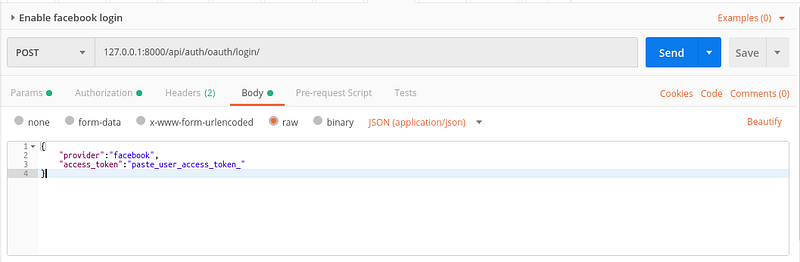
Note: This will return a response with the user’s email, username, and token(JWT). You can customize the response and get the data that you need.
TaDa!!! And that’s it for backend implementation of facebook login using Django Rest Framework.