
Simple Android Network Traffic Inspection With Chucker And Seismic
Implement a Netfox equivalent in just a few lines of code

When we are working with testers or are even testing apps by ourselves, we often face the issue that we need to make sure that certain HTTP(S) requests got executed. Sometimes we also want to make sure they got executed in a specific order or want to make sure the expected payload got sent and received.
If we have a device attached via cable or WiFi debugging to our IDE, it’s no hustle to take a look into Logcat and see what’s going on.
But if we deploy our Android app to AppTester for example with a version that is not set to be debuggable, we can no longer do that. If you’re working with a quality assurance team, your colleagues are also unlikely to have connected the app to Android Studio.
Because of these limitations, you will need a tool to somehow inspect the network traffic of your app in another way.
If you have ever developed an app for the Apple ecosystem, you might stumble about the famous Netfox library that got built for exactly that purpose. It allows you to physically shake your device and automatically open up a debug monitor that provides you with an overview of the executed network requests.
The approach to open the debug view up via shake is in my opinion very cool and easy to use even for non-technical skilled people and saves you from having to implement an extra debug menu to call the inspector.
However, this library can only be used when you are implementing an iOS or OSX app.
In this article, we will take a look at how we can achieve the same behavior of Netfox with the help of two very useful Android libraries, Chucker and Seismic, in just a few lines of code.
1. Introducing Chucker
Just like Netfox itself, Chucker is a library that allows us to inspect the network traffic of our app. The library is very easy to set up. You just need to add the ChuckerInterceptor to your OkHttpClient.Builder and are good to go.
In addition to observing the executed requests, we can also inspect what we send to the respective API and what do we receive in response.
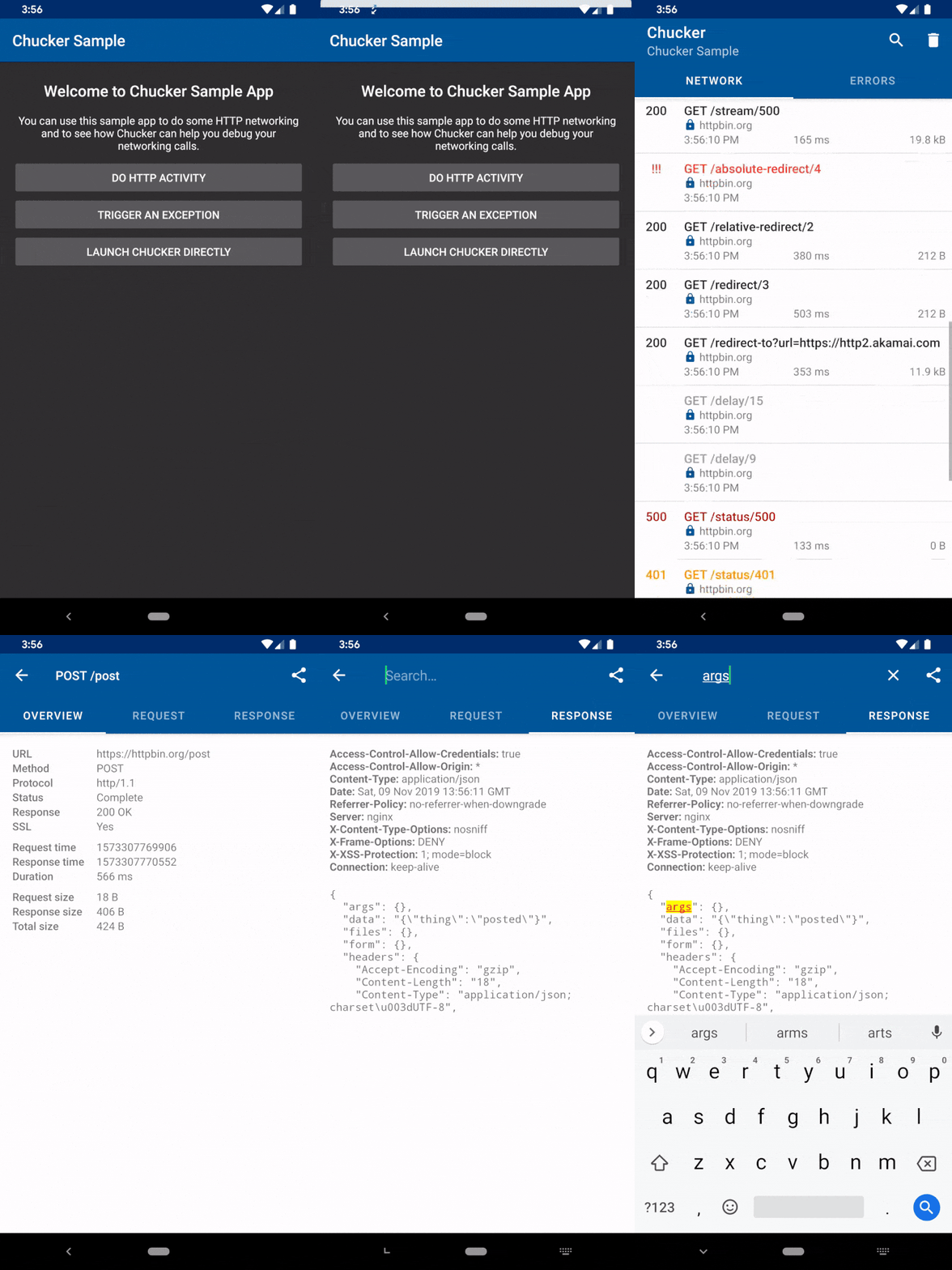
1.1 Setup
Before we can start with the actual implementation, we need to make sure that we add the required dependencies.
Chucker has one specialty that you might come across the first time. Usually, you just add one dependency for all of your build types.
Chucker, however, provides also a “no-op” variant of the library besides the actual one, that allows us to separate Chucker from the release build while still having the code itself compilable.
That is quite important because in most cases you don’t want the user to see what’s going on in cleartext within the network traffic of your app. In the worst case, you could accidentally expose vulnerabilities of your app or backend.
On the other hand, you don’t want to comment out all the code you add for using Chucker before building another variant. Therefore we need some kind of hull with no actual implementation for the actual release builds.
Luckily Gradle supports the usage of dependencies only for specific build types. You might recognize this feature from declaring your test dependencies with testImplementation(..) for example.
That said, let’s assume that we only have two build variants, release, debug and appTester. If you’d only want to expose Chucker in the debug and appTester variant but exclude it from the actual release build, you should add the following to your app-level build.gradle.
As you can see, we set the actual library for the debug and appTester variant, but use the library-no-op one for the release build.
1.2 Intercepting the network traffic
Now that we have the library integrated into our app, we can start to attach ourselves to the network traffic.
As already mentioned, Chucker provides us with the ChuckerInterceptor that can be easily added as OkHttp interceptor.
Take a look at the following code snippet, that shows a snippet of an exemplary OkHttpClient.Builder initialization:
That’s it! All your network traffic that gets executed by that OkHttpClient instance now gets automatically monitored by Chucker.
1.3 Customization
Without further configuration, if you start your Android app, Chucker will now show a notification that can be clicked to open up its network monitor Activity that you could see in the previously shown GIF from the GitHub documentation above.
But because we want to open it only up via device shake, we want to disable this feature.
Take a look at the following code snippet that extends the previous example:
As you can see we create an instance of a ChuckerCollector and set the showNotification parameter to false. That disables the mentioned notification.
We then no longer directly create a ChuckerInterceptor instance but use the ChuckerInterceptor.Builder. That builder allows us to pass in our previously instantiated ChuckerCollector.
The rest of the OkHttpClient initialization remains the same.
If you want to take further customizations like the maximum content length or other things, take a look at the official documentation on GitHub.

2. Introducing Seismic
Now that we laid the base for the network traffic inspection with Chucker, let’s go ahead and take a look at the second library we will be using.
Seismic allows us to easily detect device shakes and is written and maintained among others by the legendary Jake Wharton who is also one of the maintainers of Retrofit and other widely used libraries.
Because we want to recreate the Netfox feature of automatically opening up the network traffic inspector via device shake, the library plays right into our hands.
Before we can start with the actual implementation, make sure that you add the following dependency to your app-level build.gradle file:
Just as easy as it was to introduce Chucker into our app, the same goes for Seismic.
It is based on one single class, the ShakeDetector. It just requires the SensorManager system service as input and is already ready to do its job.
We can react to a device shake, by implementing the ShakeDetector.Listener interface and registering to the ShakeDetector.
Because we want to listen to the device shake in any part of our app, we need an easy way to implement Seismic’s ShakeDetector.
Even if base classes are very frowned nowadays, in my opinion, the best approach is to implement a “base” Activity that can be inherited from. As long as the inheriting Activity is present, we will then be able to detect device shakes and trigger the Chucker inspector by manually starting the launch intent that can be received from Chucker itself.
Take a look at my approach to this idea:
Because we don’t have Chucker in our release build, we also shouldn’t listen for device shakes in that build type. As you can see I exclude the release build from listening with a simple check for the current BuildConfig.BUILD_TYPE.
We then get the SensorManager by calling getSystemService(SENSOR_SERVICE) and casting the result as SensorManger.
The ShakeAwareActivity itself implements the ShakeDetector.Listener and can therefore be set as the listener to the ShakeDetector at the initialization.
If you are targeting Android 12 and higher, it is very important that you don’t set the sensor delay too fast. Otherwise a SecurityException will be thrown if you don’t declare the HIGH_SAMPLING_RATE_SENSORS permission in your manifest.
However, for detecting the device shake, starting the detector with SensorManager.SENSOR_DELAY_GAME delay, as you can see in line 21, is sufficient.
Finally in the hearShake() callback we call Chucker.getLaunchIntent(this) to get an Intent that allows us to launch Chucker’s network monitoring Activity that we can open up via notification in the default configuration.
So if you implemented all the steps from above accordingly, let your respective Activity inherit from the ShakeAwareActivity, start your app and shake your device, the network traffic monitor should automatically open up.
3. Conclusion
In this article, we took a look at how to easily implement local network traffic monitoring for your Android app.
We took the popular Netfox library for iOS as an inspiration and tried to achieve the same behavior.
With the help of a combination of Chucker and Seismic, we came to a pretty easy-to-implement solution that will surely make your and the life of your testing team a lot easier.
Of course, you can use Chucker on its own, or use the shake detection in combination with the notification.
I hope you had some takeaways, clap if you liked my article, make sure to subscribe to get notified via e-mail, and follow for more!


