avatarRashida Nasrin Sucky

Free AI web copilot to create summaries, insights and extended knowledge, download it at here

4819

Abstract

s-string">'student'</span>: <span class="hljs-number">6</span>, <span class="hljs-string">'plays'</span>: <span class="hljs-number">5</span>, <span class="hljs-string">'guiter'</span>: <span class="hljs-number">2</span>, <span class="hljs-string">'as'</span>: <span class="hljs-number">0</span>, <span class="hljs-string">'well'</span>: <span class="hljs-number">7</span>}</pre></div><p id="a28f">Look, each word of the text received a number. Those numbers are the index of that word. It has eight significant words. So, the index is from 0 to 7. Next, we need to transform the text. I will print the transformed vector as an array.</p><div id="cf04"><pre><span class="hljs-built_in">vector</span> = vectorizer.<span class="hljs-built_in">transform</span>(text) <span class="hljs-built_in">print</span>(<span class="hljs-built_in">vector</span>.toarray())</pre></div><p id="1447">Here is the output: [[1 1 1 1 2 1 1 1]]. ‘Jen’ has index 4 and it appeared twice. So in this output vector, the 4th indexed element is 2. All the other words appeared only once. So the elements of the vector are ones.</p><p id="5631"><b>Now, vectorize the ‘text’ column of the dataset, using the same technique.</b></p><div id="1622"><pre><span class="hljs-attr">vect</span> = CountVectorizer() <span class="hljs-attr">word_weight</span> = vect.fit_transform(df[<span class="hljs-string">'text'</span>])</pre></div><p id="1b3a">In the demonstration, I used ‘fit’ first and then ‘transform’ later’. But conveniently, you can use fit and transform both at once. This word_weight is the vectors of numbers as I explained before. There will be one such vector for each row of text in the ‘text’ column.</p><p id="601c">3. Fit this ‘word_weight’ from the previous step in the <a href="https://scikit-learn.org/stable/modules/neighbors.html">Nearest Neighbors </a>function.</p><p id="ef35">The idea of the nearest neighbor’s function is to calculate the distance of a predefined number of training points from the required point. If it’s not clear, do not worry. Look at the implementation, it will be easier for you.</p><div id="ee02"><pre><span class="hljs-variable">nn</span> = <span class="hljs-function"><span class="hljs-title">NearestNeighbors</span>(<span class="hljs-variable">metric</span> = <span class="hljs-string">'euclidean'</span>)</span> <span class="hljs-variable">nn.fit</span>(<span class="hljs-variable">word_weight</span>)</pre></div><p id="6868">4. Find 10 people with similar backgrounds as President Barak Obama.</p><p id="ab40">First, find the index of ‘Barak Obama’ from the dataset.</p><div id="efa8"><pre>obama_index = df[df[<span class="hljs-string">'name'</span>] == <span class="hljs-string">'Barack Obama'</span>].index[<span class="hljs-number">0</span>]</pre></div><p id="dfa5">Calculate the distance and the indices of 10 people who have the closest background as President Obama. In the word weight vector, the index of the text that contains the information about ‘Barak Obama’ should be in the same index as the dataset. we need to pass that index and the number of the person we want. That should return the calculated distance of those persons from ‘Barak Obama’ and the indices of those persons.</p><div id="100a"><pre><span class="hljs-built_in">distances,</span> indices = nn.kneighbors(word_weight[obam<span class="hljs-built_in">a_index</span>], n_neighbors = <span class="hljs-number">10</span>)</pre></div><p id="cf68">Organize the result in a DataFrame.</p><div id="6367"><pre>neighbors = pd<span class="hljs-selector-class">.DataFrame</span>({<span class="hljs-string">'distance'</span>: distances<span class="hljs-selector-class">.flatten</span>(), <span class="hljs-string">'id'</span>: indices<span class="hljs-selector-class">.flatten</span>()}) <span class="hljs-function"><span class="hljs-title">print</span><span class="hljs-params">(neighbors)</span></span></pre></div><figure id="c307"><img src="https://cdn-images-1.readmedium.com/v2/resize:fit:800/0*qZaR13mElJcYHggd.png"><figcaption></figcaption></figure><p id="d2d0">Let’s find the name of the persons from the indexes. There are several ways to find names from the index. I used the merge function. I just merged the ‘neighbors’ DataFrame above with the original DataFrame ‘df’ using the id column as the common column. Sorted values on distance. President Obama should have no distance from himself. So, he came on top.</p><div id="fae4"><pre>nearest_info = (df<span class="hljs-selector-class">.merge</span>(neighbors, right_on = <span class="hljs-string">'id'</span>, left_index = True)<span class="hljs-selector-class">.sort_values</span>(<span class="hljs-string">'distance'</span>)<span class="hljs-selector-attr">[[<span class="hljs-string">'id'</span>, <span class="hljs-string">'name'</span>, <span class="hljs-string">'

Options

distance'</span>]</span>]) <span class="hljs-function"><span class="hljs-title">print</span><span class="hljs-params">(nearest_info)</span></span></pre></div><figure id="797f"><img src="https://cdn-images-1.readmedium.com/v2/resize:fit:800/0*gNKa2qVmD1atZ_fE.png"><figcaption></figcaption></figure><p id="3ede">These are the 10 people closest to President Obama according to the information provided in Wikipedia. Results make sense, right?</p><p id="82b8">A similar texts search could be useful in many areas such as searching for similar articles, similar resume, similar profiles as in this project, similar news items, similar songs. I hope you find this small project useful.</p><h2 id="313f">Recommended Reading:</h2><div id="2456" class="link-block"> <a href="https://towardsdatascience.com/a-complete-k-mean-clustering-algorithm-from-scratch-in-python-step-by-step-guide-1eb05cdcd461"> <div> <div> <h2>A Complete K Mean Clustering Algorithm From Scratch in Python: Step by Step Guide</h2> <div><h3>Also, How to Use K Mean Clustering Algorithm for Dimensionality Reduction of an Image</h3></div> <div><p>towardsdatascience.com</p></div> </div> <div> <div style="background-image: url(https://miro.readmedium.com/v2/resize:fit:320/0*76T6rOdxl9CxTmy-)"></div> </div> </div> </a> </div><div id="1377" class="link-block"> <a href="https://towardsdatascience.com/great-quality-free-courses-to-learn-machine-learning-and-deep-learning-1029048fd0fc"> <div> <div> <h2>Great Quality Free Courses to Learn Machine Learning and Deep Learning</h2> <div><h3>Links to Super-Quality Free Courses from Top Universities</h3></div> <div><p>towardsdatascience.com</p></div> </div> <div> <div style="background-image: url(https://miro.readmedium.com/v2/resize:fit:320/0*S-XNBQiLrUtB6jQa)"></div> </div> </div> </a> </div><div id="a1fa" class="link-block"> <a href="https://towardsdatascience.com/a-complete-guide-to-confidence-interval-and-examples-in-python-ff417c5cb593"> <div> <div> <h2>A Complete Guide to Confidence Interval, and Examples in Python</h2> <div><h3>Deep Understanding of Confidence Interval and Its Calculation, a Very Popular Parameter in Statistics</h3></div> <div><p>towardsdatascience.com</p></div> </div> <div> <div style="background-image: url(https://miro.readmedium.com/v2/resize:fit:320/0*f3rRqBSL-A7mQbRL)"></div> </div> </div> </a> </div><div id="72da" class="link-block"> <a href="https://towardsdatascience.com/want-to-become-a-data-scientist-in-12-weeks-3926d8eacee2"> <div> <div> <h2>Want To Become A Data Scientist In 12 Weeks?</h2> <div><h3>Think one more time before you spend your money</h3></div> <div><p>towardsdatascience.com</p></div> </div> <div> <div style="background-image: url(https://miro.readmedium.com/v2/resize:fit:320/0*8ndUzCGjPpeGJY1v)"></div> </div> </div> </a> </div><div id="f890" class="link-block"> <a href="https://towardsdatascience.com/an-ultimate-cheat-sheet-for-numpy-bb1112b0488f"> <div> <div> <h2>An Ultimate Cheat Sheet for Numpy</h2> <div><h3>Good for Learning as Well</h3></div> <div><p>towardsdatascience.com</p></div> </div> <div> <div style="background-image: url(https://miro.readmedium.com/v2/resize:fit:320/0*AqhFJ9lKqCItvz5d)"></div> </div> </div> </a> </div><div id="3b83" class="link-block"> <a href="https://towardsdatascience.com/an-ultimate-cheat-sheet-for-data-visualization-in-pandas-4010e1b16b5c"> <div> <div> <h2>An Ultimate Cheat Sheet for Data Visualization in Pandas</h2> <div><h3>All the Basic Types of Visualization That Is Available in Pandas and Some Advanced Visualization That Are Extremely…</h3></div> <div><p>towardsdatascience.com</p></div> </div> <div> <div style="background-image: url(https://miro.readmedium.com/v2/resize:fit:320/0*l_zfjU9IKMa47tfy)"></div> </div> </div> </a> </div></article></body>

Natural Language Processing

Similar Texts Search In Python With A Few Lines Of Code: An NLP Project

Find similar Wikipedia profiles using count-vectorizer and nearest-neighbor method in Python, a simple and useful Natural Language Processing (NLP) project

Photo by Anthony Martino on Unsplash

What is Natural Language Processing?

Natural Language Processing (NLP) refers to developing an application that understands human languages. There are so many use cases for NLPs nowadays. Because people are generating thousands of gigabytes of text data every day through blogs, social media comments, product reviews, news archives, official reports, and many more. Search Engines are the biggest example of NLPs. I don’t think you will find very many people around you who never used search engines.

Project Overview

In my experience, the best way to learn is by doing a project. In this article, I will explain NLP with a real project. The dataset I will use is called ‘people_wiki.csv’. I found this dataset in Kaggle. Feel free to download the dataset from here:

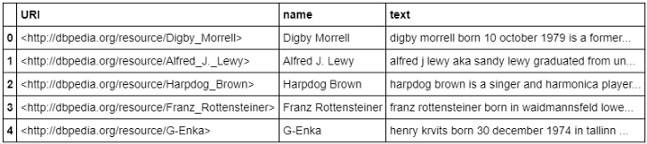
The dataset contains the name of some famous people, their Wikipedia URL, and the text of their Wikipedia page. So, the dataset is very big. The goal of this project is, to find people of related backgrounds. In the end, if you provide the algorithm a name of a famous person, it will return the name of a predefined number of people who have a similar background according to the Wikipedia information. Does this sound a bit like a search engine?

Step By Step Implementation

  1. Import the necessary packages and the dataset.
import numpy as np
import pandas as pd
from sklearn.neighbors import NearestNeighbors
from sklearn.feature_extraction.text import CountVectorizer
df = pd.read_csv('people_wiki.csv')
df.head()
2. Vectorize the ‘text’ column

How to Vectorize?

In Python’s scikit-learn library, there is a function named ‘count vectorizer’. This function provides an index to each word and generates a vector that contains the number of appearances of each word in a piece of text. Here, I will demonstrate it with a small text for your understanding. Suppose, this is our text:

text = ["Jen is a good student. Jen plays guiter as well"]

Let’s import the function from the scikit_learn library and fit the text in the function.

vectorizer = CountVectorizer()
vectorizer.fit(text)

Here, I am printing the vocabulary:

print(vectorizer.vocabulary_)#Output:
{'jen': 4, 'is': 3, 'good': 1, 'student': 6, 'plays': 5, 'guiter': 2, 'as': 0, 'well': 7}

Look, each word of the text received a number. Those numbers are the index of that word. It has eight significant words. So, the index is from 0 to 7. Next, we need to transform the text. I will print the transformed vector as an array.

vector = vectorizer.transform(text)
print(vector.toarray())

Here is the output: [[1 1 1 1 2 1 1 1]]. ‘Jen’ has index 4 and it appeared twice. So in this output vector, the 4th indexed element is 2. All the other words appeared only once. So the elements of the vector are ones.

Now, vectorize the ‘text’ column of the dataset, using the same technique.

vect = CountVectorizer()
word_weight = vect.fit_transform(df['text'])

In the demonstration, I used ‘fit’ first and then ‘transform’ later’. But conveniently, you can use fit and transform both at once. This word_weight is the vectors of numbers as I explained before. There will be one such vector for each row of text in the ‘text’ column.

3. Fit this ‘word_weight’ from the previous step in the Nearest Neighbors function.

The idea of the nearest neighbor’s function is to calculate the distance of a predefined number of training points from the required point. If it’s not clear, do not worry. Look at the implementation, it will be easier for you.

nn = NearestNeighbors(metric = 'euclidean')
nn.fit(word_weight)

4. Find 10 people with similar backgrounds as President Barak Obama.

First, find the index of ‘Barak Obama’ from the dataset.

obama_index = df[df['name'] == 'Barack Obama'].index[0]

Calculate the distance and the indices of 10 people who have the closest background as President Obama. In the word weight vector, the index of the text that contains the information about ‘Barak Obama’ should be in the same index as the dataset. we need to pass that index and the number of the person we want. That should return the calculated distance of those persons from ‘Barak Obama’ and the indices of those persons.

distances, indices = nn.kneighbors(word_weight[obama_index], n_neighbors = 10)

Organize the result in a DataFrame.

neighbors = pd.DataFrame({'distance': distances.flatten(), 'id': indices.flatten()})
print(neighbors)
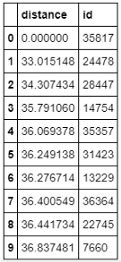
Let’s find the name of the persons from the indexes. There are several ways to find names from the index. I used the merge function. I just merged the ‘neighbors’ DataFrame above with the original DataFrame ‘df’ using the id column as the common column. Sorted values on distance. President Obama should have no distance from himself. So, he came on top.

nearest_info = (df.merge(neighbors, right_on = 'id', left_index = True).sort_values('distance')[['id', 'name', 'distance']])
print(nearest_info)
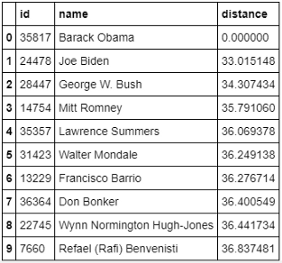
These are the 10 people closest to President Obama according to the information provided in Wikipedia. Results make sense, right?

A similar texts search could be useful in many areas such as searching for similar articles, similar resume, similar profiles as in this project, similar news items, similar songs. I hope you find this small project useful.

Recommended Reading:

Data Science
Machine Learning
Artificial Intelligence
Programming
Technology
Recommended from ReadMedium