
Sign-in on the Web — Credential Management API and Best Practices
This is a recollection of my part of the talk at Chrome Dev Summit 2016 titled “Sign-in on the Web — Credential Management and Best Practices”.
Check the video for my colleague Sabine Borsay taking the first half of the talk describing the unique challenges we face on the web when personalizing user’s experience through sign-ins.
Unlike native apps, the web needs considerations for different attack surfaces and threat models such as XSS, CSRF, clickjacking, etc — as a result, session management has very different requirements on the web and on native.
Many web sessions expire within less than a day, sometimes even within 1 hour. Getting session management right on the web is hard, and you need to strike a balance between security and convenience. While there are different approaches, the Credential Management API is an easy way to handle this problem. (As promised in the session, in detail documentation of the Credential Management API is now available.)
See the Credential Management API in action starting from 10:08 in the video. Here’s the actual demo website and its source code. I summarize its benefits in 5 bullet points:
- Enables auto sign-in across devices
- Virtually enables a permanent session
- Remembers federated accounts
- Can use account chooser to skip forms
- No typing on keyboard required
Following describes how you can replicate a similar user experience on your own website.
Save Credentials from Forms

Forms that let users sign-up, sign-in or change passwords are the great chances for you to store user’s credential information. The process can be broken into 4 steps:
- Interrupt a form submission
- Authenticate through AJAX
- Store the credential
- Update the UI or proceed to the personalized page
var f = document.querySelector('#signup');
f.addEventListener('submit', e => {
  e.preventDefault();
sendRequest(e.target)
.then(profile => {
if (window.PasswordCredential) {
var c = new PasswordCredential(e.target);
return navigator.credentials.store(c);
} else {
return Promise.resolve(profile);
}
}).then(profile => {
if (profile) {
updateUI(profile);
}
}).catch(error => {
showError('Sign-in Failed');
});
});Before moving forward, check if your form includes autocomplete attributes. This helps the Credential Management API to find id and password from the form and construct a credential object.
This also helps browsers not supporting the Credential Management API to understand its semantics. Adding autocomplete is MUST. Learn more about the topic from an article by Jason Grigsby, ☁4.
<form id="signup" method="post">
  <input name="email" type="text" autocomplete="username">
  <input name="display-name" type="text" autocomplete="name">
  <input name="password" type="password" autocomplete="new-password">
  <input type="submit" value="Sign Up!">
</form>
1. Interrupt a form submission
var f = document.querySelector('#signup');
f.addEventListener('submit', e => {
  e.preventDefault();
On this form, interrupt the event when user presses the submit button, and prevent the default behavior.
This way, you can prevent a page transition. By preventing a page transition, you can retain the credential information while verifying its authenticity.
2. Send a request via AJAX
sendRequest(e.target)
  .then(profile => {
The code above is using a pseudo code, but I recommend you to use fetch(). You will find the reason later in this post.
On the server side, you should create an API (or simply alter existing endpoint) that responds with HTTP code 200 or 401, etc so that it’s clear to the browser if the request is successful or not.
Responding with a profile information in a JSON format will be a good idea. But it’s totally up to your implementation.
3. Store the credential
   if (window.PasswordCredential) {
      var c = new PasswordCredential(e.target);
      return navigator.credentials.store(c);
    } else {
      return Promise.resolve(profile);
    }
Once the request succeeds, you can store the credential information.
Before doing so, check if the API is available. You should always keep progressive enhancement in mind.
To store a credential, instantiate a PasswordCredential with the form element as an argument. Then call navigator.credentials.store(). If the API is not available, you can simply forward the profile information to the next step.
4. Update the UI or proceed to the personalized page
  }).then(profile => {
    if (profile) {
      updateUI(profile);
    }
  }).catch(error => {
    showError('Sign-in Failed');
  });
});
If everything went well, update the UI using the profile information, or proceed to the personalized page. And done.
Federated Login
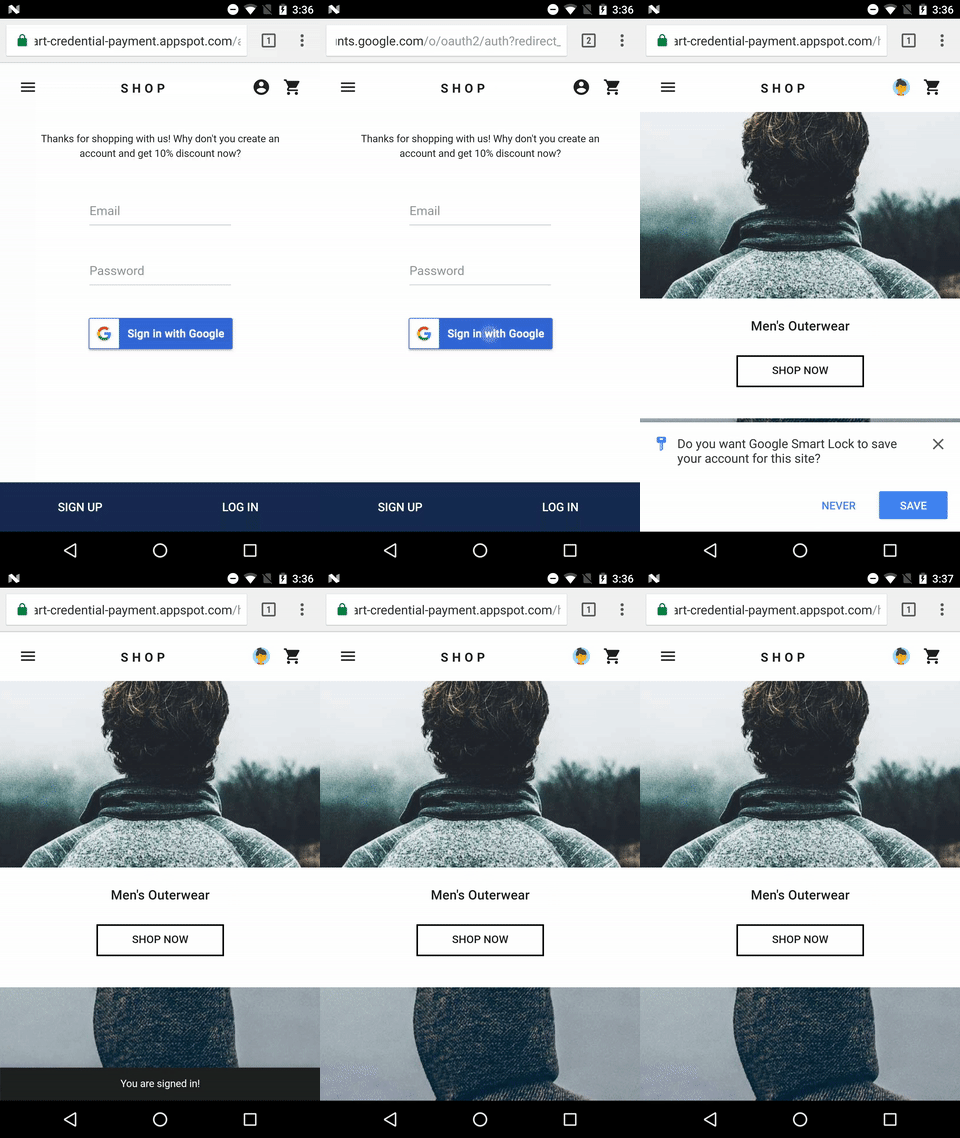
In case your website have federated logins as options, here’s how to use the Credential Management API with them.
Federated logins are in general built on top of standard protocols such as OpenID Connect or OAuth etc. Imagine Google Sign-In or Facebook Login which are frequently used.
As I mentioned earlier, using federated login is a great option. Because:
- User doesn’t have to remember extra password for your website
- Auth can happen with just by one tap in many cases
To use federated login with the Credential Management API, here are steps.
- Authenticate the user with a third party identity
- Store the identity information
- Update the UI or proceed to the personalized page
var g = document.querySelector('#g-signin');
g.addEventListener('click', e => {
  gSignIn()
  .then(profile => {
    if (window.FederatedCredential) {
      var c = new FederatedCredential({
        id:       profile.id,
        provider: 'https://accounts.google.com',
        name:     profile.name,
        iconURL:  profile.iconUrl
      });
      return navigator.credentials.store(c);
    } else {
      return Promise.resolve(profile);
    }
  }).then(profile => {
    updateUI(profile);
  }).catch(error => {
    showError('Sign-in Failed');
  });
};
1. Authenticate the user with a third party identity
var g = document.querySelector('#g-signin');
g.addEventListener('click', e => {
  gSignIn()
  .then(profile => {
When a user taps on a federated login button, run the identity provider specific authentication flow.
I’m not going to describe how to implement them in detail, but they are usually standard based such as OpenID Connect or OAuth. Find Google Sign-In example here.
2. Store the identity information
    if (window.FederatedCredential) {
      var c = new FederatedCredential({
        id:       profile.id,
        provider: 'https://accounts.google.com',
        name:     profile.name,
        iconURL:  profile.iconUrl
      });
      return navigator.credentials.store(c);
    } else {
      return Promise.resolve(profile);
    }
Once authentication is done, you can store the identity information. The information you’ll store here is the id from the identity provider and a provider string that represents the identity provider. (name and iconURL are optional.)
Instantiate a FederatedCredential with those information, then invoke navigator.credentials.store().
The rest of the steps are similar to the previous section..
Auto Sign-in
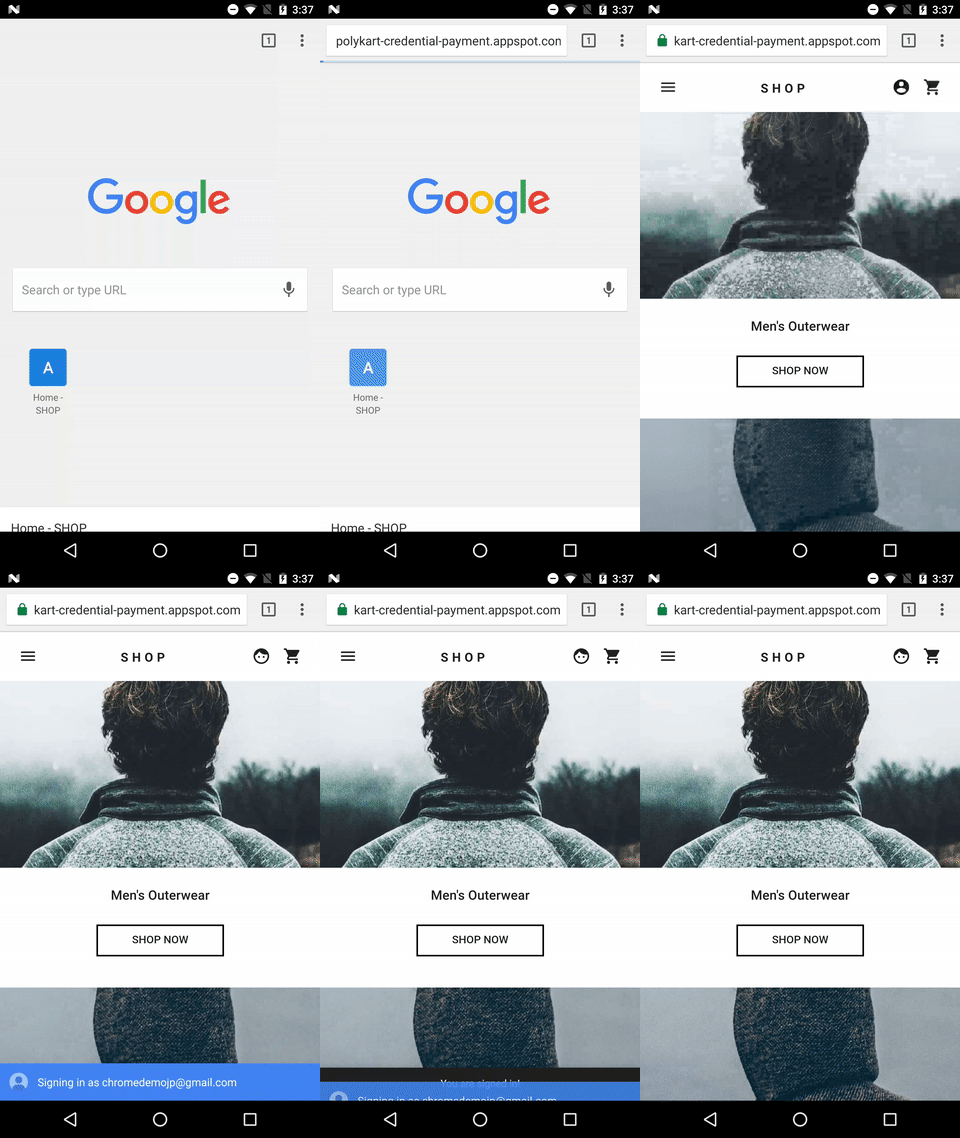
The most exciting part of using Credential Management API is the auto sign-in. Actually, this can happen anywhere on your website — not only top page but also other leaf pages. Here are steps to enable auto sign-in:
- Get a credential information
- Authenticate the user
- Update the UI or proceed to the personalized page
if (window.PasswordCredential || window.FederatedCredential) {
  if (!user.isSignedIn()) {
    navigator.credentials.get({
      password: true,
      federated: {
        provider: [
          'https://accounts.google.com'
        ]
      },
      mediation: 'silent'
    }).then(c => {
      if (c) {
        switch (c.type) {
          case 'password':
            return sendRequest(c);
            break;
          case 'federated':
            return gSignIn(c);
            break;
        }
      } else {
        return Promise.resolve();
      }
    }).then(profile => {
      if (profile) {
        updateUI(profile);
      }
    }).catch(error => {
      showError('Sign-in Failed');
    });
  }
}
1. Get a credential information
if (window.PasswordCredential || window.FederatedCredential) {
  if (!user.isSignedIn()) {
    navigator.credentials.get({
      password: true,
      federated: {
        provider: [
          'https://accounts.google.com'
        ]
      },
      mediation: 'silent'
    })
Before getting a credential, don’t forget to check if the user is already signed in.
To get a credential information, invoke navigator.credentials.get(). You can specify the type of credentials to request by giving it a password or a federated. Always use mediation: 'silent' for auto sign-ins. This way, you can easily dismiss the process if the user:
- has no credentials stored
- has multiple credentials stored
- is signed out.
2. Authenticate the user
    }).then(c => {
      if (c) {
        switch (c.type) {
          case 'password':
            return sendRequest(c);
            break;
          case 'federated':
            return gSignIn(c);
            break;
        }
      } else {
        return Promise.resolve();
      }
When the function resolved, check if you have received a credential object. If not, it means auto sign-in couldn’t happen. Silently dismiss the auto sign-in process.
If you did get a credential, run an authentication flow depending on the type of credential as I have described in previous sections.
3. Update UI or proceed to the personalized page
    }).then(profile => {
      if (profile) {
        updateUI(profile);
      }
If the authentication was successful, update the UI or forward the user to the personalized page.
Don’t forget to show an authentication error message
    }).catch(error => {
      showError('Sign-in Failed');
    });
  }
}
One important tip here is that if you succeed to obtain a credential object but failed to authenticate the user, you should show an error message.
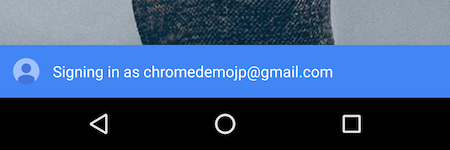
At the timing of getting a credential object, the user should have seen a blue toast saying “Signing in”. It’s confusing for users if nothing happens after this.
Sign Out
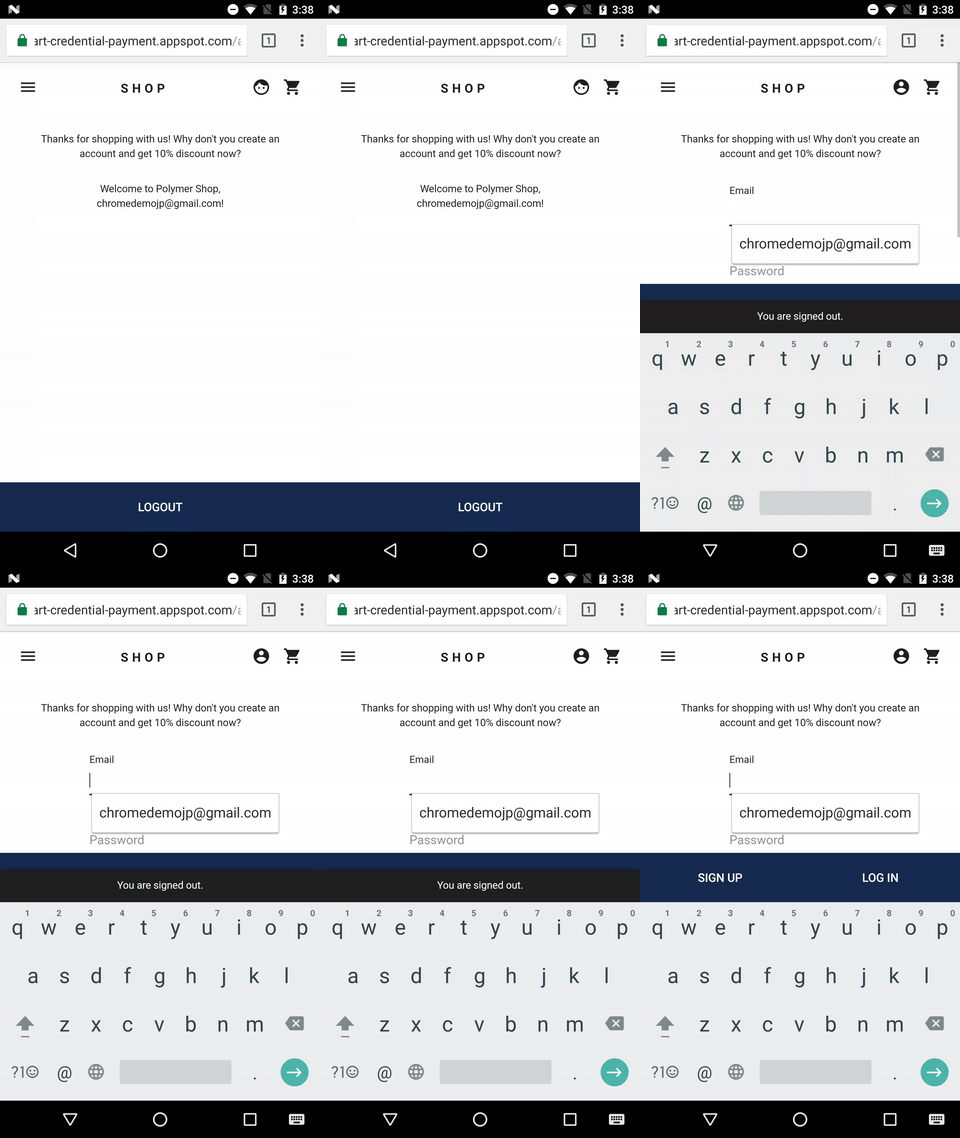
When the user signs out, let’s turn off auto sign-in for future visits.
- Sign out
- Turn off auto sign-in for future visits
signoutUser();
if (navigator.credentials && navigator.credentials.preventSilentAccess) {
  navigator.credentials.preventSilentAccess();
}
1. Sign out
To do so, let the user sign out when sign-out button is tapped. How this is executed is totally up to you, but generally you should terminate a session.
2. Turn off auto sign-in for future visits
Then call navigator.credentials.preventSilentAccess(). This will ensure the auto sign-in won’t happen until next time the user enables auto sign-in. Users can do so by tapping on an account in an account chooser which is described in next section.
Sign-in via Account Chooser

When a user taps on “Sign-In” button, let’s show an account chooser instead of showing a sign-in form, and let the user sign-in with just one tap.
Most of the process here is similar to what I have talked about auto sign-in. A trigger to this process should be some kind of user action. For example, tapping on “Sign-In” button.
- Show an account chooser
- Get a credential information
- Authenticate the user
- Update UI or proceed to a personalized page
var signin = document.querySelector('#signin');
signin.addEventListener('click', e => {
  if (navigator.credentials) {
    navigator.credentials.get({
      password: true,
      federated: {
        provider: [
          'https://accounts.google.com'
        ]
      },
      mediation: 'optional'
    }).then(c => {
      if (c) {
        switch (c.type) {
          case 'password':
            return sendRequest(c);
            break;
          case 'federated':
            return gSignIn(c);
            break;
        }
      } else {
        return Promise.resolve();
      }
    }).then(profile => {
      if (profile) {
        updateUI(profile);
      } else {
        location.href = '/signin';
      }
    }).catch(error => {
      location.href = '/signin';
    });
  }
});
1. Show an account chooser
var signin = document.querySelector('#signin');
signin.addEventListener('click', e => {
  if (navigator.credentials) {
    navigator.credentials.get({
      password: true,
      federated: {
        provider: [
          'https://accounts.google.com'
        ]
      },
      mediation: 'optional'
    }).then(c => {
Call navigator.credentials.get(). By adding mediation: 'optional', you can show the account chooser. Once the user makes a selection of an account, you will receive a credential.
Let’s skip rest of the steps as they are mostly similar to what I’ve described in previous auto sign-in section.
Don’t forget to fallback to sign-in form
    }).then(profile => {
      if (profile) {
        updateUI(profile);
      } else {
        location.href = '/signin';
      }
    }).catch(error => {
      location.href = '/signin';
    });
  }
});
You should fallback to a sign-in form if:
- no credentials are stored, or
- the user dismissed the account chooser without selecting an account
- the API is not available.
Conclusion
Did you notice that the Credential Management API itself only consists of 3 functions? It’s quite simple, but requires few bits of best practices. That’s why I wrote this article.
There are more learning resources to get you started.
- API Specification
- Spec discussions & feedback
- MDN API Reference
- Streamlining the Sign-in Flow Using Credential Management API (read first)
- Credential Management API Integration Guide (detailed document)
- Demo and its source code
- Codelab “Enabling auto sign-in with Credential Management API”
Feel free to shoot @agektmr on Twitter if you have any questions implementing this feature. Feedback to the API is also appreciated.
I’m looking forward to seeing more Credential Management API implementations in the wild!