
Should You Buy AppleCare+ for Mac?
Or is it just an unnecessary added expense?

What is AppleCare+?
Your Mac comes with a one year warranty from Apple. If the machine has a problem within that first year — not caused by accidental damage — Apple will repair or replace the machine at its discretion.
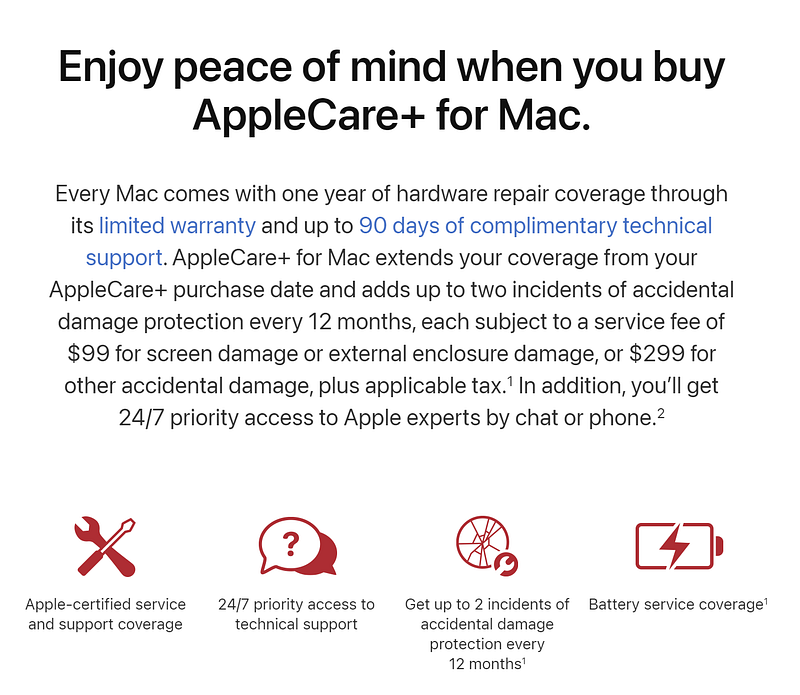
AppleCare+ is an optional, additional warranty available for purchase that covers the machine from manufacture defects and also up to two incidents of accidental damage per year.
So if you accidentally drop your fancy new computer and shatter the screen, AppleCare+ has you covered. You’ll need to pay a small fee for the repair of the accidental damage which varies based on the type of damage and where you live, but it’s typically much less expensive than paying for the replacement part out of pocket.
AppleCare+ is an added expense.
Macs aren’t exactly inexpensive computers, and I understand that adding on another purchase is a lot for some people. Some people expend their entire budgets to buy a Mac and don’t leave much left over.
So I understand why some people don’t want to shell out the extra cash for extra coverage they don’t think they’ll need. But in my estimation, that’s a foolish long-term strategy that could actually wind up costing more money down the road if something breaks out of warranty of if the machine is accidentally damaged.
For Mac users, Apple gives the option of paying for a number of years of protection up front or paying on a yearly basis. For many, the lower up front expense of paying yearly may be just what the wallet ordered.

For my 14-inch MacBook Pro, I’m paying $99 per year. Considering the cost to replace some of the major components that could fail or be damaged — probably through my clumsiness — that’s not a bad price.
“But always I’m careful with my computer!”
It’s pretty often that I hear someone tell me he doesn’t need to buy an extended warranty for his system because he’s always super careful with it.
I mean, the logic makes sense, right? You don’t need a warranty that covers accidental damage because you aren’t the kind of person who is going to accidentally damage his system. Right? Makes sense on the surface of it.
But here’s where that logic breaks down.
Even if you’re extra cautious and always take the best care of your device, accidents can happen to anyone — and it only takes a split second to permanently damage a component or crack a screen. I’ve been around technology long enough to know that even people with the best of intentions and who take the best care of their systems can accidentally cause damage.
If you have pets or children, this is especially true. Cats can walk across keyboards and spill drinks. Dogs can chew on cords and peripherals. It’s better to have the protection and not need it.
Hardware defects can take years to surface.
Even if you never drop your laptop, never spill anything on it, and never do anything else to cause permanent damage to it, it can still fail unexpectedly years down the road.
The sad reality of technology is that it can fail randomly at any point. Doesn’t matter if we’re talking about a cheap Windows laptop or a top of the line MacBook Pro. In my IT job, I see computers and parts in all form factors from all brands that have kicked the bucket — working one day and failed the next. I’ve seen it happen to all types of hardware from keyboards to solid state drives to displays.
And often those failures occur outside of the warranty window. If something fails while the machine’s covered under warranty, it stinks, but at least the manufacturer will fix it. If something breaks outside of the standard warranty, and someone didn’t pay for the extra warranty, well… that sucks. At that point, all that can be done is to pay to replace the faulty part (if one can even be found for purchase) or to toss the computer and buy a new one.
All Macs come with a one year standard warranty. During that time, if something breaks, Apple will repair or replace the machine at their discretion. But many failures happen in years two and three — through no fault of the user.
Let me say that again: (From my albeit limited experience) when a failure happens, it’s usually after the standard one year warranty has expired.
This is true for both Macs and for Windows laptops.
Even if a machine works perfectly today, there could be issues internally from the factory that you can’t see and won’t likely pose a problem for a long time.
So it’s a good idea, in my opinion, to get the extended warranty for a machine you intend to keep for a few years — even if it’s working perfectly right now.
It’s something you hope you never need but are glad to have if you do need it.
I don’t think anyone out there buys a computer hoping it’ll break at some point. I sure don’t. And when I buy a warranty, I buy it with the hope that I’ll never need it.
After all, if I buy a laptop, I don’t want it to have to be fixed. I want it to work perfectly right out of the box and for all the years I plan to use it. But if and when it does need to be fixed — either because I’ve broken it like a clutz or because a component has stopped working as it should — I’d rather be covered by the warranty than have to pay for a fix myself.
During the winter, I fell on some ice and broke my Dell XPS 17’s screen and palm rest. That was a real bummer. I’m normally very careful with my laptops, but that one slip was all it took for me to do what could have been hundreds of dollars worth of damage to my expensive device had it not been for Dell’s accidental damage coverage.
Over the years I’ve had many laptops repaired, and I’ve arranged many repairs for clients. But I’ve also had the unfortunate task of telling many clients that their failed machines are no longer covered by warranty because they didn’t get extended coverage and that their only options are to pay for replacement parts or or to replace a machine. It sucks to be in that kind of position.
No one hopes to need a warranty, but buying one is a good idea in my opinion. Yes, they can be expensive — but having to pay to fix a laptop if it’s not covered by warranty can be even more expensive.
Yes. Absolutely you should buy AppleCare+ for your Mac.
In this writer’s opinion, every purchaser of an Apple notebook or desktop should pay for AppleCare+ as well. Even though it’s an added expense, it’s one of those things that could wind up saving money down the road. Obviously the hope is to never need AppleCare+ and that our Macs will work for years to come without skipping a beat.
But having been in the position of having an accidentally damaged machine — despite being extra careful—or having components suddenly fail or need to be replaced, I can say that it’s absolutely worth the peace of mind to have AppleCare+.
And that principle goes for all brands of laptops too. My Dell XPS has an on-site warranty through Dell (which I’ve unfortunately needed to use due to a hardware issue and then my own clumsiness). When they ask me, I encourage all my friends and clients to get extended warranties — even if they don’t think they’ll need them. Whether we’re talking about an iPhone, a tablet, a laptop or a desktop, it’s always better to have extended warranty coverage and not need it than to need it and not have it.
I’ve learned that the hard way.


