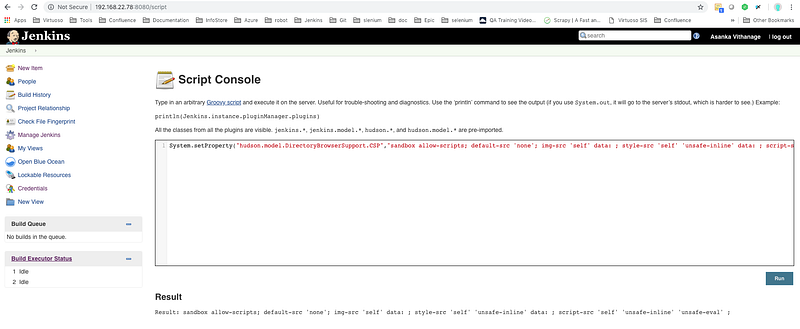
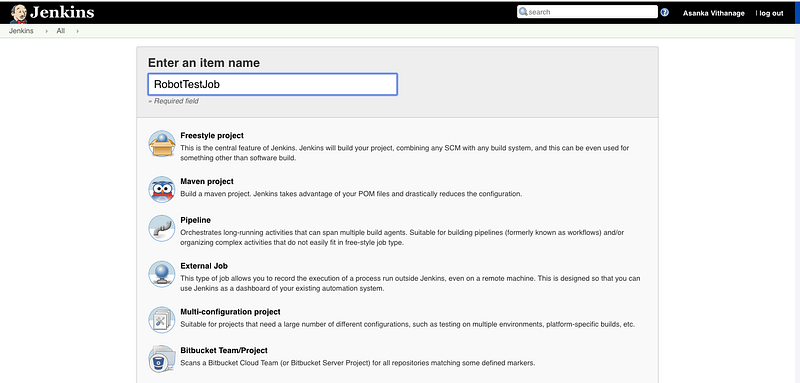
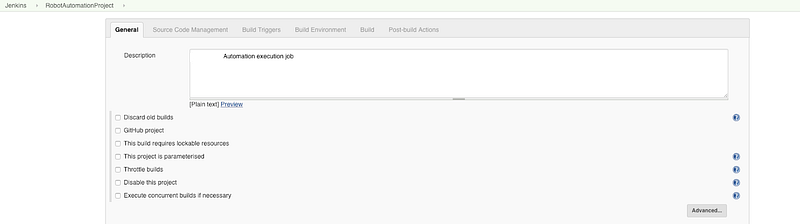
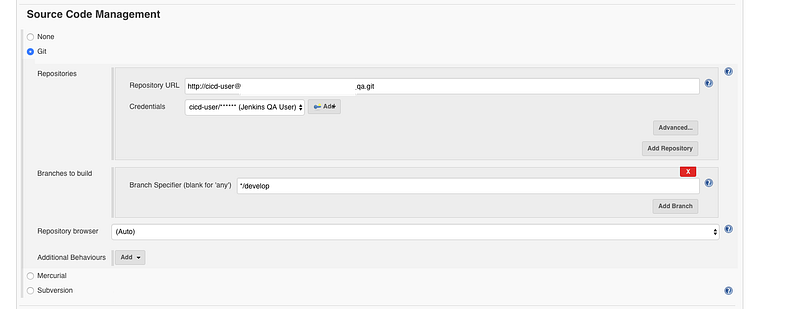
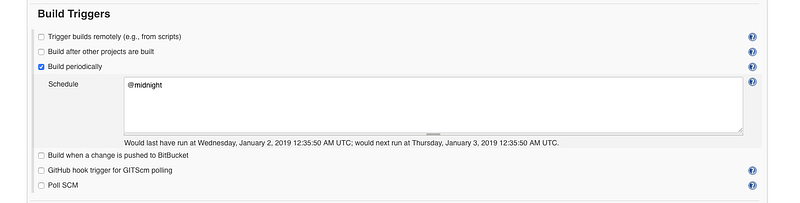
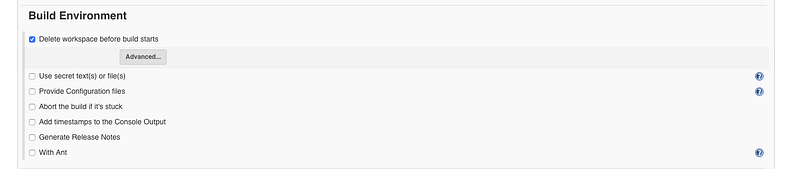
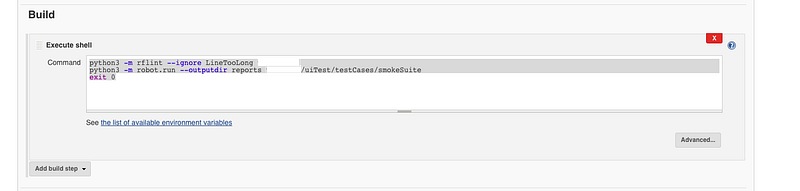
p id="d416">3. Add a description to your project</p><figure id="3424"><img src="https://cdn-images-1.readmedium.com/v2/resize:fit:800/1*P5tcOLq9NP9j6lOrzs2_HA.png"><figcaption></figcaption></figure><p id="af2f">4. Configure git to pull your automation code repository</p><figure id="8cca"><img src="https://cdn-images-1.readmedium.com/v2/resize:fit:800/1*v-5P3LSG8PVCwjZfsZkefg.png"><figcaption></figcaption></figure><p id="da67">5. Configure build trigger as per your requirement</p><figure id="80aa"><img src="https://cdn-images-1.readmedium.com/v2/resize:fit:800/1*_n9YQKUhATdWTq5KKy0tSQ.png"><figcaption></figcaption></figure><p id="cd93">6. Configure how the build environment should be set up before the build</p><figure id="efba"><img src="https://cdn-images-1.readmedium.com/v2/resize:fit:800/1*JDMsW08fb4YSJCHJ1XoTqw.png"><figcaption></figcaption></figure><p id="da85">7. Configure to execute Robot test scripts via Shell scripts with below commands</p><blockquote id="d316"><p>python3 -m rflint — ignore LineTooLong [Project Root]</p></blockquote><blockquote id="81e4"><p>python3 -m robot.run — outputdir [report Location] [Test Location]</p></blockquote><blockquote id="d6e6"><p>exit 0</p></blockquote><figure id="4f95"><img src="https://cdn-images-1.readmedium.com/v2/resize:fit:800/1*fRSQqJOt_koiZxZngCkacg.png"><figcaption></figcaption></figure><p id="eacb">8. Finally, configure robot framework test result analysis for executed tests, Use Robot Framework Plugin as Post Build Action</p><figure id="c0c1"><img src="https://cdn-images-1.readmedium.com/v2/resize:fit:800/1*ZRmtJgV5XhQ_Z1JnK-RVqA.png"><figcaption></figcaption></figure><p id="59d2">Click the Advanced button to get Advanced configuration view</p><figure id="cc88"><img src="h
Options
ttps://cdn-images-1.readmedium.com/v2/resize:fit:800/1*s82-QrLvK4-1gtRDVF7Ttg.png"><figcaption></figcaption></figure><h1 id="0787">Execute Tests</h1><p id="dd0d">Now you can execute your tests via above created Jenkins job by triggering a build, Now if everything successful, you should able to see result details as in below screenshot</p><figure id="3208"><img src="https://cdn-images-1.readmedium.com/v2/resize:fit:800/1*F7RgNJWqj4QahgZZHlJnsA.png"><figcaption></figcaption></figure><p id="e9c6">Further, you can access the Robot Report, Robot Log files as HTML reports within Jenkins itself and figure out exactly what happens with your tests.</p><figure id="ac1d"><img src="https://cdn-images-1.readmedium.com/v2/resize:fit:800/1*sCN9IsANaFvNTXpvS54tgg.png"><figcaption></figcaption></figure><figure id="afc6"><img src="https://cdn-images-1.readmedium.com/v2/resize:fit:800/1*Yz5IMfAdaUCcN12CaaRAiQ.png"><figcaption></figcaption></figure><figure id="1ef4"><img src="https://cdn-images-1.readmedium.com/v2/resize:fit:800/0*Piks8Tu6xUYpF4DU"><figcaption></figcaption></figure><p id="9b5e"><b>Follow us on <a href="https://twitter.com/joinfaun">Twitter</a> </b>🐦<b> and <a href="https://www.facebook.com/faun.dev/">Facebook</a> </b>👥<b> and join our <a href="https://www.facebook.com/groups/364904580892967/">Facebook Group</a> </b>💬<b>.</b></p><p id="c972"><b>To join our community Slack </b>🗣️ <b>and read our weekly Faun topics </b>🗞️,<b> click here⬇</b></p><figure id="83d1"><img src="https://cdn-images-1.readmedium.com/v2/resize:fit:800/0*oSdFkACJxs5iy1oR"><figcaption></figcaption></figure><h2 id="3062">If this post was helpful, please click the clap 👏 button below a few times to show your support for the author! ⬇</h2></article></body>
Setting up your Jenkins machine to execute Robot Framework automation tests
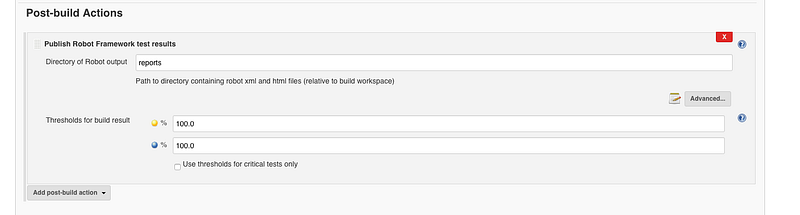
8. Finally, configure robot framework test result analysis for executed tests, Use Robot Framework Plugin as Post Build Action
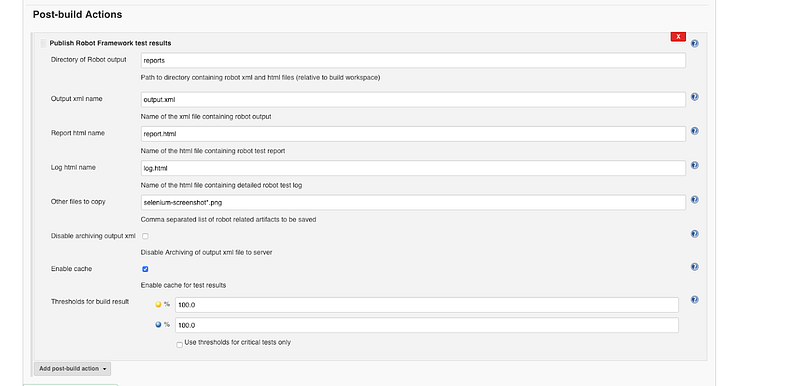
Click the Advanced button to get Advanced configuration view
Execute Tests
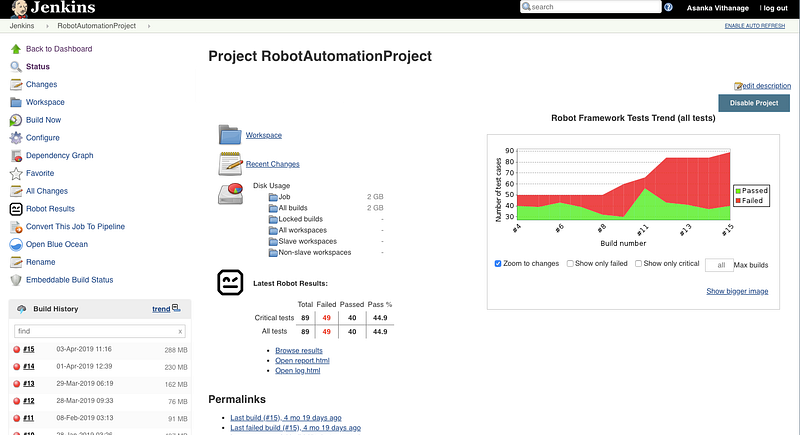
Now you can execute your tests via above created Jenkins job by triggering a build, Now if everything successful, you should able to see result details as in below screenshot
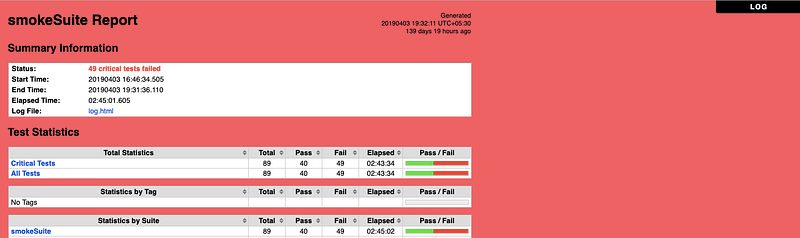
Further, you can access the Robot Report, Robot Log files as HTML reports within Jenkins itself and figure out exactly what happens with your tests.