avatarBhargav Bachina

Free AI web copilot to create summaries, insights and extended knowledge, download it at here

3078

Abstract

</b>This is a java library<b> </b>that automatically plugs into your editor and builds tools, spicing up your java. You would never write another getter or equals method again, with one annotation your class has a fully-featured builder, Automate your logging variables, and much more.</p><p id="e36e"><b>Postman:</b> Manual testing your APIs</p><h1 id="1666">Example Project</h1><p id="70f3">Here is the Github link for the example project you can just clone and run on your machine.</p><div id="821a"><pre>// <span class="hljs-keyword">clone</span> <span class="hljs-title">the</span> project git <span class="hljs-keyword">clone</span> <span class="hljs-title">https</span>://github.com/bbachi/java-webservice-example.git</pre></div><p id="6a5c">Once you clone the project and import the project as an existing maven projects</p><figure id="2a39"><img src="https://cdn-images-1.readmedium.com/v2/resize:fit:800/0*jCRKpCd5qfdv11Qj.png"><figcaption><b>Import Project as Existing Maven Projects</b></figcaption></figure><p id="c6bb">Run the project as a java application as spring boot has an embedded tomcat container.</p><figure id="b681"><img src="https://cdn-images-1.readmedium.com/v2/resize:fit:800/0*BzUqr0RNTwcaCgCb.gif"><figcaption><b>project running on port 8080 with context path /api</b></figcaption></figure><p id="d8a9">You can access the API on this URL <a href="http://localhost:8080/api/todo/tasks"><b>http://localhost:8080/api/todo/tasks</b></a></p><figure id="c6cd"><img src="https://cdn-images-1.readmedium.com/v2/resize:fit:800/0*wpS3MXhj3y493-0N.png"><figcaption><b>API running on port 8080</b></figcaption></figure><h1 id="4367">Installing SonarQube</h1><p id="bc44">You can install SonarQube in multiple ways and you can visit the below page to install based on your operating system.</p><div id="53bb"><pre>https:<span class="hljs-regexp">//</span>docs.sonarqube.org<span class="hljs-regexp">/latest/</span>setup<span class="hljs-regexp">/get-started-2-minutes/</span></pre></div><p id="74e8">I used Docker to install SonarQube on my local machine. Make sure you install the latest Docker Desktop from this page.</p><div id="b248"><pre>https:<span class="hljs-regexp">//</span>hub.docker.com<span class="hljs-regexp">/editions/</span>community/docker-ce-desktop-mac</pre></div><p id="5b79">You need to run the following command to start the SonarQube on port 9000.</p><div id="8c76"><pre>docker <span class="hljs-built_in">run</span> -d --name sonarqube -e <span class="hljs-attribute">SONAR_ES_BOOTSTRAP_CHECKS_DISABLE</span>=<span class="hljs-literal">true</span> -p 9000:9000 sonarqube:latest</pre></div><p id="f4de">You can list the docker container or you can see it in the Docker dashboard as below.</p><div id="6d48"><pre><span class="hljs-attribute">docker ps</span></pre></div><figure id="b70d"><img src="https://cdn-images-1.readmedium.com/v2/resize:fit:800/1*hsoquYxbGsZAQB7wrQbkZQ.png"><figcaption><b>docker ps</b></figcaption></figure><figure id="f939"><img src="https://cdn-images-1.readmedium.com/v2/resize:fit:800/1*5s7

Options

MbxocnJbkDxzm1NWCwQ.png"><figcaption><b>Docker Desktop Dashboard</b></figcaption></figure><p id="7b4c">Once started and you can hit the URL <a href="http://localhost:9000/">http://localhost:9000/</a></p><figure id="3249"><img src="https://cdn-images-1.readmedium.com/v2/resize:fit:800/1*DJYoJbIGjpay4vNvtm4Elg.png"><figcaption><b>SonarQube</b></figcaption></figure><h1 id="9dc8">Running Analysis</h1><p id="02df">First, we need to create a project in the SonarQube. Click on the Manually tab from the below screen.</p><figure id="5744"><img src="https://cdn-images-1.readmedium.com/v2/resize:fit:800/1*Dj2IJ-nNwoAKEah1V9deJQ.png"><figcaption><b>Creating a project</b></figcaption></figure><p id="92ca">Let’s give the project display name and the key as below and click on the setup button.</p><figure id="9f3a"><img src="https://cdn-images-1.readmedium.com/v2/resize:fit:800/1*Z3Mj9VLzjocZRjsfyCLIfA.png"><figcaption><b>Display Name and Key</b></figcaption></figure><p id="2d69">On the next screen, you need to let SonarQube know where you want it to analyze the repository. Let’s select Locally.</p><figure id="6c0d"><img src="https://cdn-images-1.readmedium.com/v2/resize:fit:800/1*SH_mHj_n8dWeKVS2tpkXzw.png"><figcaption><b>Selecting Locally</b></figcaption></figure><p id="695b">You need to generate the token on the next screen.</p><figure id="d660"><img src="https://cdn-images-1.readmedium.com/v2/resize:fit:800/1*K2mAhvEFU_euNiFTqjyepg.png"><figcaption><b>Generating the token</b></figcaption></figure><figure id="4c79"><img src="https://cdn-images-1.readmedium.com/v2/resize:fit:800/1*GKyFXvrgKfqLTp_4-kjG-Q.png"><figcaption><b>Generating the token</b></figcaption></figure><p id="4a94">Once you go to the next screen you need to select the build. Since we are running analysis on the Java API with Maven configuration, let’ select Maven as below.</p><figure id="4684"><img src="https://cdn-images-1.readmedium.com/v2/resize:fit:800/1*I5-QnMIJyAtbVHHIe2BbWg.png"><figcaption><b>Selecting the right tool</b></figcaption></figure><p id="92ad">Let’s copy the command and run it at the root of the above-cloned project as below.</p><figure id="3a7e"><img src="https://cdn-images-1.readmedium.com/v2/resize:fit:800/1*OE8qRpANQ5Fb60tIDFjq1Q.png"><figcaption><b>Running the command</b></figcaption></figure><p id="73c7">When the build is successful, you can see the SonarQube screen automatically refreshed with the analysis.</p><figure id="742a"><img src="https://cdn-images-1.readmedium.com/v2/resize:fit:800/1*coxhCSQzvhul7O0h2ff5eg.gif"><figcaption><b>Sonar Analysis</b></figcaption></figure><h1 id="17fd">Summary</h1><ul><li>Code Quality is one of the most important aspects of software engineering.</li><li>SonaQube is the code assurance tool that ensures the code quality of the project by collecting your source code and analyzing it.</li><li>You can install SonarQube in multiple ways: zip file or Docker</li></ul><h1 id="7b5b">Conclusion</h1><p id="c935">It’s always handy to run the SonarQube on your local machine for the analysis of your code.</p></article></body>

Setting up SonarQube on Your Local Machine for Java Projects

A step by step guide with an example Maven project

Code Quality is one of the most important aspects of software engineering. SonaQube is the code assurance tool that ensures the code quality of the project by collecting your source code and analyzing it. You can configure your CI/CD pipeline to deploy or not based on the results from this tool. For example, if the unit test coverage is less than 85% you can fail the build pipeline.

In this post, we will see how we can run the static analysis for your project on your local machine. This will be useful to make sure your code quality is good before you check in your changes or make a PR, etc.

  • Prerequisites
  • Example Project
  • Installing SonarQube
  • Running Analysis
  • Summary
  • Conclusion

Prerequisites

Here are the prerequisites for this article. If you don’t have these on your system go ahead and install them if you want to practice on your machine.

Java Runtime and SDK: We need java runtime and SDK for the Java applications to run. This is the core component for running Java applications.

Eclipse IDE: We need an IDE to develop this application. There are other IDEs such as NetBeans, IntelliJ IDE, etc. Eclipse is an open-source IDE and has very good community support.

Spring Boot: Spring is a framework that makes our life easy to develop these java based applications. Spring Boot makes it easy to create stand-alone, production-grade Spring-based Applications that you can “just run”.

H2 Database: H2 Database is a very fast, open-source, JDBC API, and in-memory database. We use this as a database for our project.

JUnit 5: JUnit 5 is the testing framework for Java applications.

Maven: We need Maven to install dependencies, package, and build the project.

JMeter: It’s open-source software that is designed for load testing functional behavior and measures the performance of the application.

Project Lombok: This is a java library that automatically plugs into your editor and builds tools, spicing up your java. You would never write another getter or equals method again, with one annotation your class has a fully-featured builder, Automate your logging variables, and much more.

Postman: Manual testing your APIs

Example Project

Here is the Github link for the example project you can just clone and run on your machine.

// clone the project
git clone https://github.com/bbachi/java-webservice-example.git

Once you clone the project and import the project as an existing maven projects
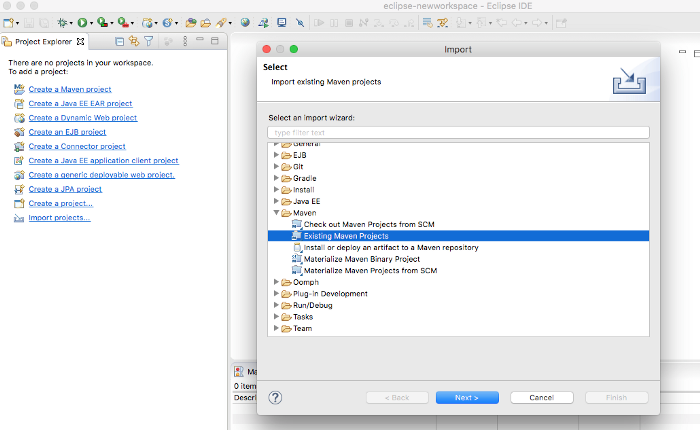
Import Project as Existing Maven Projects

Run the project as a java application as spring boot has an embedded tomcat container.

project running on port 8080 with context path /api

You can access the API on this URL http://localhost:8080/api/todo/tasks

API running on port 8080

Installing SonarQube

You can install SonarQube in multiple ways and you can visit the below page to install based on your operating system.

https://docs.sonarqube.org/latest/setup/get-started-2-minutes/

I used Docker to install SonarQube on my local machine. Make sure you install the latest Docker Desktop from this page.

https://hub.docker.com/editions/community/docker-ce-desktop-mac

You need to run the following command to start the SonarQube on port 9000.

docker run -d 
     --name sonarqube 
     -e SONAR_ES_BOOTSTRAP_CHECKS_DISABLE=true 
     -p 9000:9000 sonarqube:latest

You can list the docker container or you can see it in the Docker dashboard as below.

docker ps
docker ps
Docker Desktop Dashboard

Once started and you can hit the URL http://localhost:9000/

SonarQube

Running Analysis

First, we need to create a project in the SonarQube. Click on the Manually tab from the below screen.
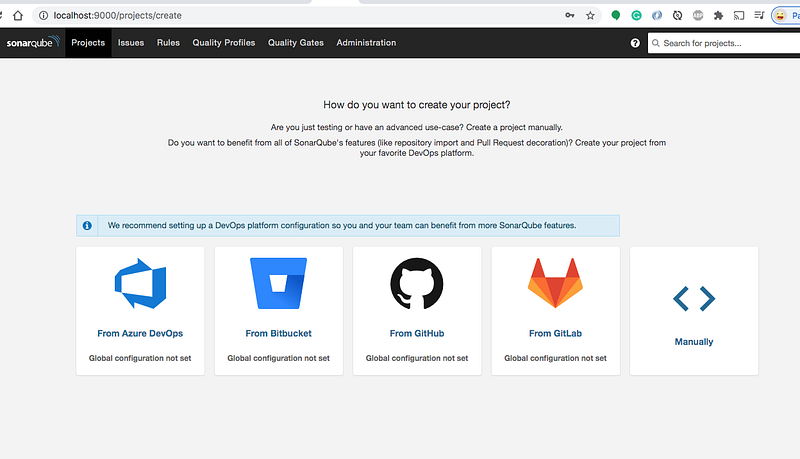
Creating a project

Let’s give the project display name and the key as below and click on the setup button.

Display Name and Key

On the next screen, you need to let SonarQube know where you want it to analyze the repository. Let’s select Locally.

Selecting Locally

You need to generate the token on the next screen.
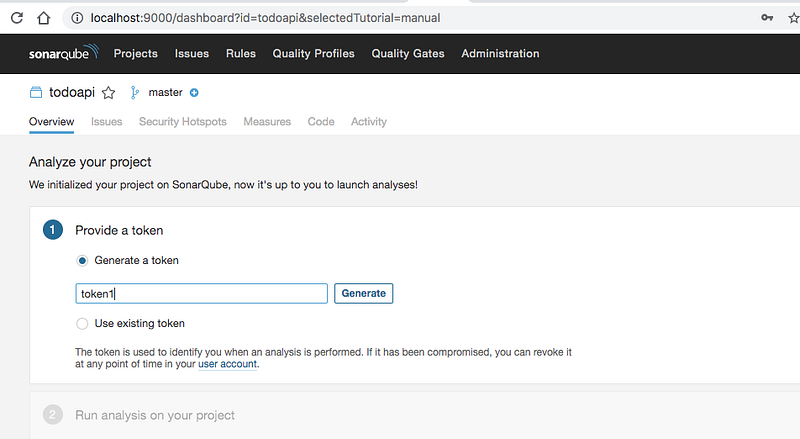
Generating the token

Once you go to the next screen you need to select the build. Since we are running analysis on the Java API with Maven configuration, let’ select Maven as below.
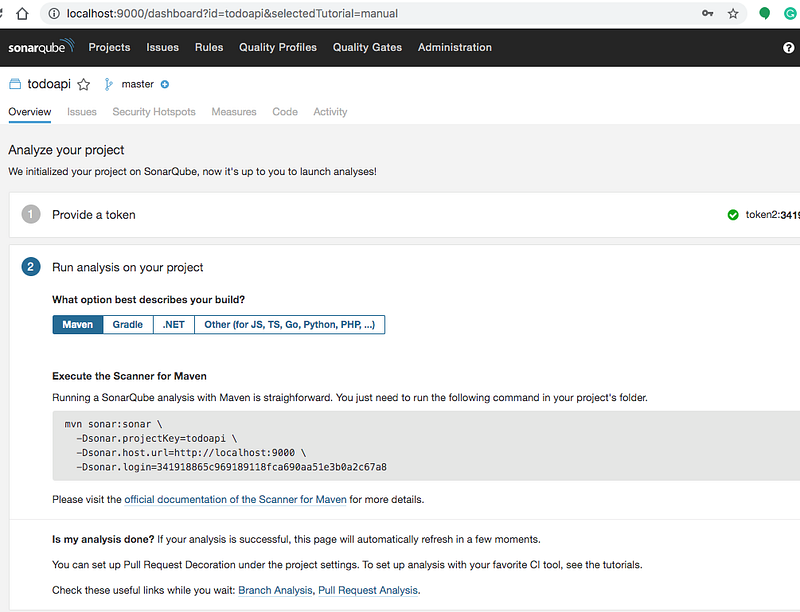
Selecting the right tool

Let’s copy the command and run it at the root of the above-cloned project as below.

Running the command

When the build is successful, you can see the SonarQube screen automatically refreshed with the analysis.
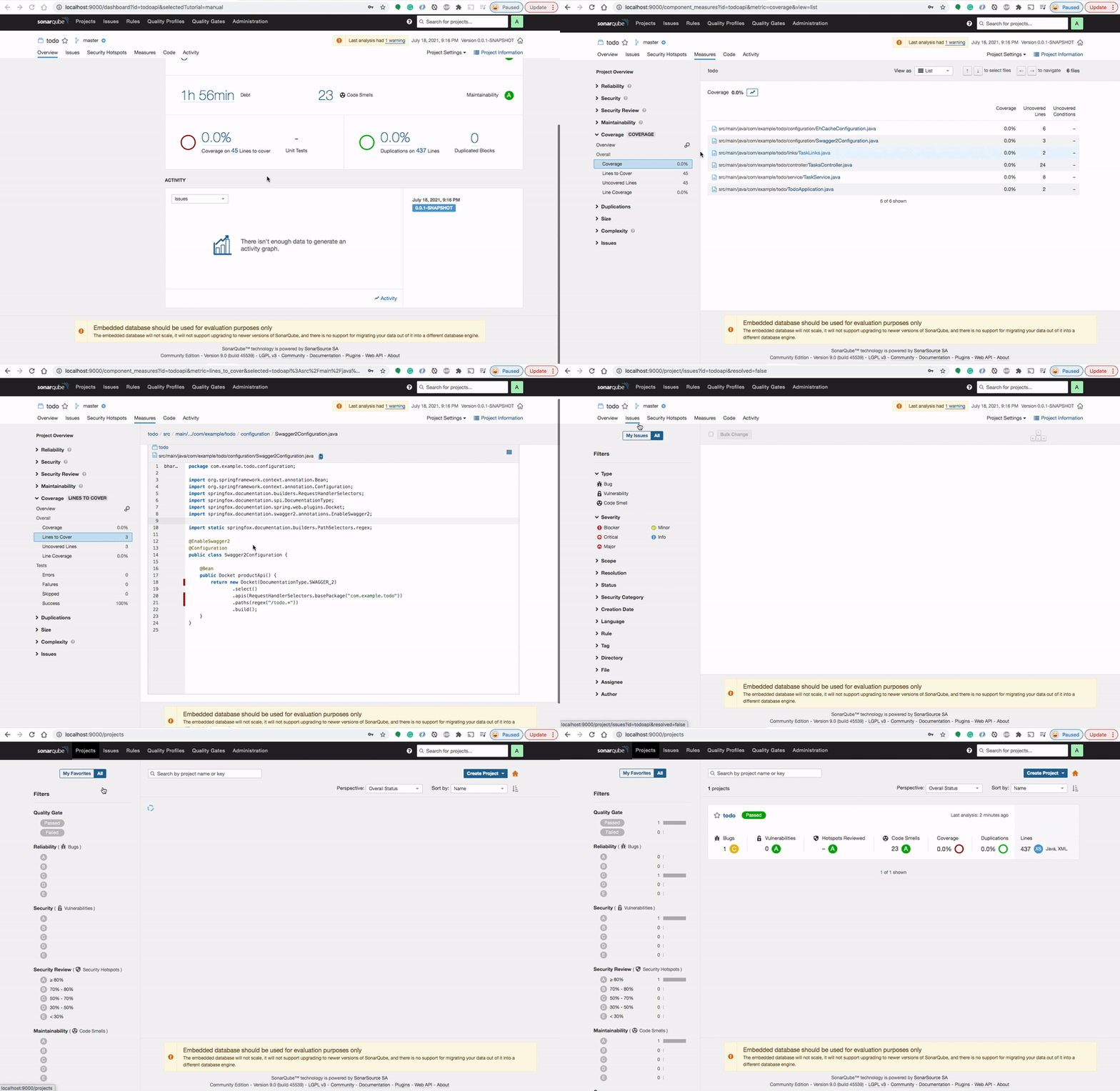
Sonar Analysis

Summary

  • Code Quality is one of the most important aspects of software engineering.
  • SonaQube is the code assurance tool that ensures the code quality of the project by collecting your source code and analyzing it.
  • You can install SonarQube in multiple ways: zip file or Docker

Conclusion

It’s always handy to run the SonarQube on your local machine for the analysis of your code.

Java
Sonarqube
DevOps
Programming
Web Development
Recommended from ReadMedium