Setting Up RabbitMQ on Amazon EC2: A Comprehensive Guide
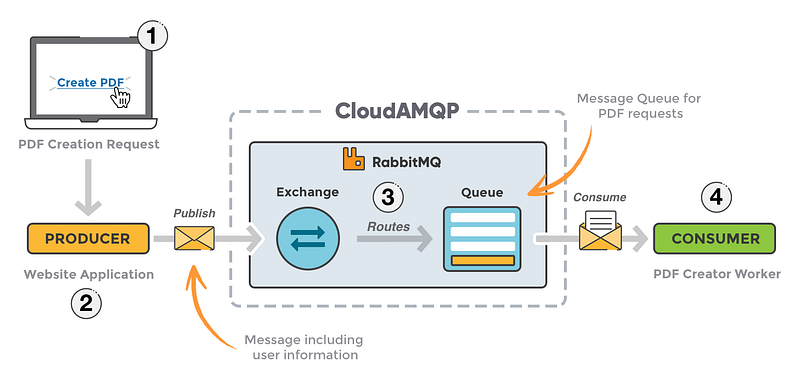
Prerequisites
- An AWS account.
- Basic knowledge of AWS EC2.
- SSH client for remote access to the EC2 instance.
Step 1: Launching an EC2 Instance
1. Log in to your AWS Management Console and navigate to the EC2 dashboard.
2. Click on “Launch Instance” and select an AMI, like Ubuntu Server.
3. Choose an “Instance Type”. (A `t2.medium` should be sufficient for small to medium workloads).
4. Configure instance details, add storage, and add tags as needed.
5. Configure the “Security Group” to open ports `22` (SSH), `5672` (RabbitMQ), and `15672` (management console).
6. Review and launch the instance, selecting a key pair for SSH access.
Step 2: Installing RabbitMQ
- SSH into your EC2 instance using:
ssh -i /path/to/your-key.pem ec2-user@your-instance-public-ip
2. Update your package lists and install RabbitMQ:
sudo apt-get update
sudo apt-get install rabbitmq-server -y
Step 3: Configuring RabbitMQ
- Start and enable RabbitMQ service:
sudo systemctl start rabbitmq-server
sudo systemctl enable rabbitmq-server
(Optional) To enable the management plugin, use:
sudo rabbitmq-plugins enable rabbitmq_managementStep 4: Creating a RabbitMQ User
For security reasons, it’s recommended to create a new user:
sudo rabbitmqctl add_user myuser mypassword
sudo rabbitmqctl set_user_tags myuser administrator
sudo rabbitmqctl set_permissions -p / myuser ".*" ".*" ".*"
Step 5: Accessing the Management Console
You can now access the RabbitMQ management console via
`http://your-ec2-instance-public-ip:15672`
Step 6: Connecting to RabbitMQ from Node.js
Use the `amqplib` package in your Node.js application:
const amqp = require('amqplib');

async function start() {
  const connection = await amqp.connect('amqp://myuser:mypassword@your-ec2-instance-public-ip');
  // more code to declare queues, send/receive messages...
}

start();
Conclusion
You now have a fully functional RabbitMQ server running on an Amazon EC2 instance, accessible for your applications to queue messages. This setup is ideal for managing asynchronous tasks, and it scales well with your application’s growth.
If you need any help on your project, please drop me a line at [email protected]
I am available for a project too! :)
Thank you and bye for now!
Sushant


