avatarShubham Soni

Free AI web copilot to create summaries, insights and extended knowledge, download it at here

10093

Abstract

name: quickstart</span> <span class="hljs-comment"># kibanaRef:</span> <span class="hljs-comment"># name: kibana</span> <span class="hljs-attr">config:</span> <span class="hljs-attr">filebeat.inputs:</span> <span class="hljs-bullet">-</span> <span class="hljs-attr">type:</span> <span class="hljs-string">container</span> <span class="hljs-attr">paths:</span> <span class="hljs-bullet">-</span> <span class="hljs-string">/var/log/containers/*.log</span> <span class="hljs-attr">processors:</span> <span class="hljs-bullet">-</span> <span class="hljs-attr">add_kubernetes_metadata:</span> <span class="hljs-attr">host:</span> <span class="hljs-string">${NODE_NAME}</span> <span class="hljs-attr">matchers:</span> <span class="hljs-bullet">-</span> <span class="hljs-attr">logs_path:</span> <span class="hljs-attr">logs_path:</span> <span class="hljs-string">"/var/log/containers/"</span> <span class="hljs-bullet">-</span> <span class="hljs-attr">drop_event.when:</span> <span class="hljs-attr">or:</span> <span class="hljs-bullet">-</span> <span class="hljs-attr">equals:</span> <span class="hljs-attr">kubernetes.namespace:</span> <span class="hljs-string">"kube-system"</span> <span class="hljs-bullet">-</span> <span class="hljs-attr">equals:</span> <span class="hljs-attr">kubernetes.namespace:</span> <span class="hljs-string">"kube-public"</span>
<span class="hljs-bullet">-</span> <span class="hljs-attr">equals:</span> <span class="hljs-attr">kubernetes.namespace:</span> <span class="hljs-string">"quickstart"</span> <span class="hljs-bullet">-</span> <span class="hljs-attr">equals:</span> <span class="hljs-attr">kubernetes.namespace:</span> <span class="hljs-string">"kube-node-lease"</span> <span class="hljs-bullet">-</span> <span class="hljs-attr">equals:</span> <span class="hljs-attr">kubernetes.namespace:</span> <span class="hljs-string">"elastic-system"</span> <span class="hljs-attr">output.logstash:</span> <span class="hljs-attr">hosts:</span> [<span class="hljs-string">"logstash.logging.svc:5044"</span>] <span class="hljs-attr">daemonSet:</span> <span class="hljs-attr">podTemplate:</span> <span class="hljs-attr">spec:</span> <span class="hljs-attr">serviceAccountName:</span> <span class="hljs-string">filebeat</span> <span class="hljs-attr">automountServiceAccountToken:</span> <span class="hljs-literal">true</span> <span class="hljs-attr">terminationGracePeriodSeconds:</span> <span class="hljs-number">30</span> <span class="hljs-attr">tolerations:</span> <span class="hljs-bullet">-</span> <span class="hljs-attr">key:</span> <span class="hljs-string">dedicated</span> <span class="hljs-attr">operator:</span> <span class="hljs-string">Exists</span> <span class="hljs-attr">effect:</span> <span class="hljs-string">NoSchedule</span>
<span class="hljs-attr">dnsPolicy:</span> <span class="hljs-string">ClusterFirstWithHostNet</span> <span class="hljs-attr">hostNetwork:</span> <span class="hljs-literal">true</span> <span class="hljs-comment"># Allows to provide richer host metadata</span> <span class="hljs-attr">containers:</span> <span class="hljs-bullet">-</span> <span class="hljs-attr">name:</span> <span class="hljs-string">filebeat</span> <span class="hljs-attr">securityContext:</span> <span class="hljs-attr">runAsUser:</span> <span class="hljs-number">0</span> <span class="hljs-comment"># If using Red Hat OpenShift uncomment this:</span> <span class="hljs-comment">#privileged: true</span> <span class="hljs-attr">volumeMounts:</span> <span class="hljs-bullet">-</span> <span class="hljs-attr">name:</span> <span class="hljs-string">varlogcontainers</span> <span class="hljs-attr">mountPath:</span> <span class="hljs-string">/var/log/containers</span> <span class="hljs-bullet">-</span> <span class="hljs-attr">name:</span> <span class="hljs-string">varlogpods</span> <span class="hljs-attr">mountPath:</span> <span class="hljs-string">/var/log/pods</span> <span class="hljs-bullet">-</span> <span class="hljs-attr">name:</span> <span class="hljs-string">varlibdockercontainers</span> <span class="hljs-attr">mountPath:</span> <span class="hljs-string">/var/lib/docker/containers</span> <span class="hljs-attr">env:</span> <span class="hljs-bullet">-</span> <span class="hljs-attr">name:</span> <span class="hljs-string">NODE_NAME</span> <span class="hljs-attr">valueFrom:</span> <span class="hljs-attr">fieldRef:</span> <span class="hljs-attr">fieldPath:</span> <span class="hljs-string">spec.nodeName</span> <span class="hljs-attr">resources:</span> <span class="hljs-attr">limits:</span> <span class="hljs-attr">cpu:</span> <span class="hljs-string">500m</span> <span class="hljs-attr">memory:</span> <span class="hljs-string">2000Mi</span> <span class="hljs-attr">requests:</span> <span class="hljs-attr">cpu:</span> <span class="hljs-string">100m</span> <span class="hljs-attr">memory:</span> <span class="hljs-string">200Mi</span> <span class="hljs-attr">volumes:</span> <span class="hljs-bullet">-</span> <span class="hljs-attr">name:</span> <span class="hljs-string">varlogcontainers</span> <span class="hljs-attr">hostPath:</span> <span class="hljs-attr">path:</span> <span class="hljs-string">/var/log/containers</span> <span class="hljs-bullet">-</span> <span class="hljs-attr">name:</span> <span class="hljs-string">varlogpods</span> <span class="hljs-attr">hostPath:</span> <span class="hljs-attr">path:</span> <span class="hljs-string">/var/log/pods</span> <span class="hljs-bullet">-</span> <span class="hljs-attr">name:</span> <span class="hljs-string">varlibdockercontainers</span> <span class="hljs-attr">hostPath:</span> <span class="hljs-attr">path:</span> <span class="hljs-string">/var/lib/docker/containers</span>

<span class="hljs-meta">--- </span> <span class="hljs-attr">apiVersion:</span> <span class="hljs-string">rbac.authorization.k8s.io/v1</span> <span class="hljs-attr">kind:</span> <span class="hljs-string">ClusterRole</span> <span class="hljs-attr">metadata:</span> <span class="hljs-attr">name:</span> <span class="hljs-string">filebeat</span> <span class="hljs-attr">rules:</span> <span class="hljs-bullet">-</span> <span class="hljs-attr">apiGroups:</span> [<span class="hljs-string">""</span>] <span class="hljs-comment"># "" indicates the core API group</span> <span class="hljs-attr">resources:</span> <span class="hljs-bullet">-</span> <span class="hljs-string">namespaces</span> <span class="hljs-bullet">-</span> <span class="hljs-string">pods</span> <span class="hljs-bullet">-</span> <span class="hljs-string">nodes</span> <span class="hljs-attr">verbs:</span> <span class="hljs-bullet">-</span> <span class="hljs-string">get</span> <span class="hljs-bullet">-</span> <span class="hljs-string">watch</span> <span class="hljs-bullet">-</span> <span class="hljs-string">list</span>

<span class="hljs-meta">--- </span> <span class="hljs-attr">apiVersion:</span> <span class="hljs-string">rbac.authorization.k8s.io/v1</span> <span class="hljs-attr">kind:</span> <span class="hljs-string">ClusterRoleBinding</span> <span class="hljs-attr">metadata:</span> <span class="hljs-attr">name:</span> <span class="hljs-string">filebeat</span> <span class="hljs-attr">subjects:</span> <span class="hljs-bullet">-</span> <span class="hljs-attr">kind:</span> <span class="hljs-string">ServiceAccount</span> <span class="hljs-attr">name:</span> <span class="hljs-string">filebeat</span> <span class="hljs-attr">namespace:</span> <span class="hljs-string">elk-test</span> <span class="hljs-attr">roleRef:</span> <span class="hljs-attr">kind:</span> <span class="hljs-string">ClusterRole</span> <span class="hljs-attr">name:</span> <span class="hljs-string">filebeat</span> <span class="hljs-attr">apiGroup:</span> <span class="hljs-string">rbac.authorization.k8s.io</span>

<span class="hljs-meta">--- </span> <span class="hljs-attr">apiVersion:</span> <span class="hljs-string">v1</span> <span class="hljs-attr">kind:</span> <span class="hljs-string">ServiceAccount</span> <span class="hljs-attr">metadata:</span> <span class="hljs-attr">name:</span> <span class="hljs-string">filebeat</span></pre></div><p id="7749">After creating the script file we have to apply this YAML file by applying the below command on Lens terminal:</p><div id="9999"><pre>kubectl apply -f filebeat<span class="hljs-selector-class">.yaml</span></pre></div><p id="912b">5.1: Monitor Beats.</p><p id="a89c">Retrieve details about the Filebeat.</p><div id="033a"><pre>kubectl <span class="hljs-keyword">get</span> beat</pre></div><p id="985d">5.2: Access logs of the filebeat Pods.</p><div id="04fb"><pre>kubectl logs -f quickstart-beat-filebeat-plr8h</pre></div><p id="df3d">5.3: Access logs ingested by Filebeat.</p><p id="c14c">You have two options:</p><ul><li>Follow the Elasticsearch deployment <a href="https://www.elastic.co/guide/en/cloud-on-k8s/current/k8s-deploy-elasticsearch.html">guide</a> and run:</li></ul><div id="b9aa"><pre>curl -u <span class="hljs-string">"elastic:<span class="hljs-variable">$PASSWORD</span>"</span> -k <span class="hljs-string">"https://localhost:9200/filebeat-*/_search"</span></pre></div><ul><li>Follow the Kibana deployment <a href="https://www.elastic.co/guide/en/cloud-on-k8s/current/k8s-deploy-kibana.html">guide</a>, log in and go to <b>Kibana</b> > <b>Discover</b>.</li></ul><h1 id="89ee">6: Depl

Options

oying Logstash</h1><p id="3e16">Add the following specification to create a minimal Logstash deployment that will listen to a Beats agent or Elastic Agent configured to send to Logstash on port 5044, create the service and write the output to an Elasticsearch cluster named <code>quickstart</code>, created in the <a href="https://www.elastic.co/guide/en/cloud-on-k8s/current/k8s-quickstart.html">Elasticsearch quickstart</a>.</p><p id="e068">For that create a logstash instance and for that create a YAML file “logstash.yaml” as mentioned below:</p><div id="fe67"><pre><span class="hljs-attr">apiVersion:</span> <span class="hljs-string">apps/v1</span> <span class="hljs-attr">kind:</span> <span class="hljs-string">Deployment</span> <span class="hljs-attr">metadata:</span> <span class="hljs-attr">name:</span> <span class="hljs-string">logstash</span> <span class="hljs-attr">labels:</span> <span class="hljs-attr">app.kubernetes.io/name:</span> <span class="hljs-string">elasticsearch-logstash</span> <span class="hljs-attr">app.kubernetes.io/component:</span> <span class="hljs-string">logstash</span> <span class="hljs-attr">spec:</span> <span class="hljs-attr">replicas:</span> <span class="hljs-number">1</span> <span class="hljs-attr">selector:</span> <span class="hljs-attr">matchLabels:</span> <span class="hljs-attr">app.kubernetes.io/name:</span> <span class="hljs-string">elasticsearch-logstash</span> <span class="hljs-attr">app.kubernetes.io/component:</span> <span class="hljs-string">logstash</span> <span class="hljs-attr">template:</span> <span class="hljs-attr">metadata:</span> <span class="hljs-attr">labels:</span> <span class="hljs-attr">app.kubernetes.io/name:</span> <span class="hljs-string">elasticsearch-logstash</span> <span class="hljs-attr">app.kubernetes.io/component:</span> <span class="hljs-string">logstash</span> <span class="hljs-attr">spec:</span> <span class="hljs-attr">containers:</span> <span class="hljs-bullet">-</span> <span class="hljs-attr">name:</span> <span class="hljs-string">logstash</span> <span class="hljs-attr">image:</span> <span class="hljs-string">docker.elastic.co/logstash/logstash:8.13.4</span> <span class="hljs-attr">ports:</span> <span class="hljs-bullet">-</span> <span class="hljs-attr">name:</span> <span class="hljs-string">"tcp-beats"</span> <span class="hljs-attr">containerPort:</span> <span class="hljs-number">5044</span> <span class="hljs-attr">env:</span> <span class="hljs-bullet">-</span> <span class="hljs-attr">name:</span> <span class="hljs-string">ES_HOSTS</span> <span class="hljs-attr">value:</span> <span class="hljs-string">"https://quickstart-es-http.elk-test.svc:9200"</span> <span class="hljs-bullet">-</span> <span class="hljs-attr">name:</span> <span class="hljs-string">ES_USER</span> <span class="hljs-attr">value:</span> <span class="hljs-string">"elastic"</span> <span class="hljs-bullet">-</span> <span class="hljs-attr">name:</span> <span class="hljs-string">ES_PASSWORD</span> <span class="hljs-attr">valueFrom:</span> <span class="hljs-attr">secretKeyRef:</span> <span class="hljs-attr">name:</span> <span class="hljs-string">quickstart-es-elastic-user</span> <span class="hljs-attr">key:</span> <span class="hljs-string">elastic</span> <span class="hljs-attr">volumeMounts:</span> <span class="hljs-bullet">-</span> <span class="hljs-attr">name:</span> <span class="hljs-string">config-volume</span> <span class="hljs-attr">mountPath:</span> <span class="hljs-string">/usr/share/logstash/config</span> <span class="hljs-bullet">-</span> <span class="hljs-attr">name:</span> <span class="hljs-string">pipeline-volume</span> <span class="hljs-attr">mountPath:</span> <span class="hljs-string">/usr/share/logstash/pipeline</span> <span class="hljs-comment"># - name: ca-certs</span> <span class="hljs-comment"># mountPath: /etc/logstash/certificates</span> <span class="hljs-comment"># readOnly: true</span> <span class="hljs-attr">volumes:</span> <span class="hljs-bullet">-</span> <span class="hljs-attr">name:</span> <span class="hljs-string">config-volume</span> <span class="hljs-attr">configMap:</span> <span class="hljs-attr">name:</span> <span class="hljs-string">logstash-config</span> <span class="hljs-bullet">-</span> <span class="hljs-attr">name:</span> <span class="hljs-string">pipeline-volume</span> <span class="hljs-attr">configMap:</span> <span class="hljs-attr">name:</span> <span class="hljs-string">logstash-pipeline</span> <span class="hljs-comment"># - name: ca-certs</span> <span class="hljs-comment"># secret:</span> <span class="hljs-comment"># secretName: elasticsearch-es-http-certs-public</span>

<span class="hljs-meta">--- </span> <span class="hljs-attr">apiVersion:</span> <span class="hljs-string">v1</span> <span class="hljs-attr">kind:</span> <span class="hljs-string">Service</span> <span class="hljs-attr">metadata:</span> <span class="hljs-attr">name:</span> <span class="hljs-string">logstash</span> <span class="hljs-attr">labels:</span> <span class="hljs-attr">app.kubernetes.io/name:</span> <span class="hljs-string">elasticsearch-logstash</span> <span class="hljs-attr">app.kubernetes.io/component:</span> <span class="hljs-string">logstash</span> <span class="hljs-attr">spec:</span> <span class="hljs-attr">ports:</span> <span class="hljs-bullet">-</span> <span class="hljs-attr">name:</span> <span class="hljs-string">"tcp-beats"</span> <span class="hljs-attr">port:</span> <span class="hljs-number">5044</span> <span class="hljs-attr">targetPort:</span> <span class="hljs-number">5044</span> <span class="hljs-attr">selector:</span> <span class="hljs-attr">app.kubernetes.io/name:</span> <span class="hljs-string">elasticsearch-logstash</span> <span class="hljs-attr">app.kubernetes.io/component:</span> <span class="hljs-string">logstash</span></pre></div><p id="51aa">The config maps defined in the following YAML file are given as volume in the logstash deployment yaml file named as “logstash-config.yaml” as mentioned below:</p><div id="6fc5"><pre><span class="hljs-attr">apiVersion:</span> <span class="hljs-string">v1</span> <span class="hljs-attr">kind:</span> <span class="hljs-string">ConfigMap</span> <span class="hljs-attr">metadata:</span> <span class="hljs-attr">name:</span> <span class="hljs-string">quickstart</span> <span class="hljs-attr">labels:</span> <span class="hljs-attr">app.kubernetes.io/name:</span> <span class="hljs-string">elasticsearch-logstash</span> <span class="hljs-attr">app.kubernetes.io/component:</span> <span class="hljs-string">logstash</span> <span class="hljs-attr">data:</span> <span class="hljs-attr">logstash.yml:</span> <span class="hljs-string">| http.host: 0.0.0.0 pipeline.ecs_compatibility: disabled </span> <span class="hljs-attr">pipelines.yml:</span> <span class="hljs-string">| - pipeline.id: logstash path.config: "/usr/share/logstash/pipeline/logstash.conf" </span> <span class="hljs-attr">log4j2.properties:</span> <span class="hljs-string">| logger.logstashpipeline.name = logstash.inputs.beats logger.logstashpipeline.level = error </span> <span class="hljs-meta">--- </span> <span class="hljs-attr">apiVersion:</span> <span class="hljs-string">v1</span> <span class="hljs-attr">kind:</span> <span class="hljs-string">ConfigMap</span> <span class="hljs-attr">metadata:</span> <span class="hljs-attr">name:</span> <span class="hljs-string">logstash-pipeline</span> <span class="hljs-attr">labels:</span> <span class="hljs-attr">app.kubernetes.io/name:</span> <span class="hljs-string">elasticsearch-logstash</span> <span class="hljs-attr">app.kubernetes.io/component:</span> <span class="hljs-string">logstash</span> <span class="hljs-attr">data:</span> <span class="hljs-attr">logstash.conf:</span> <span class="hljs-string">| input { beats { port => 5044 } } filter { json { source => "message" } prune { whitelist_names => [ "msg" ] } mutate { rename => { "msg" => "message" } } } output { if [message] =~ "admission" { elasticsearch { index => "logstashadmission-%{+YYYY.MM.dd}" hosts => [ "{ES_HOSTS}" ] user =&gt; "{ES_USER}" password => "${ES_PASSWORD}" cacert => '/etc/logstash/certificates/ca.crt' } } }</span></pre></div><p id="8c01">After creating the script file we have to apply this YAML file by applying the below command on Lens terminal:</p><div id="fe8b"><pre>kubectl apply -f logstash.yaml kubectl apply -f logstash-<span class="hljs-built_in">config</span>.yaml</pre></div><p id="18d9">6.1: Check the status of Logstash</p><div id="5847"><pre>kubectl <span class="hljs-keyword">get</span> logstash</pre></div><h1 id="e7ac">7: Accessing and Visualizing Logs in Kibana</h1><p id="58aa">Once Filebeat is running and shipping logs, you can access Kibana to visualize the logs.</p><ol><li>Navigate to the Discover tab in Kibana.</li><li>Select the Filebeat index pattern (you may need to create this pattern if it’s your first time).</li><li>Explore your logs!</li></ol><h1 id="8729">Conclusion</h1><p id="68a3">Setting up the ELK stack with Filebeat on a Kubernetes cluster can greatly enhance your ability to monitor and troubleshoot your applications. With Elasticsearch storing your logs, Filebeat shipping them, and Kibana providing visualization, you have a powerful toolset at your disposal.</p><p id="e011">Thank you for reading….❤️❤️ I hope you learn something new.</p></article></body>

Setting Up ELK Stack on Kubernetes: A Step-by-Step Guide

In the world of modern DevOps, the ELK stack (Elasticsearch, Logstash, and Kibana) has become an essential tool for log management and analysis. Combining the power of ELK with the scalability of Kubernetes (k8s) can significantly enhance your logging capabilities. This guide will walk you through the process of setting up an ELK stack on a Kubernetes cluster.
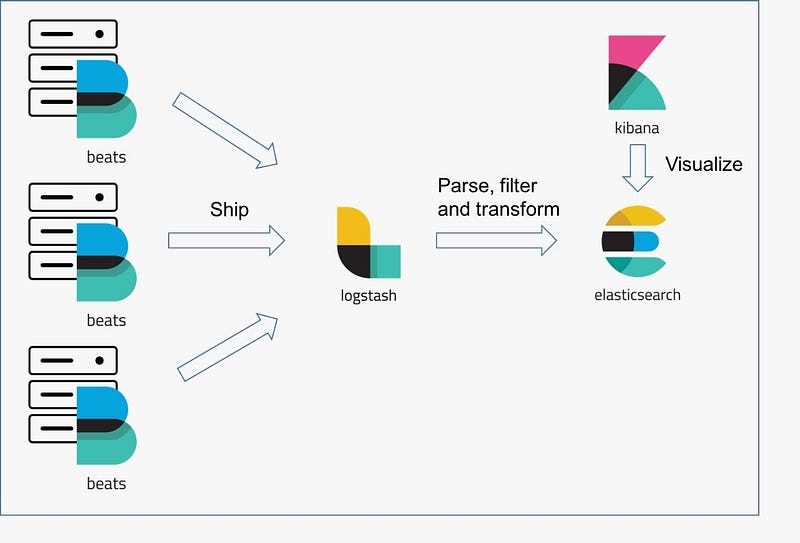
Table of Contents

  1. Introduction
  2. Prerequisites
  3. Setting Up Elasticsearch
  4. Setting Up Kibana
  5. Deploying Filebeat
  6. Deploying Logstash
  7. Configuring and Launching Kibana

1. Introduction

In today’s world of microservices and distributed systems, effective logging and monitoring are crucial for maintaining the health and performance of your applications. The ELK stack — comprising Elasticsearch, Logstash, and Kibana — along with Filebeat, provides a powerful solution for aggregating and analyzing log data. In this blog, we will walk through the steps to set up the ELK stack with Filebeat on a Kubernetes cluster.

2. Prerequisites

Before we begin, ensure you have the following:

  • A running Kubernetes cluster (Minikube, EKS, GKE, etc.).
  • kubectl command-line tool configured to interact with your cluster.
  • Lens software to connect and see all the information related to the cluster.

Install Operator

Things to consider before you start:

Install custom resource definitions and Install the operator with its RBAC rules:

kubectl create -f https://download.elastic.co/downloads/eck/2.2.0/crds.yaml
kubectl apply -f https://download.elastic.co/downloads/eck/2.2.0/operator.yaml

{MAKE SURE ALL YOUR RESOURCES ARE OF THE SAME VERSION THAT IS ELASTICSEARCH, KIBANA, LOGSTASH & FILEBEAT. }

3: Setting Up Elasticsearch

First, we’ll deploy Elasticsearch, which will store our log data. For this I am using a YAML file in which I have mention all the details for the Elasticsearch called “elasticsearch.yaml” as below.

apiVersion: elasticsearch.k8s.elastic.co/v1
kind: Elasticsearch
metadata:
  name: quickstart
spec:
  version: 8.13.4
  nodeSets:
  - name: default
    count: 1
    config:
      node.store.allow_mmap: false

After creating the script file we have to apply this YAML file by applying the below command on Lens or Terminal

kubectl apply -f elasticsearch.yaml

To monitor cluster health and creation progress apply this command:

kubectl get elasticsearch

Request Elasticsearch access

A ClusterIP Service is automatically created for your cluster:

kubectl get service quickstart-es-http

3.1: Get the credentials.

A default user named elastic is automatically created with the password stored in a Kubernetes secret:

PASSWORD=$(kubectl get secret quickstart-es-elastic-user -o go-template='{{.data.elastic | base64decode}}')

3.2: Request the Elasticsearch endpoint.

From inside the Kubernetes cluster:

curl -u "elastic:$PASSWORD" -k "https://quickstart-es-http:9200"

From your local workstation, use the following command in a separate terminal:

kubectl port-forward service/quickstart-es-http 9200

Then request localhost:

curl -u "elastic:$PASSWORD" -k "https://localhost:9200"

Or Open https://localhost:9200 in your browser. Your browser will show a warning because the self-signed certificate configured by default is not verified by a known certificate authority and not trusted by your browser. You can temporarily acknowledge the warning for the purposes of this quick start but it is highly recommended that you configure valid certificates for any production deployments.

Login as the elastic user and password is stored in lens (Your Cluster) -> Config -> Secrets -> (keys = elastic).

4: Setting Up Kibana

Kibana provides a web interface to visualize logs stored in Elasticsearch. For that create a Kibana instance and associate it with your Elasticsearch cluster and for that create a YAML file “kibana.yaml” as mentioned below

apiVersion: kibana.k8s.elastic.co/v1
kind: Kibana
metadata:
  name: quickstart
spec:
  version: 8.13.4
  count: 1
  elasticsearchRef:
    name: quickstart
  # http:
  #   tls:
  #     selfSignedCertificate:
  #       disabled: true

After creating the script file we have to apply this YAML file by applying the below command on Lens terminal:

kubectl apply -f kibana.yaml

4.1: Monitor Kibana health and creation progress.

Similar to Elasticsearch, you can retrieve details about Kibana instances:

kubectl get kibana

4.2: To access Kibana.

A ClusterIP Service is automatically created for Kibana:

kubectl get service quickstart-kb-http

Use kubectl port-forward to access Kibana from your local workstation:

kubectl port-forward service/quickstart-kb-http 5601

Open https://localhost:5601 in your browser. Your browser will show a warning because the self-signed certificate configured by default is not verified by a known certificate authority and not trusted by your browser. You can temporarily acknowledge the warning for the purposes of this quick start but it is highly recommended that you configure valid certificates for any production deployments.

Login as the elastic user. The password can be obtained with the following command:

kubectl get secret quickstart-es-elastic-user -o=jsonpath='{.data.elastic}' | base64 --decode; echo

5: Deploying Filebeat

Filebeat is a lightweight shipper for forwarding and centralizing log data. Apply the following specification to deploy Filebeat and collect the logs of all containers running in the Kubernetes cluster.

For that create a filebeat instance and for that create a YAML file “filebeat.yaml” as mentioned below:

apiVersion: beat.k8s.elastic.co/v1beta1
kind: Beat
metadata:
  name: quickstart
spec:
  type: filebeat
  version: 8.13.4
  # elasticsearchRef:
  #   name: quickstart
  # kibanaRef:
  #   name: kibana
  config:
    filebeat.inputs:
    - type: container
      paths:
      - /var/log/containers/*.log
      processors:
        - add_kubernetes_metadata:
            host: ${NODE_NAME}
            matchers:
            - logs_path:
                logs_path: "/var/log/containers/"
        - drop_event.when:
            or:
            - equals:
                kubernetes.namespace: "kube-system"
            - equals:
                kubernetes.namespace: "kube-public"  
            - equals:
                kubernetes.namespace: "quickstart"
            - equals:
                kubernetes.namespace: "kube-node-lease"
            - equals:
                kubernetes.namespace: "elastic-system"
    output.logstash:
      hosts: ["logstash.logging.svc:5044"]
  daemonSet:
    podTemplate:
      spec:
        serviceAccountName: filebeat
        automountServiceAccountToken: true
        terminationGracePeriodSeconds: 30
        tolerations:
        - key: dedicated
          operator: Exists
          effect: NoSchedule       
        dnsPolicy: ClusterFirstWithHostNet
        hostNetwork: true # Allows to provide richer host metadata
        containers:
        - name: filebeat
          securityContext:
            runAsUser: 0
            # If using Red Hat OpenShift uncomment this:
            #privileged: true
          volumeMounts:
          - name: varlogcontainers
            mountPath: /var/log/containers
          - name: varlogpods
            mountPath: /var/log/pods
          - name: varlibdockercontainers
            mountPath: /var/lib/docker/containers
          env:
            - name: NODE_NAME
              valueFrom:
                fieldRef:
                  fieldPath: spec.nodeName
          resources:
            limits:
              cpu: 500m
              memory: 2000Mi
            requests:
              cpu: 100m
              memory: 200Mi
        volumes:
        - name: varlogcontainers
          hostPath:
            path: /var/log/containers
        - name: varlogpods
          hostPath:
            path: /var/log/pods
        - name: varlibdockercontainers
          hostPath:
            path: /var/lib/docker/containers
 
---
 
apiVersion: rbac.authorization.k8s.io/v1
kind: ClusterRole
metadata:
  name: filebeat
rules:
- apiGroups: [""] # "" indicates the core API group
  resources:
  - namespaces
  - pods
  - nodes
  verbs:
  - get
  - watch
  - list
 
---
 
apiVersion: rbac.authorization.k8s.io/v1
kind: ClusterRoleBinding
metadata:
  name: filebeat
subjects:
- kind: ServiceAccount
  name: filebeat
  namespace: elk-test
roleRef:
  kind: ClusterRole
  name: filebeat
  apiGroup: rbac.authorization.k8s.io
 
---
 
apiVersion: v1
kind: ServiceAccount
metadata:
  name: filebeat

After creating the script file we have to apply this YAML file by applying the below command on Lens terminal:

kubectl apply -f filebeat.yaml

5.1: Monitor Beats.

Retrieve details about the Filebeat.

kubectl get beat

5.2: Access logs of the filebeat Pods.

kubectl logs -f quickstart-beat-filebeat-plr8h

5.3: Access logs ingested by Filebeat.

You have two options:

  • Follow the Elasticsearch deployment guide and run:
curl -u "elastic:$PASSWORD" -k "https://localhost:9200/filebeat-*/_search"
  • Follow the Kibana deployment guide, log in and go to Kibana > Discover.

6: Deploying Logstash

Add the following specification to create a minimal Logstash deployment that will listen to a Beats agent or Elastic Agent configured to send to Logstash on port 5044, create the service and write the output to an Elasticsearch cluster named quickstart, created in the Elasticsearch quickstart.

For that create a logstash instance and for that create a YAML file “logstash.yaml” as mentioned below:

apiVersion: apps/v1
kind: Deployment
metadata:
  name: logstash
  labels:
    app.kubernetes.io/name: elasticsearch-logstash
    app.kubernetes.io/component: logstash
spec:
  replicas: 1
  selector:
    matchLabels:
      app.kubernetes.io/name: elasticsearch-logstash
      app.kubernetes.io/component: logstash
  template:
    metadata:
      labels:
        app.kubernetes.io/name: elasticsearch-logstash
        app.kubernetes.io/component: logstash
    spec:
      containers:
        - name: logstash
          image: docker.elastic.co/logstash/logstash:8.13.4
          ports:
            - name: "tcp-beats"
              containerPort: 5044
          env:
            - name: ES_HOSTS
              value: "https://quickstart-es-http.elk-test.svc:9200"
            - name: ES_USER
              value: "elastic"
            - name: ES_PASSWORD
              valueFrom:
                secretKeyRef:
                  name: quickstart-es-elastic-user
                  key: elastic
          volumeMounts:
            - name: config-volume
              mountPath: /usr/share/logstash/config
            - name: pipeline-volume
              mountPath: /usr/share/logstash/pipeline
            # - name: ca-certs
            #   mountPath: /etc/logstash/certificates
            #   readOnly: true
      volumes:
        - name: config-volume
          configMap:
            name: logstash-config
        - name: pipeline-volume
          configMap:
            name: logstash-pipeline
        # - name: ca-certs
        #   secret:
        #     secretName: elasticsearch-es-http-certs-public
 
---
 
apiVersion: v1
kind: Service
metadata:
  name: logstash
  labels:
    app.kubernetes.io/name: elasticsearch-logstash
    app.kubernetes.io/component: logstash
spec:
  ports:
    - name: "tcp-beats"
      port: 5044
      targetPort: 5044
  selector:
    app.kubernetes.io/name: elasticsearch-logstash
    app.kubernetes.io/component: logstash

The config maps defined in the following YAML file are given as volume in the logstash deployment yaml file named as “logstash-config.yaml” as mentioned below:

apiVersion: v1
kind: ConfigMap
metadata:
  name: quickstart
  labels:
    app.kubernetes.io/name: elasticsearch-logstash
    app.kubernetes.io/component: logstash
data:
  logstash.yml: |
    http.host: 0.0.0.0
    pipeline.ecs_compatibility: disabled
  pipelines.yml: |
    - pipeline.id: logstash
      path.config: "/usr/share/logstash/pipeline/logstash.conf"
 
  log4j2.properties: |
    logger.logstashpipeline.name = logstash.inputs.beats
    logger.logstashpipeline.level = error
 
---
 
apiVersion: v1
kind: ConfigMap
metadata:
  name: logstash-pipeline
  labels:
    app.kubernetes.io/name: elasticsearch-logstash
    app.kubernetes.io/component: logstash
data:
  logstash.conf: |
    input {
      beats {
        port => 5044
      }
    }
    filter {
      json {
        source => "message"
      }
      prune {
        whitelist_names => [ "msg" ]
      }
      mutate {
        rename => { "msg" => "message" }
      }
    }
    output {
      if [message]  =~ "admission" {
        elasticsearch {
          index => "logstashadmission-%{+YYYY.MM.dd}"
          hosts => [ "${ES_HOSTS}" ]
          user => "${ES_USER}"
          password => "${ES_PASSWORD}"
          cacert => '/etc/logstash/certificates/ca.crt'
        }
      }
    }

After creating the script file we have to apply this YAML file by applying the below command on Lens terminal:

kubectl apply -f logstash.yaml
kubectl apply -f logstash-config.yaml

6.1: Check the status of Logstash

kubectl get logstash

7: Accessing and Visualizing Logs in Kibana

Once Filebeat is running and shipping logs, you can access Kibana to visualize the logs.

  1. Navigate to the Discover tab in Kibana.
  2. Select the Filebeat index pattern (you may need to create this pattern if it’s your first time).
  3. Explore your logs!

Conclusion

Setting up the ELK stack with Filebeat on a Kubernetes cluster can greatly enhance your ability to monitor and troubleshoot your applications. With Elasticsearch storing your logs, Filebeat shipping them, and Kibana providing visualization, you have a powerful toolset at your disposal.

Thank you for reading….❤️❤️ I hope you learn something new.

Recommended from ReadMedium