
Setting Gitlab CI/CD for Python application
Introduce how to configure a CI/CD process on Gitlab for python appliaction and pack the py file to exe on build machine in Windows.

I’ll go through how to setup GitLab CI/CD process for the jobs:
- Static analysis using pylint
- Unit testing using pytest
- gitlab-runner(Windows) deploys exe to local machine.
Whole pipeline process will look like this

Getting Started with GitLab CI
The first step is adding .gitab-ci.yml yml defines the structure and the order of the pipelines and determine how to execute Gitlab Runner
.gitlab-ci.yml
# This file is a template, and might need editing before it works on your project.
# Official language image. Look for the different tagged releases at:
# https://hub.docker.com/r/library/python/tags/
image: "python:3.7"
#commands to run in the Docker container before starting each job.
before_script:
- python --version
- pip install -r requirements.txt# different stages in the pipeline
stages:
- Static Analysis
- Test#defines the job in Static Analysis
pylint:
stage: Static Analysis
script:
- pylint -d C0301 src/*.pyadd pylint to your requirement.txt
pylint==2.4.4After adding yml and requirement.txt, we could push our py code to repo and run for the lint.
if the code doesn’t pass the lint, the fail result will be shown in the dashboard
dashboard status


Failed Jobs tab shows the reason why it doesn’t pass the lint

After fix the lint problem and push the code to repo again, CI will run the job again.


Now the jobs is passing and we could move forward to the next test stage.
Running Tests with pytest on GitLab CI
first add pytest to your requirement.txt
pytest==5.3.5then add Test stage to .gitlab-ci.yml
# This file is a template, and might need editing before it works on your project.
# Official language image. Look for the different tagged releases at:
# https://hub.docker.com/r/library/python/tags/
image: "python:3.7"

before_script:
  - python --version
  - pip install -r requirements.txt

stages:
  - Static Analysis
  - Test

pylint:
  stage: Static Analysis
  script:
  - pylint -d C0301 src/*.py

pytest:
  stage: Test
  script:
  - cd test/;pytest -v
the pytest will show the testcase name and the result

if test case fail it will look like this

if test job fail then the result of pipeline will have a x mark~

failed job tab points out why it fail

Here is the pipeline process resulting output begin from lint to testing:

Windows gitlab-runner with CD
Official set up instructions https://docs.gitlab.com/runner/install/windows.html
- Create a folder somewhere in your system, ex.:
C:\GitLab-Runner. - downlaod the binary for x86 or amd64 in
C:\GitLab-Runnerand rename togitlab-runner.exe - Run an elevated command prompt(run cmd on PowerShell by adminstrator)
- Register for the runner
gitlab-runner.exe register
5. Typing the infos for the runner
let go to the repo ->setting -> CI/CD ->runner expand

remember the URL and the token below

6. Back to the cmd and typing the infos
- Enter your GitLab instance URL: https://gitlab.com
- Enter the token you obtained to register the Runner: token from step4
- Enter a description for the Runner : cicd practice
- Enter the tags associated with the Runner : in this example we use DeployMS as tag name
- Enter the Runner executor: Use Shell in Windows
If your setting is completed, back to the runner info, it will show like this
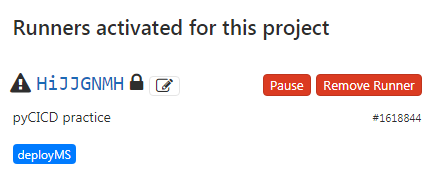
the triangle sign means runner has connection problem to the gitlab
7. Execute the ruuner
.\gitlab-runner.exe run

then the ruuner info will show a green circle mark

8. Write deploy script in .gitlab-ci.yml
- Add Deploy to stages
- Use Pyinstaller to build exe from py file
- Tags should be the same when you register to the runner
stages:
  - Static Analysis
  - Test
  - Deploy

MSDeploy:
  stage: Deploy
  script:
  - echo "test ms depoly"
  - cd src/
  - pyinstaller -F lintpractice.py
  tags:
  - deployMS
9.Result for the Deploy

build exe to build machine


In the end, we could put our depoly exe to website for browsing and download by adding artifacts to yml file(official intro)
MSDeploy:
  stage: Deploy
  script:
  - echo "test ms depoly"
  - cd src/
  - pyinstaller -F lintpractice.py
  tags:
  - deployMS
  artifacts:
    paths:
      - src/dist/*.exe
After Pyinstaller build our exe, the default path it will put in /dist so we tell gitlab to copy the exe from the path /src/dist to the gitlab website

then we could download the artifact from jobs page or CI/CD pipeline dashboard.


This time we run through a brief introduction of building a Gitlab-CI via pylint, pytest and windows gitlab-runner to run your jobs to deploy the exe to the local machine and upload the artifact back to GitLab.
short note for u and me!!!!
Reference :


