avatarJames Dorr

Free AI web copilot to create summaries, insights and extended knowledge, download it at here

1847

Abstract

ause they reference the same objects — that is, if Netflix changes something on that list for whatever reason, that object will also be changed on your list and your friend’s list. You did <i>not</i> make your own copies of the movies and shows.</p><figure id="23c3"><img src="https://cdn-images-1.readmedium.com/v2/resize:fit:800/1*XDtpJslHgTWwWbsmcG5Y9g.png"><figcaption>If you copy my Netflix, it is a shallow copy, because you are not making copies of each program. Changes to the shows and programs will also change your list.</figcaption></figure><h2 id="5e1e">Deep Copy</h2><p id="ed5c">On the other hand, most examples outside of tech are deep copies. If you make a copy of a family recipe, you can add ingredients and delete ingredients just like you can with a shallow copy above, but you can also change pre-existing ingredients without affecting the other copies of the recipe. If I decide my carrot cake needs fewer raisins than my mom’s, changing the amount of raisins on my recipe will not change the amount on my mom’s copy of it. This is a deep copy.</p><figure id="38af"><img src="https://cdn-images-1.readmedium.com/v2/resize:fit:800/1*mJ6ny11ZHLVpDGidoTmdCg.jpeg"><figcaption>This recipe is a deep copy — changing the objects inside this recipe will not change the original recipe.</figcaption></figure><h2 id="fa88">Summary</h2><p id="0aff">A shallow copy contains references and a deep copy contains its own copies of those references.</p><h1 id="dd63">Why It’s Important</h1><p id="370f">In React and Redux, your app is only updated when a change in state is detected through .setState() or the reducer, respectively. A shallow copy could change the state <i>before </i>either of these are called, so when they are called, the old state would appear equal to the new state, and your elements would not be updated.</p><p id="

Options

69fa">That’s why (as you may have noticed), when you’re having trouble updating the state, using console.log() just before the state <i>should</i> be updated shows that the state has already changed to your desired update. But because this took place at the wrong time, React and Redux don’t notice it and you don’t see the results on the page.</p><h1 id="6b2e">The Fix — Lodash</h1><figure id="43c8"><img src="https://cdn-images-1.readmedium.com/v2/resize:fit:800/1*sYsvMuoRbScpLd-LvZaJJw.png"><figcaption>The Lodash Logo</figcaption></figure><p id="249c">Lodash comes with React, but if it is not in your package-lock.json, you can add it easily with NPM.</p><div id="971e"><pre><span class="hljs-built_in">npm</span> i -g <span class="hljs-built_in">npm</span></pre></div><div id="9710"><pre>npm <span class="hljs-selector-tag">i</span> <span class="hljs-attr">--save</span> lodash</pre></div><p id="1312">If this doesn’t work, try <a href="https://lodash.com/">Lodash.com</a> or search the internet. Next, define</p><div id="0a7f"><pre><span class="hljs-keyword">var</span> <span class="hljs-literal"></span> = require(<span class="hljs-string">'lodash'</span>);</pre></div><p id="badc">In my class components, I had to define this outside of the class. Yes, the variable name is “.” Get it? Lodash? It’s a low dash!</p><p id="a3cc">Lastly, wherever you need a deep clone, simply use</p><div id="71a8"><pre><span class="hljs-literal">_</span>.cloneDeep(theObjectThatNeedsCloningHere)</pre></div><h1 id="7a12">Conclusion</h1><p id="f19f">Play around with that function and get a feel for how it works. Keep paying attention to how objects inside objects respond in both deep and shallow copies. Overall, this method has helped me write successful code quicker and made my code easier to read.</p><p id="c319">Happy coding!</p></article></body>

.setState() Not Working? Shallow Copy vs Deep Copy & Lodash

There are times in React and Redux when you are trying to update the state and it just doesn’t work. Maybe it has already been working in other cases. You start to question your sanity as you go through […theSpreadOperator], Object.assign(), and any other copying methods you can find on the internet. Unfortunately, the issue isn’t your copying method, it’s your copying type — you likely need a deep copy instead of a shallow copy.

Examples here are specific to React and Redux, but understanding shallow and deep copies is valuable computer science knowledge, and Lodash can be used with any JavaScript project.

Shallow vs Deep Copies
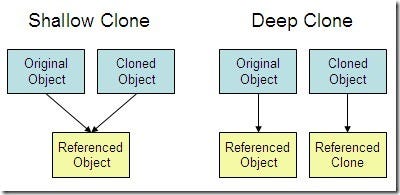
As the picture above shows, a shallow copy (or “clone”) only references the objects inside the original object, but a deep clone makes clones of the inside objects, too. In other words, a shallow clone only copies the top level of the object. Let’s compare that to real-life examples.

Shallow Copy

Let’s say you just get your own Netflix account for the first time, so you have no liked shows or movies. You ask your best friend for recommendations and you like every Netflix program on your friend’s list. (This is much more work than making a shallow clone, so ignore that part.) Now you and your friend have the same “My List” on Netflix.

You made a clone of your friend’s list. They are separate, and you can both add or remove shows from your list without influencing the other person’s list. However, they are shallow because they reference the same objects — that is, if Netflix changes something on that list for whatever reason, that object will also be changed on your list and your friend’s list. You did not make your own copies of the movies and shows.

If you copy my Netflix, it is a shallow copy, because you are not making copies of each program. Changes to the shows and programs will also change your list.

Deep Copy

On the other hand, most examples outside of tech are deep copies. If you make a copy of a family recipe, you can add ingredients and delete ingredients just like you can with a shallow copy above, but you can also change pre-existing ingredients without affecting the other copies of the recipe. If I decide my carrot cake needs fewer raisins than my mom’s, changing the amount of raisins on my recipe will not change the amount on my mom’s copy of it. This is a deep copy.
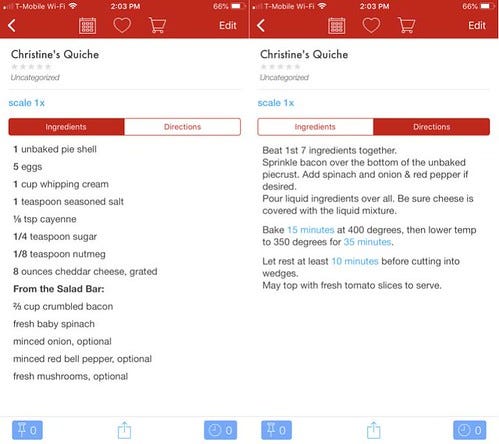
This recipe is a deep copy — changing the objects inside this recipe will not change the original recipe.

Summary

A shallow copy contains references and a deep copy contains its own copies of those references.

Why It’s Important

In React and Redux, your app is only updated when a change in state is detected through .setState() or the reducer, respectively. A shallow copy could change the state before either of these are called, so when they are called, the old state would appear equal to the new state, and your elements would not be updated.

That’s why (as you may have noticed), when you’re having trouble updating the state, using console.log() just before the state should be updated shows that the state has already changed to your desired update. But because this took place at the wrong time, React and Redux don’t notice it and you don’t see the results on the page.

The Fix — Lodash

The Lodash Logo

Lodash comes with React, but if it is not in your package-lock.json, you can add it easily with NPM.

npm i -g npm
npm i --save lodash

If this doesn’t work, try Lodash.com or search the internet. Next, define

var _ = require('lodash');

In my class components, I had to define this outside of the class. Yes, the variable name is “_.” Get it? Lodash? It’s a low dash!

Lastly, wherever you need a deep clone, simply use

_.cloneDeep(theObjectThatNeedsCloningHere)

Conclusion

Play around with that function and get a feel for how it works. Keep paying attention to how objects inside objects respond in both deep and shallow copies. Overall, this method has helped me write successful code quicker and made my code easier to read.

Happy coding!

JavaScript
React
Redux
Computer Science
Web Development
Recommended from ReadMedium