avatarIndia Snow

Free AI web copilot to create summaries, insights and extended knowledge, download it at here

1560

Abstract

r and you don’t have to spend time scrambling in the morning.</p><h2 id="cb32">Declutter and close what you are NOT using, or move them to another desktop:</h2><p id="f6ba">You might have your tabs <i>somewhat</i> ready from the last time you used them, but being intentional about what you have open declutters your work space from the second you begin.</p><p id="8d59">That way there’s no confusion about what you need, you’re not stuck in tab-purgatory, and your brain can get right to work.</p><p id="2b01">This is especially helpful if you’ll be presenting your screen at some point during the day — you don’t want to lose the tabs you really do need.</p><p id="a274">You could even take it one step further and create a work-from-home travel itinerary.</p><h2 id="8200">I call it an “integrated to-do list”. Mine might look like this:</h2><figure id="4d44"><img src="https://cdn-images-1.readmedium.com/v2/resize:fit:800/1*6FIlI1NhXVh4tWuP0u98Yg.png"><figcaption>An example integrated to-do list setup — your work-from-home travel itinerary in a nutshell.</figcaption></figure><p id="a70e">It’s not just a dump of things you “should” do — rather it’s a list in order of all the things you need to do <i>with </i>links, phone numbers, emails, and other important things you need — all in one place.</p><p id="f107">You can do this with a calendar like Google or iCal, but sometimes it’s nice to give it dedicated space — <i>just like a travel itinerary</i>.</p><p id="e03e">I used to work as a personal assistant and made these for my clients. They were by

Options

far one of their favorite systems I used!</p><p id="948c">You’ll be amazed at how much anxiety you’ll relieve by simply being tech-ready for the next day before it even begins.</p><h2 id="bfa2">How do you stay organized?</h2><p id="2c93"><i>Thank you for reading!</i></p><h2 id="9609">You May Also Like —</h2><div id="292f" class="link-block"> <a href="https://readmedium.com/how-writing-consistently-for-three-weeks-has-changed-my-life-86a68e6de5c"> <div> <div> <h2>How Writing Consistently for Three Weeks Changed My Life</h2> <div><h3>Your mindset really can boost your stats — and your earnings.</h3></div> <div><p>medium.com</p></div> </div> <div> <div style="background-image: url(https://miro.readmedium.com/v2/resize:fit:320/1*oep6Lwt7b9XHGlKSl5wHew.jpeg)"></div> </div> </div> </a> </div><div id="cf13" class="link-block"> <a href="https://readmedium.com/so-your-article-flopped-ffd807584628"> <div> <div> <h2>So — Your Article Flopped</h2> <div><h3>Here’s what you can and can’t do about it.</h3></div> <div><p>medium.com</p></div> </div> <div> <div style="background-image: url(https://miro.readmedium.com/v2/resize:fit:320/1*i9oK24gruOBsV_9Y-UoTJA.jpeg)"></div> </div> </div> </a> </div></article></body>

Set Yourself up for Morning Success by Doing This Before Bed

You might actually wake up feeling prepared for that morning meeting with your boss.

Photo by bruce mars on Unsplash

Does the work-from-home grind have you waiting until the last possible minute to open your laptop and clock in for work? Do you feel unprepared at the thought of going back into the office at some point soon?

This may sound incredibly simple, but doing this before bed will actually help you sleep better since you know you’ve set yourself up to be infallible when you peel your eyes open in the morning.

Set up your computer tabs before you go to bed:

Mine go like this from left to right —

  • Personal Email
  • Work Email
  • Google Calendar
  • Google Drive
  • Any documents or presentations that I need to have open for meetings (in order from left to right)
  • Google/Zoom/Webex Meeting Links, ready to go (also in order)

If your tabs are already open, you’re ready to go as soon as you open your computer and you don’t have to spend time scrambling in the morning.

Declutter and close what you are NOT using, or move them to another desktop:

You might have your tabs somewhat ready from the last time you used them, but being intentional about what you have open declutters your work space from the second you begin.

That way there’s no confusion about what you need, you’re not stuck in tab-purgatory, and your brain can get right to work.

This is especially helpful if you’ll be presenting your screen at some point during the day — you don’t want to lose the tabs you really do need.

You could even take it one step further and create a work-from-home travel itinerary.

I call it an “integrated to-do list”. Mine might look like this:
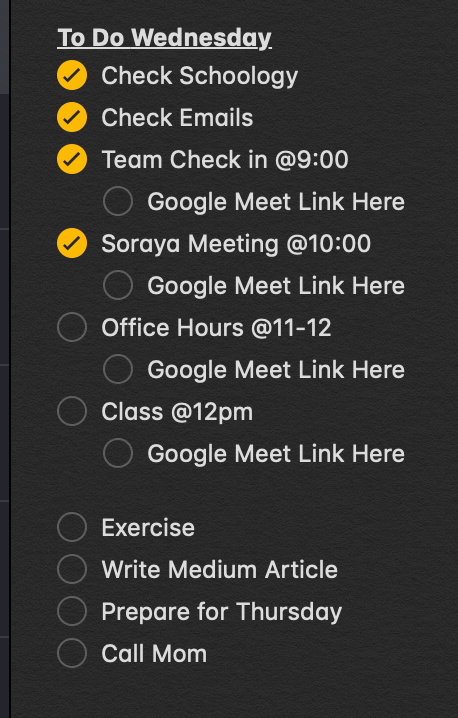
An example integrated to-do list setup — your work-from-home travel itinerary in a nutshell.

It’s not just a dump of things you “should” do — rather it’s a list in order of all the things you need to do with links, phone numbers, emails, and other important things you need — all in one place.

You can do this with a calendar like Google or iCal, but sometimes it’s nice to give it dedicated space — just like a travel itinerary.

I used to work as a personal assistant and made these for my clients. They were by far one of their favorite systems I used!

You’ll be amazed at how much anxiety you’ll relieve by simply being tech-ready for the next day before it even begins.

How do you stay organized?

Thank you for reading!

You May Also Like —

Productivity
Business
Remote Work
Work
Self
Recommended from ReadMedium