
Allure Report
Set up allure server store automation report
Save some money spent on enterprise solution for reporting service.

First thing first, a huge thanks to fescobar for his open source work. This article can’t be made without him.
Allure docker service supports for both single project and multiple project.
Single project
We will deploy with docker-compose.
version: '3'
services:
  allure:
    image: "frankescobar/allure-docker-service"
    environment:
      CHECK_RESULTS_EVERY_SECONDS: 1
      KEEP_HISTORY: 1
    ports:
      - "5050:5050"
    volumes:
      - ${PWD}/allure-results:/app/allure-results
      - ${PWD}/allure-reports:/app/default-reports
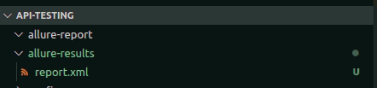
Prepare the example code to generate allure result. Allure result should be placed in allure-results folder.
Run the service with
docker-compose up -d allureNow you can checkout the report at
http://localhost:5050/allure-docker-service/projects/default/reports/latest/index.html
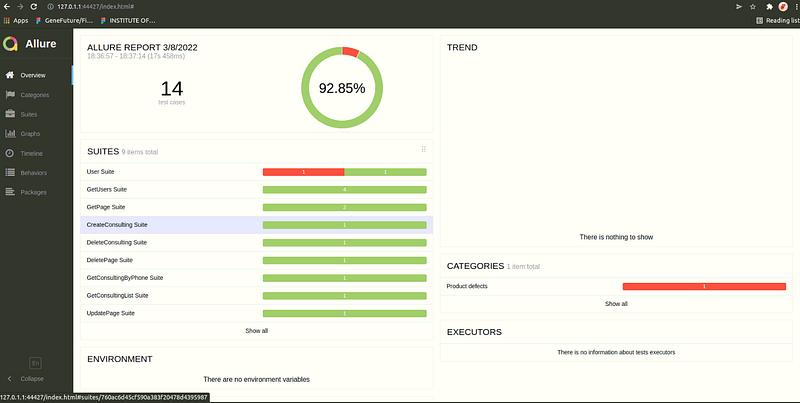
With everytime the new version of test result is updated at allure-results folder, the report will be updated automatically.
Multiple projects
This one is a little bit more complicated. We will setup with docker-compose too.
version: '3'
services:
  allure:
    image: "frankescobar/allure-docker-service"
    environment:
      CHECK_RESULTS_EVERY_SECONDS: NONE
      KEEP_HISTORY: 1
      KEEP_HISTORY_LATEST: 25
    ports:
      - "5050:5050"
    volumes:
      - ${PWD}/projects:/app/projects
Run the service with
docker-compose up -d allureThen, we will need to create a new project by using allure service API.

Prepare some allure result in allure-results folder like with single project.
Now what we need to do next is push the result to allure service by send results API. There’s already shell script which supports us do this.
send_results.sh
#!/bin/bash# This directory is where you have all your results locally, generally named as `allure-results`
ALLURE_RESULTS_DIRECTORY='allure-results'
# This url is where the Allure container is deployed. We are using localhost as example
ALLURE_SERVER='http://localhost:5050'
# Project ID according to existent projects in your Allure container - Check endpoint for project creation >> `[POST]/projects`
PROJECT_ID='mailservice'
#PROJECT_ID='my-project-id'DIR="$( cd "$( dirname "${BASH_SOURCE[0]}" )" >/dev/null 2>&1 && pwd )"
FILES_TO_SEND=$(ls -dp $DIR/$ALLURE_RESULTS_DIRECTORY/* | grep -v /$)
if [ -z "$FILES_TO_SEND" ]; then
exit 1
fiFILES=''
for FILE in $FILES_TO_SEND; do
FILES+="-F files[]=@$FILE "
doneset -o xtrace
echo "------------------SEND-RESULTS------------------"
curl -X POST "$ALLURE_SERVER/allure-docker-service/send-results?project_id=$PROJECT_ID" -H 'Content-Type: multipart/form-data' $FILES -ik#If you want to generate reports on demand use the endpoint `GET /generate-report` and disable the Automatic Execution >> `CHECK_RESULTS_EVERY_SECONDS: NONE`
#echo "------------------GENERATE-REPORT------------------"
#EXECUTION_NAME='execution_from_my_bash_script'
#EXECUTION_FROM='http://google.com'
#EXECUTION_TYPE='bamboo'#You can try with a simple curl
#RESPONSE=$(curl -X GET "$ALLURE_SERVER/allure-docker-service/generate-report?project_id=$PROJECT_ID&execution_name=$EXECUTION_NAME&execution_from=$EXECUTION_FROM&execution_type=$EXECUTION_TYPE" $FILES)
#ALLURE_REPORT=$(grep -o '"report_url":"[^"]*' <<< "$RESPONSE" | grep -o '[^"]*$')#OR You can use JQ to extract json values -> https://stedolan.github.io/jq/download/
#ALLURE_REPORT=$(echo $RESPONSE | jq '.data.report_url')Make this file executable then run it
chmod 777 send_results.sh
./send_results.sh
+ echo ------------------SEND-RESULTS------------------
------------------SEND-RESULTS------------------
+ curl -X POST 'http://localhost:5050/allure-docker-service/send-results?project_id=gtcommon-test' -H 'Content-Type: multipart/form-data' -F 'files[]=@/home/cuongld/Projects/Genetics-Testing/api-testing/allure-results/report.xml' -ik
HTTP/1.1 100 ContinueHTTP/1.1 200 OK
Access-Control-Allow-Credentials: true
Content-Length: 270
Content-Type: application/json
Date: Sat, 12 Mar 2022 09:53:48 GMT
Server: waitress{"data":{"current_files":["report.xml"],"current_files_count":1,"failed_files":[],"failed_files_count":0,"processed_files":["report.xml"],"processed_files_count":1,"sent_files_count":1},"meta_data":{"message":"Results successfully sent for project_id 'mailservice'"}}Now the results are sent to the service, we need to generate the report from the result by calling this API.

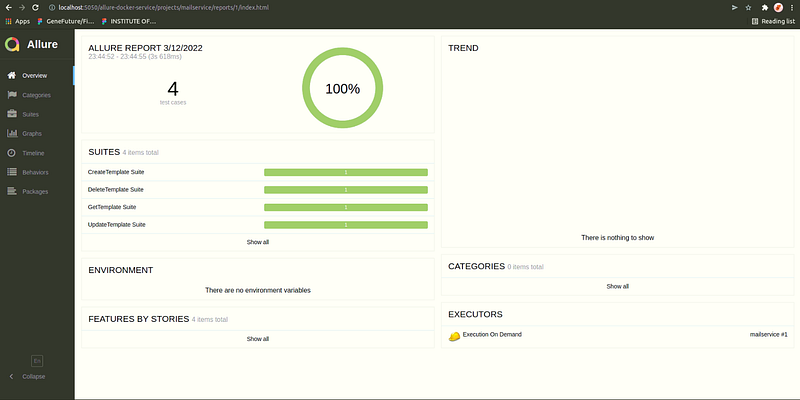
That’s it. When you go to the allure server, the report_url should be ready to view.
Hope it helps.
~~PEACE~~


