
How To Manage Your Sessions in Golang using Gin Framework And Redis ?
What is session management and why it is important?

Before we start writing code for session management in Golang let discuss on what is session management and why it is important?
What is session management?
Well, session management is the process of capturing the user status while they interact with our application. Typically, web application keeps the sessions of the connected user with our application. We all experienced the session tracking while using application. Session state remember when we logged our credentials,cart information in e-commerce applications,payments methods and so on.
Session management also helps to run our application smoothly and efficiently as it doesn’t need to request for server. So session management is the key factor for any software developer. When session is live, the application reads from and writes to the in-memory session stores exclusively. This also make our application super fast and efficient. Session state can be volatile or permanent.Depending upon the data sensitivity it can be permanent or volatile. For example, history may be volatile but your payment transactions, shopping cart information should be store permanently.
Session store the data in key and value pair with user know about key and value that makes users that session didn’t access other user information.
Golang (Gin framework) middleware supports for different backend session management. They provide 1. Cookie-based
2. Redis
3. memcached
4. MongoDB
5. memstore
Why Redis?
- Redis is based on share-nothing, symmetric architecture that let data size grow linearly without changing code.
- Offers multiple model of high availability and geographic distribution enabling local latencies.
- Multiple persistence options which doesn’t compact our application efficiency.
- Supports large volume of dataset.
Now Lets implement session in Golang using redis. Now setup our environment. Go and create a folder, I named it as session-redis-go. Inside that folder create bin,src and pkg folder and create main.go file. Now open your project in editor I am using vs code but you can choose yours. Initialize your project.To initialize it use command
go mod init session-redis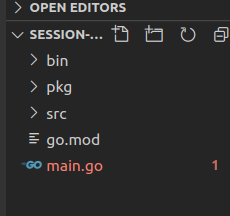
Now go and install gin-gonic (Golang framework in our application). Use command:
$ go get -u github.com/gin-gonic/ginThen we need to install the session package:
$ go get github.com/gin-contrib/sessionsOnce this two package installed we are ready to go.
Now let test our application.In main.go file
package mainimport "github.com/gin-gonic/gin"func main() {
r := gin.Default()
r.GET("/test", func(c *gin.Context) {
c.JSON(200, gin.H{
"message": "Testing Success",
})
})r.Run()}
Run your project:
go run main.goOpen your postman and hit http://localhost:8080/test
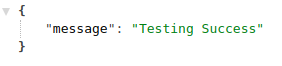
Well we can successfully run our application.
Now go and create a middleware folder inside src folder and. Inside middlerware folder create a file auth.go.
Inside auth.go file put below code:
package middlewareimport ("net/http""github.com/gin-contrib/sessions""github.com/gin-gonic/gin")
func Authentication() gin.HandlerFunc {return func(c *gin.Context) {session := sessions.Default(c)sessionID := session.Get("id")if sessionID == nil {c.JSON(http.StatusNotFound, gin.H{"message": "unauthorized",})
c.Abort()}
}
}
Let me explain above code:
Here we create a middleware function called authentication, we used session package to get session data during authentication. If there is no user id our application will be stopped showing message unauthorized.
Now we need to create a two controller to add session and to destroy the session. Go to src folder create controller folder and create auth.go
package controllerimport ("net/http""github.com/gin-contrib/sessions""github.com/gin-gonic/gin")
func Login(c *gin.Context) {session := sessions.Default(c)session.Set("id", 12090292)session.Set("email", "[email protected]")session.Save()c.JSON(http.StatusOK, gin.H{"message": "User Sign In successfully",})
}
func Logout(c *gin.Context) {session := sessions.Default(c)session.Clear()session.Save()c.JSON(http.StatusOK, gin.H{"message": "User Sign out successfully",})
}
In above code I have created two functions Login() and Logout(). In Login I saved ID and email of user in session after successful login. In logout I destroy and save the session information.
Now we need to use redis to save our session which is the motto of our application. For this we need to redefine our main.go file.
package mainimport (
"session-redis/src/controller"
"session-redis/src/middleware"
"github.com/gin-contrib/sessions"
"github.com/gin-contrib/sessions/redis"
"github.com/gin-gonic/gin"
)
func main() {
r := gin.Default()
store, _ := redis.NewStore(10, "tcp", "localhost:6379", "", []byte("secret"))
r.Use(sessions.Sessions("mysession", store))
r.POST("/login", controller.Login)
r.GET("/logout", controller.Logout)
auth := r.Group("/auth")
auth.Use(middleware.Authentication())
{
auth.GET("/test", func(c *gin.Context) {
c.JSON(200, gin.H{
"message": "Everything is ok",
})
})
}
r.Run(":8000")}
Well In this code i setup redis store to store my sessions and. I defined session name is my session . I have created a two API for “/login” and “/logout”. I use middleware here to check if user is loggedIn or not. If User is logged In they are authenticated to use “/test” else not.
Before we run our application we must ensure that We have installed redis server and it is running in port 6379. To learn how to install it in your device visit https://redis.io/
For Ubuntu users you can use following commands:
sudo apt update
sudo apt install redis-server
To check Status of server:
sudo systemctl status redis-serverConfigure redis to accept your connection:
sudo nano /etc/redis/redis.confRestart your server to see changes:
sudo systemctl restart redis-serverTo verify it is listening in 6379 port:
ss -an | grep 6379Now Its time to run our application: Enter following command in our terminal to run our application.
go run main.goOpen Postman: Hit Get method “/auth/test”
http://localhost:8000/auth/testThe result is as expected since we didn’t logged in so we are unauthorized.
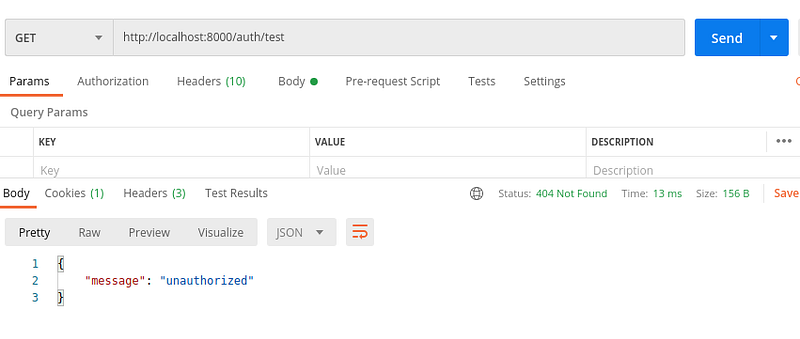
Now hit:
http://localhost:8000/login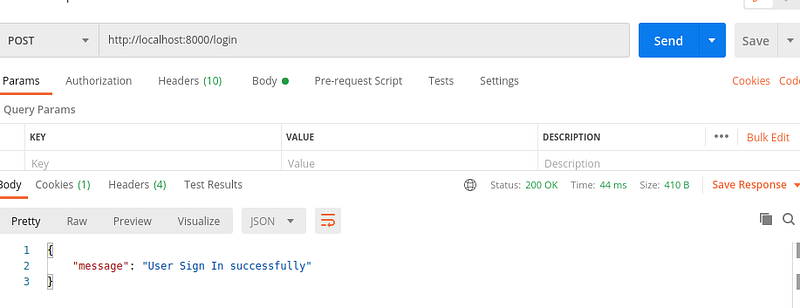
Now we Logged In successfully: Hit first API the output will be different.
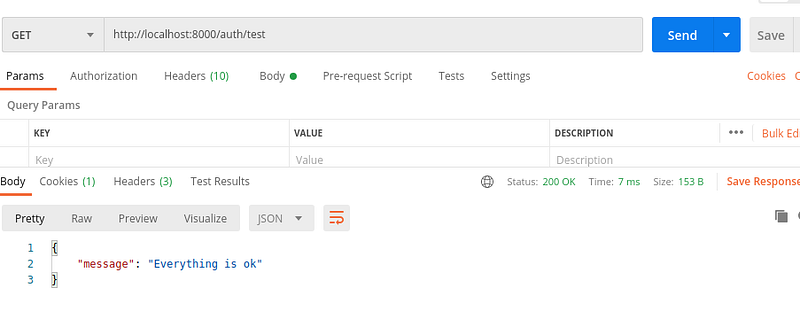
Now you can use “/logout” and test application. You will get expected result. Since Redis is a very popular platform to store our session data. The Golang provides the easy and effective way to use redis in our Golang application. As usual you can find a code in Github: https://github.com/Bikash888/session-redis-golang Happy Coding !!!


