
(Service: AmazonIdentityManagement; Status Code: 400; Error Code: MalformedPolicyDocument; Request ID: 2daba66d-6e5f-4db8–9368-ea99e4df7e83; Proxy: null)
Error trying to assign a user as the Principal in AWS AssumeRolePolicyDocument
~~~~~~~~~~~~~~~~~~~~~~~~~~~~~~~~~~~~~~~~~~~~~~~~~~~~~~~
⚙️ Check out my series on Automating Cybersecurity Metrics | Code.
🔒 Related Stories: Bugs | AWS Security | Secure Code
💻 Free Content on Jobs in Cybersecurity | ✉️ Sign up for the Email List
~~~~~~~~~~~~~~~~~~~~~~~~~~~~~~~~~~~~~~~~~~~~~~~~~~~~~~~
Initially I was trying to use an ImportValue statement and a Pseudo Parameter with a Sub function in an CloudFormation template. I got this error and presumed it was a problem with syntax combining those things, which can be tricky. But I should have done some troubleshooting in a smarter way from the start.
A more methodical approach to troubleshooting this error:
- Start with a copy of a working sample.
- Replace the things you need to change with hard coded values piece by piece.
- Replace the hard code value piece by piece with an import, sub, and/or pseudo parameter after you’re sure the rest is working.
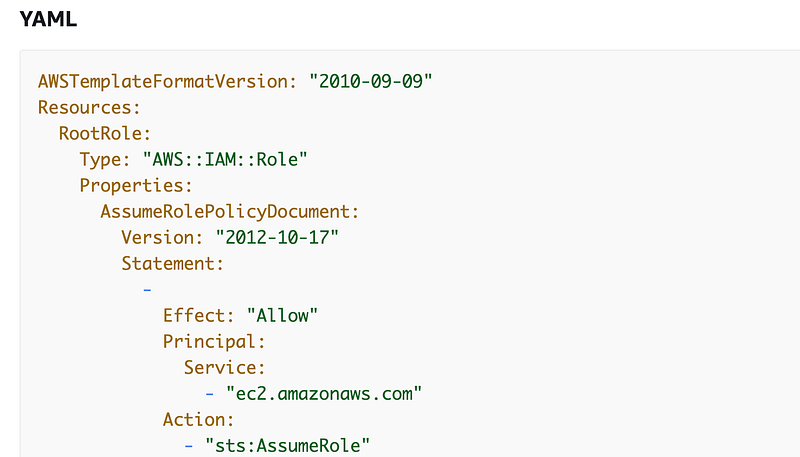
Here’s the template example I was looking at:
There’s an example with an AssumeRolePolicyDocument at the end:
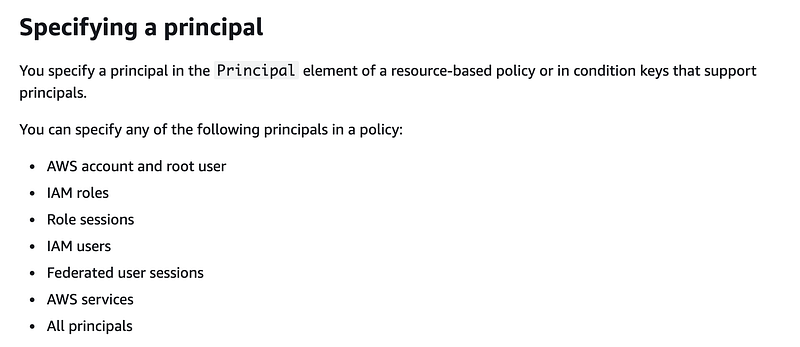
If you read the top of this document you see that one of the principals you can use is a User:
So obviously, you would replace “Service” in the above sample policy code with “User” right?
WRONG:
AssumeRolePolicyDocument:
  Version: "2012-10-17"
    Statement:
      -
        Effect: "Allow"
        Principal:
           User:
              - "[construct user ARN here]"
         Action:
              - "sts:AssumeRole"
As it turns out, User should be AWS like this:
AssumeRolePolicyDocument:
  Version: "2012-10-17"
    Statement:
      -
        Effect: "Allow"
        Principal:
           AWS:
              - "[construct user ARN here]"
         Action:
              - "sts:AssumeRole"
This small detail escaped me far too long.
In addition, make sure your user list is an array, not a single string. In YAML you indicate an array with a dash.
Make sure you put the dash AFTER AWS not before it.
WRONG:
AssumeRolePolicyDocument:
  Version: "2012-10-17"
    Statement:
      -
        Effect: "Allow"
        Principal:
          - AWS:
              "[incorrect position of dash]"
         Action:
              - "sts:AssumeRole"
Sub, ImportValue, and Pseudo Parameters (in YAML)
The documentation for Sub and ImportValues is a little scattered and you’ll find variations in JSON more frequently than YAML. Here are the key points.
Correct:
!SubIncorrect:
!Sub:Incorrect:
Sub:When you’re using a sub with an ImportValue, the first line is your complete and final string with placeholders starting with $ in curly braces like this:
!Sub
    - 'string with the ${PlaceHolder}'
The second line is the name of the value to replace followed by colon, and then value to replace it with.
!Sub
    - 'string with the ${PlaceHolder}'
    - PlaceHolder: Value
If you’re using ImportValue with the Output from another template then the second line would be:
!Sub
    - 'string with the ${PlaceHolder}'
    - PlaceHolder: !ImportValue outputname
What if you have two values that you want to replace:
!Sub
    - 'string with ${PlaceHolder1} and ${PlaceHolder2}'
With all these dashes floating around it’s easy to make the assumption you would write it like this but…
WRONG:
!Sub
    - 'string with ${PlaceHolder1} and ${PlaceHolder2}'
    - PlaceHolder1: !ImportValue outputname1
    - PlaceHolder2: !ImportValue outputname2
You only put the dash in front of the first of the list of replacement values:
!Sub
    - 'string with ${PlaceHolder1} and ${PlaceHolder2}'
    - PlaceHolder1: !ImportValue outputname1
      PlaceHolder2: !ImportValue outputname2
What if you want to use a pseudo parameter like AWS::AccountId? You might think that you should write something like this:
WRONG
!Sub
    - 'string with ${PlaceHolder1} and ${PlaceHolder2}'
    - PlaceHolder1: !ImportValue outputname1
      PlaceHolder2: ${AWS::AccountId}
The correct version puts the pseudo parameter in the first line like this:
CORRECT:
!Sub
    - 'string with ${AWS::AccountId} and ${PlaceHolder1}'
    - PlaceHolder1: !ImportValue outputname1
This all seems a bit overly convoluted and inconsistent, but that’s how it is.
And of course, the error messages are not that helpful.
Follow for updates.
Teri Radichel | © 2nd Sight Lab 2022
About Teri Radichel:
~~~~~~~~~~~~~~~~~~~~
⭐️ Author: Cybersecurity Books
⭐️ Presentations: Presentations by Teri Radichel
⭐️ Recognition: SANS Award, AWS Security Hero, IANS Faculty
⭐️ Certifications: SANS ~ GSE 240
⭐️ Education: BA Business, Master of Software Engineering, Master of Infosec
⭐️ Company: Penetration Tests, Assessments, Phone Consulting ~ 2nd Sight Lab
Need Help With Cybersecurity, Cloud, or Application Security?
~~~~~~~~~~~~~~~~~~~~~~~~~~~~~~~~~~~~~~~~~~~~~~~~~~~~~~~~~~~~~
🔒 Request a penetration test or security assessment
🔒 Schedule a consulting call
🔒 Cybersecurity Speaker for PresentationFollow for more stories like this:
~~~~~~~~~~~~~~~~~~~~~~~~~~~~~~~~~~~~~~~~~~~~~~~~~~~~~~~~~~~~~
❤️ Sign Up my Medium Email List
❤️ Twitter: @teriradichel
❤️ LinkedIn: https://www.linkedin.com/in/teriradichel
❤️ Mastodon: @teriradichel@infosec.exchange
❤️ Facebook: 2nd Sight Lab
❤️ YouTube: @2ndsightlab


