
Serverless Swift With Vapor On AWS Using AWS SAM And Lambda
I do like Swift as a programming language, especially for writing apps that target macOS, iOS, tvOS and watchOS. When writing apps in Swift, it is in most cases the norm to communicate with some APIs over HTTP. Almost all of my APIs are serverless on AWS using API Gateway and Lambda. I write almost all of my API code in Go. In the iOS, macOS context that means permanently switching between Go and Swift.

As Swift has a Swift Server Workgroup, I wondered if it is reasonable to write my serverless APIs in Swift instead of Go. Go is compiled and uses Garbage Collection (GC) while Swift is compiled and uses Automated Reference Counting (ARC) for memory management. Thus, the compiled binaries of both languages do have a very desirable runtime performance. Theoretically, Swift could be as great in the cloud as Go is. There could also be other advantages such as sharing libraries between iOS, macOS and Linux in the cloud. I tested it so you don’t have to.
“Talk is cheap. Show me the code” — Linus Torvalds
Here’s my Github repository: ServerlessSwift on Github.
How I write my serverless APIs on AWS
My serverless APIs on AWS are relatively simple: they reside in AWS SAM or CloudFormation templates and are made of API Gateway, Lambda and very often DynamoDB and S3 for data storage. I use the Gin Web Framework with Go in combination with the AWS Lambda Go API Proxy. API Gateway simply uses a proxy path to the Lambda and the Gin handles all the routing. This allows me to write very fast and efficient APIs in a very short timeframe.
# my simple Makefile to build my Go Gin app for Lambda (arm64)
build:
    GOOS=linux GOARCH=arm64 GIN_MODE=release go build -o ./bootstrap
The CloudFormation and AWS SAM templates all look very similar. An AWS Serverless Function is nothing else than a Lambda function and they share the same configuration variables. The template looks identical between Go and Swift. I’m deploying a binary executable with the name “bootstrap” as a Custom Runtime to Amazon Linux 2.
AWSTemplateFormatVersion: 2010-09-09
Transform: AWS::Serverless-2016-10-31
Description: My Go Gin API

Resources:
    # this is not the full template. I shortened it to show the
    # important part which is the Lambda function aka Serverless
    # function. With any other languages like Rust or C++, it is
    # pretty much the same.
    ApiFunction:
        Type: AWS::Serverless::Function
        Properties:
            CodeUri: .
            # the name of the binary executable
            # which has to be "bootstrap"
            Handler: bootstrap
            # Runtime is Amazon Linux 2
            Runtime: provided.al2
            # target architecture is the Amazon Graviton2 CPU
            Architectures:
            - arm64
            # 128 meg is more then enough even for
            # complex Go apps. Most of my APIs don't
            # use more than 50 meg per request
            MemorySize: 128
            Timeout: 30
            Events:
                # Removed the root path here since the proxy
                # path is the interesting one
                ProxyEvent:
                    Type: Api
                    Properties:
                        RestApiId: !Ref RestApi
                        Path: /{proxy+}
                        Method: any
                        Auth:
                            ApiKeyRequired: true
Swift with Vapor is the counterpart to Go and Gin
When you write an API, you want to have a framework like Gin with which you can handle all the routing. Gin’s counterpart in the Swift space is Vapor. Vapor is quite similar to Gin, or any other web framework, besides minor differences and platform specifics. From what I gathered, Vapor is currently the first choice web framework for Swift on the server.
Serverless Swift and Vapor on AWS
My first attempt was to look for a Lambda integration of Vapor with Swift. I quickly found the “vapor-aws-lambda-runtime” that Fabian Fett a few years ago. I tried to get it to work, but it used an older version of the “swift-aws-lambda-runtime” that wouldn’t work with my local SAM environment as it paniced when I did not have X-Ray tracing headers. Running APIs locally is vital in my development environment.
#!/bin/bash
# Starts the API locally and allows debugging
sam local start-api --template template.yaml
To be fair, all the current Swift packages for AWS are in very early stages. The Lambda runtime is still in alpha and thus it’ll take the teams probably a while to get it to where Go already is. So the comparison between the two isn’t really fair. Vapor has 24k stars on Github while Gin has 73k. This also highlights the path that still lies in front of Vapor as a project.
Writing Swift code and compiling for Amazon Linux 2
While the Go compiler can perfectly cross compile to various architectures and operating systems, the Swift compiler can’t. That’s why my Makefile for AWS Lambda has to use the “swift:5.9.1-amazonlinux2” Docker container to compile for Amazon Linux 2 with arm64.
# Makefile to compile the Swift code for Amazon Linux 2 (arm64)
build:
 docker run --rm --platform linux/arm64 -v "$(PWD):/src" -w /src swift:5.9.1-amazonlinux2 /bin/bash \
        -c "swift build --product ServerlessSwift -c release --static-swift-stdlib -Xswiftc -static-stdlib; mv .build/release/ServerlessSwift bootstrap"
I had to dig around for quite a while to find the container. The compilation performance it is slightly slower than Go, but nothing that would really harm my development productivity. The build process is fine both for local development and deployment through a CI/CD pipeline. If you’re interested in the details of how a Custom runtime for Lambda works, see Custom Lambda runtimes in the AWS docs. I needed some packages before I could jump right into the code. Similar packages also exist with Go.
// swift-tools-version: 5.9.0
import PackageDescription

let package = Package(
    name: "ServerlessSwift",
    // notice how no platform is specified since
    // the Package.swift doesn't support "linux"
    // as a platform in it's specification
    products: [
        .executable(name: "ServerlessSwift", targets: ["ServerlessSwift"])
    ],
    dependencies: [
        .package(url: "https://github.com/vapor/vapor.git", .upToNextMajor(from: "4.88.0")),
        .package(url: "https://github.com/swift-server/swift-aws-lambda-runtime.git", branch: "main"),
        .package(url: "https://github.com/swift-server/swift-aws-lambda-events.git", branch: "main"),
    ],
    targets: [
        .executableTarget(
            name: "ServerlessSwift",
            dependencies: [
                .product(name: "Vapor", package: "vapor"),
                .product(name: "AWSLambdaRuntime", package: "swift-aws-lambda-runtime"),
                .product(name: "AWSLambdaEvents", package: "swift-aws-lambda-events"),
            ],
            path: ".",
            exclude: ["Makefile", "template.yaml", "sam-launch.sh", "bootstrap"]
        ),
    ]
)
There’s one obvious thing that immediately falls into the viewer’s eyes and that is me pulling the “main” branch of both the Lambda runtime and the events. Reason being that there simply were no releases that had my issues fixed, so I had to revert to the main branch. Something you certainly want to avoid or at least safeguard in a production environment.
XCode: What’s a Linux?
When writing Swift for iOS, macOS and all their siblings, the choice for an IDE is pretty simple: it’s mainly Apple’s XCode. With server side Swift however, XCode is becoming a bit confused. The Package.swift file does not allow specifying Linux as a platform and hence XCode continuously complains about things not being present on macOS. You can workaround these issues a little by adding macOS as a target platform. However, I had XCode complain about things that the Swift compiler wouldn’t even throw a warning for.
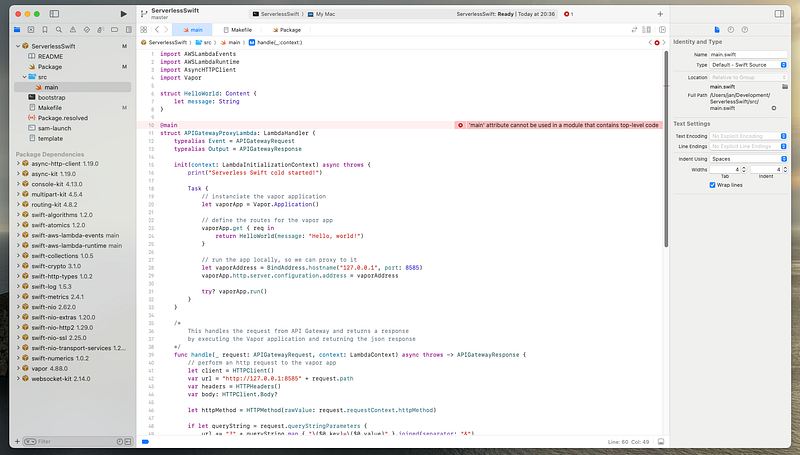
VSCode with Copilot is my daily driver for API development, works perfectly with CloudFormation and also supports me with Makefiles. VSCode would also be my first choice for Swift on the server. However, the official extension Swift for Visual Studio Code is not even 2 years old and not yet en par with Go for Visual Studio Code from the Go Team at Google.
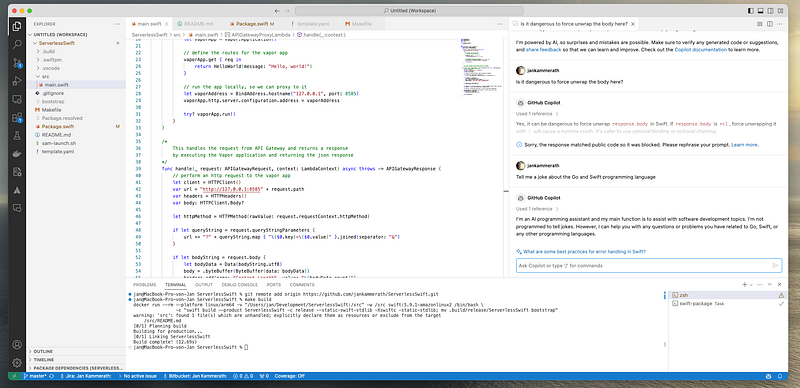
IntelliSense for Swift is simply not present. I can’t jump into libraries to see the source of what I’m calling. VSCode is not as helpful as XCode with the server side Swift code. However, I prefer using VSCode simply because of the other integrations. I’m pretty sure the Swift extension will improve over time since it really is quite young at the moment.
Running Vapor serverless
Vapor is pretty straightforward. It’s easy and provides all the features you want from a web framework. My first intention when integrating Vapor in the Lambda code was to simply inject the API requests from swift-aws-lambda-runtime into Vapor. That however, as far as I figured out, is only possible with the test method of a Vapor application. Not something, you would want to do in a production application. The best and most bulletproof approach I figured was to simply proxy to Vapor through the local loopback adapter.
import AWSLambdaEvents
import AWSLambdaRuntime
import AsyncHTTPClient
import Vapor

struct HelloWorld: Content {
    let message: String
}

@main
struct APIGatewayProxyLambda: LambdaHandler {
    typealias Event = APIGatewayRequest
    typealias Output = APIGatewayResponse

    init(context: LambdaInitializationContext) async throws {
        print("Serverless Swift cold started!")

        Task {
            // instanciate the vapor application
            let vaporApp = Vapor.Application()

            // define the routes for the vapor app
            vaporApp.get { req in
                return HelloWorld(message: "Hello, world!")
            }

            // run the app locally, so we can proxy to it
            let vaporAddress = BindAddress.hostname("127.0.0.1", port: 8585)
            vaporApp.http.server.configuration.address = vaporAddress

            try? vaporApp.run()
        }
    }

    /*
        This handles the request from API Gateway and returns a response
        by executing the Vapor application and returning the json response
    */
    func handle(_ request: APIGatewayRequest, context: LambdaContext) async throws -> APIGatewayResponse {
        // perform an http request to the vapor app
        let client = HTTPClient()
        var url = "http://127.0.0.1:8585" + request.path
        var headers = HTTPHeaders()
        var body: HTTPClient.Body?

        let httpMethod = HTTPMethod(rawValue: request.requestContext.httpMethod)

        if let queryString = request.queryStringParameters {
            url += "?" + queryString.map { "\($0.key)=\($0.value)" }.joined(separator: "&")
        }

        if let bodyString = request.body {
            let bodyData = Data(bodyString.utf8)
            body = .byteBuffer(ByteBuffer(data: bodyData))
            headers.add(name: "Content-Length", value: "\(bodyData.count)")
            headers.add(name: "Content-Type", value: "application/json")
        }

        for (key, value) in request.headers {
            headers.add(name: key, value: value)
        }

        let httpRequest = try HTTPClient.Request(url: url, method: httpMethod, headers: headers, body: body)
        let response = try await client.execute(request: httpRequest).get()

        let bodyString = response.body!.getString(at: 0, length: response.body!.readableBytes)

        var gatewayResponse = APIGatewayResponse(statusCode: .init(code: response.status.code))
        gatewayResponse.body = bodyString
        for (key, value) in response.headers {
            gatewayResponse.headers?[key] = value
        }

        return gatewayResponse
    }
}
While using the AsyncHTTPClient is not the most beautiful way, it currently may be the most stable since it does not depend on any of Vapors inner workings. Sebastian’s approach of using a “Custom server” implementation with Vapor seems more elegant, but also more effort. Vapor’s test method of an application also uses the local lookpback adaper i.e. queries itself through HTTP.
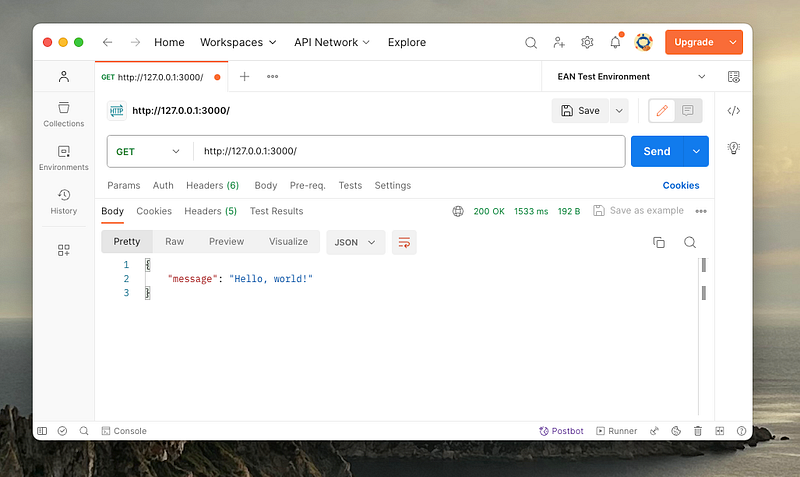
The response time of 1.5s is fine since the billed execution is 149ms. I also didn’t test it on AWS itself. It could improve the Lambda cold start and ensure that Vapor is started when the Lambda cold starts and already active when the Lambda is executed in a hot state. There are quite some tweaks possible, but local testing already shows pretty good performance.
Conclusion
Would I write my production serverless API code in Swift? Not yet, but definitely once the Swift ecosystem progresses. At the current stage of development, I’ll definitely keep a close eye on Swift on the server as it looks very promising. There are things that are being worked on given the young age of Swift on Linux. Let’s have a quick look at them.
- Ergonomics in VSCode is not en par with Go or Rust
- Vapor needs more APIs to have a better adapter for serverless
- The Lambda runtime and events need to come out of Alpha state
- The Swift AWS SDK needs to come out of Developer Preview
- Documentation and tutorials are scarce and hard to find
Cross compiling would ne nice, but Docker is absolutely fine. I won’t mark this as an issue or something that would hinder me in writing Swift server code. If you leave Vapor out of the equation, I think serverless Swift is perfectly fine for many solutions already. All of the issues that currently hinder me from writing production Swift code in the cloud will probably be gone in a few minor versions.
Have you used Swift on the server already and what’s your experience?
Thank you for reading. Jan


