
Sentiment Analysis in Python
Extracting and Analyzing Text using the Text Blob library

In this guide, we’ll learn how to extract sentiment from text using the TextBlob library in Python.
This is different from text classification where the sentiment classification is already provided. What we are doing here is that given a text, we try to extract it’s sentiment.
Let’s get started with an overview of the dataset and project objective.
Dataset
We’ll use the Women’s Clothing E-Commerce dataset revolving around the reviews written by customers.
This dataset includes 23486 rows and 10 feature variables. Each row corresponds to a customer review, and you can examine the data in detail on Kaggle. ( https://www.kaggle.com/datasets/nicapotato/womens-ecommerce-clothing-reviews)
For this demo, we will be focusing on two variables, and these are:
Review Text: String variable for the review body.Recommended IND: Binary variable stating where the customer recommends the product where 1 is recommended, 0 is not recommended.
Objective
The objective is to use the TextBlob library to extract sentiment from the Review Text variable.
We’ll not be using the Recommended IND variable, and it's not actually necessary to use this variable, but we have kept it to compare the sentiment extracted.
With the dataset and the objective clear, let’s get into some Python coding.
Step 1: Import the necessary libraries
# !pip install -U textblob
import pandas as pd
import numpy as np
from textblob import TextBlob
Step 2: Load and preview the data
# Load data
df = pd.read_csv('data.csv')

# Selecting only 'Review Text' and 'Recommended IND' columns
df = df[['Review Text', 'Recommended IND']]
df.head()
Output:
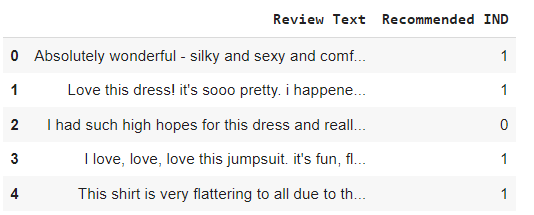
You can see the first five rows of the dataset above. Let’s have a look at one of the texts from the above data.
df['Review Text'][2]Output:
I had such high hopes for this dress and really wanted it to work for me. i initially ordered the petite small (my usual size) but i found this to be outrageously small. so small in fact that i could not zip it up! i reordered it in petite medium, which was just ok. overall, the top half was comfortable and fit nicely, but the bottom half had a very tight under layer and several somewhat cheap (net) over layers. imo, a major design flaw was the net over layer sewn directly into the zipper - it c
It’s evident reading this review that the customer isn’t delighted with the product, and hence, understandably, the Recommended IND variable has the value 0.
Step 3: Function to extract sentiment using TextBlob
We’ll write a function that’ll make it easy to extract sentiment from our data. The lines of code below defines a function named extract_sentiment that takes a single argument text.
def extract_sentiment(text):
    sentiment = TextBlob(str(text)).sentiment
    return sentiment.polarity, sentiment.subjectivity
Inside the function, the first line of code converts the input text to a string (in case it's not already), and then creates a TextBlob object from it.
Thesentiment attribute of this object is then accessed, which contains two properties: polarity and subjectivity.
Important point to take note of is that the above function returns two values: polarity (which is a measure of how positive or negative the sentiment is) and subjectivity (a measure of how subjective or objective the text is).
Step 4: Apply the function to the text column
We have created the function above and the next step is to apply it on the Review Text column in df.
# Applying the function to the 'Review Text' column
df['Polarity'], df['Subjectivity'] = zip(*df['Review Text'].apply(extract_sentiment))
The above line of code applies the extract_sentiment function to each element in the Review Text column of the DataFrame df.
Also, the two lists are then assigned to new columns in the DataFrame df, named Polarity and Subjectivity.
Let’s review the resulting changes using the df.head() command, which will produce the following output:
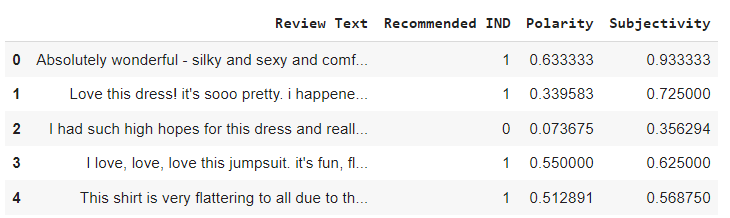
You can now see that two new columns are created. When the polarity is high, it indicates a positive sentiment, and vice versa. The subjectivity level can be ascertained in the similar manner.
Conclusion
In this guide, you saw the power and simplicity of the textblob library as in how easily it can not just extract the sentiment but also the subjectivity level from a given text. This is super useful in those cases where you don’t have sentiment labels done on the text data.
Please feel free to share your thoughts. And if you have tried out other methods, do share the findings.
Additionally, If you’re as passionate about AI, ML, DS, Strategy and Business Planning as I am, I invite you to connect with me on LinkedIn.


