avatarGanesh Chandrasekaran

Summary

The website content provides a guide on how to send automated messages to Microsoft Teams via Databricks using incoming webhooks and cURL, with instructions for both Scala and pySpark users.

Abstract

The article outlines the process of automating message delivery to Microsoft Teams from Databricks. It begins by explaining that messages can be sent to Teams either through email or incoming webhooks, with a focus on the latter method. The article is structured into steps: first, it guides the reader through setting up an incoming webhook in Teams by configuring a connector in a chosen channel. Next, it demonstrates how to send a test message using cURL, providing a JSON payload format and a shell script example. After confirming the message delivery, the article proceeds to show how to implement the same functionality within Databricks, offering specific code snippets for Scala and Python (pySpark) users. For Scala, it includes a sequence of cURL command arguments to be executed as a shell command. For pySpark, it recommends installing the pymsteams library and provides a Python function to send messages, emphasizing error handling and message formatting. The use case highlighted is the benefit of sending process status updates to a team channel during Spark jobs, which can replace the need for group emails.

Opinions

  • The article suggests that using cURL for testing is advantageous for its speed and cost-effectiveness before integrating with Databricks.
  • It emphasizes the practicality of sending messages to Microsoft Teams during Spark job executions, especially for team collaboration and process status updates.
  • The use of pymsteams library in pySpark is recommended for its ease of use and functionality in sending formatted messages to Teams.
  • The article implies that automating messages to Teams can enhance team communication and reduce the reliance on email for status updates.
  • It is noted that when using Scala, one must be mindful of using double quotes for the JSON payload and shell commands, as Scala supports only double quotes.

Send a Message to Microsoft Teams via Databricks

In Microsoft Teams, automated/programmatic messages can be posted via email or via Incoming Webhooks. This article will explain how to send messages to Microsoft Teams via webhooks.

Photo by Dimitri Karastelev on Unsplash

Step 1: Create an incoming webhook.

Right-click on to your favorite channel, choose “Connectors” and click “Configure” next to Incoming Webhook.

Step 2: Send a message to Microsoft Teams using cURL

Testing via cURL will be faster and of course, saves you some money before using Databricks.

The format for Microsoft Teams payload should be

{"text":"your msg"}

Put together as Shell Script

$msg="Test Message via cURL"
$url="https://webhook.office.com/webhookb2/b9a63247-a...."
$curl -H 'Content-Type: application/json' -d '{"text": "'"${msg}"'"}' ${url}

After confirming that the message has reached the Teams, let's implement the same using Databricks.

Usecase:

Typical Spark jobs comprise several steps. To know the process status sending message to Teams will be of great help. This is even better when working as a team, so other team members can also follow the channel instead of sending group emails.

Sending a message to Microsoft Teams via Databricks

Scala users:

import scala.sys.process._
// json Payload and Scala both supports only double quotes. Thats the reason the message is enclosed within docstring """
val msg = """{"text":"Message sent via Databricks / Scala "}"""
val webhookUrl = "https://webhook.office.com/webhookb2/b9a67-a58a"
// Creating a Sequence variable, so it basically arranges all the values in desired sequence.
val sendMessage = Seq("curl", "-H", "Content-Type: application/json", "-d", s"$json",s"${webhookUrl}")
// Executing the shell curl command 
sendMessage.!

pySpark users:

Install pymsteams library in your cluster.
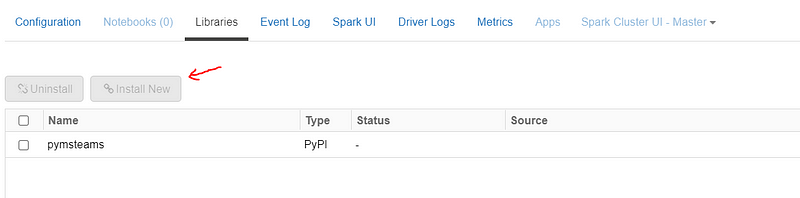
Databricks — Cluster
import pymsteams
## Please make sure library  pymsteams is installed in the cluster.
def sendMessageToTeams(webHookUrl: str,msg: str):
    try:
        # escaping underscores to avoid alerts in italics.
        msg = msg.replace('_', '\_')
        teams_msg = pymsteams.connectorcard(webHookUrl)
        teams_msg.text(f'{msg}')
        teams_msg.send()
    except Exception as e:
        print(f'failed to send alert: {str(e)}')
sendMessageToTeams("Message sent via Databricks / Python","https://....)
Databricks
Microsoft Teams
Scala
Pyspark
Curl
Recommended from ReadMedium