
Semantic Router: Enhancing Control in LLM Conversations
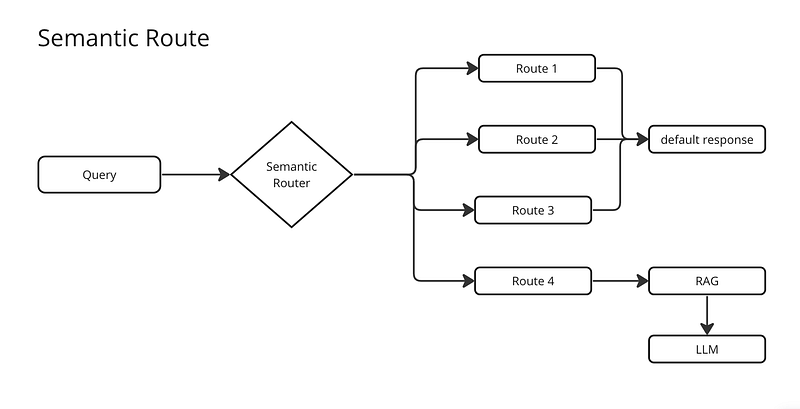
The Semantic Router is a tool that allows for controlling the nuances of conversations with LLMs.
It is a crucial part of creating effective AI assistants and agents, as it enables quick and efficient decision-making when processing queries. By using the Semantic Router, a predefined list of queries can be created to trigger specific responses or actions, providing greater control and determinism in dialogues.
Additionally, these responses are not limited to being fixed, but are represented in a semantic vector space, allowing for flexible and related responses to closely related queries.
In this example, I will show you how to use the semantic-router library in Python to control any query related to politics and guide the conversation towards the topic that the Agent should respond to.
First, you need to install the semantic-router library with this command:
pip install semantic-router
Then we are going to import Route, CohereEncoder, and RouteLayer.
from semantic_router import Route
from semantic_router.encoders import CohereEncoder
from semantic_router.layer import RouteLayer
Finally, we are going to import Completion from CodeGPT to get the response in case the query passes the RouteLayer.
from judini.codegpt.chat import CompletionIn this case, we are going to use a Cohere API Key, but you can also use an encoder from OpenAI (with OpenAIEncoder).
os.environ["COHERE_API_KEY"] = "YOUR_API_KEY"
encoder = CohereEncoder()
Then we create the intents that will trigger this first route.
intents = [
        "isn't politics the best thing ever",
        "why don't you tell me about your political opinions",
        "don't you just love the president" "don't you just hate the president",
        "they're going to destroy this country!",
        "they will save the country!"
    ]

politics = Route(
    name="politics",
    utterances=intents,
)
You can create as many routes and intents as you want. Add all your routes as an array to the RouteLayer.
routes = [politics]

prompt = "Who are you going to vote for?"
rl = RouteLayer(encoder=encoder, routes=routes)
router = rl(prompt).name

# Output: 'politics'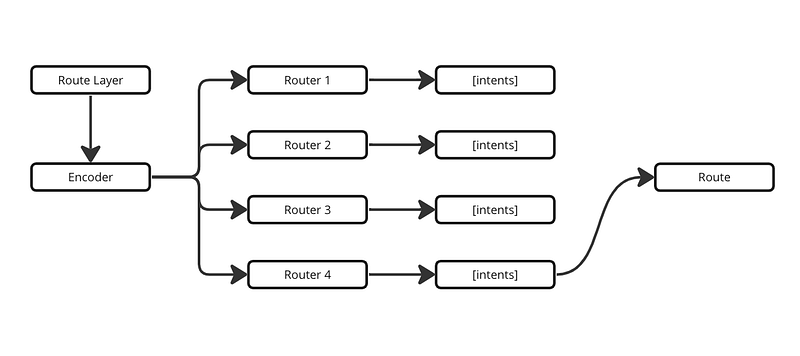
Once we have obtained the intent, we can start differentiating the routes that the Agent will take and mitigate any queries related to politics. Otherwise, we can perform completion to CodeGPT to get the Agent’s response.
if(router == 'politics'):
    response_completion = "I can't talk about politics"
else:
    completion = Completion(api_key)
    response_completion = completion.create(agent_id, prompt, stream=False)
It’s as simple as that to create routes so that your Agents don’t have to perform RAG and Completion with specific topics, or even better, you could just create a route with intents that the Agent should respond to and mitigate everything else.
It will depend on how broad you want your Agent to be. Here are three examples of how Semantic Router could be useful in an AI Agent:
- Sensitive topic control: By creating specific routes, queries related to sensitive topics such as politics, religion, or violence can be avoided. This helps to maintain the conversation in a safe scope and prevent inappropriate responses.
- Focus on specific topics: By defining routes for specific topics such as sports, technology, or entertainment, the conversation can be guided towards those topics, ensuring that the Agent provides relevant and accurate responses in those areas.
- Customization of responses: Semantic Router also allows for customization of Agent responses based on user preferences. For example, routes can be created to respond differently based on the user’s personality or specific interests. This helps to create a more personalized and engaging conversation experience for the user.
In summary, Semantic Router is a powerful tool that enhances control and precision in conversations with LLMs, enabling the creation of more effective and personalized AI Agents.
You can see the complete code integrated into a chat with Streamlit in this repository:
Check out all the examples with CodeGPT agents in this link:


