
Segmentation Fault Trying to Run Script to Test AWS Role Assumption
That’s all I know
~~~~~~~~~~~~~~~~~~~~~~~~~~~~~~~~~~~~~~~~~~~~~~~~~~~~~~~
⚙️ Check out my series on Automating Cybersecurity Metrics | Code.
🔒 Related Stories: Bugs | AWS Security | Secure Code | CloudFormation
💻 Free Content on Jobs in Cybersecurity | ✉️ Sign up for the Email List
~~~~~~~~~~~~~~~~~~~~~~~~~~~~~~~~~~~~~~~~~~~~~~~~~~~~~~~
I have this script I was using to test role assumption in AWS. Two things happened since I ran it last.
- I ran sudo yum update.
- I moved one function to a different file and had to source the file in my another file used by the script.
Other than that nothing change.
Now when I test role assumption all I get as output is:
“Segmentation Fault.”
That’s it.
That is not good.
I’m only using the AWS CLI and various role assumption related functions in Bash.
Maybe more later but I have to finish some other things…or so I thought.
Now my role assumption isn’t working altogether and another script I wrote to deploy cross-account roles is also getting a segmentation fault…
Trying to figure out which line is doing it now.
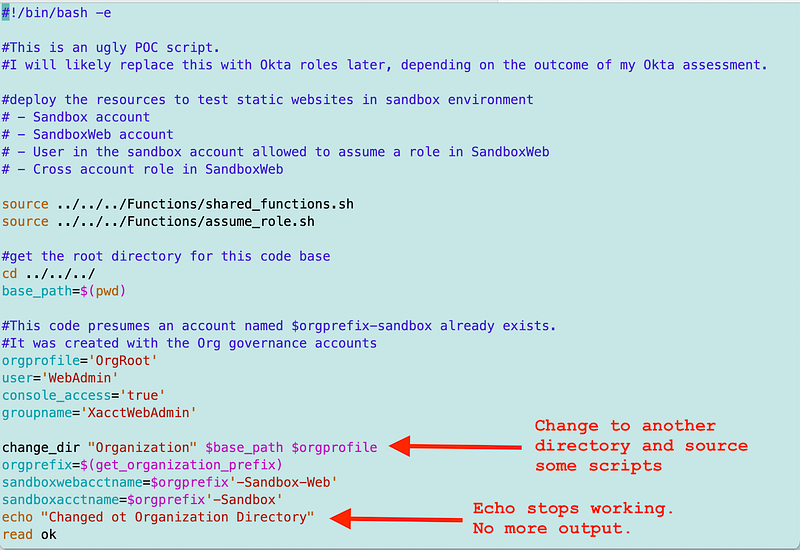
Here’s my ugly script. I was just testing so this is kind of messy.
I change to another directory and source some code so I can run the related functions. What I noticed is that after doing that, echo stops working in the outer script.
By various means of troubleshooting I have pinpointed the problem to this line of code shown below.
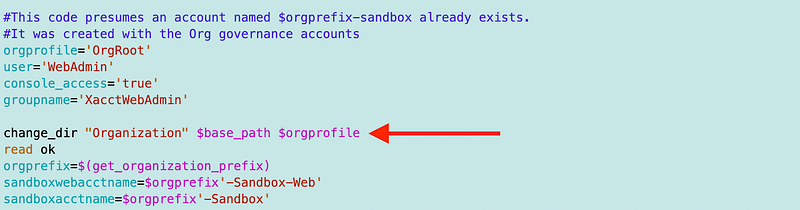
Although that line definitely causes the problem, the problem may not immediately occur after running that line of code. If I do not run that line of code, the problem never occurs. If I do run that line of code, the problem always occurs but it may not occur until a few commands later. But it always occurs if I stop at that line of code.
So now what?
Well I recently sourced another file from within that file. So I removed it. No more segmentation fault. Also, echo works again.
The reason I sourced the Org/stacks/Account/account_functions.sh file in the Org/stacks/Organization/organization_functions.sh file was due to a missing function in the former file. But I guess I can cd to the accounts directory, get what I need into a variable and then cd over to the organizations file.
Also, after removing that source include, the second script I wrote, which must work the way I just described, ran without error. So I’m wondering if it has to do with sourcing the same file from two different directories in the same script — but I’m not sure.
The unfortunate thing is, although my script ran without error, now my role assumption no longer works — a user that formerly had permission to assume a role now comes back with an error saying no permission and I haven’t changed any of that since I last worked on this. So now…onto the next problem.
Udpate: The issue seem to stem from circular dependencies via sourced files:
Follow for updates.
Teri Radichel | © 2nd Sight Lab 2023
About Teri Radichel:
~~~~~~~~~~~~~~~~~~~~
⭐️ Author: Cybersecurity Books
⭐️ Presentations: Presentations by Teri Radichel
⭐️ Recognition: SANS Award, AWS Security Hero, IANS Faculty
⭐️ Certifications: SANS ~ GSE 240
⭐️ Education: BA Business, Master of Software Engineering, Master of Infosec
⭐️ Company: Penetration Tests, Assessments, Phone Consulting ~ 2nd Sight Lab
Need Help With Cybersecurity, Cloud, or Application Security?
~~~~~~~~~~~~~~~~~~~~~~~~~~~~~~~~~~~~~~~~~~~~~~~~~~~~~~~~~~~~~
🔒 Request a penetration test or security assessment
🔒 Schedule a consulting call
🔒 Cybersecurity Speaker for PresentationFollow for more stories like this:
~~~~~~~~~~~~~~~~~~~~~~~~~~~~~~~~~~~~~~~~~~~~~~~~~~~~~~~~~~~~~
❤️ Sign Up my Medium Email List
❤️ Twitter: @teriradichel
❤️ LinkedIn: https://www.linkedin.com/in/teriradichel
❤️ Mastodon: @teriradichel@infosec.exchange
❤️ Facebook: 2nd Sight Lab
❤️ YouTube: @2ndsightlab