
Seeing the snow for the first time — Snowflake Adventures
My trip up the mountain
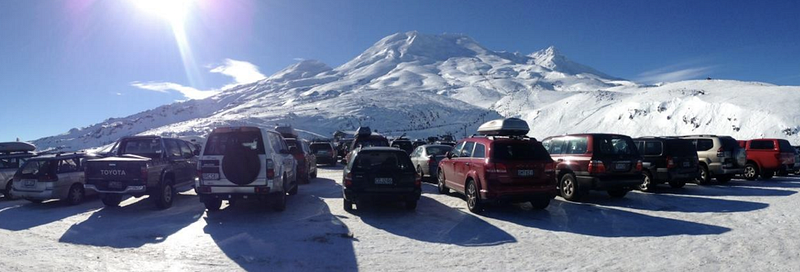
A few weeks back I drove 4.5 hours from Auckland, New Zealand, to Mount Ruapehu. It was my first time seeing the snow so I was a little excited with my snowboard. Upon picking up a bunch of snow, I realise I was holding tiny Snowflakes ❄, all microscopically beautiful and unique.
The thing is, I googled snowflake to see the different kinds and stumbled across Snowflake Data Warehouse. Publically launched in 2014, Snowflake is provided as a Warehouse-As-A-Service (WAAS?) with many awesome features. After a few weeks of curiosity and immersing myself into this new world of Elastic Data Warehouse and attending their partner training course which was sponsored by our company, Servian. I would like to take you all on an adventure with Snowflake and show you the ins and outs.
About me
As a Consultant, I have been helping businesses build scalable cloud and data solutions in the area of Data Warehousing, AI/ML, Personalisation, CICD, and Micro-services. During my spare time, I enjoy running workshops and giving talks on Cloud and productionising ML, and occasionally trying to beat my Squat record.
Introduction to Snowflake ❄
Snowflake is a highly available cloud-built data warehouse and unlike traditional data warehouse, it is a SQL Data Warehouse built for the cloud with instant elasticity and delivered as a service with per-second pricing.
Wait…what was that? You can scale up and down instantly and pay for what you use? Yes, you read right, with Snowflake, you can now run those expensive queries quicker by instantly scaling up snowflake computation and pay for what you use.
Snowflakes features include:
- SQL Database — Query from Snowflake multi-petabyte scale DWH the same way you would using the traditional DWH because it supports the common ANSI SQL (Again, this is why knowing SQL is important). This includes both structured and semi-structured data.
- (Almost) Zero management — Snowflake fully manages everything besides the messaging bus for Snowpipe (we will come back to this later) so you don’t have to worry about installing or upgrading anything, throw away that EC2. No more indexes, partitioning, vacuuming, and general admins!
- Per-second Pricing — It’s pay for what you use on a per-second base if your warehouse is running. There is a minimum of 1 minute if your warehouse is resuming, but after that it’s per-second.
- Sharing — You can easily share your data without duplicating it with those who have a Snowflake account and those who do not. This includes sharing live data, instantly.
- No performance degradation — Multiple groups of users or application can access the data at the same time and there will be no performance degradation. This also includes the ingestion of data.
Why I became interested in Snowflake?
You see, it’s actually Big Data without all those complexities. If you have many users accessing the database and there are a few users that hogs the resources while running complex queries then the unlimited concurrency and instant elasticity from Snowflake will be highly beneficial.
I have experienced situations where we were trying to run campaigns in production but because the database was getting slammed with many complex ad-hoc queries, the campaigns wouldn’t run and this cost us a lot of time and customer potentials.
Give the analysts querying power and give back their time to increase productivity and create more value for the business.
Let’s go behind the scene of Snowflake…
Snowflake Architecture
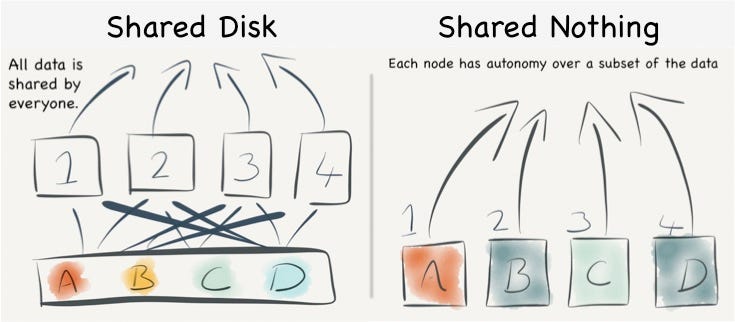
The architecture of Snowflake is a hybrid between the traditional shared-disk architecture and shared-nothing architecture. How so? According to the Snowflake Documentation, Snowflake processes queries using MPP concept such that each node has parts of the data stored locally while using a central data repository to store the data that is accessible by all compute nodes.
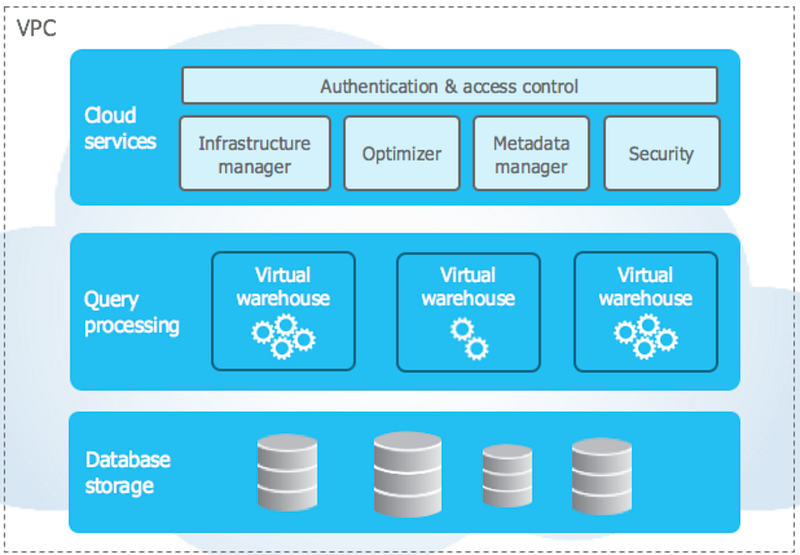
Digging into Snowflake more, it has a unique architecture which consists of 3 layers, Database Storage, Query Processing, Cloud Service.
Database Storage

Data ingested into Snowflake is intelligently compressed, reorganised into columnar format, and stored in cloud storage (AWS S3, Azure Blob Storage or GCP Cloud Storage — soon). To protect against failure, it is replicated 3+ ways.
Micro-Partition
Snowflake treats the newly created compressed columnar data as Micro-Partition called FDN (Flocon De Neige — snowflake in French). Each micro-partitions can have a max size of 16 MB compressed (50 MB–500 MB uncompressed), all stored on a logical hard-drive in Snowflake and only accessible via query but not directly. Due to the design of these micro-partitions, they are immutable and this allows for cool features such as Time Travel and Zero-Copy Cloning.
Automatically, Snowflake will create units of storage, partitioned based on the order of ingestion of micro-partitions. Remember that static partitioning of large tables to ensure performance and scaling for a traditional data warehouse, and how it often leads to variable partition size? Well, Snowflake micro-partition deals with that issue as well, sweet!
Query performance is very important in Snowflake and the way Snowflake intelligently creates these micro-partitions is quite important.
Data Clustering
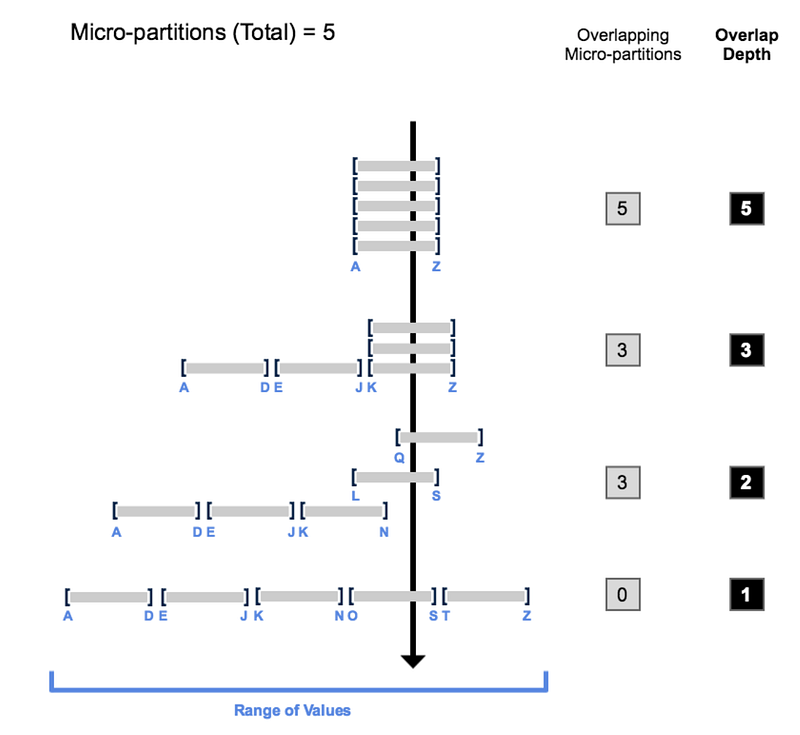
In the real world, data is usually loaded sequentially into the DWH, simply by sequential IDs or timestamp, Snowflake will use natural clustering and colocates column data with the same value or similar range. As you can see below, colocating the same values would result in non-overlapping micro-partition and least overlap depth. This results in the improvement in query performance as Snowflake avoids unnecessarily scanning of micro-partitions.
You can define your own clustering key if you want but make sure you assess the situation closely, and this should be done for very large tables - can be expensive so be cautious. Please visit the docs for more information.
Metadata
Snowflake also maintains the clustering metadata which contains information such as the number of micro-partitions used to create the table, the number of overlapping micro-partitions, and depth of overlapping micro-partitions.
It also maintains the micro-partition metadata and stores information such as table statistics (row count, size) and micro-partition statistics (MIN/MAX column values, distinct count, NULL count). You can view these without using snowflake computation.
These metadata are stored in the Cloud Service layer.
Storage
Snowflake decouples storage from computing but the storage you pay is what the cloud provider charges. Remember, you will be charged for storage for data that is active, inactive, in Time Travel and Fail-Safe state.
Let’s talk about the different types of tables within Snowflake and how it could help you manage the cost of storage. Again, there are 3 types:
Temporary — persists within a particular session, stores non-permanent data, think of it as your landing table. Can use Time Travel (0–1) but will not Fail-Safe
Transient—persists beyond the session, but the same level of data protection is not needed like a permanent table. Can use Time Travel (0–1) but will not Fail-Safe.
Permanent—Default when creating a table, has the highest level of protection and recovery, hence, has both Time Travel (0–1 Standard, 0–90 ESD) and Fail-Safe.
Zero-copy Cloning
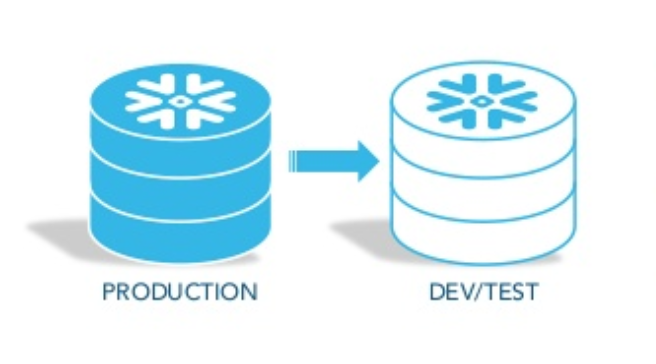
Snowflake also allows you to take a snapshot of your table, schema or database, at no charge. This process is called zero-copy cloning. This is through sharing the underlying micro-partitions. Think of how easy it is to create your DEV, UAT, and PROD environments!
Query Processing
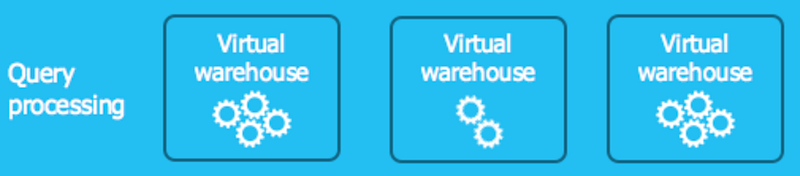
Snowflake uses the concept of Virtual Datawarhouse which is essentially an MPP compute cluster to process queries and scales on-demand. There are two types of clusters in which Snowflake provides, Standard (single compute cluster and no scaling out) and Multi-cluster (Can add additional compute clusters and scales out). When these Virtual DWH are running, that’s when it costs you credits so don’t forget to scale down your compute or scale to 0.
Scaling Up
Snowflake defines their virtual compute cluster in T-shirt sizes, X-Small, Small, Medium, etc. As you scale up and move from each size, you get double the compute of the previous. Since the smallest compute cluster X-Small has 8 vCPUs/threads, a Medium cluster would have 32 threads but would produce your query 3 times faster but at 3 times the cost of credits.
You know what they say, with great power comes great responsibilities, BE CAUTIOUS AROUND SCALING YOUR VIRTUAL DWH! It could cost you a fortune like what happened to me.
Remember, even though the amazing technology behind Snowflake could help you bring our your result faster, but if you or your users write bad SQL queries, then it’s not going to help. My take is that Snowflake should not be a technology you hand off as a typical SQL Data Warehouse alone, rather, tie it down to educating the users on writing efficient SQL.
Scaling Out
With Multi-clusters, you can scale-out using all clusters (maximized) or auto-scale, that is, additional clusters will be introduced on demand by the number of users/queries. When would you scale out? When you want concurrency such as during peak time so queries can load balance.
Caching
Similar to AWS ElastiCache, you can cache your Snowflake Results which is cached in the Database Storage layer. That means if you’re running the same queries many times, you can cache the result for up to 24 hours and no Virtual DWH resources will be needed for the computation as long as the data remains the same.
Cloud Service
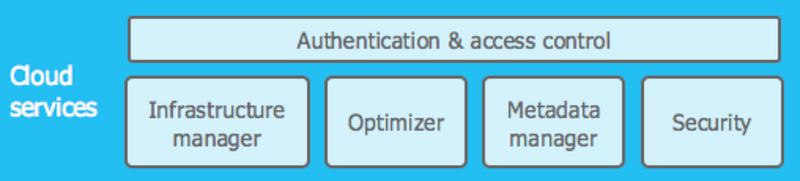
Similar to a brain, this layer is a collection of services that orchestrates and controls activities across Snowflake, such as ensuring ACID compliance. On top of that, authentication, access control, query optimisation, infrastructure, and metadata management occurs in this layer.
Although this cloud service layer is shared across all editions of Snowflake, for VPS, you get your own private cloud service layer tied to your infrastructure on the cloud to ensure your environment is isolated.
Nevertheless, each non-VPS edition Snowflake deployment within a region sits within a Virtual Private Cloud (VPC), and this is where your accounts live. This allows for Snowflake to share resources across multiple accounts for better resource utilization and performance improvements.
Encryption Everywhere
Talking to some of my non-IT friends, they all worry about putting their data on the cloud because of one of their biggest concerns is security within the cloud and “what happens when it gets hacked”.
Here is the magical thing, your data within Snowflake is automatically encrypted by default for its entire lifecycle —from loading to the storage of data at rest (end-to-end encryption)
AES 256-bit keys are used to encrypt data within Snowflake. Don’t worry about someone getting your key and decrypting your data through brute force because Snowflake uses a hierarchical key model and regularly rotate their keys.
All communications between the client-side to the server is also protected TLS but if you’re still concerned about communicating over the internet you may opt for PrivateLink and Direct Connect, both are AWS services, you can read more about it here.
Getting started
Sold so far, then let’s get started on Snowflake!
Check if snowflake is available in your region, don’t forget about Data Sovernity (if you have).
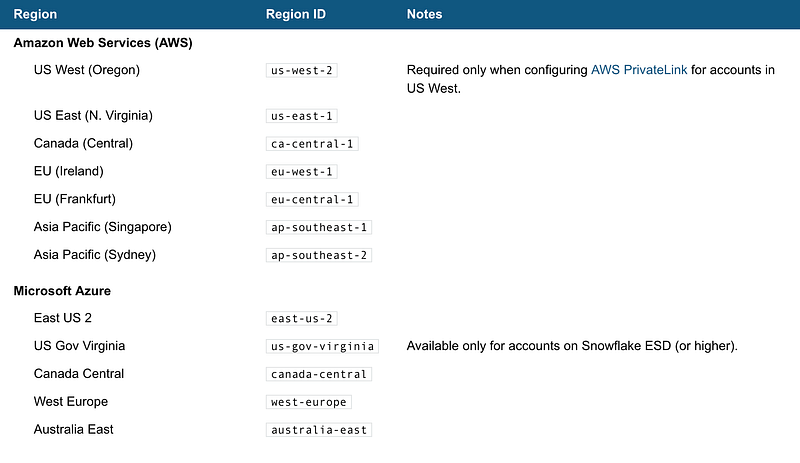
They have several editions to suit your needs, Snowflake charges on a credit basis so be cautious on the price jump between each edition. I have attached the credit cost for the query compute resource for your reference as well.
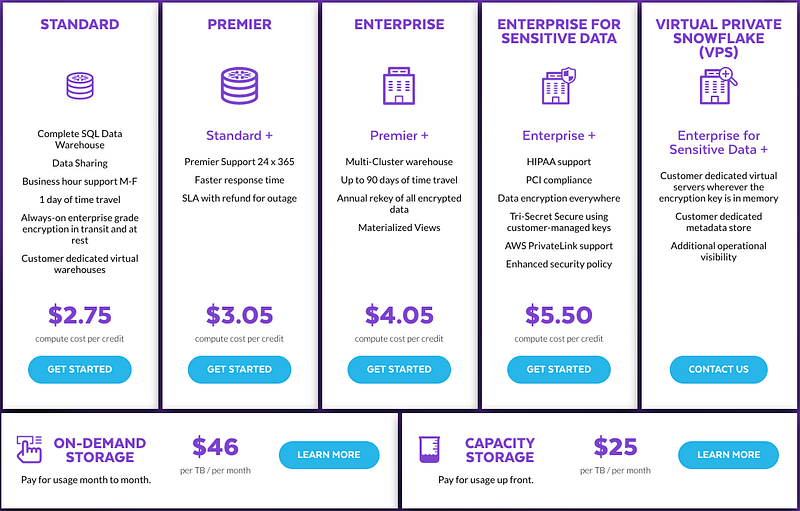

Storage cost
Storage cost is a little bit more complicated than the usage cost. It is based on the average monthly on-disk bytes you have consumed for storage daily. Since your data is compressed by Snowflake (except for the ones you chose not to be compressed in stage) to reduce storage cost.
Start off with their free trial first! You get $400 worth of credits to use for storage and computation for 30 days anyway, think about all the possible advance analytics you could do!
Accessing Snowflake
You communicate securely to Snowflake outside of its VPC through HTTPS protocols for ODBC (PUT or GET not supported), JDCB and/or Web UI.
You can also connect to snowflake includes using the Snowflake Web UI — (
Nevertheless, there are other ways of connecting to Snowflake and this includes using connectors. Check out below for the extensive list of network connectors:
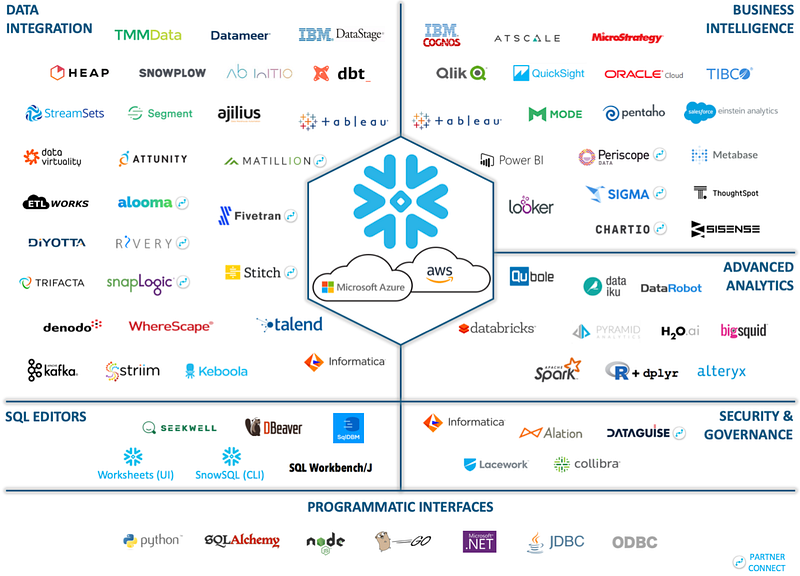
In our case, let’s do this through Snowflake Web UI and SnowSQL so that I can show you how to set up things, run queries, scale the Virtual Data Warehouse, profile queries, and many more.


