avatarVikram Shinde

Free AI web copilot to create summaries, insights and extended knowledge, download it at here

13371

Abstract

div><p id="d8fe"><b>Cloud Run</b></p><p id="5377">This POST endpoint add/update employee in Firestore. It is recommend to use the APPEND_PATH_TO_ADDRESS for host_rewriting.</p><div id="504a"><pre><span class="hljs-attribute">/employee</span><span class="hljs-punctuation">:</span> <span class="hljs-attribute">post</span><span class="hljs-punctuation">:</span> <span class="hljs-attribute">summary</span><span class="hljs-punctuation">:</span> <span class="hljs-string">Add Employee using Cloud Run Service</span> <span class="hljs-attribute">operationId</span><span class="hljs-punctuation">:</span> <span class="hljs-string">add_update_employee</span> <span class="hljs-attribute">x-google-backend</span><span class="hljs-punctuation">:</span> <span class="hljs-attribute">address</span><span class="hljs-punctuation">:</span> <span class="hljs-string">https://employee-&lt;hash&gt;-uc.a.run.app</span> <span class="hljs-attribute">path_translation</span><span class="hljs-punctuation">:</span> <span class="hljs-string">APPEND_PATH_TO_ADDRESS</span> <span class="hljs-attribute">parameters</span><span class="hljs-punctuation">:</span> <span class="hljs-bullet">-</span> <span class="hljs-string">name: employee</span> <span class="hljs-attribute">in</span><span class="hljs-punctuation">:</span> <span class="hljs-string">body</span> <span class="hljs-attribute">description</span><span class="hljs-punctuation">:</span> <span class="hljs-string">Employee to be Added</span> <span class="hljs-attribute">schema</span><span class="hljs-punctuation">:</span> <span class="hljs-attribute">ref</span><span class="hljs-punctuation">:</span> <span class="hljs-string">'#/definitions/Employee'</span></pre></div><p id="1556">The Schema definition of the employee</p><div id="022d"><pre><span class="hljs-attribute">definitions</span><span class="hljs-punctuation">:</span> <span class="hljs-attribute">Employee</span><span class="hljs-punctuation">:</span> <span class="hljs-attribute">type</span><span class="hljs-punctuation">:</span> <span class="hljs-string">object</span> <span class="hljs-attribute">required</span><span class="hljs-punctuation">:</span> <span class="hljs-bullet">-</span> <span class="hljs-string">id</span> <span class="hljs-bullet">-</span> <span class="hljs-string">firstname</span> <span class="hljs-bullet">-</span> <span class="hljs-string">lastname</span> <span class="hljs-attribute">properties</span><span class="hljs-punctuation">:</span> <span class="hljs-attribute">id</span><span class="hljs-punctuation">:</span> <span class="hljs-attribute">type</span><span class="hljs-punctuation">:</span> <span class="hljs-string">string</span> <span class="hljs-attribute">firstname</span><span class="hljs-punctuation">:</span> <span class="hljs-attribute">type</span><span class="hljs-punctuation">:</span> <span class="hljs-string">string</span> <span class="hljs-attribute">lastname</span><span class="hljs-punctuation">:</span> <span class="hljs-attribute">type</span><span class="hljs-punctuation">:</span> <span class="hljs-string">string</span></pre></div><p id="5ca9"><b>App Engine</b></p><p id="b4b7">The DELETE endpoint to delete an employee from the firestore.</p><div id="1420"><pre><span class="hljs-attribute">delete</span><span class="hljs-punctuation">:</span> <span class="hljs-attribute">summary</span><span class="hljs-punctuation">:</span> <span class="hljs-string">Delete Employee using Google App Engine service.</span> <span class="hljs-attribute">operationId</span><span class="hljs-punctuation">:</span> <span class="hljs-string">deleteEmployee</span> <span class="hljs-attribute">x-google-backend</span><span class="hljs-punctuation">:</span> <span class="hljs-attribute">address</span><span class="hljs-punctuation">:</span> <span class="hljs-string">https://&lt;PROJECT_ID&gt;.appspot.com </span> <span class="hljs-attribute">path_translation</span><span class="hljs-punctuation">:</span> <span class="hljs-string">APPEND_PATH_TO_ADDRESS</span> <span class="hljs-attribute">jwt_audience</span><span class="hljs-punctuation">:</span> <span class="hljs-string">&lt;PROJECT_NUMBER&gt;-&lt;HASH&gt;.apps.googleusercontent.com</span> <span class="hljs-attribute">protocol</span><span class="hljs-punctuation">:</span> <span class="hljs-string">h2</span> <span class="hljs-attribute">parameters</span><span class="hljs-punctuation">:</span> <span class="hljs-bullet">-</span> <span class="hljs-string">name: employee_id</span> <span class="hljs-attribute">in</span><span class="hljs-punctuation">:</span> <span class="hljs-string">path</span></pre></div><p id="7c18">In addition to x-google-backend address, IAP also check the correct audience of the JWT token. The <code>jwt_audience</code> is the <b>IAP client ID</b>. Get the Client ID from APIs &amp; Services → Credentials → OAuth 2.0 client IDs →IAP-App-Engine-app</p><p id="59ff"><b>Add Authentication (API Keys)</b></p><p id="eb2f">There are multiple ways to add security, let’s start with API Key.</p><p id="805f">Add API key security in each paths</p><div id="37a4"><pre><span class="hljs-attribute">security</span><span class="hljs-punctuation">:</span> <span class="hljs-bullet">-</span> <span class="hljs-string">api_key: []</span></pre></div><p id="7f43">And add the security definition at the end of the file</p><div id="80d6"><pre><span class="hljs-symbol">securityDefinitions:</span> <span class="hljs-symbol"> api_key:</span> <span class="hljs-symbol"> type:</span> <span class="hljs-string">"apiKey"</span> <span class="hljs-symbol"> name:</span> <span class="hljs-string">"key"</span> <span class="hljs-symbol"> in:</span> <span class="hljs-string">"query"</span></pre></div><h2 id="cc1b">Deploy the OpenAPI definition</h2><p id="52fe">Now we have created the OpenAPI definition for the route in our service we need to deploy it to Cloud Endpoints.</p><div id="1388"><pre>gcloud endpoints services deploy openapi-<span class="hljs-keyword">definition</span>.yaml </pre></div><p id="1e8d">When the deployment is successful, please note the CONFIG_ID in the response. It’ll follow the naming convention [YYYY-MM-DDrx] = [2020–01–01r0].</p><h2 id="f7ff">Build ESPv2 Docker image</h2><p id="ebfe">We have our OpenAPI definition deployed. We have our API services deployed in Cloud Run, Cloud Functions and App Engine. Now we need to build an ESPv2 Docker image that holds the OpenAPI definition. The OpenAPI definition is what allows the ESPv2 proxy to understand what to do with requests; how to authenticate them and where to send them.</p><p id="bd50">Fortunately, Google has created a script to do this for us. We only need to input the CONFIG_ID of our OpenAPI definition, the hostname of our proxy and our project id.</p><p id="a33d">Download the <a href="https://github.com/GoogleCloudPlatform/esp-v2/blob/master/docker/serverless/gcloud_build_image">script</a>, make it executable and run the follow command.</p><div id="b5d2"><pre><span class="hljs-meta prompt_"> </span><span class="language-bash"><span class="hljs-built_in">chmod</span> +x gcloud_build_image</span> <span class="hljs-meta prompt_"> </span><span class="language-bash">./gcloud_build_image -s CLOUD_RUN_HOSTNAME \ -c CONFIG_ID -p PROJECT_ID</span></pre></div><p id="3fcb"><code>CLOUD_RUN_HOSTNAME</code> is name of gateway e.g. gateway-<hash>-uc.a.run.app After a couple of minutes, the ESPv2 Docker image will complete its build and will be available in Container Registry. The name of the image will follow this naming convention.</hash></p><p id="744a"><code>gcr.io/&lt;PROJECT_ID&gt;/endpoints-runtime-serverless:ESP_VERSION-CLOUD_RUN_HOSTNAME-CONFIG_ID</code></p><h2 id="bdd2">Deploy ESPv2 Docker image</h2><p id="f0b4">Now your ESPv2 proxy has been built you need to deploy it to Cloud Run.</p><div id="2adc"><pre> gcloud run <span class="hljs-keyword">deploy</span> CLOUD_RUN_SERVICE_NAME
<span class="hljs-params">--image=</span><span class="hljs-string">"gcr.io/PROJECT_ID/endpoints-runtime-serverless:ESP_VERSION-CLOUD_RUN_HOSTNAME-CONFIG_ID"</span> \ <span class="hljs-params">--allow-unauthenticated</span> \ <span class="hljs-params">--region</span> us-central1 \ <span class="hljs-params">--platform</span> managed \ <span class="hljs-params">--project=</span>PROJECT_ID</pre></div><h2 id="e0ed">Activate API</h2><p id="6cdd">By deploying the config on Cloud Endpoint, a new API service is created. Now, you have to activate it on your project. You can do this by command line:</p><div id="ff65"><pre><span class="hljs-meta prompt_"> </span><span class="language-bash">gcloud services <span class="hljs-built_in">enable</span> gateway-&lt;<span class="hljs-built_in">hash</span>&gt;-uc.a.run.app</span></pre></div><p id="742f">The API service name is the name of your Cloud Run Endpoint gateway <code>ENDPOINTS_SERVICE_NAME</code></p><p id="4e9f">This API can be enabled and disabled the same way Google’s API’s are. You can call the private API from other GCP projects, providing your projects are part of an organisation.</p><p id="804d">Go to APIs &amp; Services &gt; Dashboard &gt; Enable APIs and Services &gt; enable your private API.</p><h2 id="d740">Creating API Key</h2><p id="e4b4">For reaching the service, <b>you have to use an API Key. For this you have to create one in Google Cloud console</b>.</p><p id="0df2">Go to <code>API &amp; Services</code> and select <code>Credentials</code>. Click on <code>Create credentials</code><i> </i>and select <code>API Key</code><i>.</i></p><p id="c911">Because of the low level of security of an API Key, <b>the best practice is to restrict the key</b>.</p><p id="c043">Edit the key (click on the pencil), under <code>API restrictions</code><i>, </i>click on <code>Restrict key</code> and, in the drop down list, only check your API Name.</p><h2 id="80e8">Cloud Endpoint Authorization</h2><p id="b2f5">We have deployed three services and an Endpoint gateway. Now we need to give authorization to Endpoint so that that it will be able to access resources in services. Gateway endpoint service is deployed using <project_number>[email protected] service account.</project_number></p><p id="00cc"><b>Cloud Run</b></p><p id="020c">As describe previously, a private Cloud Run service can be reached by authenticated user with <code>roles/run.invoker</code>. So, let’s grant this role to the Cloud Run Endpoint gateway service-account.</p><div id="83cd"><pre> gcloud run services<span class="hljs-built_in"> add-iam-policy-binding </span>employee
--member <span class="hljs-string">"serviceAccount:[email protected]"</span> \ --role <span class="hljs-string">"roles/run.invoker"</span> \ --platform managed \ --region us-central1 \ --project PROJECT_ID</pre></div><p id="bf8d"><b>Cloud Functions</b></p><p id="6156">Like for Cloud Run, and as described previously, a private Cloud Functions service can be reached by authenticated user with <code>roles/cloudfunctions.invoker</code>.</p><div id="13ed"><pre> gcloud functions<span class="hljs-built_in"> add-iam-policy-binding </span>employee \ --region us-central1 \ --member <span class="hljs-string">"serviceAccount:[email protected]"</span>
--role <span class="hljs-string">"roles/cloudfunctions.invoker"</span>
--project $PROJECT_ID</pre></div><p id="1ae9"><b>App Engine </b>App Engine is secured by IAP and we have already given access <code>IAP-secured Web App User</code> to Endpoint gateway service-account.</p><p id="9124">All the steps have been completed now let’s access the endpoints using proxy.</p><h1 id="287f">Validate Cloud Endpoints routes</h1><p id="bd71">All the steps have been completed now let’s access the endpoints using proxy.</p><p id="4202">POST the employee <code>curl POST https://gateway-&lt;hash&gt;-uc.a.run.app/employee?key=API_KEY --header 'Content-Type: application/json' --data-raw '{"id": 11223344, "firstname": "Vikram", "lastname": "Shinde"}'</code></p><p id="b9ee">GET the employee <code>curl https://gateway-&lt;hash&gt;-uc.a.run.app/employee/11223344?key=API_KEY</code></p><p id="f719">DELETE the employee <code>curl DELETE https://gateway-&lt;hash&gt;-uc.a.run.app/employee/11223344?key=API_KEY</code></p><h1 id="14da">Best practices with API Keys</h1><p id="c0c0">API keys are not secure way and it can be easily stolen as any <a href="https://en.wikipedia.org/wiki/Man-in-the-middle_attack">man-in-the-middle attack</a> or packet sniffer tool can read them as plain text.</p><p id="f61e">Hence there are some best practices for using API Keys</p><ol><li>Do not embed API keys directly in code.</li><li>Delete unneeded API keys to minimize exposure to attacks.</li><li>Regenerate your API keys periodically.</li><li>Review your code before publicly releasing it. Ensure that your code does not contain API keys.</li><li><b>Apply API key restrictions.</b> API keys are unrestricted by default.</li><li>Add application restrictions. Specify web sites, IP address or apps.</li></ol><h1 id="3ec1">Authenticate with Bearer Auth Token</h1><p id="5ae4">After successfully creating an OpenAPI

Options

definition, and building an ESPv2 proxy for API key authentication, moving to bearer authentication will be easy.</p><h2 id="338c">Resources</h2><ul><li><a href="https://cloud.google.com/endpoints/docs/openapi/service-account-authentication">Server to server bearer auth</a></li></ul><h2 id="e7d0">How bearer auth works in Cloud Endpoints</h2><p id="63d7">There are different types of bearer authentication you can use with Cloud Endpoints. You can use server-to-server or <a href="https://cloud.google.com/endpoints/docs/openapi/authenticating-users-google-id">OAuth2.0 (Google ID token) auth</a>. We’ll be using server-to-server auth. However, OAuth works very similarly to server-to-server, so do some reading if you require users to interact with your API.</p><p id="d115">The following notes are the steps the proxy will follow to authenticate the request. Use these notes when referencing the Cloud Endpoints architecture.</p><ol><li>request made to the proxy</li><li>Service Control authenticates the bearer token the bearer token is decoded and checks the following:

  • the token is not expired

  • issuer is correct

  • verifies the signature : checks the private certificate in the token against the public certificate</li><li>the proxy forwards the request to the destination</li></ol><h2 id="8f29">Configure the OpenAPI definition for Bearer Auth</h2><p id="c0c6">Let’s update our openapi-definition.yaml to include bearer auth for <code>POST</code> and <code>DELETE</code> methods</p><ol><li>Create service Account and download service account key.</li><li>Update OpenAPI definition</li></ol><div id="6602"><pre><span class="hljs-symbol">securityDefinitions:</span> <span class="hljs-symbol"> bearer:</span> <span class="hljs-symbol"> authorizationUrl:</span> <span class="hljs-string">""</span> <span class="hljs-symbol"> flow:</span> <span class="hljs-string">"implicit"</span> <span class="hljs-symbol"> type:</span> <span class="hljs-string">"oauth2"</span> x-google-issuer: <span class="hljs-string">"email_of_sa"</span> x-google-jwks_uri: <span class="hljs-string">"https://www.googleapis.com/robot/v1/metadata/x509/email_of_sa"</span> x-google-jwt-locations: - header: <span class="hljs-string">"Authorization"</span> <span class="hljs-symbol"> value_prefix:</span> <span class="hljs-string">"Bearer "</span></pre></div><p id="a1fe">Update the email_of_sa with service account email. Change security flag from <code>api-key</code> to <code>bearer</code></p><div id="565e"><pre><span class="hljs-attribute">security</span><span class="hljs-punctuation">:</span> <span class="hljs-bullet">-</span> <span class="hljs-string">bearer: []</span></pre></div><p id="c842"><b>Redeploy</b></p><p id="8efc">Since definition has been change, we need to deploy OpenAPI definition, rebuild and redeploy gateway service.</p><div id="5edc"><pre> gcloud endpoints services deploy openapi-<span class="hljs-keyword">definition</span>.yaml</pre></div><p id="0dce">It will generate new CONFIG_ID. e.g. [2020–01–01r<b>1</b>]</p><div id="6a51"><pre><span class="hljs-meta prompt_"> </span><span class="language-bash">./gcloud_build_image -s CLOUD_RUN_HOSTNAME
    -c CONFIG_ID -p ESP_PROJECT_ID</span></pre></div><p id="5b24">This will generate new version of image</p><div id="ee63"><pre>$ gcloud run <span class="hljs-keyword">deploy</span> CLOUD_RUN_SERVICE_NAME
    <span class="hljs-params">--image=</span><span class="hljs-string">"gcr.io/ESP_PROJECT_ID/endpoints-runtime-serverless:ESP_VERSION-CLOUD_RUN_HOSTNAME-CONFIG_ID"</span>
    <span class="hljs-params">--allow-unauthenticated</span>
    <span class="hljs-params">--platform</span> managed
    <span class="hljs-params">--project=ESP_PROJECT_ID</span></pre></div><p id="45e5">You can use following Python code to create a bearer token.</p> <figure id="78f4"> <div> <div>

              <iframe class="gist-iframe" src="/gist/vikramshinde12/b3091a350451a44c711cccc2d11252fa.js" allowfullscreen="" frameborder="0" height="undefined" width="undefined">
            </div>
          </div>
      </figure></iframe></div></div></figure><p id="222a">Once bearer token is generated, make a request to the proxy with the token.</p><div id="ab1f"><pre>curl <span class="hljs-params">--request</span> POST \
    

    <span class="hljs-params">--header</span> <span class="hljs-string">"Authorization: Bearer ${token}"</span>
    <span class="hljs-string">"https://gateway-{hash}-uc.a.run.app/employee"</span>
    <span class="hljs-params">--header</span> 'Content-Type: application/json'
    <span class="hljs-params">--data-raw</span> '{ <span class="hljs-string">"id"</span>: 411, <span class="hljs-string">"last"</span>: <span class="hljs-string">"vikram"</span>, <span class="hljs-string">"name"</span>: <span class="hljs-string">"Shinde"</span> }'</pre></div><h1 id="cb17">Quotas for API</h1><p id="edd5">Cloud Endpoints provides quotas which let you control the rate at which applications can call your API. Setting a quota lets you specify usage limits to protect your API from an excessive number of requests from calling applications.</p><p id="f5b8">Add following 3 sections in <code>openapi-definition.yaml</code> file.</p><ul><li>metrics: A named metric that counts requests to your API.</li><li>limit: Represents a enforced limit on the named metrc.</li><li>metricCosts: The metricCosts maps methods to metrics.</li></ul><div id="f754"><pre>x-google-management: <span class="hljs-symbol"> metrics:</span>

    • name: <span class="hljs-string">"YOUR_METRIC_NAME"</span> <span class="hljs-symbol"> displayName:</span> <span class="hljs-string">"YOUR_METRIC-DISPLAY_NAME"</span> <span class="hljs-symbol"> valueType:</span> INT64 <span class="hljs-symbol"> metricKind:</span> DELTA</pre></div><p id="ff9e"><code>metricKind</code> and <code>valueType</code> must be <code>DELTA</code> and <code>INT64</code></p><div id="48c1"><pre><span class="hljs-symbol">quota:</span> <span class="hljs-symbol"> limits:</span>
    • name: <span class="hljs-string">"YOUR_LIMIT_NAME"</span> <span class="hljs-symbol"> metric:</span> <span class="hljs-string">"YOUR_METRIC_NAME"</span> <span class="hljs-symbol"> unit:</span> <span class="hljs-string">"1/min/{project}"</span> <span class="hljs-symbol"> values:</span> <span class="hljs-symbol"> STANDARD:</span> VALUE_FOR_THE_LIMIT</pre></div><p id="2b1f">In the paths sections add x-google-quota extension under the method.</p><div id="5850"><pre><span class="hljs-attribute">x-google-quota</span><span class="hljs-punctuation">:</span> <span class="hljs-attribute">metricCosts</span><span class="hljs-punctuation">:</span> <span class="hljs-attribute">YOUR_METRIC_NAME</span><span class="hljs-punctuation">:</span> <span class="hljs-string">YOUR_METRIC_COST</span></pre></div><p id="c714">In our example, I have added quota in GET API to limit 5 requests per minute.</p><div id="9d7c"><pre><span class="hljs-attribute">paths</span><span class="hljs-punctuation">:</span> <span class="hljs-attribute">/employee/{employee_id}</span><span class="hljs-punctuation">:</span> <span class="hljs-attribute">get</span><span class="hljs-punctuation">:</span> <span class="hljs-attribute">summary</span><span class="hljs-punctuation">:</span> <span class="hljs-string">Get an Employee</span> <span class="hljs-attribute">operationId</span><span class="hljs-punctuation">:</span> <span class="hljs-string">getEmployee</span> <span class="hljs-attribute">x-google-backend</span><span class="hljs-punctuation">:</span> <span class="hljs-attribute">address</span><span class="hljs-punctuation">:</span> <span class="hljs-string">https://us-central1-&lt;PROJECT_ID&gt;.cloudfunctions.net/employee</span> <span class="hljs-attribute">protocol</span><span class="hljs-punctuation">:</span> <span class="hljs-string">h2</span> <span class="hljs-attribute">parameters</span><span class="hljs-punctuation">:</span> <span class="hljs-bullet">-</span> <span class="hljs-string">name: employee_id</span> <span class="hljs-attribute">in</span><span class="hljs-punctuation">:</span> <span class="hljs-string">path</span> <span class="hljs-attribute">responses</span><span class="hljs-punctuation">: </span> <span class="hljs-attribute">.... security</span><span class="hljs-punctuation">:</span> <span class="hljs-bullet">-</span> <span class="hljs-string">api_key: []</span> <span class="hljs-attribute">x-google-quota</span><span class="hljs-punctuation">:</span> <span class="hljs-attribute">metricCosts</span><span class="hljs-punctuation">:</span> <span class="hljs-attribute">"api_requests"</span><span class="hljs-punctuation">:</span> <span class="hljs-string">1</span> ....</pre></div><div id="ccfa"><pre><span class="hljs-attribute">x-google-management</span><span class="hljs-punctuation">:</span> <span class="hljs-attribute">metrics</span><span class="hljs-punctuation">:</span> <span class="hljs-bullet">-</span> <span class="hljs-string">name: api_requests</span> <span class="hljs-attribute">valueType</span><span class="hljs-punctuation">:</span> <span class="hljs-string">INT64</span> <span class="hljs-attribute">metricKind</span><span class="hljs-punctuation">:</span> <span class="hljs-string">DELTA</span> <span class="hljs-attribute">quota</span><span class="hljs-punctuation">:</span> <span class="hljs-attribute">limits</span><span class="hljs-punctuation">:</span> <span class="hljs-bullet">-</span> <span class="hljs-string">name: limit-on-api-requests</span> <span class="hljs-attribute">metric</span><span class="hljs-punctuation">:</span> <span class="hljs-string">"YOUR_METRIC_NAME"</span> <span class="hljs-attribute">unit</span><span class="hljs-punctuation">:</span> <span class="hljs-string">"1/min/{project}"</span> <span class="hljs-attribute">values</span><span class="hljs-punctuation">:</span> <span class="hljs-attribute">STANDARD</span><span class="hljs-punctuation">:</span> <span class="hljs-string">5</span></pre></div><p id="0f6f">After redeploying the gateway service, I called the <code>GET</code> endpoints multiple times within a minutes and I received following error.</p><div id="dfef"><pre><span class="hljs-meta prompt_"></span><span class="language-bash">curl https://gateway-6bpnwgtf6q-uc.a.run.app/employee/111?key=API_KEY</span></pre></div><div id="43c8"><pre>{<span class="hljs-string">"code"</span>:<span class="hljs-number">429</span>,<span class="hljs-string">"message"</span>:<span class="hljs-string">"RESOURCE_EXHAUSTED:Quota exceeded for quota metric '</span>api_requests' <span class="hljs-built_in">and</span> limit <span class="hljs-string">'limit-on-api-requests'</span> of service <span class="hljs-string">'gateway-6bpnwgtf6q-uc.a.run.app'</span> <span class="hljs-keyword">for</span> consumer <span class="hljs-string">'project_number:499537266481'</span>.<span class="hljs-string">"}</span></pre></div><h1 id="d630">Tracking the API activity</h1><p id="d4fc">View the activity graphs for your API on Endpoints → Service page.</p><figure id="184a"><img src="https://cdn-images-1.readmedium.com/v2/resize:fit:800/1*3FNIqei43WAgJ5nE6xHT7A.png"><figcaption></figcaption></figure><p id="855a">You can also track the activities from APIs &amp; Services → API → Metrics.</p><figure id="02e3"><img src="https://cdn-images-1.readmedium.com/v2/resize:fit:800/1*50Ib6EQ3nfH71akkkJ5b-Q.png"><figcaption></figcaption></figure><h1 id="8c9e">Conclusion</h1><p id="252c">In this tutorial, we have secured APIs on Cloud Run, Cloud Functions, App Engine with Cloud Endpoints ESPV2 using API Key and Bearer token. Also we have seen how to add quotas and rate limits and track the API activities.</p><p id="6b58">Cloud Endpoints is almost free. First 2 Millions API calls per month is free and3.00 per million thereafter.</p><p id="fe66">If you look for advance features on API management, <a href="https://cloud.google.com/apigee/">Apigee</a> is the option.</p><p id="5dbc">Please feedback how find this tutorial and connect me on <a href="https://www.linkedin.com/in/vikrampshinde/">LinkedIn</a>.</p><h1 id="7e89">Reference</h1><p id="2531"><a href="https://cloud.google.com/endpoints/docs/openapi/get-started-cloud-run#creating_a_developer_portal_for_the_api">Getting started with Endpoints for Cloud Run</a></p><p id="3fb1"><a href="https://cloud.google.com/endpoints/docs/openapi/get-started-cloud-functions">Getting started with Endpoints for Cloud Functions</a></p><p id="2c4e"><a href="https://cloud.google.com/endpoints/docs/openapi/get-started-app-engine-standard">Getting started with Endpoints for App Engine</a></p><p id="a294"><a href="https://cloud.google.com/endpoints/docs/openapi/openapi-extensions">OpenAPI extensions for Cloud Endpoints</a></p><p id="6e0f"><a href="https://readmedium.com/secure-cloud-run-cloud-functions-and-app-engine-with-api-key-73c57bededd1">Secure Cloud Run, Cloud Functions, App Engine</a> by <a href="undefined">guillaume blaquiere</a></p><p id="c9b0"><a href="https://cloud.google.com/endpoints/docs/openapi/architecture-overview">Cloud Endpoints architecture</a></p></article></body>

Secure APIs in Cloud Run, Cloud Functions and App Engine Using Cloud Endpoints ESPv2 (Beta)

Authenticate using API Keys and Bearer Token.

Photo by James Sutton on Unsplash

Introduction

Just as organisations need services management for microservices, they need API management for their APIs.

With serverless services like Cloud Run, Cloud Functions and App Engine, it is very easy and quick to create APIs. However, Security, Monitoring, Publishing APIs are some of the major challenges.

In this blog, we will see how to secure API’s in Cloud Run, Cloud Functions and App Engine Standard environment using API Keys and Bearer Token.

What is Cloud Endpoints?

Cloud Endpoints is a distributed API management system. It provides an API console, hosting, logging, monitoring and other features to help you to create, share, maintain and secure APIs.

ESPv2 Beta

There are two versions of Extensible Service Proxy (ESP). ESPv1 is an Nginx-based proxy that is modified to be highly-scalable and to work as a Google product. ESPv2 is an Envoy-based, highly scalable product that promises to have a small footprint on your infrastructure.

See architecture documentation for Cloud Endpoints.

What we’ll be doing

  • Deploy services on Cloud Run, Cloud Functions, App Engine in Python3, using Flask. These will be in private mode.
  • Deploy Endpoint ESPv2 Beta container on Cloud Run.
  • Invoke services using API Key
  • Use server-to-server (JWT) authentication.
  • Use Quota to limit API usage
  • Track API activity.

Architecture

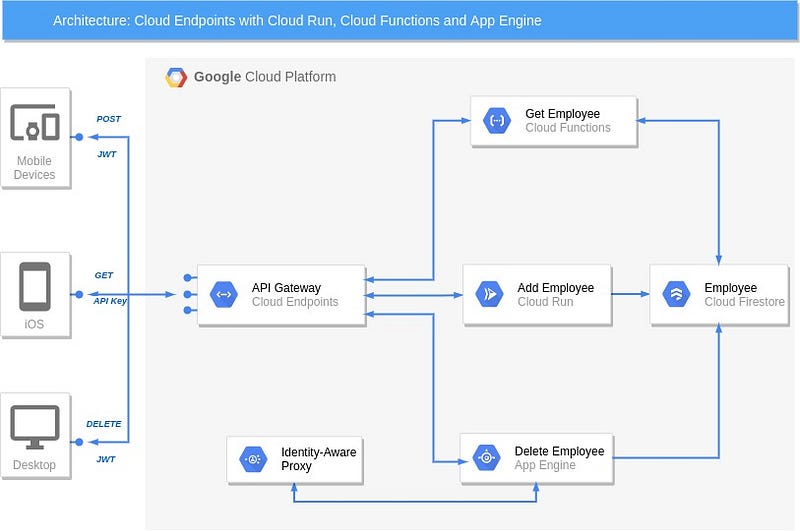
We are aiming to create an app with 3 different services using following components.

  1. Cloud Functions: GET an Employee from Firestore using API Key.
  2. Cloud Run: Add an Employee into Firestore using Bearer Token.
  3. App Engine: DELETE an Employee from Firestore using Bearer Token.
  4. Cloud Endpoints ESPV2 Beta: Proxy service to control the requests.
  5. Firestore: Store Employee data.
Architecture

All required files are stored here.

Deploy the secured services

Setup

In order to complete this guide, you’ll need to install the following tools

  • Git: Git is used to clone the example code and trigger new deployments.
  • GCP: You will need a GCP account with billing enabled.
  • Python 3.7 : Python is installed to run a script.

Create GCP Project

Create a GCP project for this tutorial.

Select Firestore mode

  • Go to Firestore
  • Select Native Mode
  • Select a Location (e.g. United States)
  • Click on “Create Database”

Enable APIs

Go to APIs & Services and Enable Following APIs

  • Cloud Build
  • Cloud Run
  • Identity-Aware Proxy
  • Service Control API

Create Service Account

Create a service account to be used in Authorization Bearer section and download key.

Clone the Repository

Open Cloud Shell, Clone the following repository containing the sample code, then switch to the cloud-run directory:

$ export PROJECT_ID = <PROJECT_ID>
$ export PROJECT_NUMBER = <PROJECT_NUMBER>
$ git clone https://github.com/vikramshinde12/endpoints-espv2.git
$ cd endpoints-espv2/cloud-run

Cloud Run

The code to add an employee in the Firestore.

The Dockerfile of the image

First build the image.

$ gcloud builds submit --tag gcr.io/$PROJECT_ID/endpoint-espv2

Then, deploy the container in private mode

$ gcloud run deploy employee --no-allow-unauthenticated \
  --image gcr.io/$PROJECT_ID/endpoint-espv2 \
  --region us-central1 --platform managed

Cloud Functions

The code to get the employee from the Firestore.

Deploy the Cloud Function in private mode.

$ cd ..
$ gcloud functions deploy employee --trigger-http \
  --runtime python37 --source cloud-function --entry-point get_emp \
  --region us-central1 --no-allow-unauthenticated

Google App Engine (Standard)

The code to Delete the employee from theFirestore

There are 2 steps involved:

  1. Deploy the App Engine service in Standard environment.
$ cd app-engine
$ gcloud app deploy

2. Configure IAP.

The App Engine is public by default, activate IAP on App Engine.

Go to App Engine →Settings → Identity-Aware Proxy → Configure Now.

Give permission “IAP-secured Web App User” to the service account [email protected]

This is important so that App Engine will be accessible by the Cloud Endpoints service that we will be deploying in next step.

Cloud Endpoints (ESPv2)

Now, we have deployed backend services in Cloud Run, Cloud Functions and App Engine in private mode, we can start to frontend them using proxy service in Cloud Endpoints ESPv2 Beta.

Following steps are involved

  1. Deploy an ESPv2 default Docker image
  2. Create an OpenAPI definition
  3. Deploy the OpenAPI definition
  4. Build an ESPv2 Docker image
  5. Deploy the ESPv2 Docker image
  6. Activate API
  7. Create an API key
  8. Authorize Cloud Endpoints

Deploy an ESPv2 default Docker image

As part of the OpenAPI definition, we need to obtain a valid hostname of the gateway service that will front all requests to our API services. We can only obtain a valid hostname for our proxy once we’ve deployed something to Cloud Run. To achieve this, we’ll deploy the default ESPv2 Docker image.

$ gcloud run deploy gateway \
 --image="gcr.io/endpoints-release/endpoints-runtime-serverless:2" \
 --allow-unauthenticated \
 --region us-central1 \
 --platform managed

I gave CLOUD_RUN_SERVICE_NAME as gateway

If you notice from the gcloud command, we won’t be blocking any traffic by default. The proxy service itself will do that for us.

Once the proxy service has deployed, take note of the hostname, we’ll use this in the OpenAPI definition.

Create an OpenAPI definition

Now, we have to declare to Cloud Endpoint service where and how to reach the backend services.

You must have an OpenAPI document based on OpenAPI specification. Let’s create one for our Employee API.

Create a YAML file called openapi-defination.yaml. let’s start with header

Header

swagger: '2.0'
info:
  title: Employee API
  description: Employee API on Cloud Endpoints with a Cloud Run, Cloud Function and App Engine with IAP backend
  version: 1.0.0
host: gateway-<hash>-uc.a.run.app
schemes:
  - https

The host is the hostname of the proxy or gateway when we deployed ESPv2 default Docker image.

The title is the name of the API in the API & Services section.

Paths

Add following paths in the openapi-defination.yaml file.

x-google-backend address: This is the full URL of the python services deployed earlier. (change <PROJECT_ID> with your project ID)

Cloud Functions

GET employee endpoint: This is endpoint receives employee_id in path parameter.

/employee/{employee_id}:
  get:
    summary: Get an Employee
    operationId: getEmployee
    x-google-backend:
      address: https://us-central1-<PROJECT_ID>.cloudfunctions.net/employee
      protocol: h2
    parameters:
      - name: employee_id
        in: path

Cloud Run

This POST endpoint add/update employee in Firestore. It is recommend to use the APPEND_PATH_TO_ADDRESS for host_rewriting.

/employee:
  post:
    summary: Add Employee using Cloud Run Service
    operationId: add_update_employee
    x-google-backend:
      address: https://employee-<hash>-uc.a.run.app
      path_translation: APPEND_PATH_TO_ADDRESS
    parameters:
      - name: employee
        in: body
        description: Employee to be Added
        schema:
          $ref: '#/definitions/Employee'

The Schema definition of the employee

definitions:
  Employee:
    type: object
    required:
     - id
     - firstname
     - lastname
    properties:
      id:
        type: string
      firstname:
        type: string
      lastname:
        type: string

App Engine

The DELETE endpoint to delete an employee from the firestore.

delete:
  summary: Delete Employee using Google App Engine service.
  operationId: deleteEmployee
  x-google-backend:
    address: https://<PROJECT_ID>.appspot.com  
    path_translation: APPEND_PATH_TO_ADDRESS
    jwt_audience: <PROJECT_NUMBER>-<HASH>.apps.googleusercontent.com
    protocol: h2
  parameters:
    - name: employee_id
      in: path

In addition to x-google-backend address, IAP also check the correct audience of the JWT token. The jwt_audience is the IAP client ID. Get the Client ID from APIs & Services → Credentials → OAuth 2.0 client IDs →IAP-App-Engine-app

Add Authentication (API Keys)

There are multiple ways to add security, let’s start with API Key.

Add API key security in each paths

security:
  - api_key: []

And add the security definition at the end of the file

securityDefinitions:
  api_key:
    type: "apiKey"
    name: "key"
    in: "query"

Deploy the OpenAPI definition

Now we have created the OpenAPI definition for the route in our service we need to deploy it to Cloud Endpoints.

gcloud endpoints services deploy openapi-definition.yaml 

When the deployment is successful, please note the CONFIG_ID in the response. It’ll follow the naming convention [YYYY-MM-DDrx] = [2020–01–01r0].

Build ESPv2 Docker image

We have our OpenAPI definition deployed. We have our API services deployed in Cloud Run, Cloud Functions and App Engine. Now we need to build an ESPv2 Docker image that holds the OpenAPI definition. The OpenAPI definition is what allows the ESPv2 proxy to understand what to do with requests; how to authenticate them and where to send them.

Fortunately, Google has created a script to do this for us. We only need to input the CONFIG_ID of our OpenAPI definition, the hostname of our proxy and our project id.

Download the script, make it executable and run the follow command.

$ chmod +x gcloud_build_image
$ ./gcloud_build_image -s CLOUD_RUN_HOSTNAME \
    -c CONFIG_ID -p PROJECT_ID

CLOUD_RUN_HOSTNAME is name of gateway e.g. gateway--uc.a.run.app After a couple of minutes, the ESPv2 Docker image will complete its build and will be available in Container Registry. The name of the image will follow this naming convention.

gcr.io/<PROJECT_ID>/endpoints-runtime-serverless:ESP_VERSION-CLOUD_RUN_HOSTNAME-CONFIG_ID

Deploy ESPv2 Docker image

Now your ESPv2 proxy has been built you need to deploy it to Cloud Run.

$ gcloud run deploy CLOUD_RUN_SERVICE_NAME \
  --image="gcr.io/$PROJECT_ID/endpoints-runtime-serverless:ESP_VERSION-CLOUD_RUN_HOSTNAME-CONFIG_ID" \
  --allow-unauthenticated \
  --region us-central1 \
  --platform managed \
  --project=$PROJECT_ID

Activate API

By deploying the config on Cloud Endpoint, a new API service is created. Now, you have to activate it on your project. You can do this by command line:

$ gcloud services enable gateway-<hash>-uc.a.run.app

The API service name is the name of your Cloud Run Endpoint gateway ENDPOINTS_SERVICE_NAME

This API can be enabled and disabled the same way Google’s API’s are. You can call the private API from other GCP projects, providing your projects are part of an organisation.

Go to APIs & Services > Dashboard > Enable APIs and Services > enable your private API.

Creating API Key

For reaching the service, you have to use an API Key. For this you have to create one in Google Cloud console.

Go to API & Services and select Credentials. Click on Create credentials and select API Key.

Because of the low level of security of an API Key, the best practice is to restrict the key.

Edit the key (click on the pencil), under API restrictions, click on Restrict key and, in the drop down list, only check your API Name.

Cloud Endpoint Authorization

We have deployed three services and an Endpoint gateway. Now we need to give authorization to Endpoint so that that it will be able to access resources in services. Gateway endpoint service is deployed using [email protected] service account.

Cloud Run

As describe previously, a private Cloud Run service can be reached by authenticated user with roles/run.invoker. So, let’s grant this role to the Cloud Run Endpoint gateway service-account.

$ gcloud run services add-iam-policy-binding employee \
  --member "serviceAccount:[email protected]" \
  --role "roles/run.invoker" \
  --platform managed \
  --region us-central1 \
  --project $PROJECT_ID

Cloud Functions

Like for Cloud Run, and as described previously, a private Cloud Functions service can be reached by authenticated user with roles/cloudfunctions.invoker.

$   gcloud functions add-iam-policy-binding employee \
   --region us-central1 \
   --member "serviceAccount:[email protected]" \
   --role "roles/cloudfunctions.invoker" \
   --project $PROJECT_ID

App Engine App Engine is secured by IAP and we have already given access IAP-secured Web App User to Endpoint gateway service-account.

All the steps have been completed now let’s access the endpoints using proxy.

Validate Cloud Endpoints routes

All the steps have been completed now let’s access the endpoints using proxy.

POST the employee curl POST https://gateway-<hash>-uc.a.run.app/employee?key=API_KEY --header 'Content-Type: application/json' --data-raw '{"id": 11223344, "firstname": "Vikram", "lastname": "Shinde"}'

GET the employee curl https://gateway-<hash>-uc.a.run.app/employee/11223344?key=API_KEY

DELETE the employee curl DELETE https://gateway-<hash>-uc.a.run.app/employee/11223344?key=API_KEY

Best practices with API Keys

API keys are not secure way and it can be easily stolen as any man-in-the-middle attack or packet sniffer tool can read them as plain text.

Hence there are some best practices for using API Keys

  1. Do not embed API keys directly in code.
  2. Delete unneeded API keys to minimize exposure to attacks.
  3. Regenerate your API keys periodically.
  4. Review your code before publicly releasing it. Ensure that your code does not contain API keys.
  5. Apply API key restrictions. API keys are unrestricted by default.
  6. Add application restrictions. Specify web sites, IP address or apps.

Authenticate with Bearer Auth Token

After successfully creating an OpenAPI definition, and building an ESPv2 proxy for API key authentication, moving to bearer authentication will be easy.

Resources

How bearer auth works in Cloud Endpoints

There are different types of bearer authentication you can use with Cloud Endpoints. You can use server-to-server or OAuth2.0 (Google ID token) auth. We’ll be using server-to-server auth. However, OAuth works very similarly to server-to-server, so do some reading if you require users to interact with your API.

The following notes are the steps the proxy will follow to authenticate the request. Use these notes when referencing the Cloud Endpoints architecture.

  1. request made to the proxy
  2. Service Control authenticates the bearer token the bearer token is decoded and checks the following: - the token is not expired - issuer is correct - verifies the signature : checks the private certificate in the token against the public certificate
  3. the proxy forwards the request to the destination

Configure the OpenAPI definition for Bearer Auth

Let’s update our openapi-definition.yaml to include bearer auth for POST and DELETE methods

  1. Create service Account and download service account key.
  2. Update OpenAPI definition
securityDefinitions:
  bearer:
    authorizationUrl: ""
    flow: "implicit"
    type: "oauth2"
    x-google-issuer: "email_of_sa"
    x-google-jwks_uri: "https://www.googleapis.com/robot/v1/metadata/x509/email_of_sa"
    x-google-jwt-locations:
      - header: "Authorization"
        value_prefix: "Bearer "

Update the email_of_sa with service account email. Change security flag from api-key to bearer

security:
  - bearer: []

Redeploy

Since definition has been change, we need to deploy OpenAPI definition, rebuild and redeploy gateway service.

$ gcloud endpoints services deploy openapi-definition.yaml

It will generate new CONFIG_ID. e.g. [2020–01–01r1]

$ ./gcloud_build_image -s CLOUD_RUN_HOSTNAME \
    -c CONFIG_ID -p ESP_PROJECT_ID

This will generate new version of image

$ gcloud run deploy CLOUD_RUN_SERVICE_NAME \
  --image="gcr.io/ESP_PROJECT_ID/endpoints-runtime-serverless:ESP_VERSION-CLOUD_RUN_HOSTNAME-CONFIG_ID" \
  --allow-unauthenticated \
  --platform managed \
  --project=ESP_PROJECT_ID

You can use following Python code to create a bearer token.

Once bearer token is generated, make a request to the proxy with the token.

curl --request POST \
  --header "Authorization: Bearer ${token}" \
  "https://gateway-{hash}-uc.a.run.app/employee" \
  --header 'Content-Type: application/json' \
  --data-raw '{
     "id": 411,
     "last": "vikram",
     "name": "Shinde"
  }'

Quotas for API

Cloud Endpoints provides quotas which let you control the rate at which applications can call your API. Setting a quota lets you specify usage limits to protect your API from an excessive number of requests from calling applications.

Add following 3 sections in openapi-definition.yaml file.

  • metrics: A named metric that counts requests to your API.
  • limit: Represents a enforced limit on the named metrc.
  • metricCosts: The metricCosts maps methods to metrics.
x-google-management:
  metrics:
    - name: "YOUR_METRIC_NAME"
      displayName: "YOUR_METRIC-DISPLAY_NAME"
      valueType: INT64
      metricKind: DELTA

metricKind and valueType must be DELTA and INT64

quota:
  limits:
    - name: "YOUR_LIMIT_NAME"
      metric: "YOUR_METRIC_NAME"
      unit: "1/min/{project}"
      values:
        STANDARD: VALUE_FOR_THE_LIMIT

In the paths sections add x-google-quota extension under the method.

x-google-quota:
  metricCosts:
    YOUR_METRIC_NAME: YOUR_METRIC_COST

In our example, I have added quota in GET API to limit 5 requests per minute.

paths:
 /employee/{employee_id}:
   get:
    summary: Get an Employee
    operationId: getEmployee
    x-google-backend:
      address: https://us-central1-<PROJECT_ID>.cloudfunctions.net/employee
      protocol: h2
    parameters:
      - name: employee_id
        in: path
    responses: 
        ....
    security:
    - api_key: []
    x-google-quota:
      metricCosts:
         "api_requests": 1
        ....
x-google-management:
  metrics:
    - name: api_requests
      valueType: INT64
      metricKind: DELTA
  quota:
    limits:
      - name: limit-on-api-requests
        metric: "YOUR_METRIC_NAME"
        unit: "1/min/{project}"
        values:
          STANDARD: 5

After redeploying the gateway service, I called the GET endpoints multiple times within a minutes and I received following error.

$ curl  https://gateway-6bpnwgtf6q-uc.a.run.app/employee/111?key=API_KEY
{"code":429,"message":"RESOURCE_EXHAUSTED:Quota exceeded for quota metric 'api_requests' and limit 'limit-on-api-requests' of service 'gateway-6bpnwgtf6q-uc.a.run.app' for consumer 'project_number:499537266481'."}

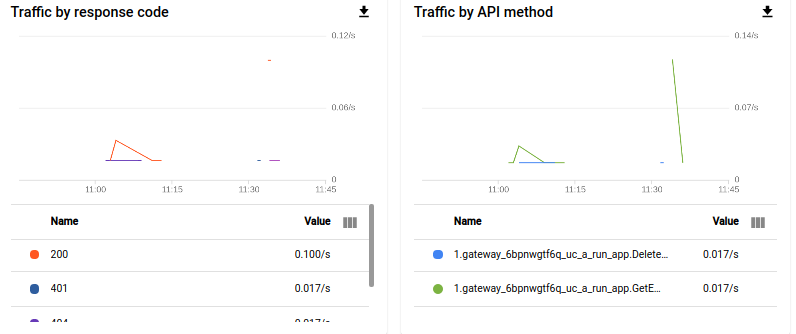
Tracking the API activity

View the activity graphs for your API on Endpoints → Service page.

You can also track the activities from APIs & Services → API → Metrics.
Conclusion

In this tutorial, we have secured APIs on Cloud Run, Cloud Functions, App Engine with Cloud Endpoints ESPV2 using API Key and Bearer token. Also we have seen how to add quotas and rate limits and track the API activities.

Cloud Endpoints is almost free. First 2 Millions API calls per month is free and $3.00 per million thereafter.

If you look for advance features on API management, Apigee is the option.

Please feedback how find this tutorial and connect me on LinkedIn.

Reference

Getting started with Endpoints for Cloud Run

Getting started with Endpoints for Cloud Functions

Getting started with Endpoints for App Engine

OpenAPI extensions for Cloud Endpoints

Secure Cloud Run, Cloud Functions, App Engine by guillaume blaquiere

Cloud Endpoints architecture

Google Cloud Platform
Security
Cloud Computing
Serverless
Python
Recommended from ReadMedium