
SEC 10-K Filings Analysis for Life Science Companies Leveraging Snowflake Marketplace, LlamaIndex, and Streamlit
From Diverse Data to Valuable Insights: Querying Structured and Unstructured Data for Life Science Companies

Building on top of our last story Exploring Snowflake and Streamlit With LlamaIndex Text-to-SQL, let’s dive a little deeper in this story. We will experiment structured data query with some real data from Snowflake Marketplace. We will also explore complex compare-and-contrast queries on unstructured data using LlamaIndex SubQuestionQueryEngine.
Snowflake Marketplace
Snowflake Marketplace is an important part of the Data Cloud. It provides data scientists, business intelligence and analytics professionals, and others who depend on data-driven decision-making live access to ready-to-query data from an ecosystem of business partners and customers, as well as potentially thousands of data and data service providers. With Snowflake Marketplace, you can source data faster and more easily, reduce analytics costs, and monetize data.
Cybersyn is a DaaS (data-as-a-service) company, whose mission is to make the world’s economic data transparent to governments, businesses, and entrepreneurs and enable a new generation of decision makers. Cybersyn is one of the data providers on Snowflake Marketplace. For our analysis in this story, we are going to use Cybersyn’s SEC (The US Securities and Exchange Commission) 10-K (annual) filings data.
High Level Requirements
We’d like to accomplish the following requirements in this article:
- We will query the Cybersyn SEC 10-K filings data for life science companies to find out the top two revenue companies for the year of 2022.
- Perform structured data query using LlamaIndex
NLSQLTableQueryEngine, which handles text-to-SQL to query in Snowflake with natural language. - Based on the query result of those top two revenue companies, we download their SEC 10-K filings for 2022 in PDF format from their websites. We will use these PDF reports as data sources for unstructured data queries.
- Perform unstructured data queries to compare and contrast revenue related aspects of these two companies using LlamaIndex
SubQuestionQueryEngine. - Since these SEC 10-K filings PDF reports for a particular year contain hundreds of pages and they don’t change overtime, we’d like to embed and create indexes for them once only, so queries can be performed as many times as we desire throughout the lifecycle of our app without having to re-embed and re-index those reports, for both performance and cost saving.
High Level Architecture
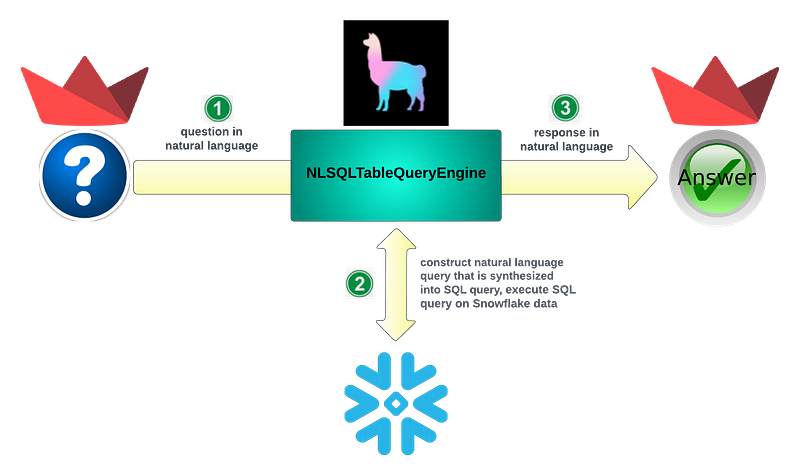
Let’s visualize the architecture of our app.
Structured Data Query
We will rely on LlamaIndex NLSQLTableQueryEngine to construct natural language query that is synthesized into SQL query for execution on Snowflake data. Streamlit is used to implement the UI for both question and answer, which contains response data in table format, as well as in area chart format.
Unstructured Data Query
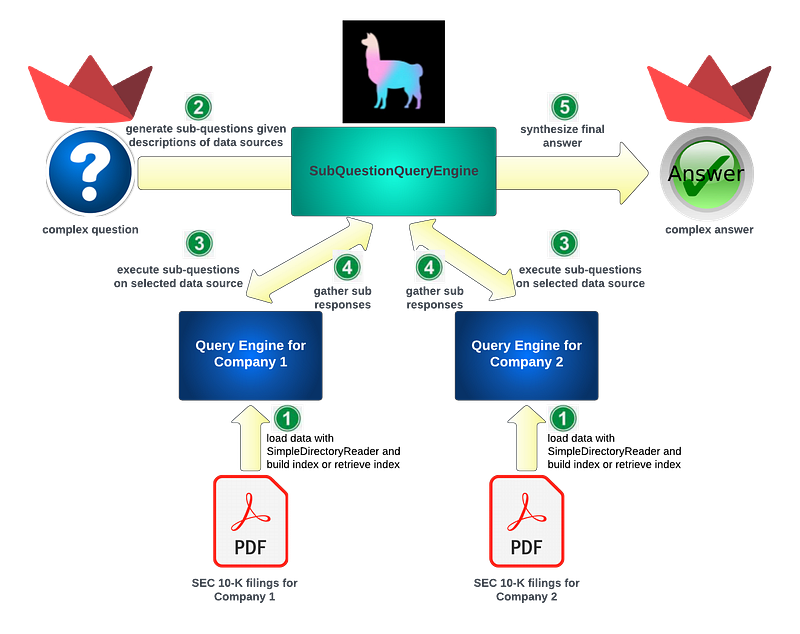
LlamaIndex SubQuestionQueryEngine will be carrying the heavy lifting of our unstructured data query, with PDF reports for SEC 10-K filings for both companies as the data source. Streamlit is again used for our UI implementation of both question and answer.
Now let’s dive into the details.
Structured Data Analysis
Let’s start with our structured data analysis by following the steps below.
Step 1: Get Cybersyn SEC filings data from Snowflake Marketplace
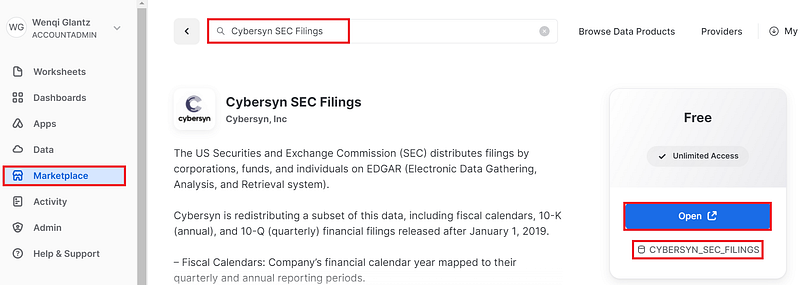
Navigate to “Marketplace” on your left navigation menu once you log into Snowflake, get a free 30-day trial account if you don’t have access to Snowflake already. Search for “Cybersyn SEC Filings” in the top search area. You should see a “Get” blue button to get the detailed data. In my case, since I already installed the data before, I see “Open” button instead.
After a few seconds, you should now see a new database named CYBERSYN_SEC_FILINGS showing up under your databases in your “Data” section:
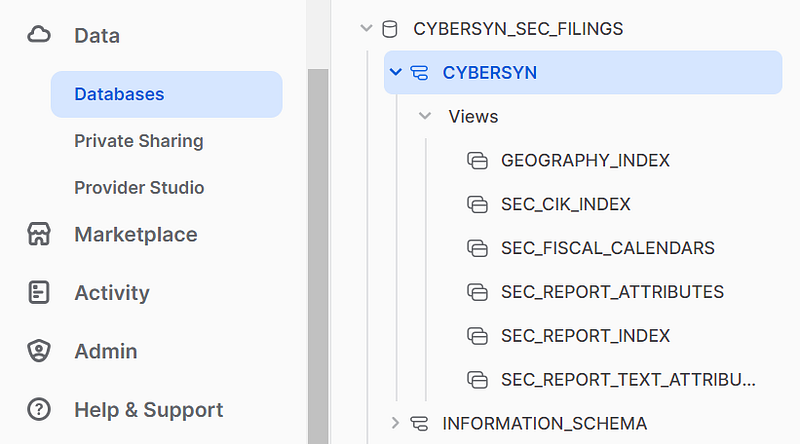
Six database views have been created as a result of installing this free Cybersyn SEC filings data.
The installation also comes with some sample queries which help us understand its data structure. Two main database views to mention:
SEC_CIK_INDEX: Company-level metadata, such as the Company Name, the Central Index Key (CIK), the employee identification number (EIN), Standard Industrial Classification Code (SIC), and geographic information.SEC_REPORT_ATTRIBUTES: Includes detailed report-level data and all metrics in each filing. Metrics include revenue, net income, and much more.
Step 2: Implementation of Text-to-SQL
Now that our data is ready, let’s work on the implementation of structured data query with text-to-SQL. We have covered the detailed implementation in our last article Exploring Snowflake and Streamlit With LlamaIndex Text-to-SQL, we are not going to repeat the implementation details here, but here is the code snippet of the function for structured data query with LlamaIndex NLSQLTableQueryEngine. The only difference between this implementation and our previous one is that we are querying multiple database views instead of the single table we explored in our last article.
def structured_data_querying(structured_question):

    # for connect to Snowflake
    snowflake_uri = "snowflake://<username>:<password>@<org-account>/<database_name>/<schema_name>?warehouse=<warehouse_name>&role=<role_name>"

    #define node parser and LLM
    chunk_size = 1024
    llm_predictor = LLMPredictor(llm=ChatOpenAI(temperature=0, model_name="gpt-3.5-turbo"))
    service_context = ServiceContext.from_defaults(chunk_size=chunk_size, llm_predictor=llm_predictor)

    engine = create_engine(snowflake_uri)

    sql_database = SQLDatabase(engine)

    query_engine = NLSQLTableQueryEngine(
        sql_database=sql_database,
        tables=["sec_cik_index", "sec_report_attributes"],
        service_context=service_context
    )

    response = query_engine.query(structured_question)
    sql_query = response.metadata["sql_query"]
    print(">>> sql_query: " + sql_query)

    con = engine.connect()
    df = pd.read_sql(sql_query, con)
    st.write(df)
    st.area_chart(df, x="company_name", y="revenue")
    return df
As discussed above, the two database views sec_cik_index and sec_report_attributes hold the data we want to query to get the top 2 revenue companies in life science. So we are passing these two database views to instruct NLSQLTableQueryEngine where to look for the data: tables=[“sec_cik_index”, “sec_report_attributes”].
Step 3: UI implementation with Streamlit
To avoid confusion of both structured data query section and unstructured data query section on the same page, let’s arrange our UI to have two different sections: structured data query and unstructured data query, identified by a navigation menu on the sidebar. Implementing each type of query on its own separate page is much simpler than having sequential text areas for both queries on the same page. Code implementation is quite straightforward, thanks to Streamlit’s built-in functions, see code snippet below:
st.title("SEC 10-K Filings Analysis for Life Science Companies")

# Create a sidebar for navigation
st.sidebar.title("Navigation")
selected_query = st.sidebar.radio("Select a Query:", ("Structured Data Query", "Unstructured Data Query"))

# Page for structured data query
if selected_query == "Structured Data Query":
    st.subheader("Structured Data Query")
    structured_query = st.text_area("Enter your question for structured Cybersyn SEC 10-K filings here", key="structured")
    if st.button("Ask"):
        if structured_query:
            structured_data_querying(structured_query)

# Page for unstructured data query
elif selected_query == "Unstructured Data Query":
    st.subheader("Unstructured Data Query")
    unstructured_query = st.text_area("Enter your question for unstructured SEC 10-K filings for Pfizer and Merck here", key="unstructured")
    if st.button("Ask"):
        if unstructured_query:
            unstructured_data_querying(unstructured_query)
Step 4: Perform structured data query
Let’s launch our app secfilings.py by running:
streamlit run secfilings.pyOnce Streamlit launches, let’s enter our structured data query.
Compare revenue numbers from 2022 for the top 2 life science companies, order by revenue value converted to number from highest to lowest. Please use ‘company_name’ column from sec_cik_index, use sec_cik_index’s SIC_CODE_CATEGORY of ‘Office of Life Sciences’ to identify life science companies, use sec_report_attributes’s tag “Revenues”, statement ‘Income Statement’, metadata IS NULL, value is not null, period_start_date ‘2022–01–01’ and period_end_date ‘2022–12–31’.
Yikes, that’s a long question! We will discuss how to optimize this query in Step 5 below.
Hit “Ask” button to trigger the query. A few seconds later, our query result gets displayed, see sample screenshot below.
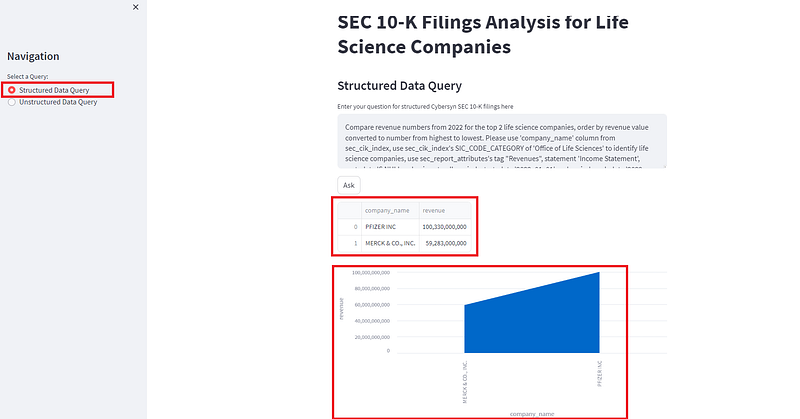
The query result table tells us that:
- Pfizer ranked number 1 with a revenue of 100.33 billion in 2022.
- Merck ranked second place with its revenue of 59.283 billion in 2022.
The area chart looks really simple, with these top two revenue companies and their corresponding revenue numbers reflected on the chart.
Also to point out is the left navigation menu, see screenshot above. There are two radio buttons, one selecting structured data query, the other unstructured data query.
Step 5: Query optimization with text_to_sql_prompt
You must have noticed our question above appears to be so convoluted. You say, you might as well write the SQL statement instead of this lengthy query in natural language. True, it has specific domain logic which needs to be given in the context for the query engine in order for it to produce the desired response. There got to be a better way to hide all those domain logic from the end users so they can truly ask the questions in simple natural language.
Let’s turn to text_to_sql_prompt.
When constructing NLSQLTableQueryEngine, text_to_sql_prompt is one of its input parameters to allow customization of the text-to-SQL prompt for the query. By default, if this parameter is not passed in, it uses LlamaIndex default DEFAULT_TEXT_TO_SQL_PROMPT, which calls DEFAULT_TEXT_TO_SQL_TMPL. In our case, we can extract much of that domain specific logic and add it to the default text-to-SQL template, which then gets passed into constructing NLSQLTableQueryEngine. See code snippet below, notice the custom query logic for our scenario we added on lines 24–28. They are not perfect, and can be refined more generically. Line 41 is where the TEXT_TO_SQL_PROMPT gets passed into the query engine:
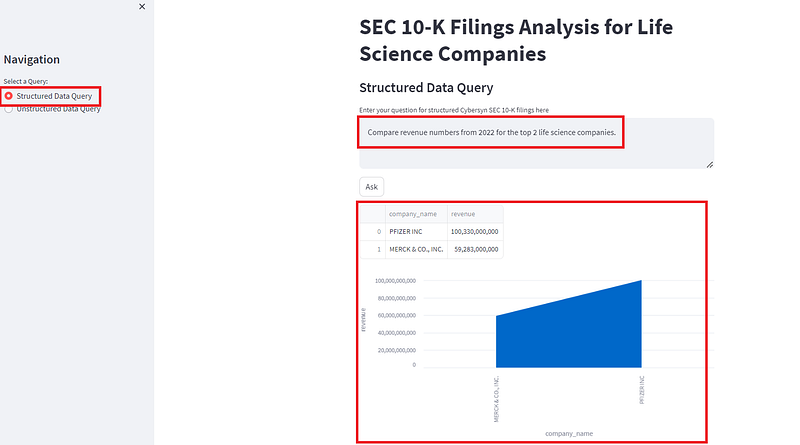
Now our query can be simplified to merely one line:
Compare revenue numbers from 2022 for the top 2 life science companies.
After executing this new simple query, we got the exact same result as the initial query response above. See screenshot below. Beautiful!
Let’s now move onto the unstructured data query section.
Unstructured Data Analysis
Let’s follow the steps below to perform unstructured data analysis.
Step 1: Download data sources for unstructured data query
The SEC 10-K filings reports for Pfizer and Merck can be downloaded from their websites respectively:
- Pfizer SEC Filing Details (159 pages)
- Merck Financial Information (374 pages)
Once downloaded, those two reports can be placed in a directory named “reports” in our project structure.
Let’s take a look at the revenue numbers in both documents for both companies for 2022: Pfizer:

Merck:
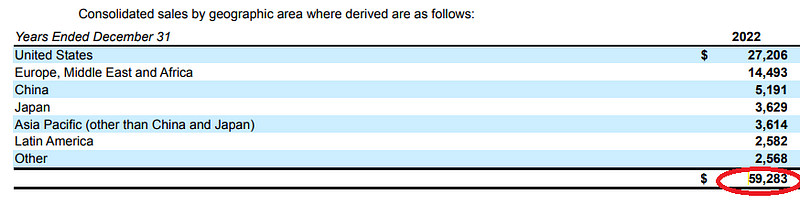
Great! Those two revenue numbers for 2022 match the query results from our structured data query in the section above. This is a confirmation that our structured data query did return honest results.
Step 2: Detailed implementation
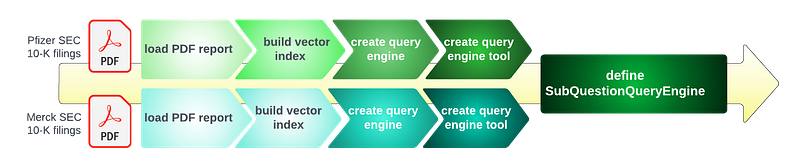
Since we are going to compare and contrast some aspects related to revenue between Pfizer and Merck, we are going to choose LlamaIndex SubQuestionQueryEngine to perform the unstructured data queries.
To construct LlamaIndex SubQuestionQueryEngine, we need to follow a series of steps, as depicted in the diagram below:
Diving into the code, we come up with the following code implementation:
#load data
pfizer_report = SimpleDirectoryReader(input_files=["reports/pfizer_sec_filings_10k_2022.pdf"], filename_as_id=True).load_data()
print(f"loaded pfizer sec filings 10k with {len(pfizer_report)} pages")

merck_report = SimpleDirectoryReader(input_files=["reports/merck_sec_filings_10k_2022.pdf"], filename_as_id=True).load_data()
print(f"loaded merck sec filings 10k with {len(merck_report)} pages")

#build indexes
pfizer_index = VectorStoreIndex.from_documents(pfizer_report, service_context=service_context)
print(f"built index for pfizer report with {len(pfizer_index.docstore.docs)} nodes")

merck_index = VectorStoreIndex.from_documents(merck_report, service_context=service_context)
print(f"built index for merck report with {len(merck_index.docstore.docs)} nodes")

#build query engines
pfizer_report_engine = pfizer_index.as_query_engine(similarity_top_k=3)
merck_report_engine = merck_index.as_query_engine(similarity_top_k=3)

#build query engine tools
query_engine_tools = [
    QueryEngineTool(
        query_engine = pfizer_report_engine,
        metadata = ToolMetadata(name='pfizer_report_2022', description='Provides information on Pfizer SEC 10K filings for 2022')
    ),
    QueryEngineTool(
        query_engine = merck_report_engine,
        metadata = ToolMetadata(name='merck_report_2022', description='Provides information on Merck SEC 10K filings for 2022')
    )
]

#define SubQuestionQueryEngine
sub_question_engine = SubQuestionQueryEngine.from_defaults(query_engine_tools=query_engine_tools, service_context=service_context)

# query unstructured question
response = sub_question_engine.query(unstructured_question)
st.write(str(response))
Step 3: Implementation optimization
As mentioned in our high-level requirements, since these SEC 10-K filings PDF reports contain hundreds of pages and they don’t change overtime, we’d like to embed and create indexes for them once only, so queries can be performed as many times as we desire throughout the lifecycle of our app without having to re-embed and re-index those reports, for both performance and cost saving. Let’s optimize our original implementation to serve this requirement.
This optimization to load indexes from StorageContext is very much similar to what’s described in details in one of my previous articles Experimenting LlamaIndex RouterQueryEngine with Document Management. A few key points to mention:
- Two indexes are created, one for Pfizer,
pfizer_index, the other Merck,merck_index. For complex query scenarios such as compare-and-contrast, we should not mix indexes for both companies in one index. - index_ids for both Pfizer and Merck are persisted in a local file named
variables.txt, which is to allow our app to load the index_ids upon application restart. - Use
try/exceptblock to load indexes fromStorageContext, if not found, load docs and build indexes for the first time, once indexes are built, subsequent queries will retrieve indexes fromStorageContext, no need to rebuild indexes each time.
See our enhanced code implementation below:
# file path for storing the variables for pfizer_index_id and merck_index_id
variables_file = "variables.txt"

def load_variables():
    global pfizer_index_id, merck_index_id

    # check if the variables file exists
    if os.path.isfile(variables_file):
        with open(variables_file, "r") as file:
            # read the values from the file
            values = file.read().split(",")
            pfizer_index_id = values[0]
            merck_index_id = values[1]

def save_variables():
    global pfizer_index_id, merck_index_id

    # write the values to the file
    with open(variables_file, "w") as file:
        file.write(f"{pfizer_index_id},{merck_index_id}")

def unstructured_data_querying(unstructured_question):

    # declare the variables as global
    global pfizer_index_id, merck_index_id

    chunk_size = 1024
    llm_predictor = LLMPredictor(llm=ChatOpenAI(temperature=0, model_name="gpt-3.5-turbo"))
    service_context = ServiceContext.from_defaults(chunk_size=chunk_size, llm_predictor=llm_predictor)

    try:
        # retrieve existing storage context and load pfizer_index and merck_index
        pfizer_storage_context = StorageContext.from_defaults(persist_dir="./storage_pfizer")
        pfizer_index = load_index_from_storage(storage_context=pfizer_storage_context, index_id=pfizer_index_id)

        merck_storage_context = StorageContext.from_defaults(persist_dir="./storage_merck")
        merck_index = load_index_from_storage(storage_context=merck_storage_context, index_id=merck_index_id)
        logging.info("pfizer_index and merck_index loaded")

    except FileNotFoundError:
        # If index not found, create a new one
        logging.info("indexes not found. Creating new ones...")

        #load data
        pfizer_report = SimpleDirectoryReader(input_files=["reports/pfizer_sec_filings_10k_2022.pdf"], filename_as_id=True).load_data()
        print(f"loaded pfizer sec filings 10k with {len(pfizer_report)} pages")

        merck_report = SimpleDirectoryReader(input_files=["reports/merck_sec_filings_10k_2022.pdf"], filename_as_id=True).load_data()
        print(f"loaded merck sec filings 10k with {len(merck_report)} pages")

        #build indices
        pfizer_index = VectorStoreIndex.from_documents(pfizer_report, service_context=service_context)
        print(f"built index for pfizer report with {len(pfizer_index.docstore.docs)} nodes")

        merck_index = VectorStoreIndex.from_documents(merck_report, service_context=service_context)
        print(f"built index for merck report with {len(merck_index.docstore.docs)} nodes")

        # persist both indexes to disk
        pfizer_index.storage_context.persist(persist_dir="./storage_pfizer")
        merck_index.storage_context.persist(persist_dir="./storage_merck")

        # update the global variables of pfizer_index_id and merck_index_id
        pfizer_index_id = pfizer_index.index_id
        merck_index_id = merck_index.index_id

        # save the variables to the file
        save_variables()

    #build query engines
    pfizer_report_engine = pfizer_index.as_query_engine(similarity_top_k=3)
    merck_report_engine = merck_index.as_query_engine(similarity_top_k=3)

    #build query engine tools
    query_engine_tools = [
        QueryEngineTool(
            query_engine = pfizer_report_engine,
            metadata = ToolMetadata(name='pfizer_report_2022', description='Provides information on Pfizer SEC 10K filings for 2022')
        ),
        QueryEngineTool(
            query_engine = merck_report_engine,
            metadata = ToolMetadata(name='merck_report_2022', description='Provides information on Merck SEC 10K filings for 2022')
        )
    ]

    #define SubQuestionQueryEngine
    sub_question_engine = SubQuestionQueryEngine.from_defaults(query_engine_tools=query_engine_tools, service_context=service_context)

    # query unstructured question
    response = sub_question_engine.query(unstructured_question)
    st.write(str(response))
Step 4: Perform unstructured data query
Now let’s test out our unstructured data query.
The cost of sales for Pfizer and Merck both increased in year 2022, primarily due to what reason? Please compare and contrast both in a bullet points.
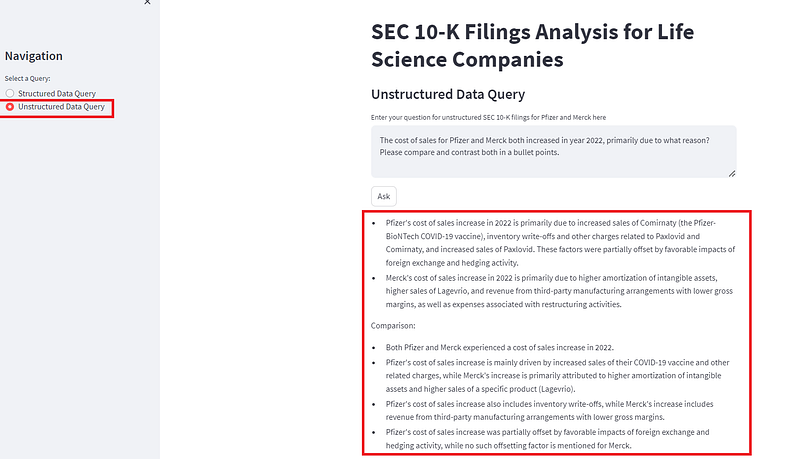
Let’s try another question on COVID-19's impact on both companies’ revenues:
Compare and contrast how COVID-19 impacted the revenues for Pfizer and Merck in year 2022.
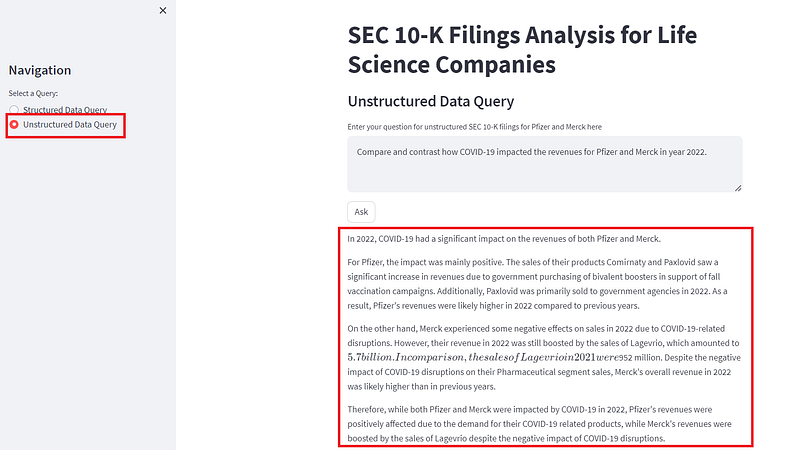
That’s it for unstructured data query. Feel free to ask away whatever other unstructured data questions regarding those two companies that come to your mind.
A Few Key Observations
Reflecting on the above implementation for both structured and unstructured data queries, we have a few key observations.
Observation #1: incorporate critical data considerations to make your LLM app production-ready
LlamaIndex’s co-founder/CEO Jerry Liu recently talked about the importance of some critical data considerations that you must take into account to make your LLM application production-ready. We implemented the two different indexes for Pfizer and Merck, which is a recommended approach. However, there are many more aspects listed in Jerry’s presentation which we need to explore. Let’s be aware of the distance between a POC and a production grade application, and keep striving to make our applications production-ready.
Observation #2: natural language for structured data query may not be as simple as SQL statement, look to text_to_sql_prompt for help
Depending on your data model, especially when joining multiple tables/views, it may not be straightforward for LLM to figure out the relationship of those tables/views, and in addition, some domain specific data can not be easily understood by LLM, in such cases, constructing the query in natural language may appear to be trickier than simply writing the SQL statement. Our initial structured data query for life science companies is a good example. That question even though phrased in natural language, was accomplished by reverse engineering based on its SQL statement. It was more painstaking to write the query in natural language than SQL.
To solve this pain point, we can use text_to_sql_prompt to unload specific domain logic used in the query into the text_to_sql_prompt template, which gets passed into the query engine construction to instruct the query engine to read the custom prompt specific to the domain logic. This greatly simplifies the natural language queries and make the text-to-SQL a pleasant experience for the end users.
Observation #3: Be sure to load existing index and avoid creating new index for the same documents
If your index has already been created, make sure you load the existing index instead of creating new index from scratch for the same documents. Embedding and creating new index for the same documents over and over again not only impacts your app’s performance, but also it can become costly if you use OpenAI’s model for embedding.
Observation #4: font issue in the response of unstructured data query
I noticed different fonts got displayed in the response of our unstructured data query, see screenshot above. For some reason, one of those lines got displayed in a different font. I have no idea why. If you know the reason, do leave me a comment.
Summary
In continuation of our last article on integrating LlamaIndex into Snowflake and Streamlit app, we dived a little deeper in this article by using real data from Snowflake Marketplace, specifically Cybersyn SEC 10-K filings data for life science companies. We walked through the implementation of structured data analysis, using LlamaIndex NLSQLTableQueryEngine to perform text-to-SQL.
We then proceeded to perform unstructured data analysis based on the top two revenue companies of 2022, Pfizer and Merck. We downloaded their SEC 10-K filings for 2022 in PDF format, and used LlamaIndex SubQuestionQueryEngine to query those PDF reports.
I hope you find this article helpful.
For the complete source code of my demo app, please refer to my GitHub repo.
Happy coding!


