

Scrapy: This is how to successfully login with ease
Demystifying the process of logging in with Scrapy.
Once you understand the basics of Scrapy one of the first complication is having to deal with logins. To do this its useful to get an understanding of how logging in works and how you can observe that process in your browser. We will go through this and how scrapy deals with the login process in this article.
In this article you will learn
- How to use the FormRequest class for a simple login procedure
- How to use the
fromresponsemethod for more complex login procedures - How to do basic XPATH selectors
- Understand the difference between session and token browser authenication
- What CSRF is and why it’s important to know
- How to deal with token authenication in Scrapy
Simple Login procedure
When you input data into website form fields this data gets packaged up. The browser will do a POST request with this into the headers. There can be many POST and redirect requests when logging in.
To do the simplest of login procedures in Scrapy we can use Scrapy’s FormRequest class. Actually it’s better using one of FormRequests methods to do the form data but more on that later on!
With that lets see how this works first and then build on that. To use it in our scrapy spider we have to import it first.
from scrapy.http import FormRequestNow instead of using start_url at the start of our spiders we use a start_requests() method. This allows us to use methods related to form filling.
Lets look underneath the hood of the scrapy.spider code to see how this works. Remember this is where we always refer to when starting a spider.
When we call the start_requests() method from that class this is what is under the hood.
def start_requests(self):
    for url in self.start_urls:
         yield self.make_requests_from_url(url)
def make_requests_from_url(self, url):
return Request(url, dont_filter=True)Here we are looping over every url in start_urls. For each of those urls we use the scrapy.requests() method and pass a url and a keyword called dont_filter. Now dont_filter=True means that duplicate requests are not filtered.
By using the FormRequest subclass we extend the scrapy.http.Request class. FormRequest gives us functionality to prepopulate form fields from the response. We extendscrapy.http.Request and get access to all it’s keyword arguments.
Lets see what this looks like.
from scrapy.http import FormRequests
import scrapy
def start_requests(self):
return [
FormRequest("INSERT URL", formdata={"user":"user",
"pass":"pass"}, callback=self.parse)]def parse(self,response):
passNotes
1. The defaultparse()function handles the responses and rules of the script to grab the data you wish.
2. With the function start_request we use the FormRequest class. We supply it an url and the keyword argument formdata with our username and password.
3. Scrapy handles the cookies for us without us needing to be specific in the start_request.
4. We use the callback keyword argument to direct the spider to the parse function.
Hidden Data
Some sites will request you pass on form data that at first glance doesn’t seem to be important. To login though it becomes necessary to authenticate the website via cookies. Sometimes pages have a hidden field that needs to passed through. The only way to get that value is through logging in.
To get around this we need to do two requests, a request to pass through some data and capture the hidden field data. A second request to login.
This time we will use a start_request function but pass through a first request. We will handle the callback to pass the information onto the second function.
For the second request we will be making use of the FormRequest.from_response() method. This method simulates a click through with the data populated in the fields we specify. Infact from_response() returns a new FormRequest object. The default for this object is to simulate a click that has a clickable item of the type <input_type=submit> .
There are different ways we can specify in the from_response() method. Referring to scrapy documentation is advisable! For example if you did not want scrapy to click through you can use the keyword dont_click=True . All arguments from from_response() method get passed to the FormRequest.
def start_requests():
    return [
       Request("URL", callback = self.parse_item)
     ]
def parse_item(self,response):
return FormRequest.from_response(response, formdata=
{'user':'user', 'pass':'pass'})Here we get the required headers from start_requests() then pass that onto parse_item()
Using FormRequest.from_response() we pass on the formdata with the appropriate headers.

Browser Authentication the Basics
HTTP is a stateless protocol. This means that from request to response there is no record of the state of the message. If you login as a request, this gets forgotten on another request. Annoying or what!
One of the first solutions was to create a session. When we do a POST request a session gets created in the server database. A cookie which is a dictionary which gets attached to the response with the session ID. The cookie gets returned to the browser.
When we try another request with this cookie, the server looks it up and checks the session ID. Gets a profile data match and sends a response back tot the browser.
Cookie authentication is stateful. An authentication record gets stored on both on client and server sider.
Now we have single page applications, with decoupling of the frontend and backend much more complicated! The session cookie we get from one server will not work when contact with another server. This is where token based authenication comes into it.

Token based authentication
Tokens are another method of browser authentication. Now the standard token that gets used these days are Json web tokens (JWT).
The advantages of a token based authenication is that it is stateless. The server keeps no record of which users gets logged in. Every request has a token which the server uses to check authenciticity. The token is usually sent in the authorisation header Bearer (JWT) but could also be in the body of a POST request.
A JWT consists of three parts, the header, payload and the signature
###HEADER###
{
  "alg": "HS256",
  "typ": "JWT"
}
###PAYLOAD###
{
  "sub": "1234567890",
  "name": "John Doe",
  "iat": 1516239022
}
###SIGNATURE###
{
  HMACSHA256(base64UrlEncode(header) + "." +           base64UrlEncode(payload),
secret)
Now JWTs get signed using an encoding algorithm. For example HMACSHA256 and will look like this.
eyJhbGciOiJIUzI1NiIsInR5cCI6IkpXVCJ9.eyJzdWIiOiIxMjM0NTY3ODkwIiwibmFtZSI6IkFkbyBLdWtpYyIsImFkbWluIjp0cnVlLCJpYXQiOjE0This could get decoded using a website like here and it’s important to know that data is not encrypted.
The user enters in login details and token gets attached. The server then verifies login is correct and then the token sent gets signed. This token gets stored on the client end, but could actually get stored as a session or in a cookie. Remember a cookie is a dictionary of keys and values.
Requests to the server includes this token to authenticate. The server decodes this token and if the token is valid the request gets sent back. When a user logs off, the token gets destroyed on the client side. No interaction with the server. This provides us with some security.

What is CSRF about ?
You will here this term when talking about token based authentication. So it’s useful to understand them. This gets to the heart of why token based authentication has become popular.
CSRF stands for cross site request forgery and is a web security vulnerability. It allows attackers to make users perform actions they did not intend to. For example by changing the email address of an account.
For a CSRF attack to occur there needs to be three things. First a relevant action that is something within the application that has a reason to change. A cookie-based session handling to authenticate and also no unpredictable request parameters.
With these in place, the attacker can create a web page with a form that changes the email address. The user inputs data and the form uses the users session cookie in the request to the original website. But using the new email address instead.
To handle this attack we can use tokens to check users rather than session based cookies.

Using Scrapy to handle token based authentication
To find out if its necessary to use a token we have to use the chrome/firefox developer tools. For this we will be scraping quotes.toscrape.com. We simulate the login process and see what headers get sent. To do this we scroll to the network tab before login and then simulate a login procedure. All requests will appear down below.
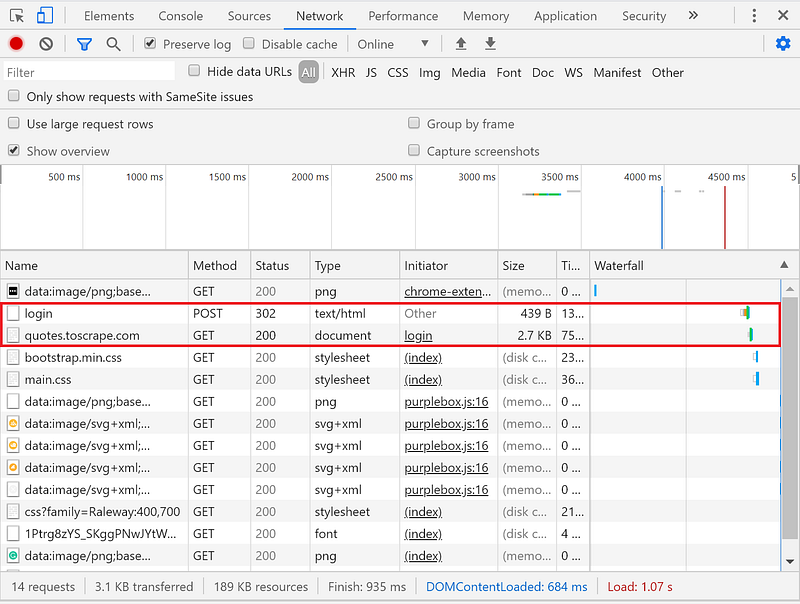
Selecting the login name on the left hand side allows us to see the request headers down below.
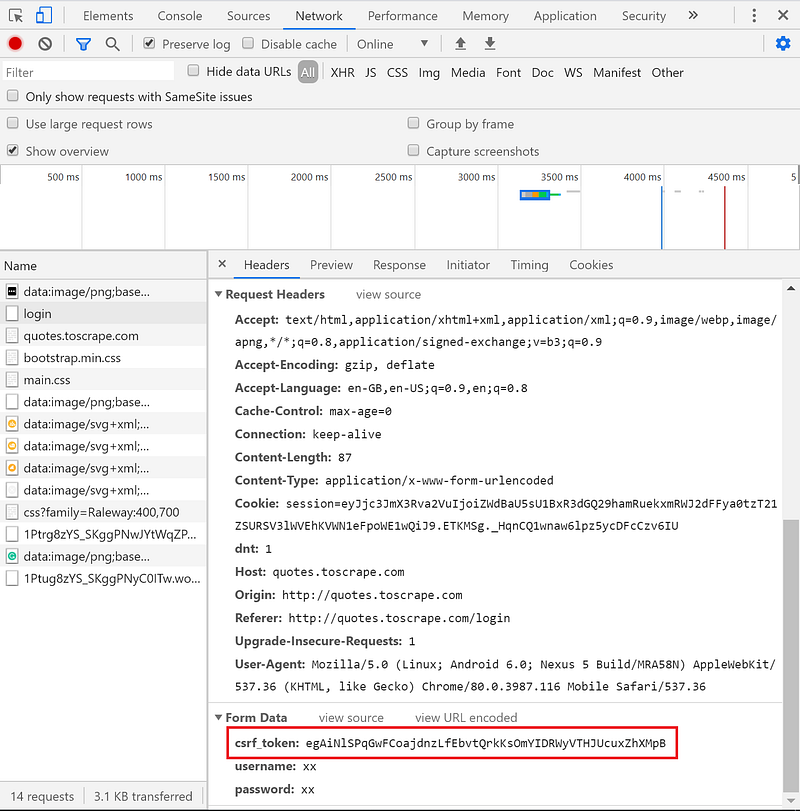
As you can see in the Form Data the csrf_token is present.
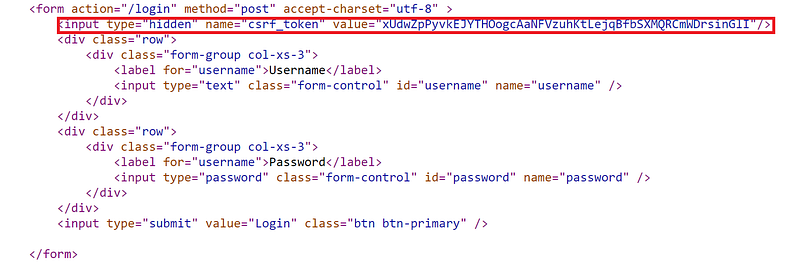
Remember this token gets destroyed when we logout. It’s necessary for us to grab this before sending it as a POST request. To do this we have to look at the HTML. The html tags for the form seen below.
We can see here in the form fields <input=’Hidden’ name=’csrf_token’> value=”xxx”>
XPATH Basics
Now to do any scrapping it’s useful to go to the shell to see if the xpath selectors will work in your spider. So here we fetch the url and test out the xpath we need.
fetch("url")
response.xpath('//*[@name='csrf_token']/@value').extract_first()
Output
u'xUdwZpPyvkEJYTHOogcAaNFVzuhKtLejqBfbSXMQRCmWDrsinGlI'Lets break down the xpath selector.
First xpath hands html documents as a tree and seperates the document out into nodes. The root node is parent to the document element <html> . Element nodes represent html tags. Attribute nodes represent any attribute from an element node. Text nodes represent any text in the element nodes.
First // is a descendant-or-self which means it selects current node or any below it. //* means to select all nodes without comments or text nodes.
We use [@ to specify the attribute csrf_token and /@ after this to specify it’s value. extract_first() will grab the first value it finds.
So we have our xpath selector to get the csrf_token, we can then use this to pass onto the FormRequest
Now that we have that understanding we can look at the code for using it.
import scrapy
from scrapy.http import FormRequests
class LoginSpider(Scrapy.spider):
name = 'login'
allowed_domains = ['quotes.toscrape.com']
start_urls = ['http://quotes.toscrape.com/login']def parse(self,response):
csrf_token = response.xpath('//*[@name='csrf_token']
/@value').extract_first()') yield FormRequests.from_response(response, formdata={'csrf_token': csrf_token, 'user':'user', 'pass','pass'}, callback=self.parse_after_login)def parse_after_login(self,response):
passNotes 1. We import scrapy and the FormRequests as before
2. We populate the variables name, allowed_domains and start_urls.
3. We assign csrf_token to the xpath selector value for the token in the login page.
4. Using the FormRequests subclass we specify the response, and input the formdata we want. In this case we specify the csrf_token and the username and password.
5. A callback gets used to direct the spider towards the function after login is successful.
Phew! Quite abit to get through. Hope that makes the login procedure with Scrapy more managable. Till next time!
About the author
I am a medical doctor who has a keen interest in teaching, python, technology and healthcare. I am based in the UK, I teach online clinical education as well as running the websites www.coding-medics.com.
You can contact me on [email protected] or on twitter here, all comments and recommendations welcome! If you want to chat about any projects or to collaborate that would be great.
For more tech/coding related content please sign up to my newsletter here.


