avatarChakri

Free AI web copilot to create summaries, insights and extended knowledge, download it at here

2218

Abstract

the ones without the results at the same time. Which means with a simple <i>wget</i> and <i>grep</i> I got the table row HTML with the needed data for each of the BIB numbers. After this, rather than adding the output to separate files, I decided to append the result rows to a single text file. The code snippet became:</p><div id="0238"><pre><span class="hljs-attribute">for</span> i in {<span class="hljs-number">10000</span>..<span class="hljs-number">11500</span>} <span class="hljs-attribute">do</span> <span class="hljs-attribute">wget</span> -O - http://resultsite.com/<span class="hljs-number">2019</span>nebwdr/?bibNo=<span class="hljs-string">"i"</span>\&amp;submit=SUBMIT | grep “<span class="hljs-number">10</span> KM” &gt;&gt; out.txt <span class="hljs-attribute">done</span></pre></div><p id="214b">And yes, I got lucky with the unique “10 KM” string for the <i>grep</i>, otherwise it would’ve been a bit complex parsing.</p><p id="4da3">Voila, now I have a text file with just the results in each row. Now, all I need to do is to parse the HTML and get the required data as a CSV file, which I could accomplish with awk in a jiffy. The CSV file can be simply accessed with Microsoft excel or google spreadsheets. For sharability I uploaded them to a google spreadsheet and shared with all my friends who participated in the run. Below is the final script and the link to the results spreadsheet.</p><div id="beb6"><pre><span class="hljs-meta">#!/bin/sh</span> <span class="hljs-keyword">for</span> i <span class="hljs-keyword">in</span> {10000..11500} <span class="hljs-keyword">do</span> wget -O — http://resultsite.com/2019nebwdr/?bibNo=<span class="hljs-string">"<span class="hljs-variable">i</span>"</span>&amp;submit=SUBMIT | grep “10 KM” | awk -F’</td><td>’ -v OFS=”,” ‘{<span class="hljs-built_in">print</span> <span class="hljs-variable">1</span>, <span class="hljs-variable">2</span>, <span class="hljs-variable">3</span>, <span class="hljs-variable">4</span>, <span class="hljs-variable">5</span>, <span class="hljs-variable">6</span>, <span class="hljs-variable">7</span>, <span class="hljs-variable">8</span>, <span class="hljs-variable">$9</span>, <span class="

Options

hljs-variable">10</span>, <span class="hljs-variable">11</span>, <span class="hljs-variable">12</span>, <span class="hljs-variable">13</span>}’ | sed -E ‘s/<tbody><<span class="hljs-built_in">tr</span>><td>|</td></tr></tbody></table>//g’ >> race_results_10k.csv <span class="hljs-keyword">done</span></pre></div><p id="bf94"><a href="http://chakrapani.me/womensday-run/results_excel.html">http://chakrapani.me/womensday-run/results_excel.html</a></p><p id="340a">While writing this post, It hit me that there was no need to parse the output file if I need to access the results as a table in a browser. Because, each row is a proper table row, all I need to do is add the table headers to the file and name it as a HTML file, voila!</p><p id="027b">Here is the simple 4 line script that did the job. It can be further optimized, but for me I just needed to get the data I needed quickly and it did the job.</p><div id="e3a0"><pre><span class="hljs-meta">#!/bin/sh</span> <span class="hljs-keyword">for</span> i <span class="hljs-keyword">in</span> {10000..11500} <span class="hljs-keyword">do</span> wget -O — http://resultsite.com/2019nebwdr/?bibNo=<span class="hljs-string">"<span class="hljs-variable">$i</span>"</span>&amp;submit=SUBMIT | grep “10 KM” | sed -E ‘s/<tbody>|</tb
ody>|</table>//g’ >> output.html <span class="hljs-keyword">done</span></pre></div><p id="dba1">I used <i>sed </i>to remove the unwanted <i>tbody</i> and <i>table</i> tags from the data. After I got the HTML file with the results from the above script, I just added the basic HTML & table tags at the top and bottom of the file to make it proper HTML file. Here’s the link to the final results.</p><p id="f315"><a href="http://chakrapani.me/womensday-run/10k-results.html">http://chakrapani.me/womensday-run/10k-results.html</a></p><figure id="a058"><img src="https://cdn-images-1.readmedium.com/v2/resize:fit:800/1*s5ojLAzaVGI5x1t5vj17Ow.png"><figcaption>Preview of the results table.</figcaption></figure><p id="fe6c">I’d love to hear your thoughts and how we can accomplish the same task in a more efficient manner. Cheers!!</p></article></body>

Scraping the results of a 10K Run for fun!

Women’s Day Run — 10th March 2019, Bangalore.

Recently I had participated in a 10k run on the occasion of Women’s Day. After the run when I got my race time with rank, I was intrigued to see how others performed and most importantly how are the chip times of the people who are ahead of me. I decided to put my rusty scripting skills to use. Then I started meddling with the results website and found that it was a simple GET request with BIB number.

wget -O - http://resultsite.com/2019nebwdr/?bibNo=11019\&submit=SUBMIT

The next step was to identify the range of BIB Numbers. After a few brute-force trials I figured out that the BIB numbers for 10K started from 10000 and there were around 620 people who participated in the race and some more who registered but didn’t turn for the run. So, I wrote a small bash script to get all the results of BIB numbers from 10000 to 11500. The initial script to get each of the result with a for loop looked like the below snippet.

for i in {10000..11500}
do
  wget -O -  http://resultsite.com/2019nebwdr/?bibNo="$i"\&submit=SUBMIT 
done

There were quite some bib numbers which didn’t have any results due to non-participation. So, I had to filter out those which didn’t have any results.

My initial approach(thought process) was to download all result pages into a folder with file names as bib-number.html and then parse each of them to get the data that is useful. But after careful observation of the resulting HTML, a simple grep was sufficient to get the data that I wanted in each of the result page and ignore the ones without the results at the same time. Which means with a simple wget and grep I got the table row HTML with the needed data for each of the BIB numbers. After this, rather than adding the output to separate files, I decided to append the result rows to a single text file. The code snippet became:

for i in {10000..11500}
do
  wget -O -  http://resultsite.com/2019nebwdr/?bibNo="$i"\&submit=SUBMIT | grep “10 KM” >> out.txt
done

And yes, I got lucky with the unique “10 KM” string for the grep, otherwise it would’ve been a bit complex parsing.

Voila, now I have a text file with just the results in each row. Now, all I need to do is to parse the HTML and get the required data as a CSV file, which I could accomplish with awk in a jiffy. The CSV file can be simply accessed with Microsoft excel or google spreadsheets. For sharability I uploaded them to a google spreadsheet and shared with all my friends who participated in the run. Below is the final script and the link to the results spreadsheet.

#!/bin/sh
for i in {10000..11500}
do
  wget -O — http://resultsite.com/2019nebwdr/?bibNo="$i"\&submit=SUBMIT | grep “10 KM” | awk -F’</td><td>’ -v OFS=”,” ‘{print $1, $2, $3, $4, $5, $6, $7, $8, $9, $10, $11, $12, $13}’ | sed -E ‘s/<tbody><tr><td>|<\/td><\/tr><\/tbody><\/table>//g’ >> race_results_10k.csv
done

http://chakrapani.me/womensday-run/results_excel.html

While writing this post, It hit me that there was no need to parse the output file if I need to access the results as a table in a browser. Because, each row is a proper table row, all I need to do is add the table headers to the file and name it as a HTML file, voila!

Here is the simple 4 line script that did the job. It can be further optimized, but for me I just needed to get the data I needed quickly and it did the job.

#!/bin/sh
for i in {10000..11500}
do
  wget -O — http://resultsite.com/2019nebwdr/?bibNo="$i"\&submit=SUBMIT | grep “10 KM” | sed -E ‘s/<tbody>|<\/tb\
ody>|<\/table>//g’ >> output.html
done

I used sed to remove the unwanted tbody and table tags from the data. After I got the HTML file with the results from the above script, I just added the basic HTML & table tags at the top and bottom of the file to make it proper HTML file. Here’s the link to the final results.

http://chakrapani.me/womensday-run/10k-results.html
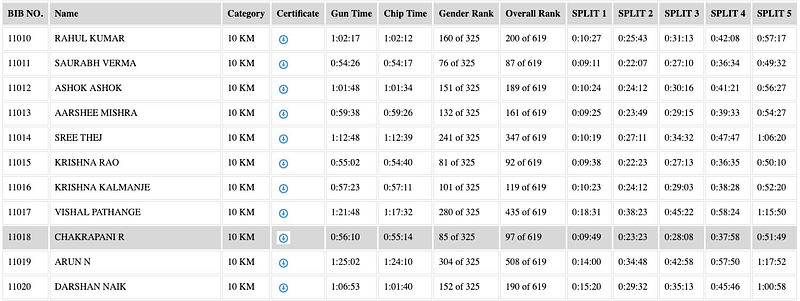
Preview of the results table.

I’d love to hear your thoughts and how we can accomplish the same task in a more efficient manner. Cheers!!

Shell Script
Scripting
Linux
Running
Web Scraping
Recommended from ReadMedium