avatarCassius

Free AI web copilot to create summaries, insights and extended knowledge, download it at here

4419

Abstract

">numResults</span>=<span class="hljs-number">100</span> <span class="hljs-attr">url</span> =<span class="hljs-string">"https://www.google.com/search?q="</span>+topic+<span class="hljs-string">"&tbm=nws&hl=en&num="</span>+str(numResults)</pre></div><p id="80e6">Now we can scrape the results</p><div id="ea0d"><pre><span class="hljs-attr">response</span> = requests.get(url) <span class="hljs-attr">soup</span> = BeautifulSoup(response.content, <span class="hljs-string">'html.parser'</span>)</pre></div><p id="e578">Google search results gives us a title, a link and some basic descriptions. We will be using the basic descriptions to build our word cloud for this tutorial. Of course, you can use the links to scrape the corpus of news articles to build a more complete word cloud. But here, for simplicity, we will use the basic descriptors.</p><div id="a7da"><pre>results = soup.find_all(‘<span class="hljs-keyword">div</span>’, attrs = {‘<span class="hljs-keyword">class</span>’: ‘ZINbbc’}) descriptions = [] <span class="hljs-keyword">for</span> result in results: <span class="hljs-keyword">try</span>: <span class="hljs-keyword">description</span> = result.<span class="hljs-keyword">find</span>(‘<span class="hljs-keyword">div</span>’, attrs={‘<span class="hljs-keyword">class</span>’:’s3v9rd’}).get_text() <span class="hljs-keyword">if</span> <span class="hljs-keyword">description</span> != ‘’: descriptions.<span class="hljs-keyword">append</span>(<span class="hljs-keyword">description</span>) except: <span class="hljs-keyword">continue</span></pre></div><p id="894b">You should get a list that looks something like this</p><figure id="a7f7"><img src="https://cdn-images-1.readmedium.com/v2/resize:fit:800/1*z4vkhLpo2eU3o-sYQhRQOw.png"><figcaption></figcaption></figure><p id="7e7f">To flatten this to a string use…</p><div id="48e4"><pre><span class="hljs-attribute">text</span> <span class="hljs-operator">=</span> ‘’.join(descriptions)</pre></div><figure id="280d"><img src="https://cdn-images-1.readmedium.com/v2/resize:fit:800/1*ttqEYt01ECJo5VLibpgxGA.png"><figcaption></figcaption></figure><h2 id="27a4">Step 2. Analyse text to create a word cloud</h2><p id="4ba7">We need to clean the data before we generate a word cloud.</p><ul><li>Convert all words to lower case</li><li>Identify all adjectives … you can add nouns, pronouns into the mix if you prefer</li><li>Remove all the stop words. These are words such as “a”, “the”, “we” …etc. They are frequent and does not hold any use information. They are simply the glue that holds a language together.</li></ul><p id="9ba6">First we load the language model from spaCy, and parse the text string int.</p><div id="a7f3"><pre><span class="hljs-attr">sp</span> = spacy.load(<span class="hljs-string">'en_core_web_sm'</span>) <span class="hljs-attr">doc</span> = sp(text)</pre></div><p id="d383">We can check words and word types immediately — which is very cool!</p><div id="c2d5"><pre><span class="hljs-keyword">for</span> <span class="hljs-built_in">word</span> <span class="hljs-keyword">in</span> doc: print(<span class="hljs-built_in">word</span>.<span class="hljs-built_in">text</span>, <span class="hljs-built_in">word</span>.pos_, <span class="hljs-built_in">word</span>.dep_)</pre></div><figure id="9ffc"><img src="https://cdn-images-1.readmedium.com/v2/resize:fit:800/1*47TII2cMm-6UEMGFLtEIxw.png"><figcaption></figcaption></figure><p id="6074">If you have issues with the <i>en_core_web_sm</i> model, try re-downloading it. I initially had some issues.</p><div id="3983"><pre><span class="hljs-attribute">python -m spacy download en_core_web_sm</span></pre></div><p id="a1eb">Next we only choose only adjectives, and force everything to lower case.</p><div id="2d6f"><pre><span class="hljs-keyword">new</span><span class="hljs-type">Text</span> =’’ <span class="hljs-keyword">for</span> word <span class="hljs-keyword">in</span> doc:<span class="hljs-type"></span> <span class="hljs-keyword">if</span> word.pos_ <span class="hljs-keyword">in</span> [‘ADJ’]:<span class="hljs-type"></span> <span class="hljs-keyword">new</span><span class="hljs-type">Text</span> = “ “.join((<span class="hljs-keyword">new</span><span class="hljs-type">Text</span>, word.text.lower()))</pre></div><p id="1c7c">Now we’re ready to input it into the wordcloud!</p><div id="caea"><pre>wordcloud

Options

= <span class="hljs-built_in">WordCloud</span>(stopwords=STOPWORDS)<span class="hljs-selector-class">.generate</span>(newText) plt<span class="hljs-selector-class">.imshow</span>(wordcloud, interpolation=’bilinear’) plt<span class="hljs-selector-class">.axis</span>(“off”) plt<span class="hljs-selector-class">.show</span>()</pre></div><figure id="a3ef"><img src="https://cdn-images-1.readmedium.com/v2/resize:fit:800/1*wTeZLdJzUQA7px7eKuWqYQ.png"><figcaption>Adjectives</figcaption></figure><p id="c8fb">If we included nouns to the mix…</p><figure id="a822"><img src="https://cdn-images-1.readmedium.com/v2/resize:fit:800/1*BxziX_bxcD-lxycwK8pL4A.png"><figcaption>Adjectives and Nouns</figcaption></figure><h2 id="b28d">Putting it all together</h2><p id="4efa">In conclusion, we can pick any topic we want, and build a news-based word cloud on it.</p><div id="22a0"><pre><span class="hljs-keyword">import</span> requests <span class="hljs-keyword">import</span> urllib.request <span class="hljs-keyword">import</span> time <span class="hljs-keyword">import</span> spacy <span class="hljs-title">from</span> bs4 <span class="hljs-keyword">import</span> BeautifulSoup <span class="hljs-title">from</span> wordcloud <span class="hljs-keyword">import</span> WordCloud, STOPWORDS, ImageColorGenerator <span class="hljs-keyword">import</span> matplotlib.pyplot <span class="hljs-keyword">as</span> plt</pre></div><div id="d518"><pre><span class="hljs-attribute">topic</span><span class="hljs-operator">=</span><span class="hljs-string">"bitcoin"</span> <span class="hljs-attribute">numResults</span><span class="hljs-operator">=</span><span class="hljs-number">100</span></pre></div><div id="a055"><pre><span class="hljs-attr">url</span> =<span class="hljs-string">"https://www.google.com/search?q="</span>+topic+<span class="hljs-string">"&tbm=nws&hl=en&num="</span>+str(numResults) <span class="hljs-attr">response</span> = requests.get(url) <span class="hljs-attr">soup</span> = BeautifulSoup(response.content, <span class="hljs-string">'html.parser'</span>)</pre></div><div id="03d3"><pre>results = soup.find_all(<span class="hljs-string">'div'</span>, attrs = {<span class="hljs-string">'class'</span>: <span class="hljs-string">'ZINbbc'</span>}) descriptions = [] <span class="hljs-keyword">for</span> result in results: <span class="hljs-keyword">try</span>: <span class="hljs-keyword">description</span> = result.<span class="hljs-keyword">find</span>(<span class="hljs-string">'div'</span>, attrs={<span class="hljs-string">'class'</span>:<span class="hljs-string">'s3v9rd'</span>}).get_text() <span class="hljs-keyword">if</span> <span class="hljs-keyword">description</span> != <span class="hljs-string">''</span>: descriptions.<span class="hljs-keyword">append</span>(<span class="hljs-keyword">description</span>) except: <span class="hljs-keyword">continue</span></pre></div><div id="3d9c"><pre><span class="hljs-attr">text</span> = <span class="hljs-string">''</span>.join(descriptions)</pre></div><div id="f473"><pre><span class="hljs-attr">sp</span> = spacy.load(<span class="hljs-string">'en_core_web_sm'</span>) <span class="hljs-attr">doc</span> = sp(text)</pre></div><div id="23cc"><pre><span class="hljs-keyword">new</span><span class="hljs-type">Text</span> =<span class="hljs-string">''</span> <span class="hljs-keyword">for</span> word <span class="hljs-keyword">in</span> doc:<span class="hljs-type"></span> <span class="hljs-keyword">if</span> word.pos_ <span class="hljs-keyword">in</span> [<span class="hljs-string">'ADJ'</span>, <span class="hljs-string">'NOUN'</span>]:<span class="hljs-type"></span> <span class="hljs-keyword">new</span><span class="hljs-type">Text</span> = <span class="hljs-string">" "</span>.join((<span class="hljs-keyword">new</span><span class="hljs-type">Text</span>, word.text.lower()))</pre></div><div id="f1ec"><pre><span class="hljs-attribute">wordcloud</span> <span class="hljs-operator">=</span> WordCloud(stopwords<span class="hljs-operator">=</span>STOPWORDS).generate(newText)</pre></div><div id="7291"><pre>plt<span class="hljs-selector-class">.imshow</span>(wordcloud, interpolation=<span class="hljs-string">'bilinear'</span>) plt<span class="hljs-selector-class">.axis</span>(<span class="hljs-string">"off"</span>) plt<span class="hljs-selector-class">.show</span>()</pre></div></article></body>

Scraping News and Creating a Word Cloud in Python

A simple step-by-step tutorial in Python on creating word clouds from news topics.

Photo by Nicole Wolf on Unsplash

Word clouds are a great way of quickly visualising the content of a website. It is also an easy way of summing up sentiment. Suppose you quickly wanted to gauge the current news sentiment of Bitcoin, or of the stock market — you can do this easily by scraping Google news search results for the specifed topic, and running a word cloud on your results.

You don’t need to be a great programmer to do this. This tutorial will teach you how.

We’re going to do two basic tasks in Python:

  1. Scrape text data from a Google news search
  2. Analyse this text data to create a word cloud

Step 0. Import libraries

First we’re going to import some Python libraries.

import requests
import urllib.request
import time
import spacy
from bs4 import BeautifulSoup
from wordcloud import WordCloud, STOPWORDS, ImageColorGenerator
import matplotlib.pyplot as plt

If you don’t have wordcloud or spaCy installed, please use:

pip install wordcloud
pip3 install https://github.com/explosion/spacy-models/releases/download/en_core_web_sm-2.2.0/en_core_web_sm-2.2.0.tar.gz

Step 1. Scrape text data from Google news search

First we need to get a handle on Google search parameters so that you can build your url. There is a good blog post that summarises most of Google’s search parameters:

All Google search urls start with:

https://www.google.com/search?

And then you append your search parameters after it. Here are the key ones we will need:

q — this is the query topic, i.e., q=bitcoin if you’re searching for Bitcoin news

hl — the interface language, i.e., hl=en for English

tbm — to be matched, here we need tbm=nws to search for news items. There’s a whole lot of other things one can match for instance, app for applications, blg for blogs, bks for books, isch for images, plcs for places, vid for videos, shop for shopping and rcp for recipes.

num — controls the number of results shown. If you only want 10 results shown, num=10

OK. Now lets’ put all this together. If you wanted to find the latest 100 news articles on Bitcoin, you would:

topic="bitcoin"
numResults=100
url ="https://www.google.com/search?q="+topic+"&tbm=nws&hl=en&num="+str(numResults)

Now we can scrape the results

response = requests.get(url)
soup = BeautifulSoup(response.content, 'html.parser')

Google search results gives us a title, a link and some basic descriptions. We will be using the basic descriptions to build our word cloud for this tutorial. Of course, you can use the links to scrape the corpus of news articles to build a more complete word cloud. But here, for simplicity, we will use the basic descriptors.

results = soup.find_all(‘div’, attrs = {‘class’: ‘ZINbbc’})
descriptions = []
for result in results:
    try:
        description = result.find(‘div’, attrs={‘class’:’s3v9rd’}).get_text()
        if description != ‘’: 
            descriptions.append(description)
    except:
        continue

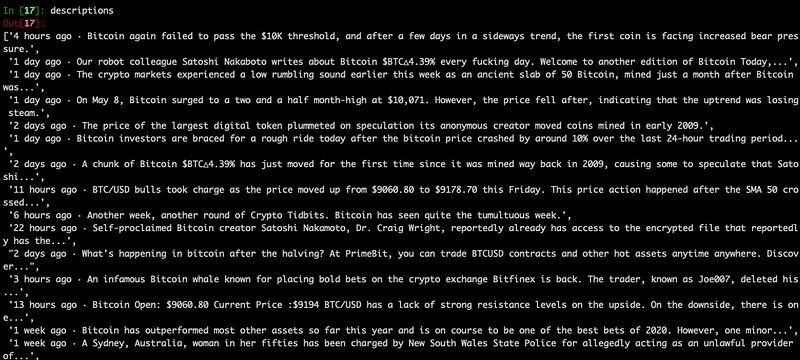
You should get a list that looks something like this
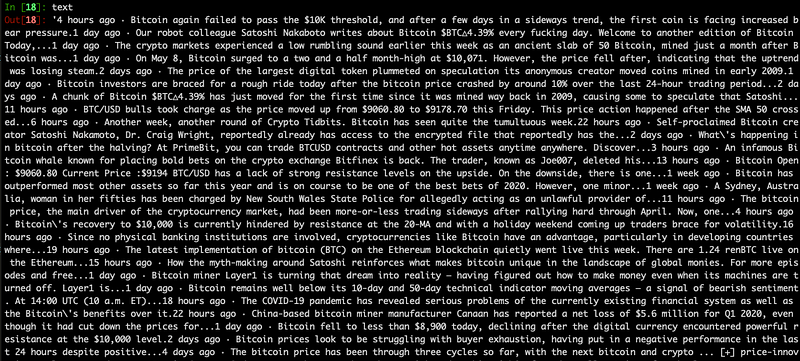
To flatten this to a string use…

text = ‘’.join(descriptions)
Step 2. Analyse text to create a word cloud

We need to clean the data before we generate a word cloud.

  • Convert all words to lower case
  • Identify all adjectives … you can add nouns, pronouns into the mix if you prefer
  • Remove all the stop words. These are words such as “a”, “the”, “we” …etc. They are frequent and does not hold any use information. They are simply the glue that holds a language together.

First we load the language model from spaCy, and parse the text string int.

sp = spacy.load('en_core_web_sm')
doc = sp(text)

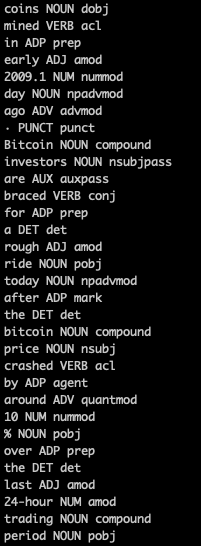
We can check words and word types immediately — which is very cool!

for word in doc:
 print(word.text, word.pos_, word.dep_)
If you have issues with the en_core_web_sm model, try re-downloading it. I initially had some issues.

python -m spacy download en_core_web_sm

Next we only choose only adjectives, and force everything to lower case.

newText =’’
for word in doc:
    if word.pos_ in [‘ADJ’]:
        newText = “ “.join((newText, word.text.lower()))

Now we’re ready to input it into the wordcloud!

wordcloud = WordCloud(stopwords=STOPWORDS).generate(newText)
plt.imshow(wordcloud, interpolation=’bilinear’)
plt.axis(“off”)
plt.show()
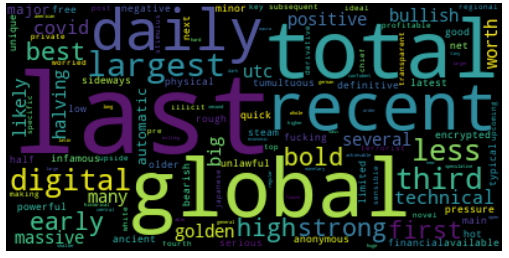
Adjectives

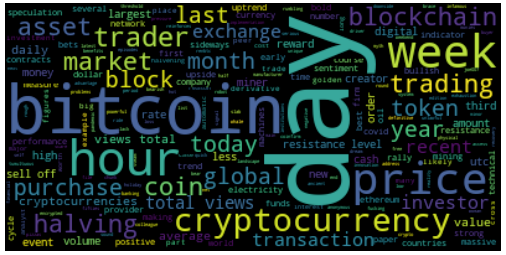
If we included nouns to the mix…

Adjectives and Nouns

Putting it all together

In conclusion, we can pick any topic we want, and build a news-based word cloud on it.

import requests
import urllib.request
import time
import spacy
from bs4 import BeautifulSoup
from wordcloud import WordCloud, STOPWORDS, ImageColorGenerator
import matplotlib.pyplot as plt
topic="bitcoin"
numResults=100
url ="https://www.google.com/search?q="+topic+"&tbm=nws&hl=en&num="+str(numResults)
response = requests.get(url)
soup = BeautifulSoup(response.content, 'html.parser')
results = soup.find_all('div', attrs = {'class': 'ZINbbc'})
descriptions = []
for result in results:
    try:
        description = result.find('div', attrs={'class':'s3v9rd'}).get_text()
        if description != '': 
            descriptions.append(description)
    except:
        continue
text = ''.join(descriptions)
sp = spacy.load('en_core_web_sm')
doc = sp(text)
newText =''
for word in doc:
 if word.pos_ in ['ADJ', 'NOUN']:
  newText = " ".join((newText, word.text.lower()))
wordcloud = WordCloud(stopwords=STOPWORDS).generate(newText)
plt.imshow(wordcloud, interpolation='bilinear')
plt.axis("off")
plt.show()
Python
Word Cloud
Scraping
Programming
Data Science
Recommended from ReadMedium