
Scraping Google: A Journey into JavaScript Magic with Cheerio
This journey takes us back to a time when I was working on a project and stumbled upon a common roadblock — the website I needed to get data from didn’t provide an API

Welcome to another adventure in the world of JavaScript! Today, we’re diving into an essential yet often misunderstood concept — web scraping. Our guide on this journey will be a versatile tool known as Cheerio.
This journey takes us back to a time when I was working on a project and stumbled upon a common roadblock — the website I needed to get data from didn’t provide an API.
I was at a loss, unsure of how to proceed.
This problem led me on an exciting quest through the labyrinth of StackOverflow, where I discovered Cheerio, a tool that has since been a constant companion in my web scraping endeavors.
Before we embark on our coding adventure, let’s make one thing clear: web scraping should always respect the target website’s terms of service.
It’s worth noting that scraping Google, as we’ll illustrate in this tutorial, could potentially violate their policies. Therefore, remember that this tutorial is solely for educational purposes.
Ready to dig in? Let’s begin!
Step 1: Set up your environment
First things first, we need to set up our coding environment. We’ll need Node.js and npm installed on our machine.
If you haven’t got them installed yet, head over to Node.js official website and download the latest stable version.
Once that’s done, create a new folder on your local machine where we’ll build our project.
Let’s call it “google-scraper”.
Inside this folder, initialize a new Node.js project with npm init -y.
mkdir google-scraper
cd google-scraper
npm init -y
Step 2: Install necessary packages
Our project will mainly rely on two packages: Axios and Cheerio.
Axios will help us make HTTP requests to fetch the HTML from the website.
Cheerio will allow us to parse that HTML and extract the data we need.
npm install axios cheerio
Step 3: Fetch the HTML
Now, let’s create a new file “index.js” in our project root and fetch the HTML from Google.
const axios = require('axios');

async function fetchHTML(url) {
  const { data } = await axios.get(url);
  return data;
}

fetchHTML("https://www.google.com/search?q=cheerio+javascript")
  .then(data => console.log(data))
  .catch(err => console.error(err));
If you run the script now using node index.js, you should see the HTML of Google's search page logged in your console.
Step 4: Parsing HTML with Cheerio
Now that we have the HTML, let’s parse it using Cheerio.
const cheerio = require('cheerio');
const axios = require('axios');

async function fetchHTML(url) {
  const { data } = await axios.get(url);
  return data;
}

async function parseHTML() {
  const data = await fetchHTML("https://www.google.com/search?q=cheerio+javascript");
  const $ = cheerio.load(data);
  const titles= $("h3").text();
  console.log(titles);
}

parseHTML().catch(err => console.error(err));
If you run the script again, you should see the titles of Google’s search results logged in your console.
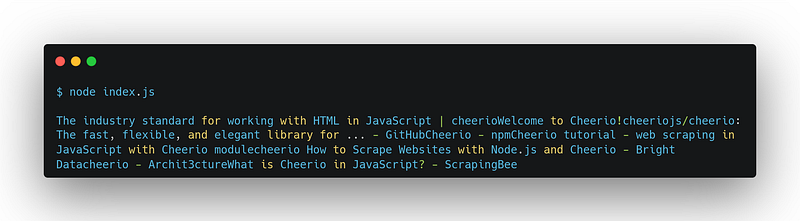
I remember the first time I was able to fetch data this way. It was nothing short of magical, making me feel like an all-powerful wizard in the realm of code.
I’m sure you’re experiencing something similar!
That’s it!
You have successfully fetched and parsed HTML from Google’s homepage using Axios and Cheerio.
Now you’re ready to explore further and extract more sophisticated data as needed.
A Word of Caution
Always remember to respect the target website’s terms of service and don’t use web scraping for any illegal or unethical activities. The power we wield as developers comes with responsibility.
In conclusion
Web scraping is a powerful tool, and when used responsibly, can unlock many possibilities.
However, we must always be mindful of the legal and ethical boundaries.
Cheerio is just one of the many tools available in the vast JavaScript toolbox. It’s one that’s served me well throughout my career, and I hope it does the same for you.
- Cheerio’s Official Documentation: This is the definitive source for Cheerio, its methods, and use cases.
- Axios’ GitHub page: Great for understanding more about making HTTP requests using Axios.
- Node.js Documentation: Explore more about Node.js and its vast capabilities.
- Web scraping with Node.js and Cheerio: A comprehensive guide by Digital Ocean on web scraping with Node.js and Cheerio.
- The Modern JavaScript Tutorial: A complete guide to JavaScript with modern syntax, a great way to expand your JavaScript knowledge.
- StackOverflow: The go-to place for solving issues and learning from other developers’ experiences. Remember to search for Cheerio related queries.
- Web Scraping legal guide: An essential guide to understanding the legal implications of web scraping.
- Google’s robots.txt: It’s always good to understand what a website explicitly allows or disallows for web crawlers and scrapers.
Enjoyed the read? For more on Web Development, JavaScript, Next.js, Cybersecurity, and Blockchain, check out my other articles here:
If you have questions or feedback, don’t hesitate to reach out at [email protected] or in the comments section.
[Disclosure: Every article I pen is a fusion of my ideas and the supportive capabilities of artificial intelligence. While AI assists in refining and elaborating, the core thoughts and concepts stem from my perspective and knowledge. To know more about my creative process, read this article.]
In Plain English 🚀
Thank you for being a part of the In Plain English community! Before you go:
- Be sure to clap and follow the writer ️👏️️
- Follow us: X | LinkedIn | YouTube | Discord | Newsletter
- Visit our other platforms: Stackademic | CoFeed | Venture
- More content at PlainEnglish.io


