
Scraping 180k Luxury Fashion Products with Python
How to find undocumented API on FarFetch and create Python package with 3 tools; Firefox Web Developer, Requests & Pandas.
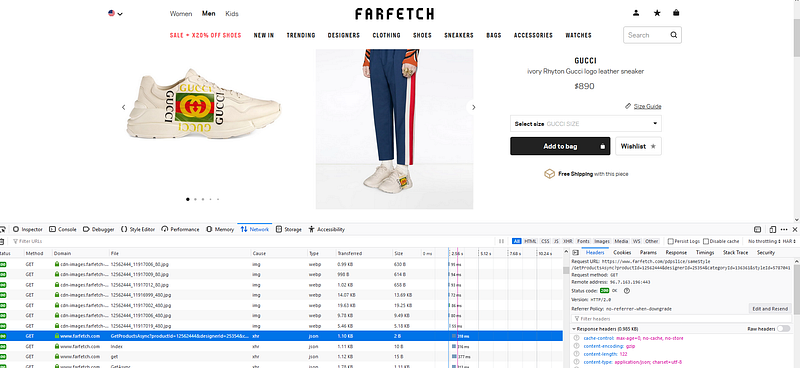
Instead of using popular web scraping packages like Scrapy or Selenium I’ve decided to take a more basic approach and only use Requests library in Python. The goal here is to find a GET request being made to FarFetch servers and return a response containing product information. After finding the right endpoint create a For Loop to bring back all available products. Finally use Pandas and it’s extended capabilities to normalize data and insert into a DataFrame!
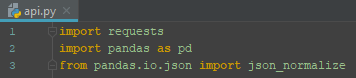
FarFetch is one of those sites I like to browse trendy goods but can’t actually afford to buy anything. Out of curiosity and a genuine interest in data I use my web scraping skills (limited at best..) to collect and analyze product information on this vast data driven platform. Taking a quick “peak under the hood” I start by monitoring network traffic using Web Developer in Firefox (Firefox Quantum 67.0.4). Half an hour of clicking though different pages and reading the XHR request, I uncover a undocumented API. Used for all (or what seems to be all) of the 180,000 luxury fashion products currently listed.
Half an hour of clicking though different pages and reading the XHR request, I uncover a undocumented API.
Exploratory Phase
On most e-commerce websites you can clearly see some type of URL pattern on search and product pages, generally following their product taxonomy. This is what a URL looks like on FarFetch.
https://www.farfetch.com/shopping/women/all-in-one-1/items.aspx?view=180
After the main domain name you can see the hierarchy, ‘shopping / women / all-in-one-1 / items’. This could be used as a basis to scrape specific parts of the website. Maybe you just want data from the landing page of women’s products or all men’s shoes, well I want it all!
Did you notice the .aspx and question mark followed by ‘view’ in the URL? Here is an idea of what this means.
“ It is a server-generated webpage that contains scripts, which are processed on the web server and the resulting HTML is sent to the user’s web browser.” https://fileinfo.com/extension/aspx
Active Server Page Extended also known as aspx helps a webpage communicate (aka get data I want) from a server. By passing in special parameters with the URL you are able to filter to and extract specific data. A question mark signifies the use of parameters, which could be important when building a URL to make a GET request for specific data. The .aspx sequence in the FarFetch example above uses one parameter (view=180) filtering the number of products returned.
To find API like URLs specifically look for XHR (XMLHttpRequest) traffic since it is common for data exchange with .aspx driven websites. Firefox Web Developer enables filtering of only XHR network traffic and even has search capabilities for words contained in request made. Searching ‘API’ or ‘api’ is a quick way to reveal any undocumented API being used to request data from servers.
To find API like URLs specifically look for XHR (XMLHttpRequest) traffic

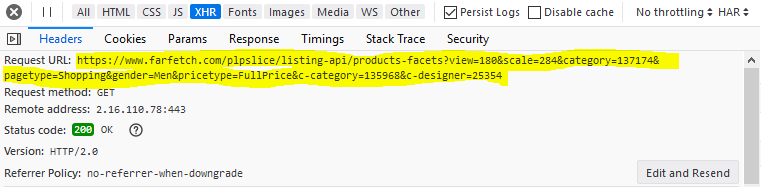
Looking through Headers on the Request Details page we can start to see how to construct the proper URL for our own request in Python.
After finding a Request URL that returns product data, start to explore all data points returned. Copying & pasting the highlighted URL into a Firefox browser, a beautifully parsed (and interactive!) JSON object is shown.
This seems to be a pretty solid way to get data back in a easy to read format. Modifying the URL by changing parameter values or removing some parameters completely, different data returns at other levels of the product hierarchy. I will use this as the starting point to build a Python method to generate a dynamic URL. Used with a For Loop to pass in different parameters (brand, category, page, etc.) to return various products from the hierarchy.
Building Phase
There are 3 methods created to extract all products.
- URL constructor
- Data requester
- Data parser
These all fit nicely together under a single Class I named Api.
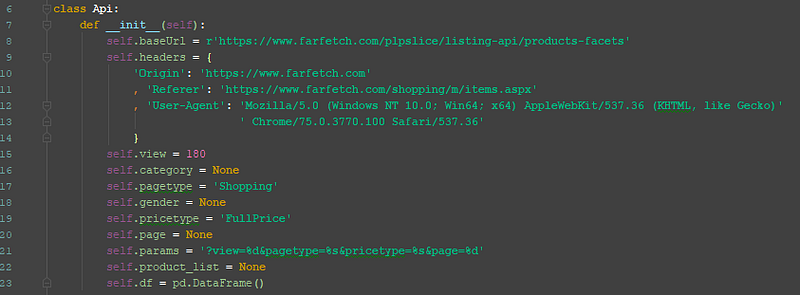
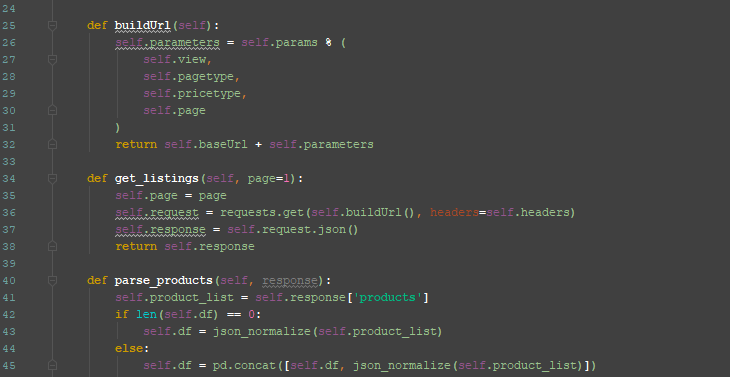
This unofficial API which was constructed from a few methods packaged as a simple module can now be used. From here the objective is to utilize the Api class to get all data available from FarFetch listings that match the set parameters. The only input that will need to be passed to the Api is page number.
A for loop will iterate through a series of numbers and pass each one to get_listings, in return a JSON object will be parsed and added to a Pandas DataFrame.
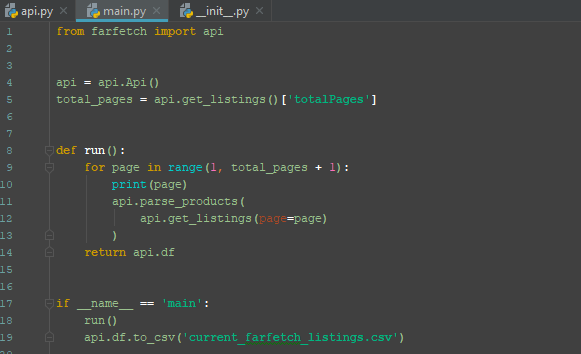
A separate file named main does just that and exports the data to a csv file. This could easily be setup to write to a database and scheduled to run daily. Creating a rich time-series data set would take little additional code.
Conclusion
You don’t always need the latest or most popular web scraping tools to build robust data sets. Spending a little time with my browsers web console open and paying attention to how network traffic is being sent greatly improved my understanding of how data is communicated from servers and how to mimic what the site was built to do. I’ve done this for a handful of sites now and plan to write more on how to improve these techniques. Here is my GitHub repo if you would like to check out the entire code base for this project or others I’ve worked on. https://github.com/zpencerguy
Thanks for reading. This is my first Medium post so I would love any critical feedback or suggestions!


