
Scheduled Data Pipelines in 5 Minutes with Prefect and GitHub Actions
The easiest way to get started with scheduled serverless workflows built in Python

Scheduling is a critical component of any data platform. Whether you are running nightly ETL jobs, Sunday-night maintenance scripts, or triggering high-velocity workflows every couple of minutes, some data workloads need to be executed at the right time. This holds true even when moving to (near) real-time data ingestion. Because of its importance, scheduling has become table stakes. There are countless enterprise tools and open-source frameworks allowing you to run some work on schedule, but they are usually difficult to use and maintain. In contrast, Prefect flows can be triggered from anywhere. If you are not ready to fully migrate to scheduling your workflows using Prefect deployments, you don’t have to.
In this post, we’ll demonstrate the easiest way to run scheduled serverless workflows. Using the combination of Prefect and GitHub Actions, you’ll be able to schedule your first Python-based workflows running in the cloud in under 5 minutes.
Getting started with scheduled workflows
This demo follows a top-down approach. First, we’ll build something (just five minutes, as promised!). Then, we’ll explain how it works under the hood.
Prefect Cloud setup
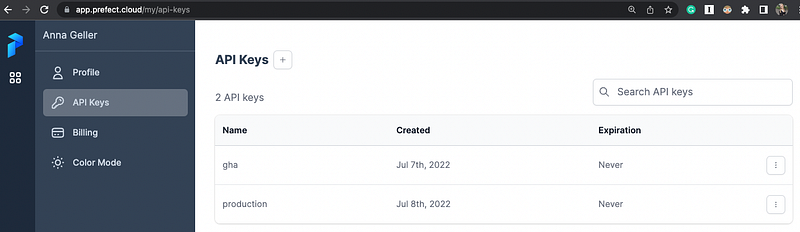
To get started, sign up for the free tier of Prefect Cloud. Once logged in, create a workspace and an API key.
GitHub repository setup
Use the following GitHub template to create your own GitHub repository.
Adding secrets
Add the previously created API key and the name of your workspace as repository secrets, as shown in this image:
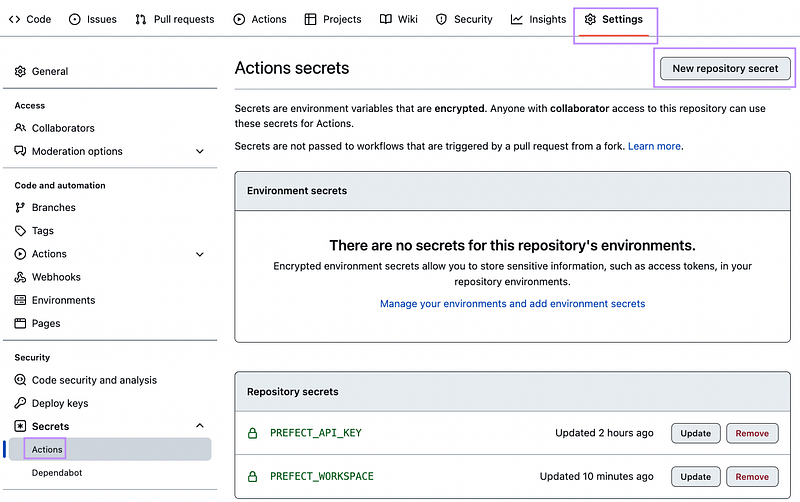
- The
PREFECT_API_KEYis the API key you created before (should start withpnu_). - The
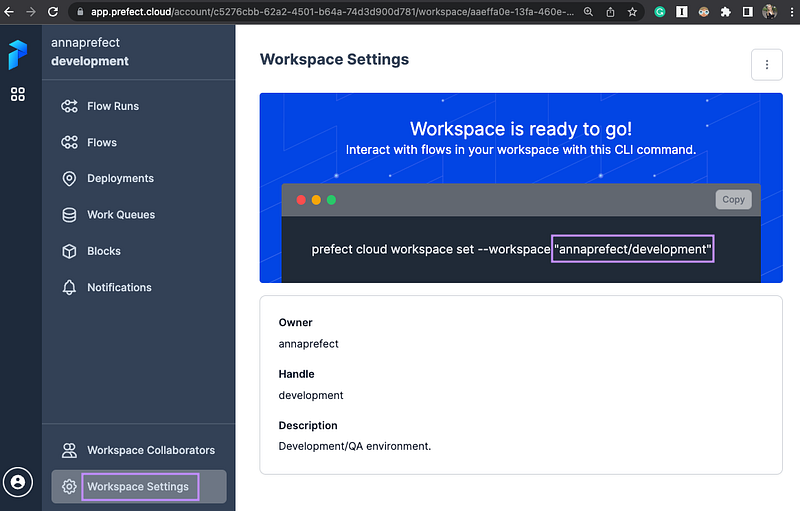
PREFECT_WORKSPACEis a combination of youraccount/workspacee.g.annaprefect/developmemt— you can also retrieve it from your workspace settings:
That’s it, you’re all set! From now on, all flows listed in the directory flows will run on schedule.
How can I trigger the workflow manually?
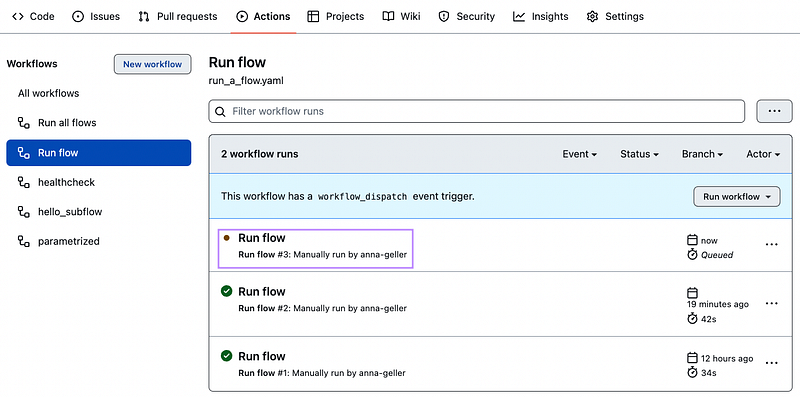
To manually trigger any workflow, go to Actions (#1), select the “Run flow” workflow (#2), then choose the flow you want to run from the dropdown menu and click on “Run workflow” (#3):
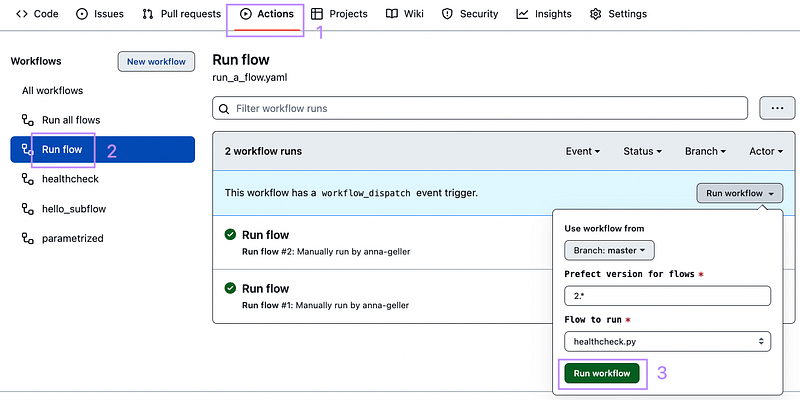
The image below shows that the flow run of the flow healthcheck.py has been triggered.
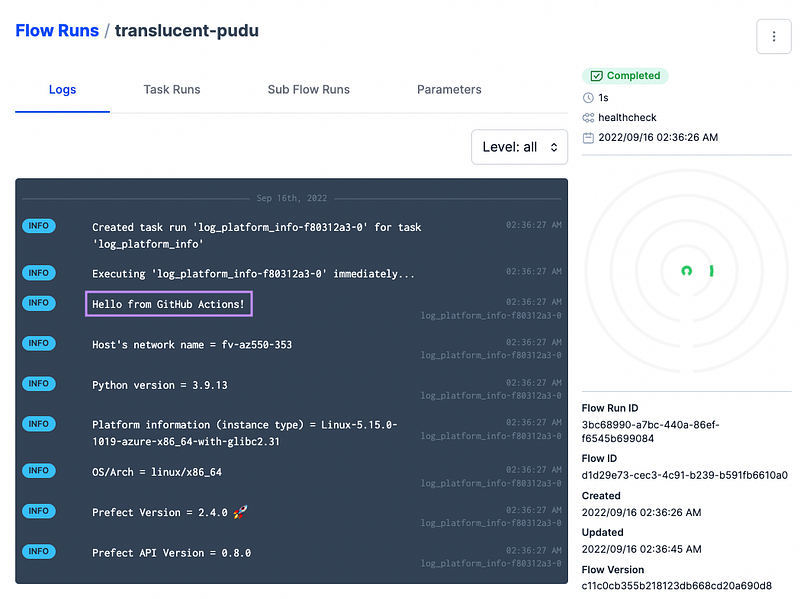
You can see the same workflow run in the Prefect Cloud UI:
What happened under the hood?
How did Prefect “know” that GitHub Actions triggered the flow run?
As long as your Prefect settings point to a URL of your Prefect Cloud workspace, you can schedule your flows from GitHub Actions, a legacy scheduler, serverless functions, or even from your company’s internal APIs. Prefect will make those workflows observable and improve their reliability and maintainability with retries, caching, notifications, and secure configuration of your building blocks.
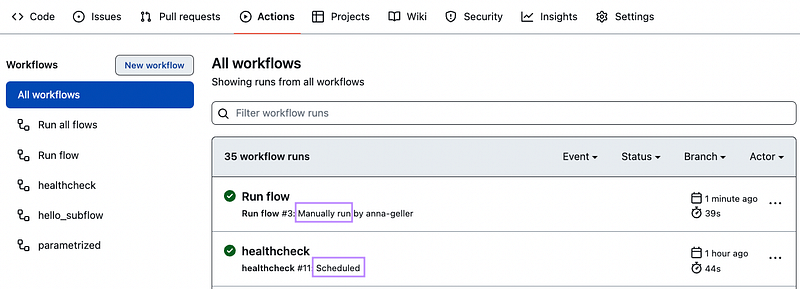
Scheduled vs. manually triggered runs — how to tell the difference?
The image below shows how you can distinguish between manually triggered workflows and those that ran on schedule.
How can I modify the schedule of each workflow?
The repository template contains a separate YAML file for each scheduled Prefect flow. To modify the schedule, you can adjust the CRON string:
name: healthcheck
on:
  schedule:
    - cron: '42 * * * *'
How can I add new flows?
Add your flow to the flows directory and add a new GitHub Actions workflow (akin to healthcheck.yaml) to configure your schedule for that new flow. Once you push the changes to the default branch, you’re all set.
What if I have custom package dependencies?
Add those to requirements.txt and to modules in your repository code. Then add the pip install . command to your scheduled workflows as shown here.
How can I run all flows at once?
To trigger all flows from the flows directory, you can use this GitHub Actions workflow. It will:
- detect all flows in this
flowsdirectory, and - start runs for all those flows in parallel.
What are the limitations of scheduling flows using GitHub Actions?
The approach demonstrated here is best suited to get started. For mission-critical scheduled serverless deployments, consider the alternatives mentioned below.
Other serverless options to schedule Prefect flows
If you are on AWS, there are two convenient ways to easily get started:
1) Prefect AWS ECS integration with the ECSTask infrastructure block — the following repository template provides automation to deploy a Prefect agent to ECS and run serverless flow run containers on AWS.
2) AWS Lambda running Prefect flows.
If you are on Azure or GCP, the DataflowOps Prefect Discourse category provides plenty of resources to help you get started.
Lastly, check our documentation, including the catalog of Prefect Recipes.
Next steps
Thanks for reading. If you have any questions about getting started with Prefect and scheduled workflows, you can reach me via Prefect Community Slack or Prefect Discourse.
Happy Engineering!


