
ONLINE SCAMS
SCAM ALERT: Domain Name Renewals and Quarantined Messages Pending
Scammers will try every angle and every trick in the book

As if we don’t have enough to occupy our minds with everything else that’s going on in the world, now we have another online scam.

That old domain name renewal scam routine
Domain renewal scams have been going on as long as domain names have been around. It’s simple. A scammer looks-up your domain name to find when it’s due for renewal (it’s public information). They send you a letter or email — some sort of official-looking notification that explains your entire online presence will disappear if you don’t renew the domain name right now. ‘Click here to pay.’
Maybe they’re not that direct, and they simply tell you your domain name is due to expire and that you need to renew it before a certain date. ‘Click here to pay.’
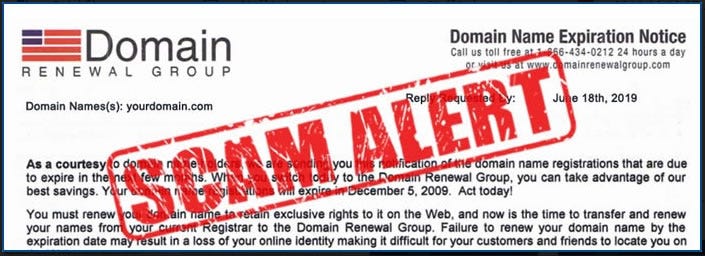
You, the unsuspecting, non-technical, trusting domain owner, assume it’s genuine and pay what they’re asking. Why wouldn’t you?
The net result? The domain (potentially) lapses because the registrar didn’t receive your renewal fees. So now you have lost your original fee, the scammer has your credit card payment details, and you may have to fight the registrar to get your domain back.
BE WARNED: The domain renewal scam is less-often seen now, mainly due to the GDPR (Europe) and the Privacy Shield Framework (US) restricting access to domain ownership details, but it’s still out there and it will be back in some form.
The new email release scam routine
If scammers can’t track you down as the owner of your domain name(s) to get you to part company with your money, there’s a new(ish), easier way.
Email addresses are stolen all the time. Like every day. Some say they steal hundreds of millions, some say it’s more like billions. The number is irrelevant. But when your email address is stolen because of a data breach, and then sold on the dark web, well now any number of ‘dark’ organisations might have it.
On March 9th, 2021, I received an email that included the following table:
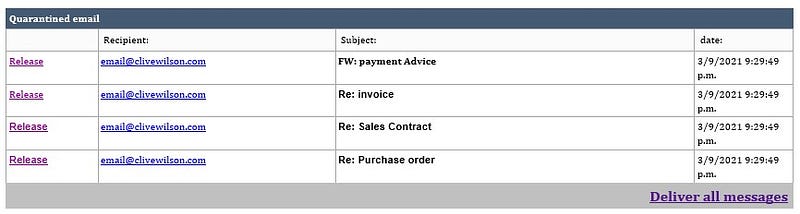
This says there are four emails held in quarantine that I’m likely to want to be released. Specifically, the email message says: “You have 4 Quarantined emails in our server cloud storage.” Nothing else. No instructions, no threats, and no idea even who they are.
But I’m worried, right? The four emails are all financial transaction-based, so I’m definitely going to want those emails. Well, maybe.
All I have to do is click the handy ‘Deliver all messages’ link and they’ll be flying into my mailbox soon.
Hmm. Really?
Ok, so let’s click the link and see what happens.
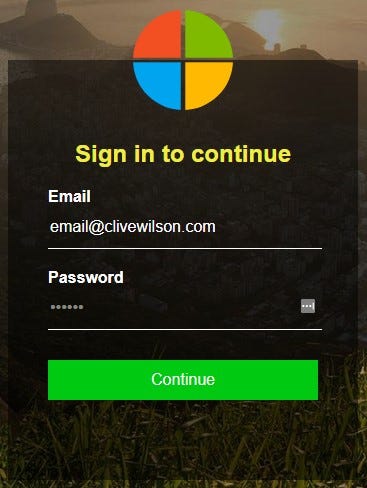
I’m asked to log in. To what, exactly? I mean, it looks like Microsoft with the four colour logo, but I’ve not seen one quite like that before.
Wait, look at the address bar:

Oh, ok, that’s fine. It IS a Microsoft login page, and I have a Microsoft account. So far, so good.
But hang on. I don't use Microsoft for my emails.
In fact, if I look at the address bar again, well, it’s not actually the address bar at all. It’s part of the screen background that sits BELOW my address bar:

Ok, ok, so maybe this is looking seriously suspect now. Maybe I shouldn't go any further. I mean, those emails can’t be real. Can they?
In fact, now I think about it, those emails held in quarantine are all business-type emails, but the email address is my [old] personal email address.
I’m seeing the bigger picture now, but what would happen if I continued and attempted to login?
First, they’d have my username and password for my Microsoft account, but whatever I put in will work anyway, as they need me to move on to the next stage. Second, they’re likely to ask me for money to release the imaginary emails. It is a service they’re providing. Weird though, as I’ve never seen this before.
Oh, that right, because I manage my own hosted email account! Of course, silly me.
I think I’ll leave it right there.

Seriously. Just stop right there.
What to do if you receive something like this
Step one is to use your common sense. I cannot emphasise this enough. Common sense, gut feeling, call it what you will. If it doesn’t feel right from the second you open the email, then it’s not right.
Do you even recognise who the email came from? Did they send it to an email address you’re currently using, but can still receive? You know that feeling you get when your phone rings, but you’re 100% sure you want to answer because the caller’s number is withheld? It’s the same feeling. Don’t ignore it.
Step two: If you were trusting/gullible/stupid enough to open an email you’re already suspicious of, well, two things have happened.
First, you have a second chance to exercise your common sense. You don't recognise the sender; the content looks suspicious; you know your email is hosted/managed somewhere else/by someone else/by you, and there’s no company name, no signature, no contact details. So ignore it and delete it.
Second, you received the email; you opened it, so you’ve just confirmed you’re alive and kicking. Bingo. The value of your email address has shot up and you’ll probably be spammed to death in the coming weeks and months. Sorry about that, but it’s what they rely on.
NOTE: I have subjected myself to what you see above in your best interests so that I could show you what happens when you click the link. You’re welcome.
I always say, with suspicious emails and phone calls, if I don’t read it/answer, and it’s that important, they’ll get back to me. They usually don’t.
Can you find out if your email address has been stolen in the past?
Absolutely. Most data breaches are public knowledge. The GDPR and the Privacy Sheild Framework put companies and organisations under serious pressure to own up to data breaches within a fixed time period. This way the public is aware and does something about it, like change account passwords, at the very least. Maybe delete the accounts entirely.
You can check if any of your email addresses have been stolen in the past by using the ‘pwned’ website. It’s not 100% foolproof, but it’s pretty damn good.
Brace yourself to be shocked. #sorrynotsorry
Go to: https://haveibeenpwned.com/
This is my pwned search for the email address they sent the scam to. It’s an old email address that I no longer use:
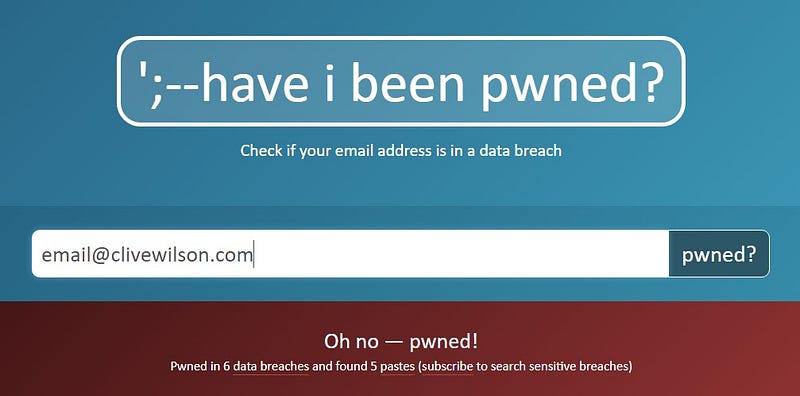
See those six data breaches it mentions? Here are the details:
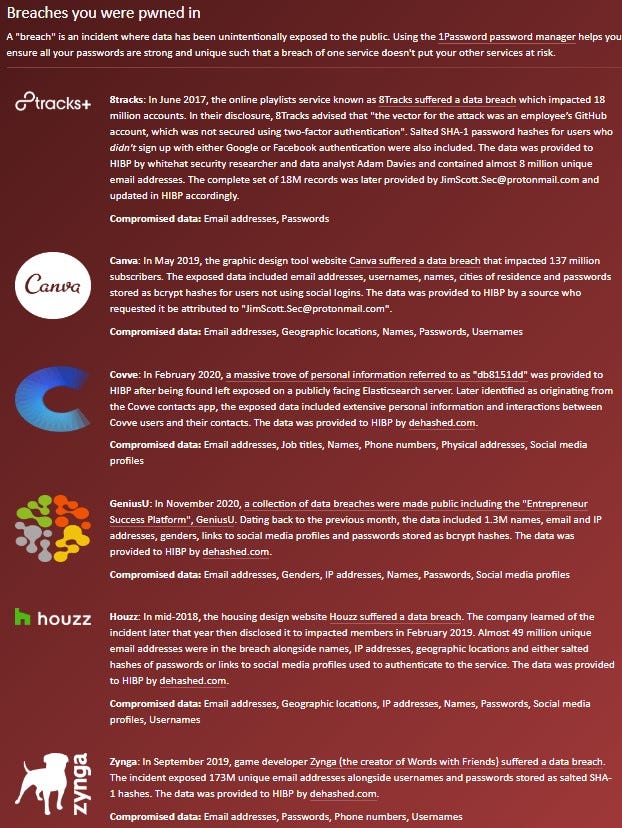
Where I could, I changed login details or deleted the account. Covve and GeniusU remain a mystery as I do not know what they are and don’t recall signing-up for them.
In conclusion:
Your data is out there somewhere in the world, on dozens of different servers and probably clawing its way through the dark web as I write. It’s sad, it’s worrying, but it’s true, and it’s something we all have to get used to.
Don’t make it easier for the scammers by handing them your details — especially financial details — on a plate.
Change passwords regularly. Better still, use a password manager like LastPass or 1Password.
Finally, never, ever, ever, login to anything you don’t own, know or trust 100%
About the author: Clive Wilson


