
Scale Applications by optimizing DNS Configuration
The Domain Name System (DNS) plays a crucial role in the era of the internet. And the beauty of its design is that every engineer takes it for granted, that this will work — one of the best system designs and a lot to learn from this simple yet powerful solution.
We take for granted another robust and straightforward component is the Load Balancer. The LB acts as a middle-man between clients and servers; the client sends requests to LB and internally, via physical NIC to VIPs, forwards to attached servers. So what challenges do we see here? The Load Balancer itself, In your complex, robust system design, the Load Balancer will become a single point of failure. If LB goes down, your system goes down as well. You can add more complexity by introducing Zookeeper and having active-passive / active-active LBs logic, but that may be overkill.
Alternatively, Use DNS Load Balancing.
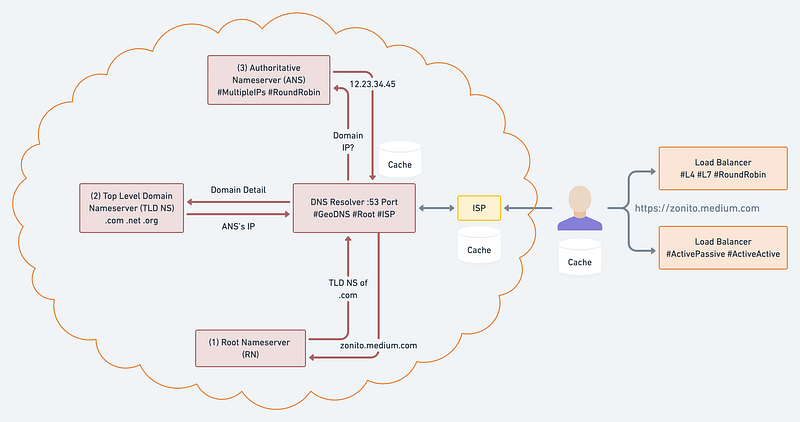
About Diagram:
- ISP: Internet Service Provider: All your requests route through your ISP that helps to resolve the IP Address for the requested hostname. It will be the first lookup in the cache; if it misses, then delegate the request to DNS Resolver sitting inside ISP.
- DNS Resolver: It starts its journey by first sending a request to Root Nameserver to get the Top Level Domain Nameserver. TLD NS, in return, provides the address of Authoritative Nameserver, which will return with the list of IP Addresses or single IP, depending on your configurations.
- Root Nameserver (RN): The top or the root of the DNS hierarchy. 13 sets of these root servers are strategically placed worldwide and operated by 12 different organizations. Each set has its unique IP address. It contains the global list of top-level domains and it contains the generic top-level domains (.com, .net, .org), country code top-level domains (.no, .se, .uk), and internationalized top-level domains. Its role is to return the Top Level Domain server address for further lookup. You can read more about it at here.
- Top Level Domain Nameserver (TLD NS): Stores the address information for the top-level domains such as .com, .net, .org, etc. It again will not return the actual IP address of the requested domain name; instead returns the address of the final Authoritative Name Server.
- Authoritative Nameserver (ANS): Responsible for knowing everything about the domain, including the IP Address or list of IP Addresses. DNS load balancing enables the authoritative server to return different IP addresses of a specific domain to the clients. With every request, the authoritative server changes the order of the IP addresses in the list in a round-robin fashion. As the client receives the list, it sends out a request to the first IP address to fetch the data from the website. The reason for returning a list of IP addresses to the client is to enable it to use other IP addresses in the list if the first doesn’t return a response within a stipulated time. When another client requests an IP address to the authoritative server, it re-orders the list and puts another IP address at the top of the list following the round-robin algorithm.
Note: Domain IP caches in DNS Resolver, ISP, and Client with TTL.
Geo Load Balancing
The overall goal of any system design is to minimize the latency between a client and a server. No matter how fast the server is, if the client locates on the other side of the world, the response time will be over 100ms because of the network latency, and the speed of light limits it. Not to mention the increased error rate when sending data across the public internet over long distances.
You can distribute the traffic to different data centers located in other regions to mitigate these performance issues. But how do you ensure that the clients communicate with the geographically closest L4 Load Balancer?
This is where DNS Geo Load Balancing comes in — it’s an extension to DNS that considers the client’s location inferred from its IP and returns a list of the geographically closest L4 Load Balancer IP/VIP.
Conclusion
The most basic form of load balancing can be implemented with DNS. Suppose you have a couple of servers that you would like to load balance requests over. If these servers have publicly-reachable IP addresses, you can add those to the service’s DNS record and have the clients pick one when resolving the DNS address.
Although this works, it doesn’t deal well with failures. If one of the two servers goes down, the DNS server will happily continue serving its IP address, unaware of the failure. You can manually reconfigure the DNS record to take out the problematic IP, but changes are not applied immediately due to the nature of DNS Caching.


