
Saving Money on S3 and KMS with Lifecycle Rules, CloudFront, and AWS S3 Bucket Keys
ACM.266 Taking a look at options for reducing S3 costs
~~~~~~~~~~~~~~~~~~~~~~~~~~~~~~~~~~~~~~~~~~~~~~~~~~~~~
⚙️ Check out my series on Automating Cybersecurity Metrics | Code.
🔒 Related Stories: Application Security | Secure Code | AWS Security | S3
💻 Free Content on Jobs in Cybersecurity | ✉️ Sign up for the Email List
~~~~~~~~~~~~~~~~~~~~~~~~~~~~~~~~~~~~~~~~~~~~~~~~~~~~~
In the last post I wrote about requiring MFA for Git commands via AWS CodeCommit policies.
I’m going to move onto implementing the rest of my architecture but first a note on S3 buckets, KMS, CloudFront, and costs.
I just got done helping another client with a penetration test and we were talking about the costs of S3 buckets with KMS keys and CloudFront among other things. One of the issues was that my client’s team had set up an API gateway in front of S3 for some static content that was 100% public and was not using CloudFront. They had encrypted the bucket with a KMS key so every time someone made an API request, they would pay for a KMS decryption action, and the bucket was very active. They removed KMS to save money.
The cost of security and architecture alternatives
In a recent post I was suggesting I was just going to encrypt everything to simplify compliance and improve data integrity. However, this may be a consideration if you have to directly serve content from S3 through API gateway.
However, what I’m hoping is that CloudFront will save us money in the end. I explained what CloudFront is here (a CDN):
The files should be cached in CloudFront which will not have encrypted data. That means the only time you’ll pay for the KMS key is when CloudFront reaches back to the S3 bucket to update the cache — if we have configured everything correctly.
But the question becomes — how much does CloudFront cost? Of course, you will be paying more to add CloudFront along with S3 but we’re also considering the cost of compliance, data breaches, and security which generally increases your costs compared to a completely insecure solution. The cost savings comes at the point the company did not take those measures gets breached and has a data breach when you didn’t — or the cost of their data breach is higher due to more access throughout the organization to all data instead of just one application.
But overall, I’m hoping the cost of KMS decreases when we add CloudFront. Will it? Let’s look at the pricing
CloudFront data transfer
The first consideration is how much data you are transferring out of CloudFront. The more data you transfer, the lower the cost becomes.
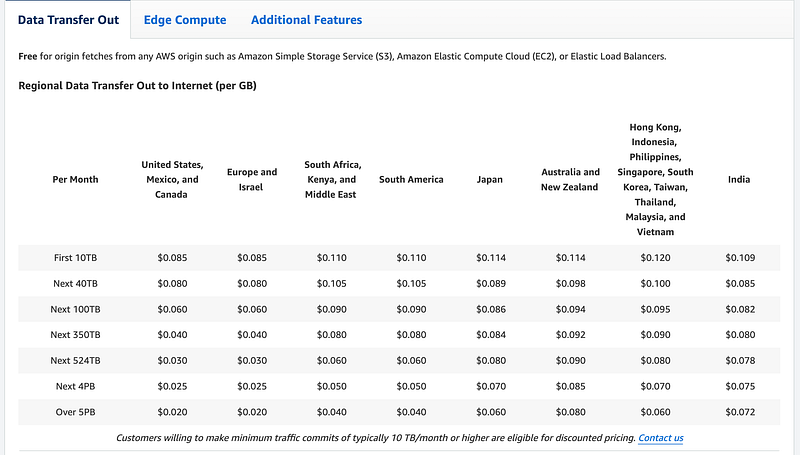
S3 Data Transfer
S3 Data Transfer to the Internet is going to cost more than CloudFront.
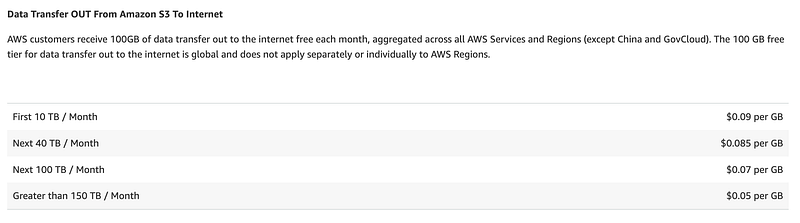
What about transfer to CloudFront? It’s free.

Note that there are some charges when transferring from an S3 bucket to another region and the cost is generally .02 at the time of this writing but it varies. Here is a partial list.
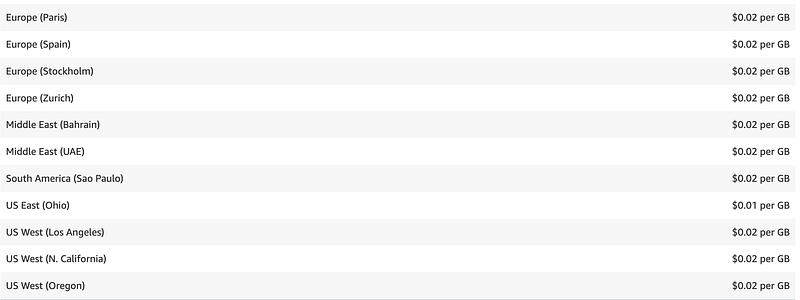
There are some other pricing options but not going to get into all of that here.
How many times will the KMS key be accessed by CloudFront?
The cost of KMS if we put CloudFront in front of an S3 bucket will depend on how many times CloudFront access the bucket and how many times you update your website. You will need to understand your application to understand what those costs might be.
In addition, it’s always a good idea to beta test your solution and evaluate the costs to ensure what you think will be the case is the case in reality. Your application make take actions of which you were not aware when you developed your cost model. Additionally, you may think you understand the pricing page but missed a key point somewhere. Always test and monitor costs for new applications.
S3 Storage
How much does it cost to store data in S3? We’re going to pay these costs regardless so it is a bit of a moot point in terms of our comparison but we will want to add it to our calculation.
Note that I’ve selected the us-east-1 North Virginia region and the costs vary by region. Here you can see that the per GB cost is actually lower in S3 to start with. Depending on how much data you transfer, you may et down to the same prices as S3 when using CloudFront, but lower data transfer amounts will cost more.
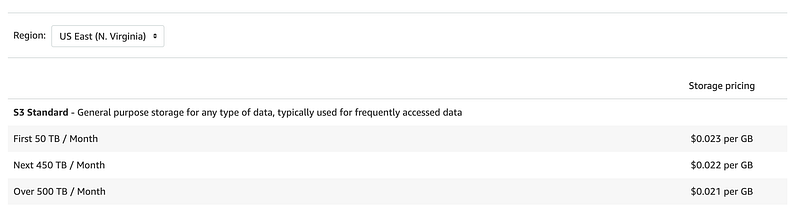
Note that I’m not using intelligent tiering which has a minimum object size as I’ve written about in other S3 posts.
Reducing storage costs with a lifecycle policy
One way to reduce storage costs would be to implement a lifecycle policy to reduce the amount stored each month. Different options exist such as completely deleting the objects, or moving them into a cheaper storage tier.
Don’t forget about versions
I was just talking to a client about how their team was deleting objects in S3 to save money but leaving all the versions. You can also apply lifecycle policies to S3 object versions. You may opt to save the versions and migrate them to Glacier for a period of time, or delete them. You pay for versions in S3 as well the objects themselves.
AWS S3 Bucket Keys
If you are ok with Amazon managed encryption keys then you can opt for AWS S3 Bucket Keys which are cheaper than other encryption options. AWS started offering this option in 2020.
Using a bucket-level key for SSE-KMS can reduce AWS KMS request costs by up to 99 percent by decreasing the request traffic from Amazon S3 to AWS KMS.
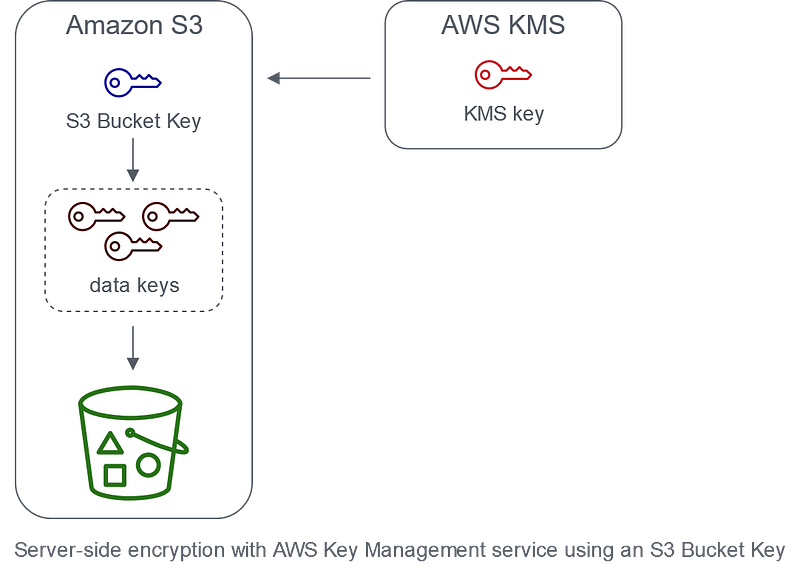
One note on using S3 bucket keys:
If your existing AWS Identity and Access Management (IAM) policies or AWS KMS key policies use your object Amazon Resource Name (ARN) as the encryption context to refine or limit access to your KMS key, these policies won’t work with an S3 Bucket Key. S3 Bucket Keys use the bucket ARN as encryption context. Before you enable an S3 Bucket Key, update your IAM policies or AWS KMS key policies to use your bucket ARN as the encryption context.
Now, the reason I didn’t use a bucket key to begin with for my S3 bucket is exactly that above. I wasn’t sure how it was going to work with AWS S3 bucket policies, KMS, and IAM policies. We’ll need to take a look at that in an upcoming post. One reason for using a KMS key was to limit access and the bast radius of a data breach as I’ve explained in a bunch of other S3 posts. We want to make sure that holds true for an AWS S3 key.
It sounds like we simply change the Encryption Key ARN to the bucket ARN. We lose a layer of security because we can’t require a user to have both access to the key and the bucket, but in the case of a public website this is probably not much of a risk. Especially for any users with read-only access.
With those things in mind we’ll make a few changes to our S3 bucket in upcoming posts. I’m also going to complete the rest of the static S3 bucket website deployment architecture I proposed.
Follow for updates.
Teri Radichel | © 2nd Sight Lab 2023
About Teri Radichel:
~~~~~~~~~~~~~~~~~~~~
⭐️ Author: Cybersecurity Books
⭐️ Presentations: Presentations by Teri Radichel
⭐️ Recognition: SANS Award, AWS Security Hero, IANS Faculty
⭐️ Certifications: SANS ~ GSE 240
⭐️ Education: BA Business, Master of Software Engineering, Master of Infosec
⭐️ Company: Penetration Tests, Assessments, Phone Consulting ~ 2nd Sight Lab
Need Help With Cybersecurity, Cloud, or Application Security?
~~~~~~~~~~~~~~~~~~~~~~~~~~~~~~~~~~~~~~~~~~~~~~~~~~~~~~~~~~~~~
🔒 Request a penetration test or security assessment
🔒 Schedule a consulting call
🔒 Cybersecurity Speaker for PresentationFollow for more stories like this:
~~~~~~~~~~~~~~~~~~~~~~~~~~~~~~~~~~~~~~~~~~~~~~~~~~~~~~~~~~~~~
❤️ Sign Up my Medium Email List
❤️ Twitter: @teriradichel
❤️ LinkedIn: https://www.linkedin.com/in/teriradichel
❤️ Mastodon: @teriradichel@infosec.exchange
❤️ Facebook: 2nd Sight Lab
❤️ YouTube: @2ndsightlab


