
Saving DevOps and Security Teams Bazillions of Hours on AWS
Two logs that would help a lot of people save time and detect breaches faster
~~~~~~~~~~~~~~~~~~~~~~~~~~~~~~~~~~~~~~~~~~~~~~~~~~~~~
⚙️ Check out my series on Automating Cybersecurity Metrics | Code.
🔒 Related Stories: Network Security | AWS Security | Application Security
💻 Free Content on Jobs in Cybersecurity | ✉️ Sign up for the Email List
~~~~~~~~~~~~~~~~~~~~~~~~~~~~~~~~~~~~~~~~~~~~~~~~~~~~~
I wish AWS had a the two times of logs I’m going to describe in this post because it would cut the time to write this blog into about 33% of the time. If you read the blogs and the problems I am running into trying to get things done they are almost always access errors, not writing code to build things. I’ve also documented some CloudFormation errors and how I fixed them that are a bit unclear but for the most part, access errors take up most of my time.
Failed access log with instructions to fix each issue
What would help is a single “failed access” log that transcends all services and includes every possible kind of access error would save everyone lots of time and help security teams spot anomalies more quickly, with proper tuning.
This log most helpful only if it contains ALL access errors and includes the following in a single log entry for every single action that is blocked for any reason:
- The resource someone or something attempted to access.
- The principal that tried to access the resource
- The error message from the resource accessed.
- The error from the action that triggered the access violation.
- A stack trace if possible of all service calls that led to the access violation.
- The IP address of the principal tried to access the resource.
- The IP address of the resource the principal tried to access.
- Whether the access was denied by an IAM policy, Resource Policy, Trust Policy, Service Control Policy, Security Group rule, Network Access Control List, route table, peering connection, no transitive access, or whatever it was that can be reconfigured to fix the access problem.
- Explain how to correct the access problem in very specific terms for the error message presented, not some generic link to a troubleshooting page or worse — a link to the home page for the service documentation.
- In order to provide specific instructions for the error message, the error message needs to be very specific. There are far too many “the policy is invalid” errors that are not that helpful. Provide specifics.
- Make it easy to create alerts for specific types of errors to send to email, phone, a Lambda function or a queue (and I don’t mean go configure SNS — I mean easy.)
- Since credentials are the number one source of data breaches getting alerts on access errors will help security teams more quickly identify threats and attacks in an environment.
- The ability to disregard certain access log violations that are know issues or “noise” that distract from actual problems, like rejected traffic on Internet facing resources that I wrote about here:
If this log would actually *quickly* pinpoint the problem and precisely explain how to fix this it, this would save hours and hours of time for those who are actually trying to implement secure architectures on AWS.
If security teams could fine tune this log they could more easily spot attacks and investigate them.
If you review this blog series, you will see that most of my time is spent in many of the posts trying to resolve access errors. Imagine where I’d be in this series if I was able to immediately be able to find the error in a single log with an explanation of how to fix it!
Right now I’m trying to figure out why I cannot add a prefix list to a route table for a Transit Gateway. I’m getting some max entry error. I’ve been scouring the documentation but the fix is not obvious. If you saw an attempt to get out to the Internet and there’s a Transit Gateway or NAT in the account, include in the instructions that to reach the specific IP address the customer could add a particular route, or peer the VPCs, and all the possible options.
In my case, I have a NACL blocking Internet access except for specific IPs. I want to force the traffic for a certain range through the Transit Gateway to a NAT. So whatever the instructions are to “fix” the problem need to be smart enough to look at the account and find the different options. Yes, I could open the NACLs but that is not what I want to do. Maybe the magic AI pixie dust can figure this out. 😉
Actually, I think the documentation could just be easier to search for and find regarding using prefix lists with Transit Gateway. Also I have not maxed out routes in my route table so an error telling me the maximum routes have been reached is clearly not helpful.
That is just one of hundreds of examples of me trying to interpret error messages and access issues. Make it easier……..somehow.
The faster customers can resolve access problems the faster they can get back to what they were actually trying to build. And they won’t skip security becuase it is “hard.”
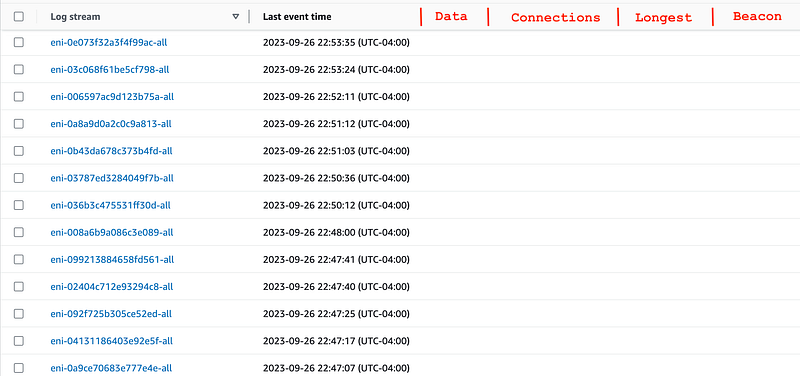
The other change I’d like to see is to add the following next to each ENI in AWS VPC Flow Logs in CloudWatch, and these values should be sortable:
- The total data sent by each ENI over a specified time period.
- The total connections for each ENI over a specified time period.
- The longest connection for each ENI over a specified time period.
- It would be ideal if you could also pinpoint any beacons — you can use an open source tool like Rita to do that.
The reason for #1: If a log doesn’t have any data in it, show me that without having me click into it to figure that out.
That’s my biggest request of the above at the moment. At least put “No Data” next to the ENIs that have no data so I don’t waste my time.
The other reason for #1 is that ENIs sending an exceptional and anomalous amount of data may indicate data exfiltration.
Next help me figure out which ENIs have the most logs and data. Let me filter on ACCEPT, REJECT, or choose BOTH.
#2 Helps identify an anomalous number of connections so someone can dig in further. Even better if you could drill down to a list of IPs so you can see which IP addresses are making the most connections. These may be beacons or other suspicious behavior.
#3 can help spot C2 channels with long running connections. The ability to drill down to the IP addresses would help also.
#4 can help spot malware beaconing out to a C2 server. Again, the ability to drill down to the IPs easily would be great.
If this is available somewhere else within AWS, link to it from the AWS CloudWatch Flow Logs page.
Save time.
Faster troubleshooting.
Prevent data breaches.
#awswishlist
Follow for updates.
Teri Radichel | © 2nd Sight Lab 2023
About Teri Radichel:
~~~~~~~~~~~~~~~~~~~~
⭐️ Author: Cybersecurity Books
⭐️ Presentations: Presentations by Teri Radichel
⭐️ Recognition: SANS Award, AWS Security Hero, IANS Faculty
⭐️ Certifications: SANS ~ GSE 240
⭐️ Education: BA Business, Master of Software Engineering, Master of Infosec
⭐️ Company: Penetration Tests, Assessments, Phone Consulting ~ 2nd Sight Lab
Need Help With Cybersecurity, Cloud, or Application Security?
~~~~~~~~~~~~~~~~~~~~~~~~~~~~~~~~~~~~~~~~~~~~~~~~~~~~~~~~~~~~~
🔒 Request a penetration test or security assessment
🔒 Schedule a consulting call
🔒 Cybersecurity Speaker for PresentationFollow for more stories like this:
~~~~~~~~~~~~~~~~~~~~~~~~~~~~~~~~~~~~~~~~~~~~~~~~~~~~~~~~~~~~~
❤️ Sign Up my Medium Email List
❤️ Twitter: @teriradichel
❤️ LinkedIn: https://www.linkedin.com/in/teriradichel
❤️ Mastodon: @teriradichel@infosec.exchange
❤️ Facebook: 2nd Sight Lab
❤️ YouTube: @2ndsightlab