
SAR Forest Monitoring Series Part3: PALSAR-2 Forest Non-forest Classification using Random Forest classifier in Google Earth Engine
To learn more about SAR remote sensing, please visit my series HERE.
Here, I discuss a basic supervised classification to generate a FNF map and some ideas to improve the classification. While several global land cover and forest/non-forest (FNF) maps are accessible through the Google Earth Engine (GEE) data catalog [1], such as the CORINE land cover map, Copernicus global land cover layer, ESA world cover, MODIS land cover type map, and the global PALSAR-2/PALSAR forest/non-forest map, there are distinct advantages to generating your own forest/non-forest map. Customization, accuracy enhancement, temporal consistency, and regular updates are among the key benefits that can be achieved through this approach.
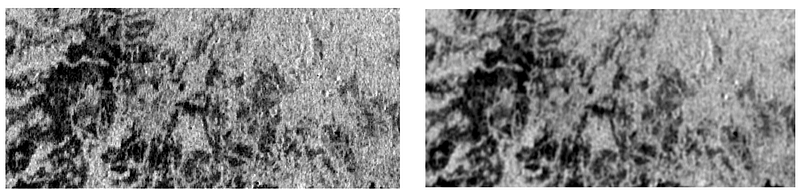
In the preceding segments of the series (PART1 and PART2), we covered accessing PALSAR-2 imagery in GEE, visualizing the data, and gaining insights into the backscatter properties. In this installment, we proceed directly to the classification process, incorporating one additional step in the pre-processing of PALSAR-2 imagery — Speckle filtering. For this purpose, a basic smoothing filter with a radius of 50 is applied, although it’s important to note that this may result in reduced image resolution. Notice that in figure(1) the salt and pepper effect in the SAR image is reduced upon filtering (right image).
As this is a supervised classification approach, the acquisition of training data is imperative to effectively train the classifier. Three primary classes are considered: Forest, non-forest, and water. To gather reference data, various sources can be utilized, including in-situ measurements, high-resolution optical imagery, or existing land cover maps. In this instance, I have used the knowledge of SAR backscatter properties together with the available PALSAR-2 global FNF map — HERE. Understanding that darker areas in SAR imagery typically represent bare land, water, or unvegetated regions, while brighter areas often indicate forests or settlements, we use this knowledge in conjunction with the existing map to delineate training samples. To accomplish this, one can navigate to the geometry tool, draw polygons directly onto the image, access geometry properties, and assign the corresponding class name. Additionally, an extra property name can be designated, with the class value specified accordingly as shown in figure (2). Following this process, import the geometry as a feature collection, with the option to customize the color scheme if desired.
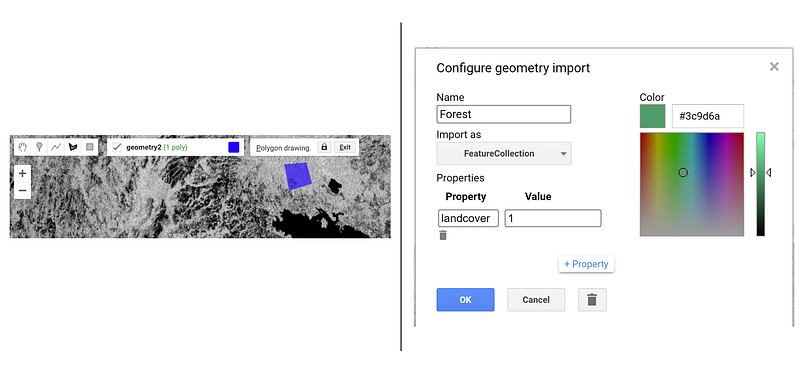
Now that all three classes have been imported into GEE as feature collections with class values 1 (forest), 2 (non-forest), and 3 (water), the next step involves merging these feature collections. Following this, define the bands necessary to train the data, proceed to train the classifier, and initiate the classification process.
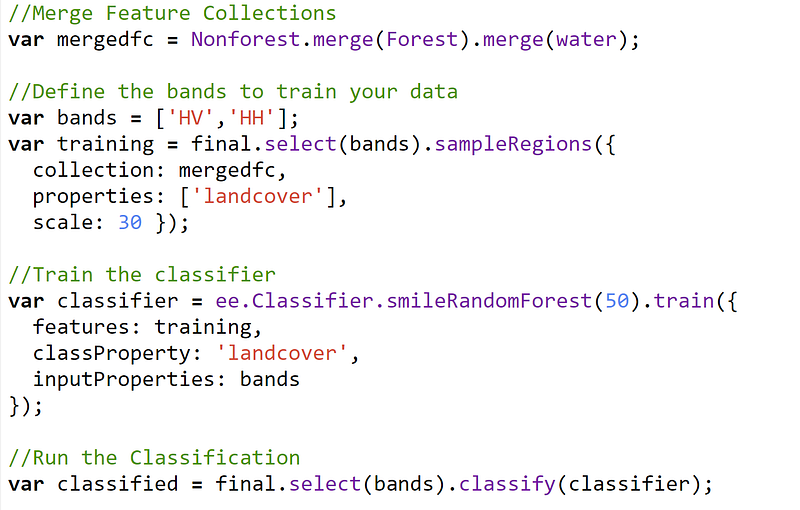
Random forest algorithm creates a set of decision trees from a sample of training data. It builds a committee of a number of individual decision tree classifiers and the votes cast by each tree are later combined to make a decision based on the majority votes derived. It takes a random set of 2/3 of training samples to build the decision trees and uses the remaining 1/3 of the sample to estimate error and importance of predictor variables. The number of trees I have used here is 50 — you can tweak it and experiment to see changes in classification.
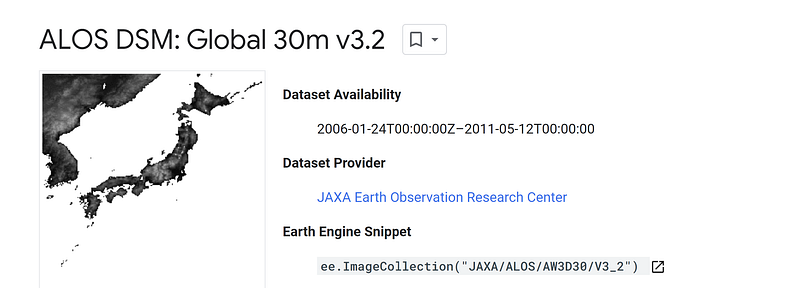
I wanted to improve the classification further and decided to include more bands. I added the slope and elevation bands from the ALOS World Digital Surface Model elevation (DSM) to the existing SAR bands and trained the classifier using the new bands. Read more about the DSM HERE.
I trained the classifier again with the bands — HH, HV, elevation and slope and the results surprised me! Before I show the comparison between the results, I want to mention that I created a confusion matrix. But this was based on the training data and hence it is not a true representation of accuracy. You need to create an independent dataset or a new testing set of polygons and run the confusion matrix on it to check the true accuracy of the classifier!
Results
The comparison depicted in figure (3) illustrates the differences between classified maps generated by running the classification solely on the SAR bands (HH and HV) versus incorporating additional variables such as elevation and slope.
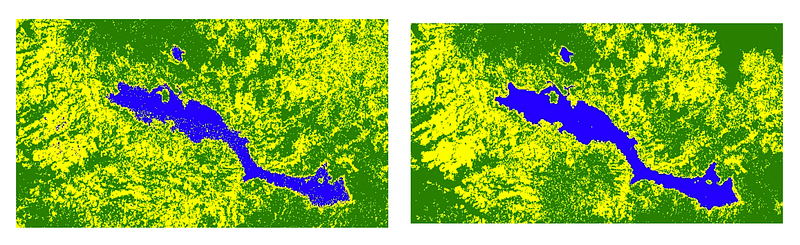
Clearly, you can see the difference. More the bands, better the classification. A random forest variable importance plot gives a better understanding of the input variables that are important for the classification.
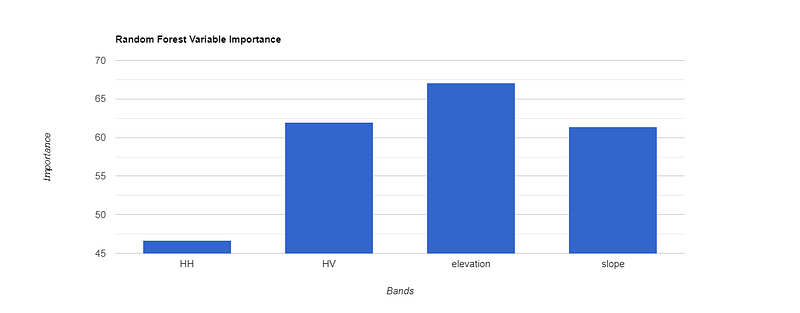
Notice that elevation is the most important variable followed by HV for this FNF classification!
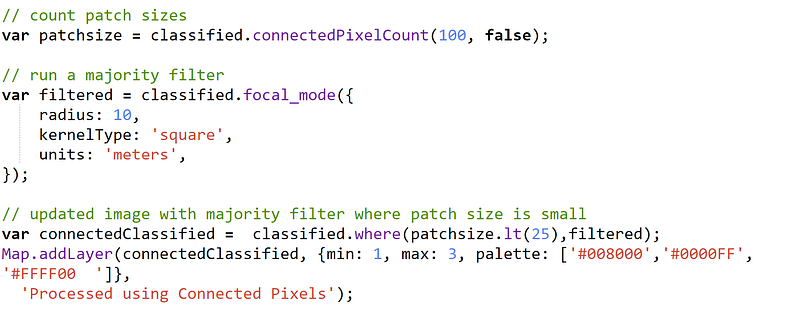
As a next step, post classification cleaning was performed by applying a majority filter as shown below.
Key notes: a few tips to improvise the classification further
- Further improve the classification by adding more bands such as the Gray Level Co-occurrence Matrix texture measures extracted from the SAR images and SAR ratio images (HH/HV)
- You can tune the RF model parameters and experiment with them. Read more in [2][3][4]
- As mentioned before, create a new testing dataset and perform the accuracy assessment.
- Understanding the topography of the study area is crucial. In mountainous regions, it becomes essential to implement terrain correction techniques.
- Consider the possible error sources that can occur in a SAR image:
- Error sources in SAR image classification include shadows, incidence angle variations, and moisture content. It’s advisable to check weather conditions since although SAR is generally not impacted by weather, errors can arise, especially when the ground is wet. Changes in the dielectric constant due to moisture content, and errors induced by freezing conditions, should also be considered.
FNF maps enable continuous monitoring of changes in forest cover over time. By comparing FNF maps from different time periods, researchers and policymakers can assess deforestation, reforestation, and forest degradation trends, helping guide conservation efforts and land management strategies.
Do let me know what you use the FNF maps for and what approaches you prefer! This will help us learn and grow together!
If you liked this article, then consider clapping for it! You also may want to follow me for more stories like this or subscribe to my email https://medium.com/@preet.balaji20/subscribe. Thank you for your support!
References
[1]https://developers.google.com/earth-engine/datasets/tags/landcover
[2] Gandhi, Ujaval, 2021. End-to-End Google Earth Engine Course. Spatial Thoughts. https://courses.spatialthoughts.com/end-to-end-gee.html
[3] Breiman, L., 2001. Random Forests. Mach. Learn. 45, 5–32. https://doi.org/10.1023/A:1010933404324
[4] Gislason, P.O., Benediktsson, J.A., Sveinsson, J.R., 2006b. Random Forests for land cover classification. Pattern Recognit. Lett., Pattern Recognition in Remote Sensing (PRRS 2004) 27, 294–300. https://doi.org/10.1016/j.patrec.2005.08.011


