
RxJava: Multi-Threading in Android
A detailed guide on how to master RxJava

RxJava has been in the development market for a long time but while interacting with some of my colleagues, I found out that many people haven’t started using RxJava because they are unaware of the benefits it provides.
Although there are many articles, I am writing this post to explain how easily one can get accustomed to using RxJava. At the starting point, everything is new, like the terminology and what to use.
We need to continue working with it so we get habituated and understand it. In this post, we will discuss the basics of RxJava and some useful insights.
What Is RxJava
RxJava is a Java VM implementation of Reactive Extensions: a library for composing asynchronous and event-based programs by using observable sequences.
Simply, we can define it as an API for asynchronous programming with observable streams. It is a combination of the best ideas from the observer pattern, the iterator pattern, and functional programming.
It extends the observer pattern to support sequences of data/events and adds operators that allow you to compose sequences together declaratively while abstracting away concerns about things like low-level threading, synchronization, thread-safety, and concurrent data structures.
In other words, we can say that data emitted by one component and the underlying structure provided by the Rx libraries will propagate those changes to another component that is registered to receive those data changes.
Why Should We Use RxJava?
Before starting to use anything, we need to analyze why we need this thing. Using the Executor Service for threading and AsyncTask for other asynchronous operations can perform our task but we have a lot more pain to manage them properly.
Easy multi-threading
For asynchronous work, thread management is crucial. In many situations, while a task is being performed, we encounter a situation of communicating between a background thread and the main thread.
A simple example is updating the UI while the background thread is being executed. Although it sounds easy, we know how many checks we need to perform before updating the UI.
Rx has made it easier for us so with the use of Rx, we can control the task that we started in a separate thread easily.
Simple error handling
Errors are the most frustrating thing for developers. While performing a lot of complex, asynchronous operations, we encounter errors in many places.
To avoid this we generally use try/catch or some other patchy code to resolve this. But Rx provides a standard approach for handling these errors. It has a standard success and failure delivery approach.
Avoid the callback hell
At any point, if you have made nested network calls, you may know what the pain will be of handling them. But Rx has many operators to resolve these kinds of issues very easily.
Observer Pattern
Let us understand a little bit about the observer pattern. The observer pattern is a software design pattern in which an object, called the subject, maintains a list of its dependents, called observers.
It notifies them automatically of any state changes, usually by calling one of their methods. In simple terms, there will be an Observer that subscribes to the Observable to get notified for the latest data or, say, state changes.
Formula
RxJava to some extent, is all about learning this formula and applying it as per our requirement.
Rx= SCHEDULERS + OBSERVABLE + OBSERVERLet’s analyze and understand each component.
Observable
In RxJava, Observables are the source that emits data to the Observers. For Observers to listen to the Observables, they need to subscribe first.
The instance created after subscribing, in RxJava2, is called Disposable. If the task is completed or to stop listening to Observables, we can unsubscribe by calling the method dispose() on the Disposable instance.
We can think of observables as suppliers. They process and supply the data to other components. It does some work and emits some values.
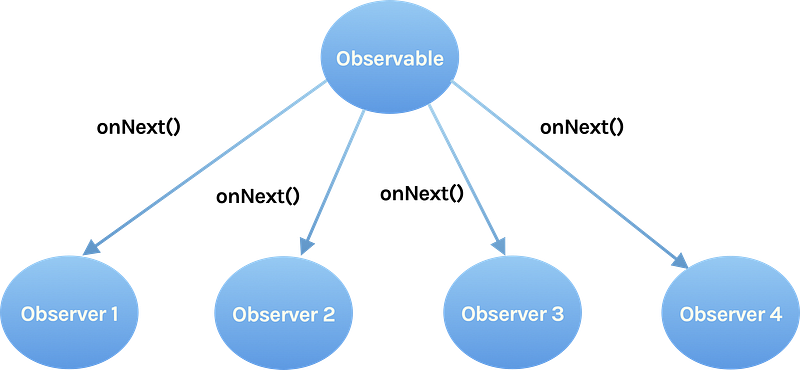
Observable.OnSubscribe is an interface that defines the action to be taken when a subscriber subscribes to the Observable. The subscribe method would only run when an Observer is subscribed to the Observable.
Let’s create a simple Observable.
Observer
Observers are the components that consume the data that is emitted by an observable. In Rx, Observers subscribe to the observable using the subscribe method to receive the data emitted by the observable.
Whenever the observable emits the data, all the registered observers receive the data in the onNext() method callback. Here, we can perform various operations like parsing the JSON response or updating the UI, etc. If there is an error thrown from the observable, the observer will receive it in onError().
There are three basic methods that we should know to understand the Observer.
onNext(): Used to receive data when the observable emits the next item.onError(): Triggered when an error occurs.onComplete(): Called after the last item is emitted. Basically when the work is completed.

Let’s create a simple Observer instance.
Let’s subscribe to the observable with the observer.
observableObject.subscribe(observerInstance);This creates a subscription between the observer and observable. The Observable would now emit values which would be caught by the onNext() of the Observer.
The output from the console is:
Output:
onSubscribe
onNext 10
onNext 20
onNext 30
onComplete
Schedulers
Schedulers are used to specify on which thread the work must be done so this is more useful in the case of thread management.
In Rx, schedulers are the components that tell the Observable or Observer on which thread they should run.
We can use subscribeOn() to tell the Observable on which thread it should run and we can use observeOn() to tell the observable on which thread they should emit the data.
There are many Schedulers but we will discuss three main Schedulers that we use mostly.
Schedulers.io()
Generally used for IO related stuff such as network requests, file system operations, etc. IO Scheduler is backed by a thread-pool. We generally use it as:
observableInstance.subscribeOn(Schedulers.io())Returns a default, shared Scheduler instance intended for IO-bound work. This can be used for asynchronously performing blocking IO operations.
This implementation works similarly to ThreadPoolExecutor from java.util.concurrent with an unbounded pool of threads.
The implementation is backed by a pool of single-threaded ScheduledExecutorService instances that will try to reuse previously started instances used by the worker, otherwise they will start a new backing ScheduledExecutorService instance.
Note that this Scheduler may create an unbounded number of worker threads that can result in system slowdowns or OutOfMemoryError. Therefore, for casual uses or when implementing an operator, the Worker instances must be disposed of.
We can control certain properties of this standard scheduler via system properties that have to be set before the Scheduler class is referenced in your code. Supported system properties System.getProperty().
Keep-alive time of the io() Scheduler workers, by default, is 60 seconds and Thread priority of the io() Scheduler, by default, is NORM_PRIORITY.
The following method in the Rx framework gets invoked when we call Schedulers.io() from any part of our app:
@NonNull
public static Scheduler io() {
    return RxJavaPlugins.onIoScheduler(IO);
}
Schedulers.computation()
This scheduler can be used to perform CPU-intensive operations like processing huge data, bitmap processing, etc. The number of threads created using this scheduler completely depends on the number of CPU cores available on mobile.
So, if you have two cores on your mobile, it will have two threads in the pool. This also means that if these two threads are busy then the process will have to wait for them to be available.
As this limits the number of threads running in parallel, we should use a computation scheduler when tasks are entirely CPU-bound; that is when they require computational power and have no blocking code.
observableInstance.subscribeOn(Schedulers.computation())AndroidSchedulers.mainThread()
This Scheduler is provided by the Rx Android library with the package name io.reactivex.android.schedulers.
This scheduler is used to bring back the execution to the main thread so that UI updates can be done when required. This is usually used with observeOn() as shown below.
observableInstance.observeOn(AndroidSchedulers.mainThread())Example
Let’s better understand all these components with an example.
Step 1
Add dependencies to app-level build.gradle.
//RxJava
implementation 'io.reactivex.rxjava2:rxjava:2.2.8'
//RxAndroid
implementation 'io.reactivex.rxjava2:rxandroid:2.1.1'//ViewModel
implementation 'androidx.lifecycle:lifecycle-viewmodel-ktx:2.2.0'Step 2
Let’s first understand some methods before diving in, like subscribeOn() and observeOn().
subscribeOn(): This is the method that tells the Observables on which thread they should run. Wherever you put the subscribeOn() method in the chain of observables, it only acts on the root observable and controls on which thread it should run.
There should be only one subscribeOn() per observable that defines its thread of execution. Although we define multiple subscribeOn() methods, the one which is closest to the root observable will have the effect, no others.
If we have a chain of observables, the root observable is the one from which the emissions originate.
observeOn(): This method tells on which thread all subsequent operators will execute (until another observeOn is encountered), it may appear multiple times in the chain, changing execution thread of different code pieces.
This is the method that tells the Observers on which thread they should consume the emitted values by Observable. If we have defined subscribeOn() on an observable and not specified observeOn() then the Observer will consume the items on that particular thread only.
Use case
Generally, we do network requests on the Scheduler.io() which runs in a separate worker thread but we need to specify the observeOn() with AndroidSchedulers.mainThread() to consume the data emitted to update the UI.
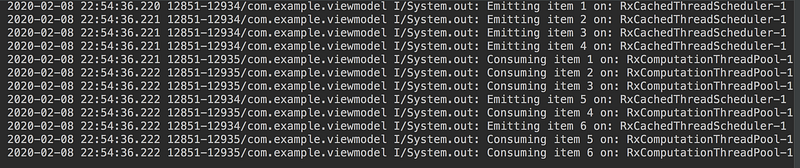
Let us create a simple app that has an activity and in which, on a button click, calls the method on the ViewModel to fetch the data either from the remote repo or local computation to check how multithreading is being performed with Rx.
Let's go through the ViewModel logic.
Output is:
Step 3
Analysis. As we observe the method in the ViewModel, we can understand that:
CompositeDisposable: A disposable container that can hold onto multiple other disposables and offers O(1) for addition and removal complexity.subscribe(): This method has two parts, success and failure blocks, where we can handle each case as per the requirement.subscribeOn()andobserveOn():subscribeOn()is used to specify on which thread the Observable should perform its work andobserveOn()is used to specify on which thread the Observable should emit the items.onCleared(): This is the overridden method ofViewModelwhere we can dispose of all the disposables. This method is called whenViewModelis getting destroyed.
Bonus
Eager to learn more about Rx please continue your reading on the Series Complete Guide on RxJava.
Conclusion
That’s not all there is to know about RxJava; there is much more to explore like different ways to create an Observable and types of Observables, operators, etc.
I will be writing about each of these in my upcoming posts. Let’s keep learning.
Please let me know your suggestions and comments.
Thanks for reading.


