
Running Go Unit Tests Inside a Docker Container
99% of the time, I can simply unit test my project locally without any issues. However, occasionally I run into a situation where I need some 3rd party software installed for the application to work properly, which I just don’t want to install on my laptop. You may also not be able to install software on your laptop/PC due to security rules of your organization. This usually results in incomplete unit tests, as I can’t fully test the functionality of the code dependent on the 3rd party software. Luckily, we can utilize Docker for this very scenario and get complete unit test coverage.
Before we get started, this post can absolutely apply to any language where you have a need to run tests inside a Docker container. However, for this post, we’ll be looking at a Go project where I found myself in need of this very thing.
The Setup
For this project, I was playing with Go’s templating engine via thehttp/templatepackage. I’m taking the output of that templating and saving it as an HTML file, then converting that to a PDF. To handle the PDF conversion, I’m using an open-source command-line tool called wkhtmltopdf. This is a very simple tool that can run headless which is exactly what I need. This is a REST API, using the Goji framework, which is meant to run in a Docker container. Getting wkhtmltopdf installed is no problem, as you can see in my Dockerfile.
FROM golang:latest as BUILDWORKDIR builddirCOPY . .RUN CGO_ENABLED=0 GOOS=linux GOARCH=amd64 go build -ldflags="-s -w" -o go-goji-templating-pdf-generation-apiFROM alpine:3.12.0RUN apk update && \ apk add xvfb ttf-freefont fontconfig wkhtmltopdf ghostscriptCOPY --from=BUILD ./go/builddir/go-goji-templating-pdf-generation-api .ENTRYPOINT ["./go-goji-templating-pdf-generation-api"]This is pretty straight-forward but let’s unpack it. First, we’re performing a multi-stage build, using a Golang Docker image to perform the actual build. Next, we use an Alpine container to keep the size as small as possible and install some dependencies, one of which is wkhtmltopdf. The other packages are needed for things like CSS rendering and compression. Finally, we copy the build from the previous step and we’re done.
Invoking wkhtmltopdf is simple enough using the os/execpackage. In this function, we accept a path to where the HTML file exists, as well as the PDF to where we want the PDF to be output.
func ConvertHTMLtoPDF(htmlFilePath string, pdfFilePath string) error { args := []string{htmlFilePath, pdfFilePath} cmd := exec.Command("wkhtmltopdf", args...) err := cmd.Run() if err != nil { log.Print(err) return err}
return nil}
This is a nice simple function, that is very easy to test. Unless you don’t have wkhtmltopdf installed on the machine running the tests! At this point, I have just one option, run a negative test by calling the function, and inspecting the error. You will get back an error of “exec: “wkhtmltopdf”: executable file not found in $PATH”. While this bumps up your lines of coverage metric, it's not really testing your code.
Docker to the Rescue
To run our unit tests in Docker we need to create a new container with wkhtmltopdf installed along with our uncompiled code. This Dockerfile looks like the following.
FROM golang:latest as BUILDRUN apt-get update && \ apt-get install -y xvfb wkhtmltopdf ghostscriptWORKDIR testdirCOPY . .ENTRYPOINT ["go", "test", "-v", "./...", "-coverprofile", "cover.out"]This Dockerfile is much more streamlined than before. We can use the Golang base image as we’re less concerned with size for running tests. Also, we can install fewer packages, as for unit tests I don’t care about the CSS rendering, just PDF conversion. Finally, we make the entrypoint our go test command, with a coverage report for good measure. We need this file Dockerfile.testas we only use this one for running tests.
We can now build this container with the following command:
docker build -t github.com/atkinsonbg/go-goji-templating-pdf-generation/api/tests:latest -f Dockerfile.test .And we can run the container with the following command:
docker run github.com/atkinsonbg/go-goji-templating-pdf-generation/api/tests:latestRunning this command produces an output of all our tests in the terminal and we can successfully test wkhtmltopdf without installing it locally! This is great on so many levels. If you’re working on a team of developers, you don’t have to worry about local setup. If your organization won’t allow 3rd party software to be installed locally, no worries. If you’re like me, and just prefer a pristine laptop, then you’re golden. If your CI/CD pipeline supports Docker containers, you can even now test this via your pipeline! Life is good.
But wait, what about our coverage report! We’re running our tests successfully, but our coverage report is in the container! We need that back out so we can have a record of our test coverage. Not a problem, all we need to do is mount a volume to get the coverage report out. We can do this by updating our run command with a volume mount:
docker run -v ${PWD}:/go/testdir github.com/atkinsonbg/go-goji-templating-pdf-generation/api/tests:latestWith this new command, we’re simply mounting our current working directory to the work directory we created in the Dockerfile.test file. Just in case you missed it, we’re operating in a Golang container and using go mods, so we have to be in a working directory that is not root. As such, our mount needs to reference the root “go” folder to work properly.
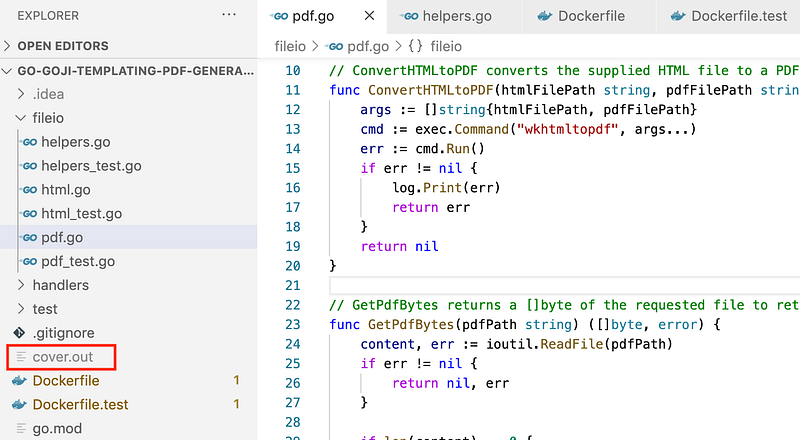
Running this new command will drop the coverage report into our repo.
Wrapping Up
Docker continues to be an essential part of my daily development. Even in this very simple example, you can see the power and flexibility it provides. As stated before, this is not directly tied to Go. If you have needs like this in any development project, Docker can solve them for you.
