
Run GPTQ, GGML, GGUF… on Apple Silicon?
A community sharing effort on the topic: GPU does not mean NVidia. Mac M1/M2 Metal support and AMD GPUs have their own game too.
Quantized Models are on trend. The Trend of Enabling Large Language Models on Consumer Hardware The advent of large language models has revolutionized natural language processing and driven significant advancements in AI-powered applications. However, their resource-intensive nature has posed challenges when it comes to deployment on consumer hardware.
The biggest problem is the total hegemony of the NVidia hardware: you can have a powerful Mac Silicon or a really performing AMD graphic card, and yet many of the LLM libraries lacks of the requirements to make use of them.
In this article I will report the answers of many Medium readers demanding how can we run Quantized models on Mac Silicon computers. Here the things I learned from them and I would like to share:
The state of the art and Quantization in general
Feedback from Mac M1/M2 users (Apple Silicon)
How to install and use GGUF/GGML with llama-ccp-python
And what about CTransformers on M1/M2?
Prompt templates as a pro
ConclusionsDisclaimer: I don’t have a Mac Silicon machine. I am going to collect here the strategies of other users, hoping more are going to contribute in the Medium Community
The situation in general
Large language models, such as GPT-3, have traditionally demanded substantial computational resources and memory capacity, making their deployment limited to high-end servers or cloud-based infrastructure.
This has posed hurdles for individuals and organizations looking to leverage the power of these models on everyday devices like smartphones, tablets, and personal computers. Quantized models have emerged as a solution to this problem by enabling the use of large language models on consumer hardware efficiently.
Quantization for Efficiency
Quantization involves reducing the precision or bit-width of numerical values in a model, thereby reducing the memory footprint and computational requirements. By applying quantization techniques to large language models, it becomes possible to compress them to a size that can be accommodated by consumer hardware without sacrificing performance significantly.

There are 2 main formats for quantized models: GGML (now called GGUF) and GPTQ.
GGML/GGUF is a C library for machine learning (ML) — the “GG” refers to the initials of its originator (Georgi Gerganov). This format is good for people that does not have a GPU, or they have a really weak one. It runs on CPU only.
GPTQ is also a library that uses the GPU and quantize (reduce) the precision of the Model weights. Generative Post-Trained Quantization files can reduce 4 times the original model. If you have a GPU this format is the right one. You can read more here:
A reply received in the mentioned above article gave me some push to write a little bit more.
Alessandro Borges reminded me to point out the differences in terms of performance: GGML/GGUF will always be slower than GPTQ, even if we offload some of the weights to the GPU.
You should mention the performance on inference speed. In the current version, the inference on GPTQ is 2–3 faster than GGUF, using the same foundation model. GGUF is slower even when you load all layers to GPU. It just relieves the CPU a little bit but has minimal performance gain.
So certainly the GPTQ version is the best option… but test it yoursef and decide how much is it for you in terms of setup/time/benefits. 😁
Feedback from Mac M1/M2 users (Apple Silicon)
Andreas Kunar replied to me in the article with some really interesting remarks: he was also kind enough to share with some of the instructions to run the GGML/GGUF models on Mac M2. Let’s start first with the remarks, because they are quite important, and clearly explaining the quantization inference using both CPU&GPU:
What I find a tiny bit misleading is your “GPU” naming. You associate GPU only with having dedicated Nvidia and AMD GPU-chips. However Apple silicon Macs come with interesting integrated GPUs and shared memory. E.g. in the case of the M2 Max GPU it has up to 4864 ALUs , and can use up to 96GB (512Bit wide, 4x the width of the base M2) RAM — much more RAM than any non-workstation/server’s dedicated GPU, and faster than most Intel/AMD CPU-memory.
This is indeed one problem: as I mentioned in the Introduction, there is an NVidia-centric focus. I mean even my MacBook Pro Intel does have a GPU, but it is not supported by any of the LLM libraries, so far 😂, moreover not for pytorch.
Andreas Kunar is using llama.cpp: I strongly suggest any of the Mac users to do the same! For the following reasons:
- llama.cpp python bindings are great and easy to use
- llama.cpp supports many model families, also to offload to GPU some layers
- llama.cpp is easily integrated with langchain for advanced prompt templates, RAG and so on.
If you like you can have a look at this article were I used llama-cpp-python to run 3 different Models.
Here some more supportive motivation…
“llama.cpp” is able to use this fully (parameter “-ngl 1” from terminal or e.g. “n_gpu_layers=1” in llama-cpp-python calls) and this yields MUCH faster performance if running on the integrated GPU vs. just on the CPU. It does this for all Apple silicon Macs as well as Nvidia/AMD GPUs (but for these with gpu-layer parameter tweaks, depending on the GPU used).
Andreas then is giving us the benchmarks for the performance you can achieve with the quantized model:
E.g. with GPU instead of CPU, the M2 Max for me is 3x faster with llama.cpp than a base M2, even though its standard multi-core performance benchmark numbers just suggests 1.5x.
With its 96GB my M2 Max runs 4-Bit (Q4_1) 70B llama-2-chat with 7.6 token/s. For llama-2-chat 7B Q4_K_S its 60 token/s on M2 Max GPU (20 on the M2 MacBook Air GPU), 20 on M2 Max CPU (14 on the M2 CPU).
How to install and use GGUF/GGML with llama-ccp-python
I encourage you to always create a virtual environment. Skip this part if you usually use Conda: it will be covered shortly.
python3.10 -m venv venvIt is recommended to use python3.10 for clear support on llama.cpp and the Ctransformers. Activate the virtual environment:
source venv/bin/activateAccording to Andreas..
As for llama.cpp itself and llama-cpp-python, they both install/compile on Apple silicon hardware MacOS automatically with Metal support enabled by default. But it needs to be used also with the correct switches on invocation (n gpu layers)…
To be more clear we will use the triggers according to the official page: note that there it suggests to use Conda for the virtual environment. If you usually use Conda, skip my previous step and go for your usual way…
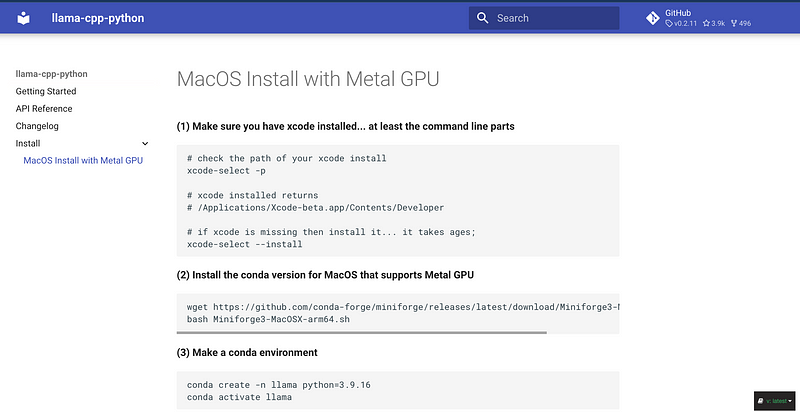
NOTE: make sure to have xcode installed!
Now it comes the good part:
Install the LATEST llama-cpp-python…which happily supports MacOS Metal GPU as of version 0.1.62 (you needed xcode installed in order pip to build/compile the C++ code)
pip uninstall llama-cpp-python -y
CMAKE_ARGS="-DLLAMA_METAL=on" pip install -U llama-cpp-python --no-cache-dir
pip install 'llama-cpp-python[server]'

# you should now have llama-cpp-python v0.1.62 or higher installed
llama-cpp-python         0.1.68
First we are uninstalling every other version of llama-cpp-python, and then we invoke the make from source with few CMAKE arguments.
Thanks to his reply to my previous article we also have some code snippets to start using llama-ccp-python with your chosen model (GGUF or GGML):
from llama_cpp import Llama
llm = Llama(model_path=<model>,
n_threads = <number of performance-cores>,
n_gpu_layers=<0 for CPU only, 1 for Metal, otherwise dependent on GPU-type>,
<all other params like context-size,...> )
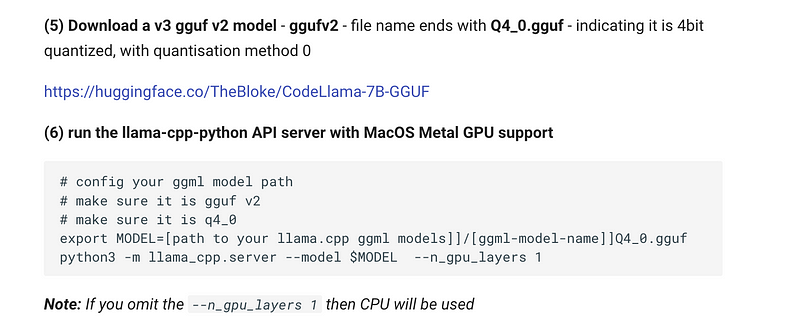
You can always refer to the official documentation to see some examples:
And what about CTransformers on M1/M2?
Andreas Kunar explained to me something I was not aware:
I just read on marella/ctransformers, that ctransformers only supports Metal for LLaMA/LLaMa2 models. Other than llama.cpp or llama-cpp-python, which supports a lot of models.
So, except you want to run Llama2, it is not a good choice to use CTransformers: better to stick to llama.cpp. But in case Llama2 is your preference on the GitHub repo there are instructions to build from source CTransformers with Metal support (Apple Silicon M1 and M2):

CT_METAL=1 pip install ctransformers --no-binary ctransformers
QueryType posted to me his own setup on Mac with CTransformers. He says that the trick is in the Configuration:
For M1/M2, we need to specifically instruct to offload to gpu. For example, on M2, I did,
conf = AutoConfig(Config(temperature=0.7,
                         repetition_penalty=1.1, batch_size=52,
                         max_new_tokens=1024, context_length=2048,
                         threads=8, gpu_layers=1))
to offload to GPU. threads =8 since M2 mac mini is a 8 core CPU machine.
Prompt templates as a pro
I see many of us struggling with f-strings and formatting of the prompt templates.
Lidia Pierre gave me an amazing feedback. It is about using the Jinja template strings or the ChatML format language structure for the prompt template. Let’s hear it directly from her:
I just wanted to share a tip (and actually best practice), you can now use the HuggingFace chat templates for every model to correctly format prompts, see this HF blog post https://huggingface.co/blog/chat-templates. Basically, you need to have your messages in a dict format like
messages = [{"role": "user", "content": "Hi there!"},
            {"role": "assistant", "content": "Nice to meet you!"}]
Then use the tokenizer as follows (here for Mistral7):
tokenizer = AutoTokenizer.from_pretrained("mistralai/Mistral-7B-v0.1")
tokenizer.apply_chat_template(messages, tokenize=False)
Magic! No need to create f-strings, and no more typos that cause hard-to-detect performance deterioration down the line :)
I believe this is certainly a good strategy. It is also a really smart idea because you can easily store in a structured format all your templates and call them at convenience from a single source.
Conclusions
It may looks like I just put together things from different sources… The reality is that I learned most of the LLM strategies here on Medium. And I think that make quality information, tips and tricks and new ideas is the best way to learn and give back what I received.
It is always about Challenges and Advancements: for example while quantized models offer great promise, challenges persist. One primary concern is striking a balance between model compression and accuracy preservation.
The same goes for active explorer of the LLM/AI ecosystem like us: pioneers are showing us new ways, and we strive to make this new path accessible and understandable.
If you have some remarks on the codes or instructions mentioned here, please leave your comments to the article so I can share here for everybody.
If this story provided value and you like the topics consider subscribing to Medium to unlock more resources. Medium is a big community with high quality content: you can certainly find here what you need.
- Sign up for a Medium membership using my link — ($5/month to read unlimited Medium stories)
- Follow me on Medium
- Highlight what you want to remember and if you have doubts or suggestions simply drop a comment to the article: I will promptly reply to you
- Read my latest articles https://medium.com/@fabio.matricardi
Don you want to read more? Here some topics


