
Ruby on Rails: HTTP, MVC and Routes
The web and Ruby on Rails request-response cycle
After learning your first programming language, you may ask what can you do with programming: AI / Machine Learning? Hardware development? Mobile apps? Or maybe you want to start developing web applications! :)
Here we’ll understand the basics of how the web, the routes, and the MVC architecture work, using Ruby on Rails web framework. Let’s dive into the web world!
Before learning web development with Rails, I really recommend learning about Ruby first.
How does the web work?
The web has a bunch of layers (Application, TCP, Internet, Hardware layers) all connected, but basically, it works through HTTP (Hypertext Transfer Protocol).
The Hypertext Transfer Protocol (HTTP) is an application protocol for distributed, collaborative, hypermedia information systems. — Wikipedia
The HTTP works like a request — response cycle in the client — server model.
We have a web browser (Google Chrome, for example). So we write www.google.com URL, the client submits the HTTP request (request message) to the server. The server returns the HTTP response (response message — in that case, the response is the HTML from google website).
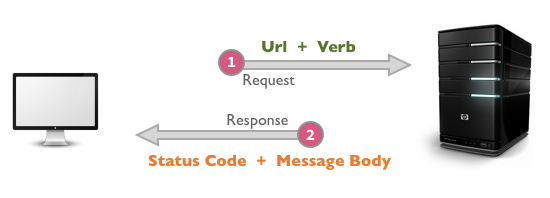
The client does the request and receives the response from the server. The client handles the UI and user interactions. On the server, we can store and retrieve data (on databases), process logic on the background (workers/jobs), and a lot of other things.
If you want to deeply understand it, I’ll suggest some resources. I am a big fan of Preethi’s posts. Here a series of 3 parts:
- A Primer for Newcomers to Web Development
- Client-Server Model & the Structure of a Web Application
- HTTP & REST
The MVC architecture and Rails Routes
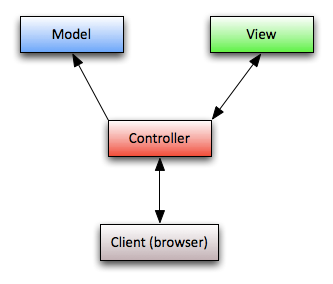
Now we understand how the web works, we’ll study the MVC architecture and Rails Routes.
MVC stands for Model (M), View (V), and Controller ©.
On this architecture, we have the “separation of the concerns” among Models, Views and, Controllers. Each part has its own responsibility. Let’s dive in each part.
Model
“Maintains the relationship between Object and Database and handles validation, association, transactions”
It means that the model will maintain an extreme relation with the Database. Each model (can) represent a database table (in case of SQL databases). This model object gains capabilities (inherited from ActiveRecord — Rails class) to retrieve, save, edit, and delete data from database table. We use model objects as a layer between our application and the database.
Besides that relation with the database, the model can create validations and associations between models.
View
“A presentation of data in a particular format, triggered by a controller’s decision to present the data.”
It is the presentation of the request’s response. This presentation can be a bunch of format types: PDF, HTML, JSON, etc. The final result of a view will be probably the user interface (UI) — Part of the “Client”.
For most pages on the web, the views will be an HTML styled with CSS and JS. But we can implement PDFs of user behavior on a Travel digital product to show all employees how people use their website too.
Controller
“The facility within the application that directs traffic, on the one hand querying the models for specific data, and on the other hand organizing that data (searching, sorting) into a form that fits the needs of a given view.”
The controller is the “Maestro”. It takes care of the flow: uses models to do queries, parses data, make decisions in which format you’ll present the data.
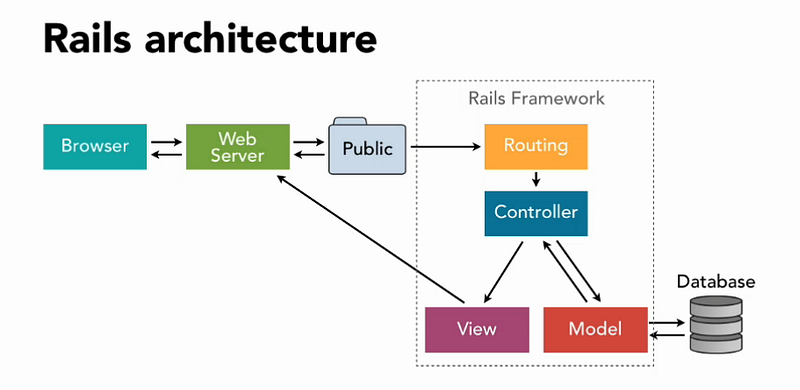
MVC & Routes cycle on a Rails application
So imagine we work at a Travel Startup. Part of the product is to present for travelers a list of great articles about travel stories and tips.
Just think in the traveler perspective. You go to www.worldpackers.com/articles and you see a beautiful page listing a bunch of great articles.
The time you digit this URL in the browser, it makes a request to the server. In the server, we have the Rails web application. The Rails Router verifies if there is an entry matching the requested URL.
We just need to configure the routes for this line:
This will create RESTful routes for articles. If we run bundle exec rake routes, it will show the list of paths created.
The HTTP Verb can be GET, POST, PATCH, PUT, or DELETE. And we know how Rails maps each PATH to the right controller and action. Read more here.
In our case, the server will receive /articles path and GET as HTTP Verb. It will map to ArticlesController and index action.
In the controller ArticlesController we use the model Article to get all articles in the database and render the view index.html.erb as the server response (the UI).
By convention, this controller will render the view in views/articles/index.html.erb. Basically it’s a plain HTML file powered by Ruby.
The Rails request-response cycle is one of the first concepts you need to understand when you start learning web development.
The user does stuff (request to the server), the Rails application has the router to map the URL path to the right controller. In the controller, we can do all things with a model (or more than one model) — meaning getting, saving, editing, deleting data — and render a view to the user.
That’s all!
We learned a lot here. I hope you guys could appreciate the content and learn more about how the MVC architecture and the routing work on Rails.
This is one more step forward in my journey to learning and mastering Rails and web development. You can see the documentation of my complete journey here on my Renaissance Developer publication.
Have fun, keep learning and coding.
I hope you liked this content. Support my work on Ko-Fi