avatarLuke Sun

Free AI web copilot to create summaries, insights and extended knowledge, download it at here

3635

Abstract

s://grouplens.org/datasets/movielens/">here</a>. Briefly looking at the data in Figure 3, <b>Movies</b> data contain names and types of movies, <b>Ratings</b> data contains user ID, movie ID, user rating from 0 to 5 and timestamps, and <b>User</b> data contain user ID, gender, age, job code, and zip code.</p><figure id="6eb0"><img src="https://cdn-images-1.readmedium.com/v2/resize:fit:800/1*LPHmZk8glcWtLaCv4IC3eQ.png"><figcaption>Fig.3 Snippet of source dataset</figcaption></figure><p id="b33d">3.1 Import data</p><p id="2351">The dataset contains 80,000 rows for the training set and 20,000 rows for the test set. Let’s read in them. Specifically,</p><div id="5558"><pre><span class="hljs-attr">training_set</span> = pd.read_csv(‘ml-<span class="hljs-number">100</span>k/u1.base’, delimiter = ‘\t’) <span class="hljs-attr">training_set</span> = np.array(training_set, dtype = ‘int’)</pre></div><div id="00bc"><pre><span class="hljs-attr">test_set</span> = pd.read_csv(‘ml-<span class="hljs-number">100</span>k/u1.test’, delimiter = ‘\t’) <span class="hljs-attr">test_set</span> = np.array(test_set, dtype = ‘int’)</pre></div><p id="c9d6"><b>Note we convert Dataframe to Numpy array because we will use Pytorch tensor which requires array as input.</b> Figure 4 shows the training/test set, including user ID, movie ID, rating, and timestamps (irreverent for model training).</p><figure id="e450"><img src="https://cdn-images-1.readmedium.com/v2/resize:fit:800/1*b40AwXK9K76ih2-Uiaq1tQ.png"><figcaption>Fig.4 Snippet of training and test dataset</figcaption></figure><p id="240d">3.2 Data structure creation</p><p id="67ef" type="7">To prepare the training/test data, we need to create training/test sets in array format with each row representing a user and each cell in the row representing the rating for each movie. This is the expected input for RBM.</p><p id="9f7f">To do this, we need the total number of users as row numbers and the total number of movies as a column number.</p><div id="a79a"><pre>nb_users = <span class="hljs-built_in">int</span>(<span class="hljs-built_in">max</span>(<span class="hljs-built_in">max</span>(training_set<span class="hljs-selector-attr">[:, 0]</span>), <span class="hljs-built_in">max</span>(test_set<span class="hljs-selector-attr">[:, 0]</span>))) nb_movies = <span class="hljs-built_in">int</span>(<span class="hljs-built_in">max</span>(<span class="hljs-built_in">max</span>(training_set<span class="hljs-selector-attr">[:, 1]</span>), <span class="hljs-built_in">max</span>(test_set<span class="hljs-selector-attr">[:, 1]</span>)))</pre></div><p id="2428">We create a function for data conversion which returns a list of lists. Each child list represents one user’s ratings for all movies. If the user did not rate a movie, initialize the rating with 0.</p><div id="72ce"><pre><span class="hljs-attribute">def</span> convert(data): <span class="hljs-attribute">new_data</span> =<span class="hljs-meta"> []</span> <span class="hljs-attribute">for</span> id_users in range(<span class="hljs-number">1</span>, nb_users + <span class="hljs-number">1</span>): <span class="hljs-attribute">id_movies</span> = data[:,<span class="hljs-number">1</span>][data[:,<span class="hljs-number">0</span>] == id_users] <span class="hljs-attribute">id_ratings</span> = data[:,<span class="hljs-number">2</span>][data[:,<span class="hljs-number">0</span>] == id_users] <span class="hljs-attribute">ratings</span> = np.zeros(nb_movies) <span class="hljs-attribute">ratings</span>[id_movies — <span class="hljs-number">1</span>] = id_ratings <span class="

Options

hljs-attribute">new_data</span>.append(list(ratings)) <span class="hljs-attribute">return</span> new_data</pre></div><p id="f606">With the above conversion, we convert the training set and test set.</p><div id="0a25"><pre><span class="hljs-attr">training_set</span> = convert(training_set) <span class="hljs-attr">test_set</span> = convert(test_set)</pre></div><p id="947d">Figure 5 shows the final training set. Again, each row contains a user’s ratings for all movies.</p><figure id="0a1c"><img src="https://cdn-images-1.readmedium.com/v2/resize:fit:800/1*WjCNG3iY0x4L26W6UEsD6A.png"><figcaption>Fig.5 Snippet of the final training dataset</figcaption></figure><p id="6565">Finally, we convert the <b>list of list</b> type into <b>Tensor</b> because we will use Pytorch to build the RBM.</p><div id="2f80"><pre><span class="hljs-attr">training_set</span> = torch.FloatTensor(training_set) <span class="hljs-attr">test_set</span> = torch.FloatTensor(test_set)</pre></div><p id="0a1d">3.3 Binary data conversion</p><p id="9b1e">Our task is to predict if users like the movies as 1 and not like as 0. RBM will take the movie ratings by a user and try to predict movies that were not rated by the user. Since the to-be-predicted ratings are computed from the original input, we must keep the input ratings and predicted ratings in a consistent manner.</p><p id="4667">Specifically, rating set as 0 previously is reset to be -1, movies given 1 or 2 are set as 0 (not like), and movies rating over 3 set as 1 (like).</p><div id="2842"><pre>training_set[training_set <span class="hljs-operator">=</span><span class="hljs-operator">=</span> <span class="hljs-number">0</span>] <span class="hljs-operator">=</span> -<span class="hljs-number">1</span> training_set[training_set <span class="hljs-operator">=</span><span class="hljs-operator">=</span> <span class="hljs-number">1</span>] <span class="hljs-operator">=</span> <span class="hljs-number">0</span> training_set[training_set <span class="hljs-operator">=</span><span class="hljs-operator">=</span> <span class="hljs-number">2</span>] <span class="hljs-operator">=</span> <span class="hljs-number">0</span> training_set[training_set ><span class="hljs-operator">=</span> <span class="hljs-number">3</span>] <span class="hljs-operator">=</span> <span class="hljs-number">1</span></pre></div><div id="bd68"><pre>test_set[test_set <span class="hljs-operator">=</span><span class="hljs-operator">=</span> <span class="hljs-number">0</span>] <span class="hljs-operator">=</span> -<span class="hljs-number">1</span> test_set[test_set <span class="hljs-operator">=</span><span class="hljs-operator">=</span> <span class="hljs-number">1</span>] <span class="hljs-operator">=</span> <span class="hljs-number">0</span> test_set[test_set <span class="hljs-operator">=</span><span class="hljs-operator">=</span> <span class="hljs-number">2</span>] <span class="hljs-operator">=</span> <span class="hljs-number">0</span> test_set[test_set ><span class="hljs-operator">=</span> <span class="hljs-number">3</span>] <span class="hljs-operator">=</span> <span class="hljs-number">1</span></pre></div><p id="a6bc">Great. We successfully converted raw to binary rating data, ready to train the model.</p><p id="4410"><b>Great! That’s all for Part 1. The next<a href="https://readmedium.com/restricted-boltzmann-machine-as-a-recommendation-system-for-movie-review-part-2-9a6cab91d85b"> article</a> will walk through how to build an RBM step by step. If you need the source code, visit my <a href="https://github.com/luke4u/Movie-Rating-Prediction">Github </a>page 🤞🤞.</b></p></article></body>

Restricted Boltzmann Machine Creation as Recommendation System for Movie Review (part 1)

Intuitive Introduction on Restricted Boltzmann Machine and Detailed Data Processing Steps for Model Training using Movie Rating Data

Img adapted from unsplash via link

This is Part 1 of how to build a Restricted Boltzmann Machine (RBM) as a recommendation system. Here the focus is on data processing.

What you will learn is how to transform raw movie rating data into data ready to train the RBM model. It is split into 3 parts.

  1. RBM introduction
  2. Problem statement
  3. Data processing

Now let’s begin the journey 🏃‍♂️🏃‍♀️.

  1. RBM introduction

First, let’s start with the Boltzmann machine (BM). BM is a type of unsupervised neural network. Three distinct features characterize BM as illustrated in Figure 1.

  • No output layers
  • No direction between connection
  • Each neuron is densely connected to each other, even between input nodes (visible nodes)
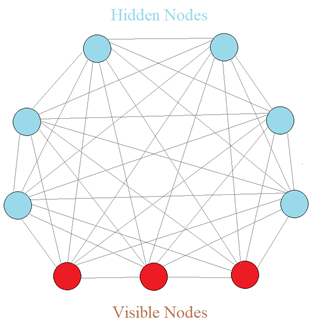
Fig.1 Boltzmann machine diagram (Img created by Author)

Why BM so special? Fundamentally, BM does not expect inputs. On the contrary, it generates states or values of a model on its own. Thus, BM is a generative model, not a deterministic model. BM does not differentiate visible nodes and hidden nodes. Visible nodes are just where we measure values.

However, BM has an issue. As the number of nodes increases, the number of connections increases exponentially, making it impossible to compute a full BM. Therefore, RBM is proposed as Figure 2 shows.
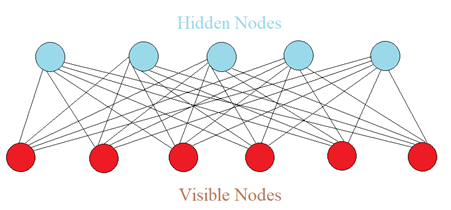
Fig.2 Restricted Boltzmann machine diagram (Img created by Author)

Compared to full BM, RBM does not allow connections between hidden nodes, and connections between visible nodes. This is the only difference 📣📣.

Through the training process, we feed a large amount of data to RBM, RBM learns how to allocate each hidden node to represent features of movies such as genres, actors, directors, etc. In another word, the weight of each node is adjusted in such a way that hidden nodes are better reflective of the features.

Specifically, RBM will accept inputs from visible nodes into hidden nodes. It tries to reconstruct the input values based on hidden node values. If the reconstructed values are incorrect, the weights are adjusted, and RBM reconstructs the input again. In the end, RBM is trained to best represent the system which generates all the data. The benefit is with all weights optimized, RBM can understand what is normal and abnormal for the system.

2. Problem statement

A large amount of movie rating data is given to build an RBM. The task is to predict if a user likes a movie as 1 or dislike as 0.

3. Data processing

The data MovieLens 100K movie ratings are from GroupLens Research here. Briefly looking at the data in Figure 3, Movies data contain names and types of movies, Ratings data contains user ID, movie ID, user rating from 0 to 5 and timestamps, and User data contain user ID, gender, age, job code, and zip code.
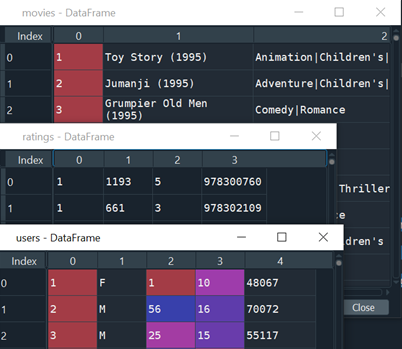
Fig.3 Snippet of source dataset

3.1 Import data

The dataset contains 80,000 rows for the training set and 20,000 rows for the test set. Let’s read in them. Specifically,

training_set = pd.read_csv(‘ml-100k/u1.base’, delimiter = ‘\t’)
training_set = np.array(training_set, dtype = ‘int’)
test_set = pd.read_csv(‘ml-100k/u1.test’, delimiter = ‘\t’)
test_set = np.array(test_set, dtype = ‘int’)

Note we convert Dataframe to Numpy array because we will use Pytorch tensor which requires array as input. Figure 4 shows the training/test set, including user ID, movie ID, rating, and timestamps (irreverent for model training).
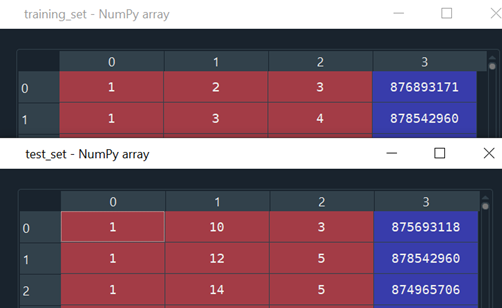
Fig.4 Snippet of training and test dataset

3.2 Data structure creation

To prepare the training/test data, we need to create training/test sets in array format with each row representing a user and each cell in the row representing the rating for each movie. This is the expected input for RBM.

To do this, we need the total number of users as row numbers and the total number of movies as a column number.

nb_users = int(max(max(training_set[:, 0]), max(test_set[:, 0])))
nb_movies = int(max(max(training_set[:, 1]), max(test_set[:, 1])))

We create a function for data conversion which returns a list of lists. Each child list represents one user’s ratings for all movies. If the user did not rate a movie, initialize the rating with 0.

def convert(data):
    new_data = []
    for id_users in range(1, nb_users + 1):
        id_movies = data[:,1][data[:,0] == id_users]
        id_ratings = data[:,2][data[:,0] == id_users]
        ratings = np.zeros(nb_movies)
        ratings[id_movies — 1] = id_ratings
        new_data.append(list(ratings))
    return new_data

With the above conversion, we convert the training set and test set.

training_set = convert(training_set)
test_set = convert(test_set)

Figure 5 shows the final training set. Again, each row contains a user’s ratings for all movies.
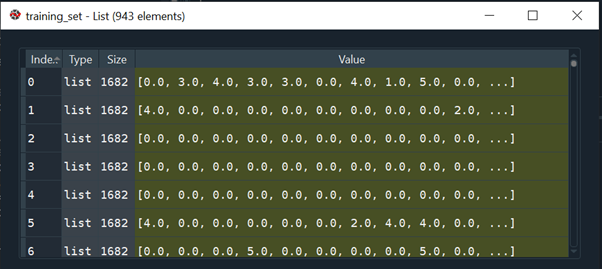
Fig.5 Snippet of the final training dataset

Finally, we convert the list of list type into Tensor because we will use Pytorch to build the RBM.

training_set = torch.FloatTensor(training_set)
test_set = torch.FloatTensor(test_set)

3.3 Binary data conversion

Our task is to predict if users like the movies as 1 and not like as 0. RBM will take the movie ratings by a user and try to predict movies that were not rated by the user. Since the to-be-predicted ratings are computed from the original input, we must keep the input ratings and predicted ratings in a consistent manner.

Specifically, rating set as 0 previously is reset to be -1, movies given 1 or 2 are set as 0 (not like), and movies rating over 3 set as 1 (like).

training_set[training_set == 0] = -1
training_set[training_set == 1] = 0
training_set[training_set == 2] = 0
training_set[training_set >= 3] = 1
test_set[test_set == 0] = -1
test_set[test_set == 1] = 0
test_set[test_set == 2] = 0
test_set[test_set >= 3] = 1

Great. We successfully converted raw to binary rating data, ready to train the model.

Great! That’s all for Part 1. The next article will walk through how to build an RBM step by step. If you need the source code, visit my Github page 🤞🤞.

Boltzmann Machines
Recommendation System
Movie Review
Pytorch
Python3
Recommended from ReadMedium