avatarMartin van Soest

Free AI web copilot to create summaries, insights and extended knowledge, download it at here

3040

Abstract

ew</i>)</li><li>Loading Progress-indicator (🎁 <i>new</i>)</li><li>Improved Export (🧬 <i>improved</i>)</li><li>Improved read times (🧬 <i>improved</i>)</li></ul><h2 id="bc89">Performance Boost and a Fancy New Graph</h2><p id="832d">As I shared earlier, loading the extension could take nearly 10 minutes. I’ve taken the easy way out on this one and removed the culprit (the fancy new graph). Now it only shows after you click a button and confirm that you want to load it.</p><p id="3813">As I did like to have some visual information in the extension, I added a new graph, which shows you your earnings for the previous 6 months:</p><figure id="dc26"><img src="https://cdn-images-1.readmedium.com/v2/resize:fit:800/1*NKt92VW5ltYXO22ZQ0rPXQ.png"><figcaption>The new graph. My poor earnings, but I am happy with them nonetheless. Screenshot by me.</figcaption></figure><p id="7133">The new overview gives you a quick insight into how you are doing this month (blue) compared to the rest (orange). It might help you to stay sane when you are typing out your stories.</p><figure id="cd00"><img src="https://cdn-images-1.readmedium.com/v2/resize:fit:800/1*d-ps9ZrLwGiwTCLJmGe4Kg.png"><figcaption></figcaption></figure><p id="5cf7">The old graph is still available, but you now have to click a button to see it. No more useless waiting. That is, if you disregard waiting for your next potential viral story to kick off.</p><p id="3b76">I’ve now become aware that JavaScript doesn’t handle some kinds of computations in the code very well. I have updated some of the code to speed things up a bit. You shouldn’t experience a huge boost, but I’ll be more careful with unoptimized functions in the future.</p><h2 id="5670">Correct earnings</h2><p id="9fc1">Nothing much to show here, but I finally managed to make sure that the data in the extension matches the partner program dashboard. I’m sorry for those of you that have created exports in the past. They don’t contain all the information.</p><p id="3d0e">If you’re curious about what the bug was, have a look <a href="https://readmedium.com/expect-an-update-soon-earnings-extension-aa431f24d51c">here</a>.</p><h2 id="08b8">Quick Filters</h2><p id="bdec">This extension introduces the first version of some quick filters. I created a couple to kick things off.<i> Let me know in the comments if you want to see some other filters added.</i></p><figure id="5c51"><img src="https://cdn-images-1.readmedium.com/v2/resize:fit:800/1*EQtWvE3eC1UeUx7bOpGPKQ.png"><figcaption>New filters! This year’s/month’s/week’s earnings are just one click away! Screenshot by author.</figcaption></figure><p id="20e2">Note that the weeks starts on the day depending on your locale. For now I am letting the browser figure it out, but I may change this someday to start on Monday.</p><h2 id="a852">When Was The Data Updated?</h2><p id="3f1d">The data in the extension should be synced with the data you pull from the partner program dashboard. But up until when was the data up to date?</p><figure id="c344"><img s

Options

rc="https://cdn-images-1.readmedium.com/v2/resize:fit:800/1*pt-jKVSqCes_V-BU8tP3-A.png"><figcaption>Now showing up until when the data is updated. Screencap by me.</figcaption></figure><p id="c01b">As you might expect from my last update, I don’t want to make any assumptions about when Medium runs their batches for earnings or views. To get the data as shown in the screenshot, I just look at when you have received your last earning and when you have received your last view, so on a very poor day, the dates here might look the same as yesterday.</p><h2 id="a6f0">Loading Progress</h2><figure id="5cbf"><img src="https://cdn-images-1.readmedium.com/v2/resize:fit:800/1*zwN1oGcBnB_FgQfVPqB8DA.png"><figcaption></figcaption></figure><p id="76ac">I don’t know about you, but having to wait isn’t good for my blood pressure. To ease that pain and to make analyzing the wait-times a bit easier I created a little progress indicator.</p><p id="22bf">It’s a bit of a quick hack-but I liked it enough to have it stick around for some mental support.</p><h2 id="d1e2">Improved Export</h2><p id="2938">Maybe Improvement is too big of a word, but now the export uses leading zeroes for months and days. This feature won’t mean a lot to most, but some people that do some automation with the csv will have an easier time to parse the data in their own program (credit to <a href="undefined">Anthony Lawrence (Pcunix)</a> for the suggestion).</p><h2 id="f72f">Read times</h2><p id="08da">Earlier, if your story had been read over 24 hours, the clock would reset and start at 0 again. Now the extension properly displays the number of days. I am not sure if I should revert back to seconds, but I am fond of human-readable formats, so I’ll stick to this for a while, unless I get some devastating feedback. Let me know in the comments what you prefer.</p><p id="1a6a">I prefer to at least see how viral my viral stories went…</p><h2 id="5b2d">Known issues</h2><p id="841d"><i>You know what, I’d best not share this. All of these issues have been fixed anyway. Ready for the sneak peek?</i></p><h1 id="3727">The release that will make it</h1><figure id="3c55"><img src="https://cdn-images-1.readmedium.com/v2/resize:fit:800/1*sq0VzbtZDNj1NtElfFJiSQ.png"><figcaption>The new table for the release! It might not look much (no, I am not talking about my earnings), but do realize I have taken load times from 9 minutes to under 100 milliseconds.</figcaption></figure><p id="8190">So, there you have it. A totally revamped table to show your earnings. I will keep the old table in this release. Next release it is probably gone.</p><p id="9231">My own experience is that, although it takes some getting used to, is that this works a lot better. I am very curious to know what you think.</p><p id="13a4">There are a few other tiny updates as well, but I’ll share those with you in the actual release notes.</p><p id="cbd2">Sorry to keep you waiting. It’s been worth it. I promise.</p><p id="fc6e">Stay tuned for an update sometime soon!</p></article></body>

Chrome extension

Restoring Sanity in 2022 with the Earnings Extension

Packing a punch again

Close enough to punching, right? People photo created by master1305 — www.freepik.com

Early this week I was happily typing out these release notes. I was just about ready to release a new version of the Earnings-extension. Then, when I was reluctantly crafting the ‘Known issues’-section, I did some more elaborate testing.

It was then that I found a, ahem, feature. Let’s not call it a bug, shall we?

A little later I stumbled upon some unexpected behaviour. Let’s not call it a bug, shall we?

Slightly discouraged, I did some more testing and I found yet another oddity.

Let’s not call it a bug, shall we?

Ok, maybe I should call it a bug. Maybe even a couple of bugs. They were not your typical shoulder-shrug-types. They were the kind Apple found when they released their navigation-app. You know… The one that was supposed to get you to your destination, but ended up sending you on the wrong way.

Yeah, those kind of bugs. Being a responsible adult, I postponed the release, got my tools from the shed, and started hammering away the bugs. That’s what they get for punching me in my face!

I am about ready to release my fixes, but I want to do a few more tweaks before I release the extension into the wild. Below you’ll find the release notes that I originally wanted to ship with this version.

Most of it has made it to the new release, but I did some major refactoring and you won’t recognize the main screen anymore! There’s a screenshot at the bottom of this story.

The release notes that didn’t make it

These release notes of an unreleased version are for your pleasure only. They provide a sneak peek as to what’s coming. They’re not totally accurate, as the new version is fabulated up beyond any recognition.

Last year I already posted that the latest release of the Earnings-extension came with a couple of bugs. This update fixes all of this.

And to kick off 2022 properly, I added a few additional things into this release as well. Ready for version 1.1.3? Here’s your package to restore sanity this year:

  • No more tedious waiting for the graph (🩹 bugfix)
  • Showing the actual earnings (🩹 bugfix)
  • Better performance (💉 booster-shot)
  • Replaced the graph with the earnings of the last six months (🎁 new)
  • Added quick-filters (🎁 new)
  • Shows when the data is collected (🎁 new)
  • Loading Progress-indicator (🎁 new)
  • Improved Export (🧬 improved)
  • Improved read times (🧬 improved)

Performance Boost and a Fancy New Graph

As I shared earlier, loading the extension could take nearly 10 minutes. I’ve taken the easy way out on this one and removed the culprit (the fancy new graph). Now it only shows after you click a button and confirm that you want to load it.

As I did like to have some visual information in the extension, I added a new graph, which shows you your earnings for the previous 6 months:
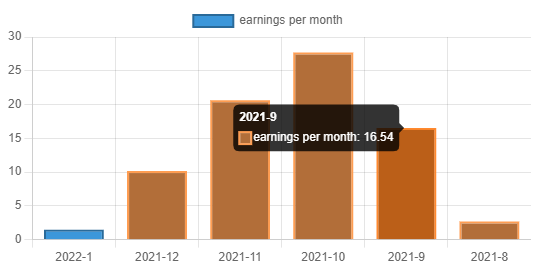
The new graph. My poor earnings, but I am happy with them nonetheless. Screenshot by me.

The new overview gives you a quick insight into how you are doing this month (blue) compared to the rest (orange). It might help you to stay sane when you are typing out your stories.
The old graph is still available, but you now have to click a button to see it. No more useless waiting. That is, if you disregard waiting for your next potential viral story to kick off.

I’ve now become aware that JavaScript doesn’t handle some kinds of computations in the code very well. I have updated some of the code to speed things up a bit. You shouldn’t experience a huge boost, but I’ll be more careful with unoptimized functions in the future.

Correct earnings

Nothing much to show here, but I finally managed to make sure that the data in the extension matches the partner program dashboard. I’m sorry for those of you that have created exports in the past. They don’t contain all the information.

If you’re curious about what the bug was, have a look here.

Quick Filters

This extension introduces the first version of some quick filters. I created a couple to kick things off. Let me know in the comments if you want to see some other filters added.

New filters! This year’s/month’s/week’s earnings are just one click away! Screenshot by author.

Note that the weeks starts on the day depending on your locale. For now I am letting the browser figure it out, but I may change this someday to start on Monday.

When Was The Data Updated?

The data in the extension should be synced with the data you pull from the partner program dashboard. But up until when was the data up to date?

Now showing up until when the data is updated. Screencap by me.

As you might expect from my last update, I don’t want to make any assumptions about when Medium runs their batches for earnings or views. To get the data as shown in the screenshot, I just look at when you have received your last earning and when you have received your last view, so on a very poor day, the dates here might look the same as yesterday.

Loading Progress
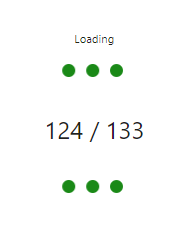
I don’t know about you, but having to wait isn’t good for my blood pressure. To ease that pain and to make analyzing the wait-times a bit easier I created a little progress indicator.

It’s a bit of a quick hack-but I liked it enough to have it stick around for some mental support.

Improved Export

Maybe Improvement is too big of a word, but now the export uses leading zeroes for months and days. This feature won’t mean a lot to most, but some people that do some automation with the csv will have an easier time to parse the data in their own program (credit to Anthony Lawrence (Pcunix) for the suggestion).

Read times

Earlier, if your story had been read over 24 hours, the clock would reset and start at 0 again. Now the extension properly displays the number of days. I am not sure if I should revert back to seconds, but I am fond of human-readable formats, so I’ll stick to this for a while, unless I get some devastating feedback. Let me know in the comments what you prefer.

I prefer to at least see how viral my viral stories went…

Known issues

You know what, I’d best not share this. All of these issues have been fixed anyway. Ready for the sneak peek?

The release that will make it
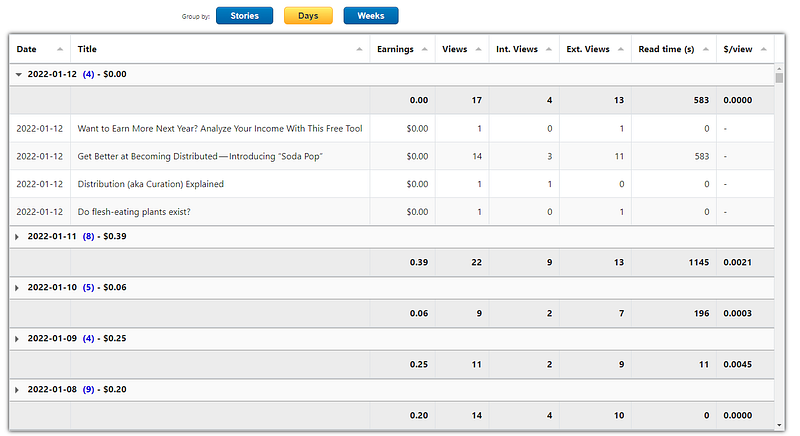
The new table for the release! It might not look much (no, I am not talking about my earnings), but do realize I have taken load times from 9 minutes to under 100 milliseconds.

So, there you have it. A totally revamped table to show your earnings. I will keep the old table in this release. Next release it is probably gone.

My own experience is that, although it takes some getting used to, is that this works a lot better. I am very curious to know what you think.

There are a few other tiny updates as well, but I’ll share those with you in the actual release notes.

Sorry to keep you waiting. It’s been worth it. I promise.

Stay tuned for an update sometime soon!

Chrome Extension
Earnings
Income
Debates Deciphers
Postponed
Recommended from ReadMedium