
Resizing StatefulSet Persistent Volumes with zero downtime

Before we go all hands on into resizing StatefulSet Persistent Volumes, let’s do a brief recap into what are stateful applications, what a StatefulSet is, and how Kubernetes Storage works at a high level.
Stateless vs Stateful applications
A stateless application is one that neither reads nor stores information about its state. By design, containers work best with stateless applications, as Kubernetes is able to create and remove containers in a rapid and dynamic manner.
A stateful application, on the other hand, saves data to persistent disk storage for use by the server, by clients, and by other applications. An example of a stateful application is a database or key-value store to which data is saved and retrieved by other applications.
Kubernetes StatefulSets
StatefulSets are objects used to manage stateful applications. StatefulSets manage the deployment and scaling of a set of Pods, and provides guarantees about the ordering and uniqueness of these Pods.
StatefulSets are valuable for applications that require one or more of the following:
- Stable, unique network identifiers.
- Stable, persistent storage.
- Ordered, graceful deployment and scaling.
- Ordered, automated rolling updates.
It is very common for StatefulSets to make use of some kind of persistent storage.
Kubernetes Storage
The Kubernetes storage architecture is based in the abstraction of volumes. Volumes can be persistent or non-persistent, and Kubernetes allows containers to request storage resources dynamically, using a mechanism called volume claims.
Volume
A Volume is a directory containing data which is accessible to the containers in a Pod. The creation of the directory, the medium that backs it, and the contents of it are determined by the particular volume type used.
Kubernetes supports many types of volumes. Ephemeral volume types have a lifetime of a pod, but persistent volumes exist beyond the lifetime of a pod. When a pod ceases to exist, Kubernetes destroys ephemeral volumes; however, Kubernetes does not destroy persistent volumes. For any kind of volume in a given pod, data is preserved across container restarts.
PersistentVolume (PV)
A PersistentVolume is a piece of storage in the cluster that has been provisioned by an administrator, or dynamically provisioned using Storage Classes. It is a resource in the cluster just like a node.
PersistentVolumeClaim (PVC)
A PersistentVolumeClaim is a request for storage by a user. It is similar to a pod. Pods consume node resources and PVCs consume PV resources. Claims can request specific size and access modes (i.e. ReadWriteOnce, ReadOnlyMany or ReadWriteMany).
Binding
A control loop in the master watches for new PVCs, finds a matching PV (if possible), and binds them together. If a PV was dynamically provisioned for a new PVC, the loop will always bind that PV to the PVC.
StorageClass
Kubernetes StorageClass objects are specified by name in PersistentVolumeClaims to provision storage with a set of properties. The storage class itself identifies the provisioner that will be used and defines that set of properties in terms the provisioner understands.
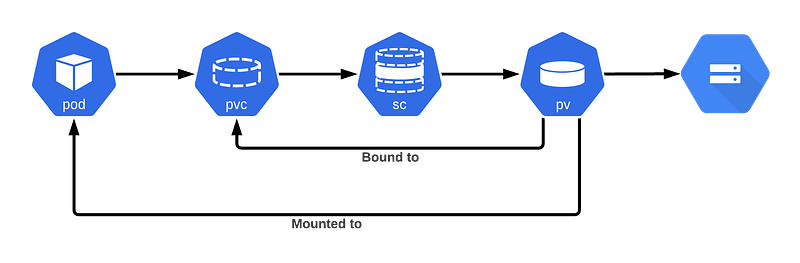
Now that we know the ins and outs of Kubernetes Storage, let’s find out how to resize StatefulSet persistent volumes without downtime!
Resizing a Persistent Volume (PV) was very difficult prior to Kubernetes v1.11. It was an entirely manual process that involved a long list of steps, and required the creation of a new volume from a snapshot. You couldn’t just go and modify the PVC object to change the claim size.
Persistent volume expansion feature was promoted to beta in Kubernetes v1.11. This feature allows users to easily resize an existing volume by editing the PersistentVolumeClaim object. Users no longer have to manually interact with the storage backend or delete and recreate PV and PVC objects to increase the size of a volume. Shrinking persistent volumes is not supported though. You can find more information, including a list of volume types supported, here.
Although the feature is enabled by default, a cluster admin has to make the feature available to users by setting the allowVolumeExpansion field to true in their StorageClass object(s). Only PVCs created from a StorageClass with this setting will be allowed to trigger volume expansion.
allowVolumeExpansion: true
apiVersion: storage.k8s.io/v1
kind: StorageClass
metadata:
  annotations:
    storageclass.kubernetes.io/is-default-class: "true"
  name: gp2
parameters:
  fsType: ext4
  type: gp2
provisioner: kubernetes.io/aws-ebs
reclaimPolicy: Delete
volumeBindingMode: Immediate
Any PVC created from this StorageClass can be edited to request more space. Kubernetes will interpret a change to the storage field as a request for more space, and will trigger an automatic volume resizing.
You can find a list of types of volumes that support volume expansion here.
Resizing a PV claimed by a StatefulSet application
Once created, StatefulSets objects can’t be modified, other than the number of replicas, the update strategy, and the object template. If you try to modify any other specification, you’ll get the error below:
# * spec: Forbidden: updates to statefulset spec for fields other than ‘replicas’, ‘template’, and ‘updateStrategy’ are forbiddenWe faced this issue when trying to increase the volumes used by our Prometheus instances, which are managed by Prometheus Operator. We found our way through it though with zero downtime.
If you haven’t yet, have a look at our Observability platform!
Directly modifying the storage request in the Prometheus CRD ( spec.storage.VolumeClaimTemplate.spec.resources.requests.storage ) would recreate the StatefulSet with the new spec and, unfortunately, all the pods managed by the StatefulSet would be recreated at the same time incurring downtime. On top of that, this wouldn’t modify the PVC object, and the storage won’t increase.
There are few more steps that needs to be done, and in a particular order:
- Scale Prometheus Operator (or any Operator that manages your StatefulSet) deployment to zero replicas: this means you can modify the Prometheus Object without any kind of reconciliation. Skip this step if your StatefulSet is not managed by an Operator.
- Delete the StatefulSet object without deleting the pods: a StatefulSet object can be deleted without deleting the underlying pods. We’ll have orphan pods for some time, but we won’t have downtime that is the main goal here.
kubectl delete sts <statefulset-name> --cascade=orphan
Make sure you have a way to recreate the StatefulSet object. You can generate the yaml file with
kubectl get sts <statefulset-name> -o yamland remove unnecessary fields from it.
- Modify the PVC object with the desired storage:
kubectl get pvc myPVC -o yaml apiVersion: v1
kind: PersistentVolumeClaim
metadata:
annotations:
...
spec:
accessModes:
- ReadWriteOnce
resources:
requests:
storage: 8Gi
storageClassName: gp2
volumeMode: Filesystem
volumeName: pvc-xxxx-xxxx-xxxx-xxxx-xxxx
status:
accessModes:
- ReadWriteOnce
capacity:
storage: 80Gi
phase: BoundMake sure the storageClass used by the PVC (gp2 in this case) has allowVolumeExpansion set to true:
kubectl get storageclass gp2 -o yaml allowVolumeExpansion: true
apiVersion: storage.k8s.io/v1
kind: StorageClass
metadata:
annotations:
storageclass.kubernetes.io/is-default-class: "true"
name: gp2
parameters:
fsType: ext4
type: gp2
provisioner: kubernetes.io/aws-ebs
reclaimPolicy: Delete
volumeBindingMode: Immediate- Recreate the StatefulSet with the new storage request: The StatefulSet will take charge of the orphan pods again, and will update the storage spec without recreating them. If you’re managing your deployments with Helm, just run Helm with the new storage size. If not, use the yaml file generated in step 2 (
kubectl apply -f <file_name.yaml> - Modify the CRD with the new storage request: If the StatefulSet was managed by an Operator through a CRD (in our case, Prometheus Operator), make sure you also make the changes in this object. After this, scale back the Operator deployment.
Conclusion
Although resizing a StatefulSet volume is not supported by default by Kubernetes (there’s an open PR for it) this workaround helps achieving the goal with zero downtime. We hope you find this article useful and helpful if you ever see yourself in the need of resizing volumes.


