avatarXinyu Chen (陈新宇)

Free AI web copilot to create summaries, insights and extended knowledge, download it at here

6218

Abstract

ector-class">.set_visible</span>(True) plt<span class="hljs-selector-class">.show</span>()</pre></div><blockquote id="8774"><p>Note that we place the fluid data at our GitHub repository: <a href="https://github.com/xinychen/fluid-inpainting">https://github.com/xinychen/fluid-inpainting</a>.</p></blockquote><h1 id="924b">DMD Model</h1><p id="5164">In our previous blog post [5], we discussed the detailed algorithm of DMD. In this story, we use the Python codes of DMD in that blog post for introducing this story. The function of DMD is given as here:</p><div id="d46a"><pre><span class="hljs-keyword">import</span> numpy <span class="hljs-keyword">as</span> np</pre></div><div id="bffb"><pre>def DMD(data, r): """Dynamic Mode Decomposition (DMD) algorithm."""

## Build data matrices
X1 = data[:, : <span class="hljs-number">-1</span>]
X2 = data[:, <span class="hljs-number">1</span> :]
## <span class="hljs-keyword">Perform</span> singular <span class="hljs-keyword">value</span> decomposition <span class="hljs-keyword">on</span> X1
u, s, v = np.linalg.svd(X1, full_matrices = <span class="hljs-keyword">False</span>)
## Compute the Koopman matrix
A_tilde = u[:, : r].conj().T @ X2 @ v[: r, :].conj().T * np.reciprocal(s[: r])
## <span class="hljs-keyword">Perform</span> eigenvalue decomposition <span class="hljs-keyword">on</span> A_tilde
eigval, eigvec = np.linalg.eig(A_tilde)
## Compute the coefficient matrix
Psi = X2 @ v[: r, :].conj().T @ np.diag(np.reciprocal(s[: r])) @ eigvec

<span class="hljs-keyword">return</span> eigval, eigvec, Psi</pre></div><p id="d39c">In the case, <code>r</code> is the predefined low rank of DMD. <code>eigval</code> and <code>eigvec</code>correspond to the eigenvalues and the eigenvectors of Koopman matrix in DMD. In particular, <code>eigval</code> can be interpreted as DMD spectrum, appearing as complex conjugate pairs. <code>Psi</code> refers to the dynamic modes.</p><h1 id="139a">Toy Example on the Fluid Flow Data</h1><p id="6888">In this story, we use the first 50 snapshots of the fluid flow dataset for analysis. We set the rank of DMD as 5.</p><div id="3b5b"><pre><span class="hljs-keyword">import</span> numpy <span class="hljs-keyword">as</span> np

<span class="hljs-keyword">import</span> time</pre></div><div id="da5e"><pre>dense_tensor = np.<span class="hljs-keyword">load</span>(<span class="hljs-string">'tensor.npz'</span>)[<span class="hljs-string">'arr_0'</span>] dense_tensor = dense_tensor[:, :, : <span class="hljs-number">50</span>] M, N, T = dense_tensor.shape mat = np.reshape(dense_tensor, (M * N, T), <span class="hljs-keyword">order</span> = <span class="hljs-string">'F'</span>)</pre></div><div id="e9d2"><pre><span class="hljs-built_in">rank</span> = <span class="hljs-number">5</span> eigval, eigvec, Psi = DMD(mat, <span class="hljs-built_in">rank</span>)</pre></div><h2 id="754b">Eigenvalues</h2><p id="40d2">We can check out the eigenvalues (see Figure 2). It seems that all eigenvalues are on the unit circle.</p><figure id="c74e"><img src="https://cdn-images-1.readmedium.com/v2/resize:fit:800/1*YOFBsCO7pnFgo71_PTfufw.png"><figcaption>Figure 2: The eigenvalues of the DMD on the fluid flow data.</figcaption></figure><p id="880c">To draw this figure, please try the following Python codes.</p><div id="d6f1"><pre><span class="hljs-keyword">import</span> matplotlib.pyplot <span class="hljs-keyword">as</span> plt</pre></div><div id="ddfe"><pre>fig = plt<span class="hljs-selector-class">.figure</span>(figsize = (<span class="hljs-number">4</span>, <span class="hljs-number">4</span>)) ax = fig<span class="hljs-selector-class">.add_subplot</span>(<span class="hljs-number">1</span>, <span class="hljs-number">1</span>, <span class="hljs-number">1</span>) ax<span class="hljs-selector-class">.set_aspect</span>(<span class="hljs-string">'equal'</span>, adjustable = <span class="hljs-string">'box'</span>) plt<span class="hljs-selector-class">.plot</span>(eigval<span class="hljs-selector-class">.real</span>, eigval<span class="hljs-selector-class">.imag</span>, <span class="hljs-string">'o'</span>, <span class="hljs-attribute">color</span> = <span class="hljs-string">'red'</span>, markersize = <span class="hljs-number">6</span>) circle = plt<span class="hljs-selector-class">.Circle</span>((<span class="hljs-number">0</span>, <span class="hljs-number">0</span>), <span class="hljs-number">1</span>, <span class="hljs-attribute">color</span> = <span class="hljs-string">'blue'</span>, linewidth = <span class="hljs-number">2.5</span>, fill = False) ax<span class="hljs-selector-class">.add_patch</span>(circle) plt<span class="hljs-selector-class">.grid</span>(axis = <span class="hljs-string">'both'</span>, linestyle = <span class="hljs-string">"--"</span>, linewidth = <span class="hljs-number">0.1</span>, <span class="hljs-attribute">color</span> = <span class="hljs-string">'gray'</span>) ax<span class="hljs-selector-class">.tick_params</span>(<span class="hljs-attribute">direction</span> = <span class="hljs-string">"in"</span>) plt<span class="hljs-selector-class">.xlabel</span>(<span class="hljs-string">'Real axis'</span>) plt<span class="hljs-selector-class">.ylabel</span>(<span class="hljs-string">'Imaginary axis'</span>) plt<span class="hljs-selector-class">.show</span>()</pre></div><h2 id="390e">Spatial Modes</h2><p id="f772">We can also check out the spatial modes, i.e., <code>Psi</code> in the outputs of the DMD function. Figure 3 shows both the mean vorticity field and the spatial modes. Of these results, the spatial mode 1 shows the most basic pattern which is similar to the mean vorticity field. The remaining spatial modes identify the wave pattern of the fluid flow.</p><figure id="3f9d"><img src="https://cdn-images-1.readmedium.com/v2/resize:fit:800/1*FRDoY1wjoKSf5oL-P9bf7A.png"><figcaption>Figure 3: Mean vorticity field and spatial modes of the fluid flow dataset achieved by DMD with rank 5.</figcaption></figure><p id="0a42">To draw this figure, please try the following Python codes.</p><div id="a327"><pre><span class="hljs-keyword">import</span> seaborn <span class="hljs-keyword">as</span> sns <span class="hljs-keyword">

Options

import</span> scipy.io <span class="hljs-keyword">import</span> matplotlib.pyplot <span class="hljs-keyword">as</span> plt from matplotlib.colors <span class="hljs-keyword">import</span> ListedColormap, LinearSegmentedColormap <span class="hljs-built_in">color</span> = scipy.io.loadmat(<span class="hljs-string">'CCcool.mat'</span>) cc = <span class="hljs-built_in">color</span>[<span class="hljs-string">'CC'</span>] newcmp = LinearSegmentedColormap.from_list(<span class="hljs-string">''</span>, cc)</pre></div><div id="f3ce"><pre><span class="hljs-attribute">W</span> <span class="hljs-operator">=</span> Psi.real</pre></div><div id="b62a"><pre><span class="hljs-attribute">plt</span>.rcParams['font.size'] = <span class="hljs-number">12</span> <span class="hljs-attribute">fig</span> = plt.figure(figsize = (<span class="hljs-number">7</span>, <span class="hljs-number">6</span>)) <span class="hljs-attribute">ax</span> = fig.add_subplot(<span class="hljs-number">3</span>, <span class="hljs-number">2</span>, <span class="hljs-number">1</span>) <span class="hljs-attribute">sns</span>.heatmap(np.mean(dense_tensor, axis = <span class="hljs-number">2</span>), cmap = newcmp, vmin = -<span class="hljs-number">5</span>, vmax = <span class="hljs-number">5</span>, cbar = False) <span class="hljs-attribute">ax</span>.contour(np.linspace(<span class="hljs-number">0</span>, N, N), np.linspace(<span class="hljs-number">0</span>, M, M), np.mean(dense_tensor, axis = <span class="hljs-number">2</span>), levels = np.linspace(<span class="hljs-number">0</span>.<span class="hljs-number">15</span>, <span class="hljs-number">15</span>, <span class="hljs-number">20</span>), colors = 'k', linewidths = <span class="hljs-number">0</span>.<span class="hljs-number">7</span>) <span class="hljs-attribute">ax</span>.contour(np.linspace(<span class="hljs-number">0</span>, N, N), np.linspace(<span class="hljs-number">0</span>, M, M), np.mean(dense_tensor, axis = <span class="hljs-number">2</span>), levels = np.linspace(-<span class="hljs-number">15</span>, -<span class="hljs-number">0</span>.<span class="hljs-number">15</span>, <span class="hljs-number">20</span>), colors = 'k', linestyles = 'dashed', linewidths = <span class="hljs-number">0</span>.<span class="hljs-number">7</span>) <span class="hljs-attribute">plt</span>.xticks([]) <span class="hljs-attribute">plt</span>.yticks([]) <span class="hljs-attribute">plt</span>.title('Mean vorticity field') <span class="hljs-attribute">for</span> _, spine in ax.spines.items(): <span class="hljs-attribute">spine</span>.set_visible(True) <span class="hljs-attribute">for</span> t in range(<span class="hljs-number">5</span>): <span class="hljs-attribute">ax</span> = fig.add_subplot(<span class="hljs-number">3</span>, <span class="hljs-number">2</span>, t + <span class="hljs-number">2</span>) <span class="hljs-attribute">ax</span> = sns.heatmap(W[:, t].reshape((<span class="hljs-number">199</span>, <span class="hljs-number">449</span>), order = 'F'), cmap = newcmp, vmin = -<span class="hljs-number">0</span>.<span class="hljs-number">03</span>, vmax = <span class="hljs-number">0</span>.<span class="hljs-number">03</span>, cbar = False) <span class="hljs-attribute">num</span> = <span class="hljs-number">10</span> <span class="hljs-attribute">ax</span>.contour(np.linspace(<span class="hljs-number">0</span>, N, N), np.linspace(<span class="hljs-number">0</span>, M, M), W[:, t].reshape((<span class="hljs-number">199</span>, <span class="hljs-number">449</span>), order = 'F'), levels = np.linspace(<span class="hljs-number">0</span>.<span class="hljs-number">0005</span>, <span class="hljs-number">0</span>.<span class="hljs-number">05</span>, num), colors = 'k', linewidths = <span class="hljs-number">0</span>.<span class="hljs-number">7</span>) <span class="hljs-attribute">ax</span>.contour(np.linspace(<span class="hljs-number">0</span>, N, N), np.linspace(<span class="hljs-number">0</span>, M, M), W[:, t].reshape((<span class="hljs-number">199</span>, <span class="hljs-number">449</span>), order = 'F'), levels = np.linspace(-<span class="hljs-number">0</span>.<span class="hljs-number">05</span>, -<span class="hljs-number">0</span>.<span class="hljs-number">0005</span>, num), colors = 'k', linestyles = 'dashed', linewidths = <span class="hljs-number">0</span>.<span class="hljs-number">7</span>) <span class="hljs-attribute">plt</span>.xticks([]) <span class="hljs-attribute">plt</span>.yticks([]) <span class="hljs-attribute">plt</span>.title('Spatial mode {}'.format(t + <span class="hljs-number">1</span>)) <span class="hljs-attribute">for</span> _, spine in ax.spines.items(): <span class="hljs-attribute">spine</span>.set_visible(True) <span class="hljs-attribute">plt</span>.show()</pre></div><h1 id="9a8e">Conclusion</h1><p id="45c1">In this story, we introduce what is fluid flow dataset and how to discover the underlying spatial modes from the data through DMD. If you are interested in the detailed algorithm of DMD, please check out our previous blog posts in [4–5].</p><h1 id="a8d3">References</h1><p id="c772">[1] Peter Schmid (2010). Dynamic mode decomposition of numerical and experimental data. Journal of fluid mechanics, 656: 5–28.</p><p id="1917">[2] Dynamic mode decomposition on Wikipedia: <a href="https://en.wikipedia.org/wiki/Dynamic_mode_decomposition">https://en.wikipedia.org/wiki/Dynamic_mode_decomposition</a></p><p id="b8a2">[3] J. Nathan Kutz, Steven L. Brunton, Bingni W. Brunton, Joshua L. Proctor (2016). Dynamic mode decomposition: Data-driven modeling of complex systems. SIAM.</p><p id="c9ea">[4] Dynamic mode decomposition for multivariate time series forecasting. <a href="https://readmedium.com/415d30086b4b">https://readmedium.com/415d30086b4b</a></p><p id="9e74">[5] Dynamic Mode Decomposition for Spatiotemporal Traffic Speed Time Series in Seattle Freeway. <a href="https://towardsdatascience.com/dynamic-mode-decomposition-for-spatiotemporal-traffic-speed-time-series-in-seattle-freeway-b0ba97e81c2c">https://towardsdatascience.com/dynamic-mode-decomposition-for-spatiotemporal-traffic-speed-time-series-in-seattle-freeway-b0ba97e81c2c</a></p></article></body>

Reproducing Dynamic Mode Decomposition on Fluid Flow Data in Python

What is the fluid flow data? How to visualize these data? How to reproduce dynamic mode decomposition in Python?

Dynamic mode decomposition (DMD) is a data-driven dimensionality reduction approach for discovering underlying data patterns of time series [1–3]. Its introduction into spatiotemporal data analysis shows great potential, and one important application of DMD is analyzing fluid dynamics. In our previous blog post [4], we discussed how to reproduce DMD in the case of multivariate time series forecasting. Today, we introduce how to reproduce DMD on the fluid flow data with NumPy in Python. Let’s get started!

Fluid Flow Data

In this story, we consider the cylinder wake dataset (source: http://dmdbook.com/) for analysis. The dataset is collected from the fluid flow passing a circular cylinder. This is a representative three-dimensional flow dataset in fluid dynamics, which consists of matrix-variate time series of vorticity field snapshots for the wake behind a cylinder. The dataset is of size 199-by-449-by-150, and the last dimension refers to 199-by-449 vorticity fields with 150 time snapshots.

In the following analysis, we reshape the data as multivariate time series matrix of size 89,351-by-150, which seems to be high-dimensional. To design a toy example, we only use the first 50 snapshots. We draw some snapshots of the dataset as shown in Figure 1.
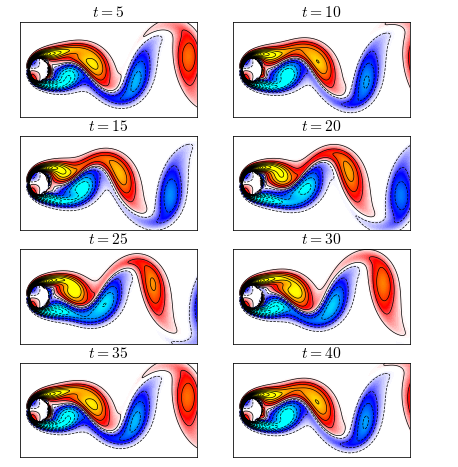
Figure 1: Snapshots of the fluid flow at times t = 5, 10, …, 40.

To reproduce Figure 1 in Python, please consider the following codes.

import numpy as np
import seaborn as sns
import scipy.io
import matplotlib.pyplot as plt
from matplotlib.colors import ListedColormap, LinearSegmentedColormap
color = scipy.io.loadmat('CCcool.mat')
cc = color['CC']
newcmp = LinearSegmentedColormap.from_list('', cc)
dense_tensor = np.load('tensor.npz')['arr_0']
dense_tensor = dense_tensor[:, :, : 50]
M, N, T = dense_tensor.shape
plt.rcParams['font.size'] = 13
plt.rcParams['mathtext.fontset'] = 'cm'
fig = plt.figure(figsize = (7, 8))
id = np.array([5, 10, 15, 20, 25, 30, 35, 40])
for t in range(8):
    ax = fig.add_subplot(4, 2, t + 1)
    ax = sns.heatmap(dense_tensor[:, :, id[t] - 1], cmap = newcmp, vmin = -5, vmax = 5, cbar = False)
    ax.contour(np.linspace(0, N, N), np.linspace(0, M, M), dense_tensor[:, :, id[t] - 1], levels = np.linspace(0.15, 15, 30), colors = 'k', linewidths = 0.7)
    ax.contour(np.linspace(0, N, N), np.linspace(0, M, M), dense_tensor[:, :, id[t] - 1], levels = np.linspace(-15, -0.15, 30), colors = 'k', linestyles = 'dashed', linewidths = 0.7)
    plt.xticks([])
    plt.yticks([])
    plt.title(r'$t = {}$'.format(id[t]))
    for _, spine in ax.spines.items():
        spine.set_visible(True)
plt.show()

Note that we place the fluid data at our GitHub repository: https://github.com/xinychen/fluid-inpainting.

DMD Model

In our previous blog post [5], we discussed the detailed algorithm of DMD. In this story, we use the Python codes of DMD in that blog post for introducing this story. The function of DMD is given as here:

import numpy as np
def DMD(data, r):
    """Dynamic Mode Decomposition (DMD) algorithm."""
    
    ## Build data matrices
    X1 = data[:, : -1]
    X2 = data[:, 1 :]
    ## Perform singular value decomposition on X1
    u, s, v = np.linalg.svd(X1, full_matrices = False)
    ## Compute the Koopman matrix
    A_tilde = u[:, : r].conj().T @ X2 @ v[: r, :].conj().T * np.reciprocal(s[: r])
    ## Perform eigenvalue decomposition on A_tilde
    eigval, eigvec = np.linalg.eig(A_tilde)
    ## Compute the coefficient matrix
    Psi = X2 @ v[: r, :].conj().T @ np.diag(np.reciprocal(s[: r])) @ eigvec
    
    return eigval, eigvec, Psi

In the case, r is the predefined low rank of DMD. eigval and eigveccorrespond to the eigenvalues and the eigenvectors of Koopman matrix in DMD. In particular, eigval can be interpreted as DMD spectrum, appearing as complex conjugate pairs. Psi refers to the dynamic modes.

Toy Example on the Fluid Flow Data

In this story, we use the first 50 snapshots of the fluid flow dataset for analysis. We set the rank of DMD as 5.

import numpy as np
import time
dense_tensor = np.load('tensor.npz')['arr_0']
dense_tensor = dense_tensor[:, :, : 50]
M, N, T = dense_tensor.shape
mat = np.reshape(dense_tensor, (M * N, T), order = 'F')
rank = 5
eigval, eigvec, Psi = DMD(mat, rank)

Eigenvalues

We can check out the eigenvalues (see Figure 2). It seems that all eigenvalues are on the unit circle.
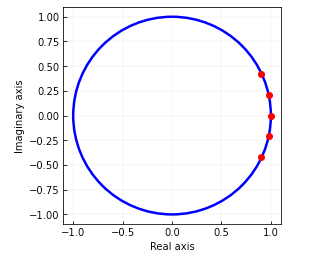
Figure 2: The eigenvalues of the DMD on the fluid flow data.

To draw this figure, please try the following Python codes.

import matplotlib.pyplot as plt
fig = plt.figure(figsize = (4, 4))
ax = fig.add_subplot(1, 1, 1)
ax.set_aspect('equal', adjustable = 'box')
plt.plot(eigval.real, eigval.imag, 'o', color = 'red', markersize = 6)
circle = plt.Circle((0, 0), 1, color = 'blue', linewidth = 2.5, fill = False)
ax.add_patch(circle)
plt.grid(axis = 'both', linestyle = "--", linewidth = 0.1, color = 'gray')
ax.tick_params(direction = "in")
plt.xlabel('Real axis')
plt.ylabel('Imaginary axis')
plt.show()

Spatial Modes

We can also check out the spatial modes, i.e., Psi in the outputs of the DMD function. Figure 3 shows both the mean vorticity field and the spatial modes. Of these results, the spatial mode 1 shows the most basic pattern which is similar to the mean vorticity field. The remaining spatial modes identify the wave pattern of the fluid flow.
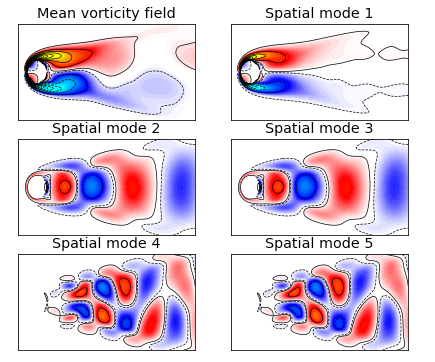
Figure 3: Mean vorticity field and spatial modes of the fluid flow dataset achieved by DMD with rank 5.

To draw this figure, please try the following Python codes.

import seaborn as sns
import scipy.io
import matplotlib.pyplot as plt
from matplotlib.colors import ListedColormap, LinearSegmentedColormap
color = scipy.io.loadmat('CCcool.mat')
cc = color['CC']
newcmp = LinearSegmentedColormap.from_list('', cc)
W = Psi.real
plt.rcParams['font.size'] = 12
fig = plt.figure(figsize = (7, 6))
ax = fig.add_subplot(3, 2, 1)
sns.heatmap(np.mean(dense_tensor, axis = 2), cmap = newcmp, vmin = -5, vmax = 5, cbar = False)
ax.contour(np.linspace(0, N, N), np.linspace(0, M, M), np.mean(dense_tensor, axis = 2), levels = np.linspace(0.15, 15, 20), colors = 'k', linewidths = 0.7)
ax.contour(np.linspace(0, N, N), np.linspace(0, M, M), np.mean(dense_tensor, axis = 2), levels = np.linspace(-15, -0.15, 20), colors = 'k', linestyles = 'dashed', linewidths = 0.7)
plt.xticks([])
plt.yticks([])
plt.title('Mean vorticity field')
for _, spine in ax.spines.items():
    spine.set_visible(True)
for t in range(5):
    ax = fig.add_subplot(3, 2, t + 2)
    ax = sns.heatmap(W[:, t].reshape((199, 449), order = 'F'), cmap = newcmp, vmin = -0.03, vmax = 0.03, cbar = False)
    num = 10
    ax.contour(np.linspace(0, N, N), np.linspace(0, M, M), W[:, t].reshape((199, 449), order = 'F'), levels = np.linspace(0.0005, 0.05, num), colors = 'k', linewidths = 0.7)
    ax.contour(np.linspace(0, N, N), np.linspace(0, M, M), W[:, t].reshape((199, 449), order = 'F'), levels = np.linspace(-0.05, -0.0005, num), colors = 'k', linestyles = 'dashed', linewidths = 0.7)
    plt.xticks([])
    plt.yticks([])
    plt.title('Spatial mode {}'.format(t + 1))
for _, spine in ax.spines.items():
    spine.set_visible(True)
plt.show()

Conclusion

In this story, we introduce what is fluid flow dataset and how to discover the underlying spatial modes from the data through DMD. If you are interested in the detailed algorithm of DMD, please check out our previous blog posts in [4–5].

References

[1] Peter Schmid (2010). Dynamic mode decomposition of numerical and experimental data. Journal of fluid mechanics, 656: 5–28.

[2] Dynamic mode decomposition on Wikipedia: https://en.wikipedia.org/wiki/Dynamic_mode_decomposition

[3] J. Nathan Kutz, Steven L. Brunton, Bingni W. Brunton, Joshua L. Proctor (2016). Dynamic mode decomposition: Data-driven modeling of complex systems. SIAM.

[4] Dynamic mode decomposition for multivariate time series forecasting. https://readmedium.com/415d30086b4b

[5] Dynamic Mode Decomposition for Spatiotemporal Traffic Speed Time Series in Seattle Freeway. https://towardsdatascience.com/dynamic-mode-decomposition-for-spatiotemporal-traffic-speed-time-series-in-seattle-freeway-b0ba97e81c2c

Machine Learning
Data Science
Artificial Intelligence
Time Series Analysis
Python
Recommended from ReadMedium