
How I Predict When to Buy and Sell with Reinforcement Learning

Have you ever wondered how a computer program can learn from experience, just like humans do? Reinforcement learning is a type of machine learning that enables an agent to learn by interacting with an environment through trial and error. It is based on the principle of reward and punishment, where the agent receives a reward for performing an action that leads to a desirable outcome, and a punishment for performing an action that leads to an undesirable outcome.
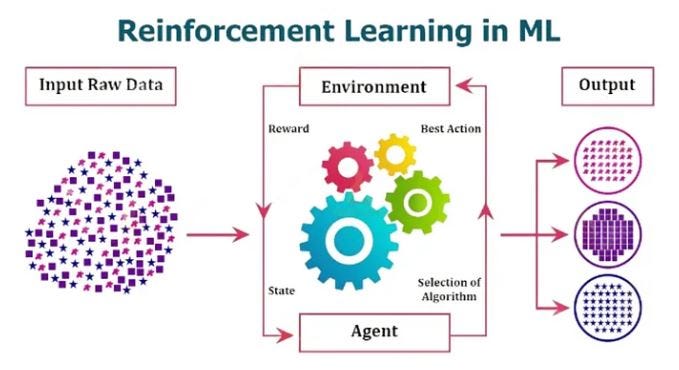
In reinforcement learning, the agent learns from its experience by updating its knowledge of the environment through a process called learning. The learning process is guided by a policy, which is a set of rules that the agent follows to make decisions. The policy is optimized to maximize the cumulative reward that the agent receives over time.
One of the key challenges in reinforcement learning is to balance exploration and exploitation. Exploration involves trying out different actions to discover new ways of achieving the desired outcome. Exploitation involves using the knowledge gained from past experience to make decisions that are likely to lead to a desirable outcome. Finding the right balance between exploration and exploitation is critical to the success of the learning process.
Check my previous article for a detailed explanation of this and to see a real-life example of a dog catching a ball.
Introducing MaskablePPO for Stock Trading Strategies
In the previous article, we demonstrated how to use Proximal Policy Optimization (PPO) to predict the next close price of a stock. While plain PPO is a widely used algorithm in reinforcement learning, it may not be the best approach for all scenarios.
In this article, we will introduce a different approach to training a model using MaskablePPO. The reason why we are using MaskablePPO is because we want to avoid buying an asset that is already bought or selling an asset that has not been bought before.
MaskablePPO works by masking the actions that are not allowed based on the current state. For example, if the agent has already bought a particular stock, it cannot buy more of the same stock until it is sold. Similarly, if the agent has not bought a stock, it cannot sell it.
This approach is different from traditional PPO, which applies penalization to actions that violate the constraints. However, this can take a longer time to train the model.
MaskablePPO optimizes the policy based on the reward signal and the masked actions, allowing the agent to learn an optimal policy that takes into account the constraints of the portfolio. This approach can lead to more efficient and effective stock trading strategies.
Before I share all the following information, if you enjoy reading my articles, please hit the follow button — Diego Degese
Implementing the Sell-Hold-Buy Environment
In the article Backtesting Stock Trading Strategies Using Python (Data Preparation), we learned how to obtain the stock data of OIH from the internet, and how to generate a file containing the data in different time intervals.
Now, we will move forward and implement the SellHoldBuy Environment for Reinforcement Learning using the 15-minute OIH stock data file.
Step 1: Importing the Libraries
First, we need to import the required libraries, which are NumPy and OpenAI Gym. We also import the spaces module from the Gym library to define the observation and action spaces of the environment.
import numpy as np
import gym
from gym import spaces
Step 2: Defining the Constants, the Environment Class, and the Class Constructor
We define the constants required for normalization and penalization. Then, we define the SellHoldBuyEnv class, which inherits from the gym.Env class. We also define the class constructor that takes two parameters, observation_size and closes, which represent the size of the observation space and the closing prices of an asset, respectively.
In the constructor, we set up the observation and action spaces. In this case, the action space will be Discrete since the action that the agent will return is SELL (0), HOLD (1), and BUY (2). We also initialize some variables that we will use later in the reset() and step() methods.
# Normalization & Penalization
OBS_MIN_MAX = 0.05
NOOP_PENALIZATION = 0.01

# Operations
SELL = 0
HOLD = 1
BUY = 2

class SellHoldBuyEnv(gym.Env):

    def __init__(self, observation_size, closes):

        # Data
        self.__features = closes
        self.__prices = closes

        # Spaces
        self.observation_space = spaces.Box(low=np.NINF, high=np.PINF, shape=(observation_size,), dtype=np.float32)
        self.action_space = spaces.Discrete(3)

        # Episode Management
        self.__start_tick = observation_size
        self.__end_tick = len(self.__prices)
        self.__current_tick = self.__end_tick

        # Position Management
        self.__current_action = HOLD
        self.__current_profit = 0
Step 3: Defining the Reset Method
In thereset() method, we reset the current action and current profit variables. We also set the current tick pointer to the start tick and return a new observation using the__get_observation() method.
    def reset(self):

        # Reset the current action and current profit
        self.__current_action = HOLD
        self.__current_profit = 0

        # Reset the current tick pointer and return a new observation
        self.__current_tick = self.__start_tick

        return self.__get_observation()
Step 4: Defining the Step Method
In the step() method, we first check if the current tick is over the last index in the feature array. If it is, we raise an exception because the environment needs to be reset.
Then, we compute the step reward based on the current action and the action passed as a parameter by the agent. If the action is BUY, we set the open price to the current price and change the current action to BUY. If the action is SELL, we calculate the step reward as the difference between the current price and the open price, add it to the current profit, and change the current action to HOLD. If the current action is HOLD, we penalize the agent with a small value to avoid the agent getting stuck doing nothing.
After computing the step reward, we generate a custom info array with the current action and current profit values that we will use later when we test the model performance. We then increase the current tick pointer, check if the environment is fully processed, and get a new observation using the __get_observation() method. Finally, we return the observation, the step reward, the status of the environment, and the custom information.
    def step(self, action):

        # If current tick is over the last index in the feature array, the environment needs to be reset
        if self.__current_tick > self.__end_tick:
            raise Exception('The environment needs to be reset.')

        # Compute the step reward (Penalize the agent if it is stuck doing anything)
        step_reward = 0
        if self.__current_action == HOLD and action == BUY:
            self.__open_price = self.__prices[self.__current_tick]
            self.__current_action = BUY
        elif self.__current_action == BUY and action == SELL:
            step_reward = self.__prices[self.__current_tick] - self.__open_price
            self.__current_profit += step_reward
            self.__current_action = HOLD
        elif self.__current_action == HOLD:
            step_reward = -NOOP_PENALIZATION

        # Generate the custom info array with the real and predicted values
        info = {
            'current_action': self.__current_action,
            'current_profit': self.__current_profit
        }

        # Increase the current tick pointer, check if the environment is fully processed, and get a new observation
        self.__current_tick += 1
        done = self.__current_tick >= self.__end_tick
        obs = self.__get_observation()

        # Returns the observation, the step reward, the status of the environment, and the custom information
        return obs, step_reward, done, info
Step 5: Defining the Action Masks Method
The action_masks() method is used by the MaskablePPO algorithm to filter the actions that are not allowed in the current state of the environment. It returns a boolean mask that indicates which actions are valid in the current state of the environment. In this case, we want to make sure that we don't buy an asset that has already been bought or sell an asset that has not been bought before. Therefore, the action_masks() method checks the current action of the agent and disables the actions that are not allowed.
def action_masks(self):

    mask = np.ones(self.action_space.n, dtype=bool)

    # If current action is Buy, only allow to hold or sell
    if self.__current_action == BUY:
        mask[BUY] = False

    # If current action is Hold, only allow to hold or buy
    if self.__current_action == HOLD:
        mask[SELL] = False

    return mask
Step 6: Defining the Get Observation Method
The __get_observation() method returns the current observation of the environment. It generates a new observation by taking a window of historical prices from the current tick and normalizing it to values between -1 and 1.
def __get_observation(self):

    # If current tick over the last value in the feature array, the environment needs to be reset
    if self.__current_tick >= self.__end_tick:
        return None

    # Generate a copy of the observation to avoid changing the original data
    obs = self.__features[(self.__current_tick - self.__start_tick):self.__current_tick].copy()

    # Calculate values between -1 and 1 for the new observation without leak any data
    avg = np.mean(obs)
    obs = np.clip((obs / avg - 1) / OBS_MIN_MAX, -1, 1)

    # Return the calculated observation
    return obs
Using the Sell-Hold-Buy Environment to train and predict when to buy and sell an asset
In this section, we will provide a step-by-step guide for implementing the configuration and execution of our model for training and prediction. We will use Python and the Stable Baselines3 library (Version < 2.0 since the environment is implemented with OpenAI gym and not gymnasium) to create an RL model based on the Maskable Proximal Policy Optimization (MaskablePPO) algorithm. We will also provide code snippets for each step to facilitate the implementation process. The model will be trained on the 15-minute OIH stock market data to predict when to buy and sell an asset, and we will show how to evaluate the model’s performance on a test dataset.
Step 1: Import the required libraries and classes
import math
import numpy as np
import pandas as pd

from sb3_contrib import MaskablePPO
from stable_baselines3.common.env_util import make_vec_env

from sell_hold_buy_env import SellHoldBuyEnv
This step imports the necessary libraries and classes that will be used in the implementation, such as math, numpy, pandas, MaskablePPO, make_vec_env, and SellHoldBuyEnv.
Step 2: Read the data and generate the train and test datasets
df = pd.read_csv('OIH_15T.csv.gz', compression='gzip')
train = df[df['date'] <= '2022-01-01']
test = df[df['date'] > '2022-01-01']
This step reads the data from the OIH_15T.csv.gz file, which contains the historical prices of OIH. The data is then split into train and test datasets based on the date.
Step 3: Create 4 parallel train environments
env = make_vec_env(SellHoldBuyEnv, seed=42, n_envs=4, env_kwargs={'observation_size': 26, 'closes': train['close'].values})This step creates 4 parallel environments using the make_vec_env function from stable_baselines3. The SellHoldBuyEnv class is passed as an argument to make_vec_env method to create the environments with the seed parameter set to 42 (to allow repeatability). The observation_size parameter is set to 26, which is the number of features in the observation space. The closes parameter is set to the close column of the train dataset.
Step 4: Train the model
model = MaskablePPO("MlpPolicy", env, verbose=1)
model.learn(total_timesteps=10000000)
This step creates an instance of the MaskablePPO class and trains the model using the learn method. The total_timesteps parameter is set to 10 million, which is the number of timesteps the model will be trained for. It may take some time for training so, you can reduce this number if it is needed.
Step 5: Save, remove, and reload the model
model.save("maskableppo_sell_hold_buy")
del model
model = MaskablePPO.load("maskableppo_sell_hold_buy")
This step saves the trained model to disk using the save method. The del statement removes the model instance from memory. Finally, the model is reloaded from the disk using the load method to verify that it has been saved and can be loaded successfully.
Step 6: Predict the test values with the trained model
# Create a test environmant
env = SellHoldBuyEnv(observation_size=26, closes=test['close'].values)

# Create the required variables for calculation
done = False

# Predict the test values with the trained model
obs = env.reset()
while not done:
    action, _states = model.predict(obs, deterministic=True))
    obs, rewards, done, info = env.step(action)

    print(f"Action: {info['current_action']} - Profit: {info['current_profit']:6.3f}")
In the above code, we first create a new environment env using the SellHoldBuyEnv class and pass the observation_size and closes arguments. Then, we initialize the done variable to False.
Next, we call the reset() method on the environment to get the initial observation. We then start a loop that runs until the done flag is set to True. Inside the loop, we call the predict() method on the model, passing in the current observation obs to get the next action to take. We then pass this action to the environment's step() method, which returns the next observation, rewards, done flag, and info dictionary.
We then print the current action taken by the model and the current profit made by the model using the info dictionary returned by the step() method.
Step 7: Showing the Results
print(' RESULT '.center(56, '*'))
print(f"* Profit/Loss: {info['current_profit']:6.3f}")
Finally, we print the results of the prediction. We print the current profit made by the model on the test data.
After making the predictions, we need to evaluate the performance of our model. We will get the profit/loss of the model from the custom_infodata.
Here is the profit/loss result after the execution
************************ RESULT ************************
* Profit/Loss: 72.870
Note: These evaluation results are specific to the configuration used in this example and may differ for different models and datasets.
And that’s it! We have successfully implemented and executed a basic model to predict when to buy and sell using reinforcement learning and the MaskablePPO algorithm.
If you enjoy my work, please support me on Medium by becoming a member through my referral link, and consider giving it a clap as a small gesture of motivation. Thank you!
Download the full source code of this article from here.
Twitter: https://twitter.com/diegodegese LinkedIn: https://www.linkedin.com/in/ddegese Github: https://github.com/crapher
Disclaimer: Investing in the stock market involves risk and may not be suitable for all investors. The information provided in this article is for educational purposes only and should not be construed as investment advice or a recommendation to buy or sell any particular security. Always do your own research and consult with a licensed financial advisor before making any investment decisions. Past performance is not indicative of future results
A Message from InsiderFinance

Thanks for being a part of our community! Before you go:
- 👏 Clap for the story and follow the author 👉
- 📰 View more content in the InsiderFinance Wire
- 📚 Take our FREE Masterclass
- 📈 Discover Powerful Trading Tools