
Register & Login API with JWT Authentication in Golang Gin
The objective of this project is to create a Register and Login API using the Golang Gin Framework and MySQL database, and implement JWT authentication to secure a protected endpoint. The project will involve creating two public endpoints for user registration and login, as well as a protected endpoint that requires a valid JWT to access.
Login
The Login endpoint will be used to authenticate the user by providing a username and password. Upon successful authentication, a JSON Web Token will be generated and returned to the user.
Register
Now we have a login endpoint, we also need a way to register user information so it can be verified during authentication.
Protected Route
This endpoint will serve as the entry point for our protected endpoints.
Technologies
- Golang
- Gin Framework
- GORM
- MySQL
So we will start with, What is JSON Web Token?
JSON Web Token (JWT) is a standard for creating secure, stateless authentication tokens that are commonly used in web applications. JWTs allow for the secure transmission of information between parties by encoding the information as a JSON object that is signed using a secret key.
For example, if a user named userX successfully logs into an application or website, they would receive a JWT token that might look like the following:
eyJhbGciOiJIUzI1NiIsInR5cCI6IkpXVCJ9.eyJ1c2VybmFtZSI6InVzZXIxIiwiZXhwIjoxNTQ3OTc0MDgyfQ.2Ye5_w1z3zpD4dSGdRp3s98ZipCNQqmsHRB9vioOx54
This is a JWT, which is made up of three parts (separated by . )
- The first part is the header (
eyJhbGciOiJIUzI1NiIsInR5cCI6IkpXVCJ9). The header specifies information like the algorithm used to generate the signature (the third part). This part is pretty standard and is the same for any JWT using the same algorithm. - The second part is the payload (
eyJ1c2VybmFtZSI6InVzZXIxIiwiZXhwIjoxNTQ3OTc0MDgyfQ), which contains application specific information (in our case, this is the user details), along with information about the expiry and validity of the token. - The third part is the signature (
2Ye5_w1z3zpD4dSGdRp3s98ZipCNQqmsHRB9vioOx54) It is generated by combining and hashing the first two parts along with a secret key.
Note that the header and payload are not encrypted; they are simply base64 encoded. This means that anyone can decode them using a base64 decoder.
Step 1: Basic Setup
a. The base directory Create the go-jwt directory in any path of your choice on your computer, and switch to that directory using the following commands:
mkdir go-jwt
cd go-jwt
b. Go Modules
To manage the packages that we will be installing later on, we can start by initializing our go.mod file, which takes care of our dependency management.
Run the following command in the root directory:
go mod init go-jwt
As you can see, I used go-jwt as the module name, but you can use any naming convention that you prefer.
c. .env file To keep the database configuration and other sensitive details secure, create and set up a .env file in the root directory.
Here is an example of a .env file:
DB_USERNAME=your_username
DB_PASSWORD=your_password
DB_DATABASE=your_database_name
DATABASE_HOST=127.0.0.1
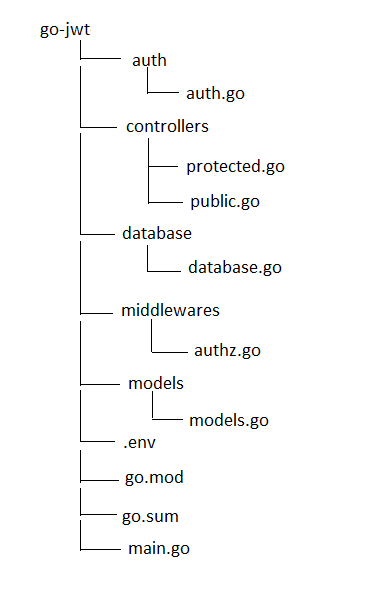
d. File Structure
Step 2: Setting up the Models
We will create User model in this go-jwt app. Inside the go-jwt directory, create the models directory:
mkdir models
and inside that create models.go file.
package models

import (
 "go-jwt/database"

 "golang.org/x/crypto/bcrypt"
 "gorm.io/gorm"
)

// User defines the user in db
// User struct is used to store user information in the database
type User struct {
 gorm.Model
 ID       int    `gorm:"primaryKey"`
 Name     string `json:"name" binding:"required"`
 Email    string `json:"email" binding:"required" gorm:"unique"`
 Password string `json:"password" binding:"required"`
}

// CreateUserRecord creates a user record in the database
// CreateUserRecord takes a pointer to a User struct and creates a user record in the database
// It returns an error if there is an issue creating the user record
func (user *User) CreateUserRecord() error {
 result := database.GlobalDB.Create(&user)
 if result.Error != nil {
  return result.Error
 }
 return nil
}

// HashPassword encrypts user password
// HashPassword takes a string as a parameter and encrypts it using bcrypt
// It returns an error if there is an issue encrypting the password
func (user *User) HashPassword(password string) error {
 bytes, err := bcrypt.GenerateFromPassword([]byte(password), 14)
 if err != nil {
  return err
 }
 user.Password = string(bytes)
 return nil
}

// CheckPassword checks user password
// CheckPassword takes a string as a parameter and compares it to the user's encrypted password
// It returns an error if there is an issue comparing the passwords
func (user *User) CheckPassword(providedPassword string) error {
 err := bcrypt.CompareHashAndPassword([]byte(user.Password), []byte(providedPassword))
 if err != nil {
  return err
 }
 return nil
}
Note that any struct type starting with a capital letter is exported and accessible from outside packages. Similarly, any struct field starting with a capital letter is also exported. On the other hand, all names starting with a lowercase letter are only visible within the same package.
After each code change, run the go mod tidy command in the terminal to ensure that the go.mod file is synced with the dependencies used in the codebase. This command ensures that the go.mod file contains the correct dependencies and versions used in the codebase.
The User struct serves as a container to hold user data in the database. The User struct is implemented with the gorm.Model, which provides the struct with fields to store information about the database record, such as the created_at and updated_at timestamps. The struct comprises four fields: ID, Name, Email, and Password. Additionally, it encompasses three methods, namely, CreateUserRecord, HashPassword, and CheckPassword. CreateUserRecord is responsible for generating a user record within the database. HashPassword encrypts a password with bcrypt, while CheckPassword verifies a supplied password against the user’s encrypted password.
Step 3: Using JWT for Authentication
To enable secure access to our application, we need to implement an authentication system using JSON Web Tokens (JWTs). To achieve this, we will create a new directory called auth in the root directory of our project:
mkdir auth
Now inside this directory, we will create a file named auth.go which will contain the code for our authentication system:
package auth

import (
 "errors"
 "time"

 jwt "github.com/dgrijalva/jwt-go"
)

// JwtWrapper wraps the signing key and the issuer
// JwtWrapper is a struct that holds the secret key, issuer and expiration time for a JWT token
type JwtWrapper struct {
 SecretKey       string // key used for signing the JWT token
 Issuer          string // Issuer of the JWT token
 ExpirationMinutes int64 // Number of minutes the JWT token will be valid for
 ExpirationHours int64 // Expiration time of the JWT token in hours
}

// JwtClaim adds email as a claim to the token
// JwtClaim is a struct that holds the Email of the user, as well as the StandardClaims
type JwtClaim struct {
 Email    string
 jwt.StandardClaims
}

// GenerateToken generates a jwt token
// GenerateToken takes an email as an argument and returns a signed JWT token and an error
func (j *JwtWrapper) GenerateToken(email string) (signedToken string, err error) {
 claims := &JwtClaim{
  Email: email,
  StandardClaims: jwt.StandardClaims{
   ExpiresAt: time.Now().Local().Add(time.Minute * time.Duration(j.ExpirationMinutes)).Unix(),
   Issuer:    j.Issuer,
  },
 }
 token := jwt.NewWithClaims(jwt.SigningMethodHS256, claims)
 signedToken, err = token.SignedString([]byte(j.SecretKey))
 if err != nil {
  return
 }
 return
}

// RefreshToken generates a refresh jwt token
// RefreshToken takes an email as an argument and returns a signed JWT token and an error
func (j *JwtWrapper) RefreshToken(email string) (signedtoken string, err error) {
 claims := &JwtClaim{
  Email: email,
  StandardClaims: jwt.StandardClaims{
   ExpiresAt: time.Now().Local().Add(time.Hour * time.Duration(j.ExpirationHours)).Unix(),
   Issuer:    j.Issuer,
  },
 }
 token := jwt.NewWithClaims(jwt.SigningMethodHS256, claims)
 signedtoken, err = token.SignedString([]byte(j.SecretKey))
 if err != nil {
  return
 }
 return
}

//ValidateToken validates the jwt token
// ValidateToken takes a signed JWT token as an argument and returns the JwtClaim and an error
func (j *JwtWrapper) ValidateToken(signedToken string) (claims *JwtClaim, err error) {
 token, err := jwt.ParseWithClaims(
  signedToken,
  &JwtClaim{},
  func(token *jwt.Token) (interface{}, error) {
   return []byte(j.SecretKey), nil
  },
 )
 if err != nil {
  return
 }
 claims, ok := token.Claims.(*JwtClaim)
 if !ok {
  err = errors.New("Couldn't parse claims")
  return
 }
 if claims.ExpiresAt < time.Now().Local().Unix() {
  err = errors.New("JWT is expired")
  return
 }
 return
}
The auth package offers the capability to create, refresh, and verify JWT tokens. It comprises of two structs: JwtWrapper, that stores the secret key, issuer, and expiry time of a JWT token, and JwtClaim, that includes the email as a standard claim for a JWT token. This package includes three functions: GenerateToken, that creates a signed JWT token, RefreshToken, that generates a signed refresh JWT token, and ValidateToken, that validates a signed JWT token and returns its claims.
Step 4: Protect App with Middlewares
Now within the go-jwt directory, make a directory named middlewares.
mkdir middlewares
Then Create a file called authz.go inside the middlewares directory.
package middlewares

import (
 "go-jwt/auth"
 "strings"

 "github.com/gin-gonic/gin"
)

// Authz is a middleware that validates token and authorizes users
// It takes a gin.Context as an argument and returns a gin.HandlerFunc
// This function is responsible for validating the token sent by the client in the Authorization header
// and authorizing the user if the token is valid.
func Authz() gin.HandlerFunc {
 return func(c *gin.Context) {
  // Get the Authorization header from the request
  clientToken := c.Request.Header.Get("Authorization")
  if clientToken == "" {
   // If the Authorization header is not present, return a 403 status code
   c.JSON(403, "No Authorization header provided")
   c.Abort()
   return
  }
  // Split the Authorization header to get the token
  extractedToken := strings.Split(clientToken, "Bearer ")
  if len(extractedToken) == 2 {
   // Trim the token
   clientToken = strings.TrimSpace(extractedToken[1])
  } else {
   // If the token is not in the correct format, return a 400 status code
   c.JSON(400, "Incorrect Format of Authorization Token")
   c.Abort()
   return
  }
  // Create a JwtWrapper with the secret key and issuer
  jwtWrapper := auth.JwtWrapper{
   SecretKey: "verysecretkey",
   Issuer:    "AuthService",
  }
  // Validate the token
  claims, err := jwtWrapper.ValidateToken(clientToken)
  if err != nil {
   // If the token is not valid, return a 401 status code
   c.JSON(401, err.Error())
   c.Abort()
   return
  }
  // Set the claims in the context
  c.Set("email", claims.Email)
  // Continue to the next handler
  c.Next()
 }
}
The purpose of the Authz middleware is to verify the validity of a JWT token and authorize users. When passed a gin.Context as input, it returns a gin.HandlerFunc. This middleware performs several checks, including verifying if a token exists in the Authorization header of the incoming request, validating the token’s authenticity, and storing the claims within the context. If the token is not present or is invalid, the middleware will return an error response.
Step 5: Database Connection
In order to store user credentials, we must establish a connection to a desired database. For this purpose, we will be using MySQL database that is already installed in my system.
To do this, we will create a new directory called database inside the go-jwt directory:
mkdir database
Inside this newly created database directory, we will create a file called database.go file:
package database

import (
 "fmt"
 "log"

 "github.com/joho/godotenv"
 "gorm.io/driver/mysql"

 "gorm.io/gorm"
)

// GlobalDB is a global db object that will be used across different packages
var GlobalDB *gorm.DB

// InitDatabase creates a mysql db connection and stores it in the GlobalDB variable
// It reads the environment variables from the .env file and uses them to create the connection
// It returns an error if the connection fails
func InitDatabase() (err error) {
 // Read the environment variables from the .env file
 config, err := godotenv.Read()
 if err != nil {
  log.Fatal("Error reading .env file")
 }
 // Create the data source name (DSN) using the environment variables
 dsn := fmt.Sprintf(
  "%s:%s@(%s)/%s?charset=utf8mb4&parseTime=True&loc=Local",
  config["DB_USERNAME"],
  config["DB_PASSWORD"],
  config["DATABASE_HOST"],
  config["DB_DATABASE"],
 )
 // Create the connection and store it in the GlobalDB variable
 GlobalDB, err = gorm.Open(mysql.Open(dsn), &gorm.Config{})
 if err != nil {
  return
 }
 return
}
The database package contains a function called InitDatabase that initializes a MySQL database connection using environment variables from a .env file. The package also exports a global gorm.DB object that can be used across different packages
Step 6: Wiring Up Controllers
In the go-jwt directory, create the controllers directory.
mkdir controllers
a. Public Controller
Inside the controllers directory, create the public.go file.
package controllers

import (
 "go-jwt/auth"
 "go-jwt/database"
 "go-jwt/models"
 "log"

 "github.com/gin-gonic/gin"
 "gorm.io/gorm"
)

// LoginPayload login body
// LoginPayload is a struct that contains the fields for a user's login credentials
type LoginPayload struct {
 Email    string `json:"email" binding:"required"`
 Password string `json:"password" binding:"required"`
}

// LoginResponse token response
// LoginResponse is a struct that contains the fields for a user's login response
type LoginResponse struct {
 Token        string `json:"token"`
 RefreshToken string `json:"refreshtoken"`
}


// Signup is a function that handles user signup
// It takes in a gin context as an argument and binds the user data from the request body to a user struct
// It then hashes the user's password and creates a user record in the database
// If successful, it returns a 200 status code with a success message
// If unsuccessful, it returns a 400 or 500 status code with an error message

func Signup(c *gin.Context) {
 var user models.User
 err := c.ShouldBindJSON(&user)
 if err != nil {
  log.Println(err)
  c.JSON(400, gin.H{
   "Error": "Invalid Inputs ",
  })
  c.Abort()
  return
 }
 err = user.HashPassword(user.Password)
 if err != nil {
  log.Println(err.Error())
  c.JSON(500, gin.H{
   "Error": "Error Hashing Password",
  })
  c.Abort()
  return
 }
 err = user.CreateUserRecord()
 if err != nil {
  log.Println(err)
  c.JSON(500, gin.H{
   "Error": "Error Creating User",
  })
  c.Abort()
  return
 }
 c.JSON(200, gin.H{
  "Message": "Sucessfully Register",
 })
}

// Login is a function that handles user login
// It takes in a gin context as an argument and binds the user data from the request body to a LoginPayload struct
// It then checks if the user exists in the database and if the password is correct
// If successful, it generates a token and a refresh token and returns a 200 status code with the token and refresh token
// If unsuccessful, it returns a 401 or 500 status code with an error message

func Login(c *gin.Context) {
 var payload LoginPayload
 var user models.User
 err := c.ShouldBindJSON(&payload)
 if err != nil {
  c.JSON(400, gin.H{
   "Error": "Invalid Inputs",
  })
  c.Abort()
  return
 }
 result := database.GlobalDB.Where("email = ?", payload.Email).First(&user)
 if result.Error == gorm.ErrRecordNotFound {
  c.JSON(401, gin.H{
   "Error": "Invalid User Credentials",
  })
  c.Abort()
  return
 }
 err = user.CheckPassword(payload.Password)
 if err != nil {
  log.Println(err)
  c.JSON(401, gin.H{
   "Error": "Invalid User Credentials",
  })
  c.Abort()
  return
 }
 jwtWrapper := auth.JwtWrapper{
  SecretKey:       "verysecretkey",
  Issuer:          "AuthService",
  ExpirationMinutes: 1,
  ExpirationHours: 12,
 }
 signedToken, err := jwtWrapper.GenerateToken(user.Email)
 if err != nil {
  log.Println(err)
  c.JSON(500, gin.H{
   "Error": "Error Signing Token",
  })
  c.Abort()
  return
 }
 signedtoken, err := jwtWrapper.RefreshToken(user.Email)
 if err != nil {
  log.Println(err)
  c.JSON(500, gin.H{
   "Error": "Error Signing Token",
  })
  c.Abort()
  return
 }
 tokenResponse := LoginResponse{
  Token:        signedToken,
  RefreshToken: signedtoken,
 }
 c.JSON(200, tokenResponse)
}
The controllers package is responsible for handling user authentication requests. It contains two main functions, namely Signup and Login.
The Signup function is responsible for creating a new user account. It first extracts the user data from the request body and binds it to a User struct. The user’s password is then hashed for security reasons, and a new user record is created in the database.
On the other hand, the Login function is responsible for verifying the user’s login credentials. It extracts the user data from the request body and binds it to a LoginPayload struct. The function then checks if the user exists in the database and if the supplied password is correct. If the user is authenticated, a token and a refresh token are generated, and a 200 status code is returned with the token and refresh token in the response body.
b. Protected Controller
Inside the controllers directory, create the protected.go file.
package controllers

import (
 "go-jwt/database"
 "go-jwt/models"

 "github.com/gin-gonic/gin"
 "gorm.io/gorm"
)

// Profile is a controller function that retrieves the user profile from the database
// based on the email provided in the authorization middleware.
// It returns a 404 status code if the user is not found,
// and a 500 status code if an error occurs while retrieving the user profile.

func Profile(c *gin.Context) {
 // Initialize a user model
 var user models.User
 // Get the email from the authorization middleware
 email, _ := c.Get("email")
 // Query the database for the user
 result := database.GlobalDB.Where("email = ?", email.(string)).First(&user)
 // If the user is not found, return a 404 status code
 if result.Error == gorm.ErrRecordNotFound {
  c.JSON(404, gin.H{
   "Error": "User Not Found",
  })
  c.Abort()
  return
 }
 // If an error occurs while retrieving the user profile, return a 500 status code
 if result.Error != nil {
  c.JSON(500, gin.H{
   "Error": "Could Not Get User Profile",
  })
  c.Abort()
  return
 }
 // Set the user's password to an empty string
 user.Password = ""
 // Return the user profile with a 200 status code
 c.JSON(200, user)
}
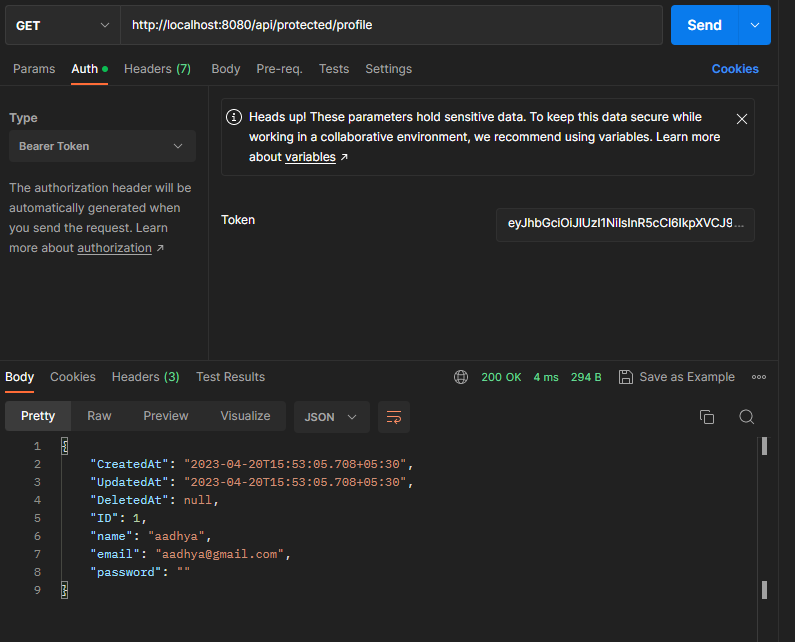
The Profile function is responsible for retrieving the user’s profile data from the database, based on the email that was provided in the authorization middleware. It will return a status code of 404 if the user is not found in the database, and a status code of 500 if an error occurs during the retrieval of the user’s profile data.
Step 7: Create the main File
In the main.go file, we open a connection to the database, provide a port the app listens to from the .env file. Inside the go-jwt directory create the main.go file:
package main

import (
 "go-jwt/controllers"
 "go-jwt/database"
 "go-jwt/middlewares"
 "go-jwt/models"
 "log"

 "github.com/gin-gonic/gin"
)

// main is the entry point of the program.
// It initializes the database, sets up the router and starts the server.
func main() {
 // Initialize the database
 err := database.InitDatabase()
 if err != nil {
  // Log the error and exit
  log.Fatalln("could not create database", err)
 }
 // Automigrate the User model
// AutoMigrate() automatically migrates our schema, to keep our schema upto date.
 database.GlobalDB.AutoMigrate(&models.User{})
 // Set up the router
 r := setupRouter()
 // Start the server
 r.Run(":8080")
}

// setupRouter sets up the router and adds the routes.
func setupRouter() *gin.Engine {
 // Create a new router
 r := gin.Default()
 // Add a welcome route
 r.GET("/", func(c *gin.Context) {
  c.String(200, "Welcome To This Website")
 })
 // Create a new group for the API
 api := r.Group("/api")
 {
  // Create a new group for the public routes
  public := api.Group("/public")
  {
   // Add the login route
   public.POST("/login", controllers.Login)
   // Add the signup route
   public.POST("/signup", controllers.Signup)
  }
  // Add the signup route
  protected := api.Group("/protected").Use(middlewares.Authz())
  {
   // Add the profile route
   protected.GET("/profile", controllers.Profile)
  }
 }
 // Return the router
 return r
}
The main function is responsible for initializing the database, setting up the router, and starting the server. Within the main function, the setupRouter function is called, which creates a router, adds routes to it, and returns the router.
Step 8: Run the App
To run this API, ensure that you have created the database and provided the necessary details, including the username and password, in the .env file. Once you have made the required configurations, open the Terminal and navigate to the root directory. From there, you can run the API using:
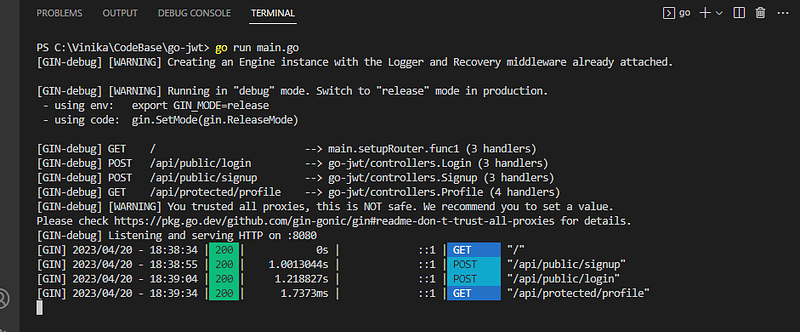
go run main.go
Your terminal output should look like this:
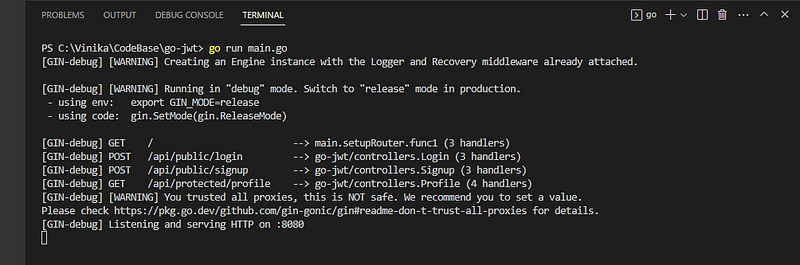
This code snippet creates an instance of the gin.Engine and starts the API server. The gin.Engine is the primary entry point for handling HTTP requests in the Gin framework. Once the server is up and running, we can use Postman to test our API.
The first endpoint we can test is the welcome page:
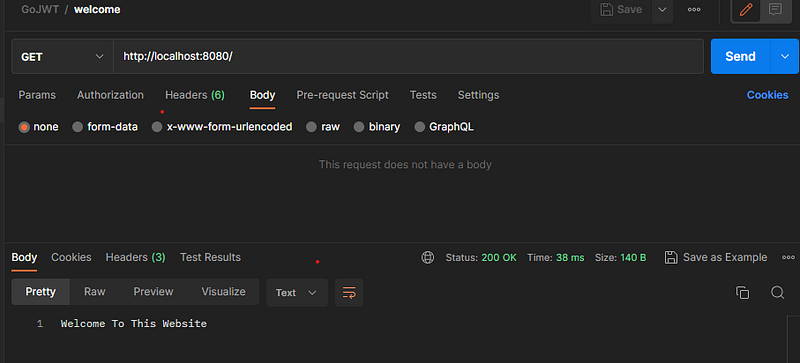
Moving forward, let’s proceed to the signup screen:
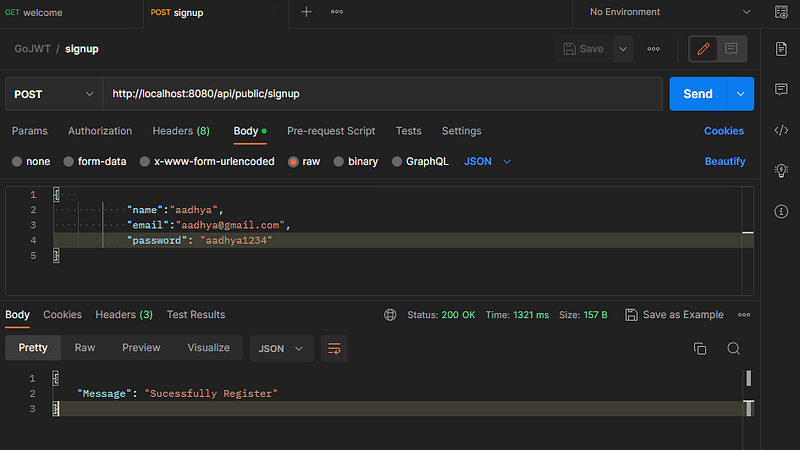
After successfully signing up, we can proceed to the login screen to test the authentication process. In the login screen:
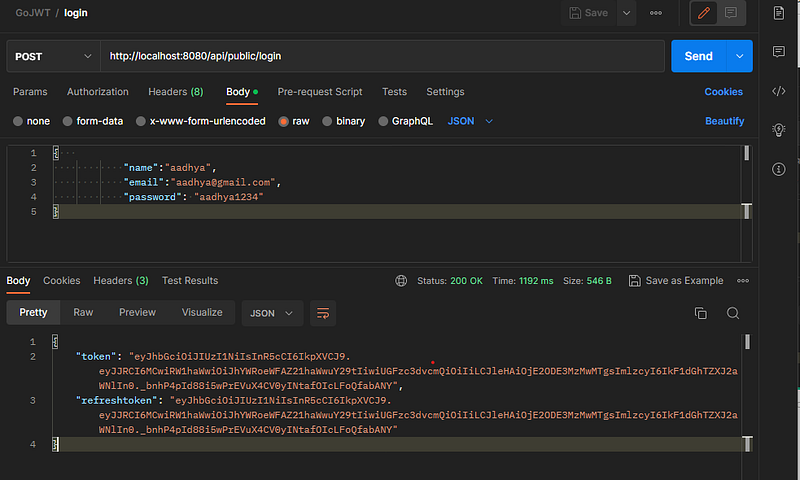
After successful login and obtaining the JWT token, you can use it to access protected endpoints. In order to test the protected endpoint, you need to provide the JWT token in the authorization header of the API request. The API will then decode the JWT token and verify its authenticity before allowing access to the protected endpoint.
Here’s how protected profile looks:
And here’s how our terminal looks like after running the commands:
Perfect!
In this lesson, we learned how to use Go, Gin, and MySQL to create a build a signup and login system. Setting up the environment and installing the required dependencies came first. The API endpoints for registration and login were then created, along with middleware for user authentication and authorization. We also talked about several password security best practises, such salting and hashing with bcrypt. By that, it will conclude the tutorial, I hope it helps you.
Check out the full source code on GitHub.
Thank you!


