Regex in Python
I want to learn Python, so I’ve been working through the Automate the Boring Stuff book by Al Sweigart. I’m documenting my journey on Medium to help retain what I’ve learned and maybe help some of you as well! Check out what I’ve completed so far here:
Chapter 7 in Automate the Boring Stuff covers Regex. Regex is extremely helpful, but not very pretty. No offense regex.
Regex is short for regular expressions, and it’s basically a language to find patterns in text. To use it with Python, the re library will need to be imported. This can be done by adding the line ‘import re’ before utilizing regex in code.
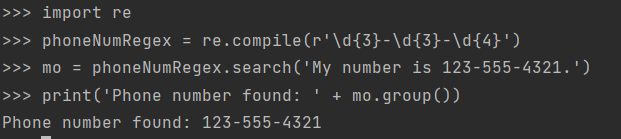
The next step for using regex is making a regex object. This is done by using the re.compile() function and putting the regex syntax in the parentheses. Since regex commonly uses backslashes (\), they’re often raw strings. This is represented by starting the regex strings with ‘r’.

In the example string above, the regular expression looks for three digits (\d{3}) followed by a hyphen, followed by three more digits (\d{3}), then a hyphen, and four more digits (\d{4}).
To see this in action, use the regex object’s search() method. This method is passed a string and is attached to the variable containing the compile function. The search method searches the string using the regex contained in the variable. If anything is found, a match object is created. Next, call the match object’s group() method to see what the regex string found.
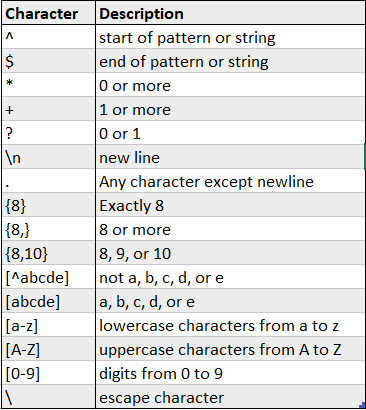
There are quite a few different characters, quantifiers, and groups used for regex, so I’m not going to list them all here. Instead, here is a link for an excellent regex resource and a chart of some commonly used syntax.
In order to accomplish this chapter’s project that is basically all I needed to know about regex. It did go into more detail, and upon doing research for this article I saw even more than can be done with regex! It would be far too much to write about in a single article, so perhaps I will write about it more later on.
The Project.
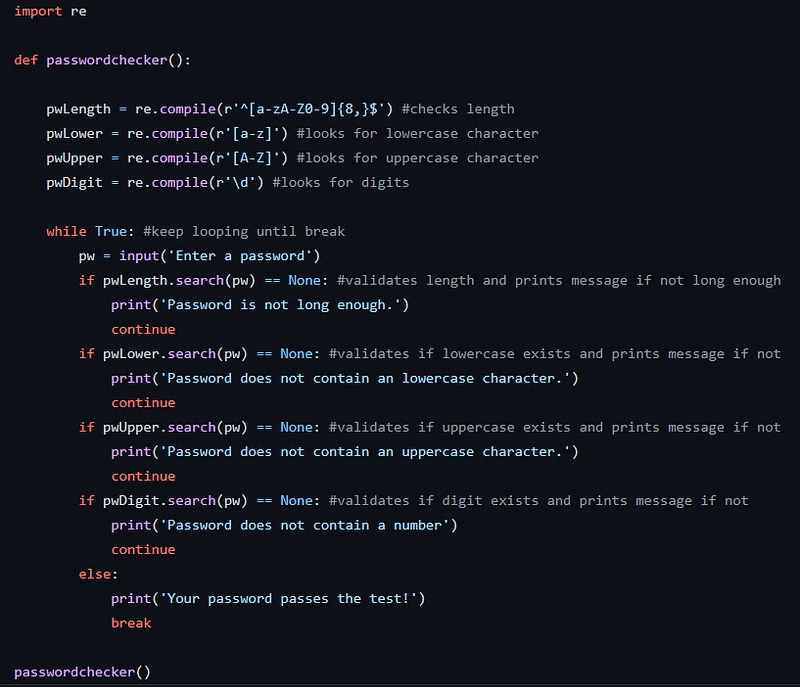
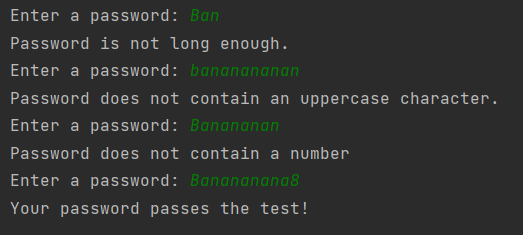
The project for this chapter is to make a function that checks the strength of a password by utilizing regex. The password needs to be at least 8 characters long, have at least one lowercase and one uppercase character, and one digit.
This project was quite a bit easier for me to figure out. I’m sure there is probably a way to write it by using less code than I did, but I’m not quite there yet. It will be interesting to come back to these early projects after I’ve been coding for a while and improve on what I’ve done.