avatarDavid Such

Free AI web copilot to create summaries, insights and extended knowledge, download it at here

11764

Abstract

ode>ODR1</code>: Bit 5</li><li><code>ODR0</code>: Bit 4</li><li><code>BDU</code> : Bit 1</li></ul><p id="0431">The value of these bits are used to determine the sensor acquisition rate as shown in Table 2.</p><figure id="99cc"><img src="https://cdn-images-1.readmedium.com/v2/resize:fit:800/1*KIS5JUoZmtYBiqE0PRG36Q.png"><figcaption>Table 2. ODR Bits and Sample Rate</figcaption></figure><p id="4356">When the ODR bits are set to ‘000’, the device is in power-down / one-shot mode. When the ODR bits are set to a value different than ‘000’, the device is in continuous-mode and automatically acquires a set of data (pressure and temperature) at the frequency selected through the <code>ODR[2:0]</code> bits (Table 2).</p><p id="bc73">The <code>BDU</code> bit in <code>CTRL_REG1</code> is used to inhibit the update of the output registers between the reading of upper, middle and lower register parts. In default mode (<code>BDU</code> = ‘0’), the lower and upper register parts are updated continuously. When the <code>BDU</code> is activated (<code>BDU</code> = ‘1’), the content of the output registers is not updated until <code>PRESS_OUT_H</code> (<code>0x2A</code>) is read, avoiding the reading of values related to different samples. This is why we read the <code>PRESS_OUT_H</code> register last.</p><p id="994f">The LPS22HB has 32 slots of 40-bit FIFO data to store the pressure and temperature output values. The 40-bit FIFO buffer consists of pressure and temperature samples of 24-bit and 16-bit words respectively. We are not using this and have the FIFO mode set to Bypass.</p><p id="4e9f">In Bypass mode (<code>FIFO_CTRL(F_MODE2:0) = ‘000’</code>) the FIFO data store is not operational and the buffer remains empty. The pressure and temperature values are sent directly to the PRESS_OUT and TEMP_OUT registers.</p><h2 id="dd28">Interpreting Pressure Readings</h2><p id="24fe">The pressure sensor stores pressure as a 24-bit word. Both values are stored as two’s complement integers as illustrated in Figure 9. The pressure data is stored in 3 registers: <code>PRESS_OUT_H</code> (0x2A), <code>PRESS_OUT_L</code> (0x29), and <code>PRESS_OUT_XL</code> (0x28).</p><figure id="40d5"><img src="https://cdn-images-1.readmedium.com/v2/resize:fit:800/1*KAsRfBmqLu_sBvaJ-7k_Pw.png"><figcaption>Figure 9. LPS22HB analog-to-digital data flow (<a href="https://www.st.com/resource/en/technical_note/tn1229-how-to-interpret-pressure-and-temperature-readings-in-the-lps22hb-pressure-sensor-stmicroelectronics.pdf">credit</a>)</figcaption></figure><p id="fb19">The readings are expressed as a 2’s complement value. If a register is defined as two’s complement, the most significant bit (msb) of the most significant byte (MSB) indicates the sign as shown in Figure 10. If the msb of the register is 1, the number is negative and we use two’s complement. If the bit is 0, the integer is positive and no translation is necessary.</p><figure id="3fec"><img src="https://cdn-images-1.readmedium.com/v2/resize:fit:800/1*aIMvcH6DHAkLie-r_KIjyg.png"><figcaption>Figure 10. 2’s complement value showing sign bit (<a href="https://www.st.com/resource/en/technical_note/tn1229-how-to-interpret-pressure-and-temperature-readings-in-the-lps22hb-pressure-sensor-stmicroelectronics.pdf">credit</a>)</figcaption></figure><p id="d6cc">The pressure sensor stores the pressure value in raw counts in 3 registers: <code>PressOut_H</code>, <code>PressOut_L</code>, and <code>PressOut_XL</code>. The most significant bit of the <code>PressOut_H</code> register indicates the sign. If the sign bit is zero, then the value is positive and the pressure in mbar is determined by dividing the decimal count value by the scaling factor of 4096. A sign bit of 1 indicates a negative value, so we first take the two’s complement of the complete word and then divide by 4096.</p><div id="5c28"><pre>Two’s Complement

Two’s complement encoding <span class="hljs-built_in">is</span> used <span class="hljs-keyword">to</span> simplify the processing required <span class="hljs-keyword">to</span> handle negative numbers <span class="hljs-built_in">and</span> subtractions. <span class="hljs-keyword">To</span> convert a <span class="hljs-type">decimal</span> number <span class="hljs-keyword">to</span> its two<span class="hljs-comment">'s complement:</span>

<span class="hljs-number">1</span>. Write the absolute value <span class="hljs-keyword">of</span> the given number <span class="hljs-keyword">in</span> <span class="hljs-keyword">binary</span> form. <span class="hljs-number">2</span>. <span class="hljs-keyword">Take</span> the complement <span class="hljs-keyword">of</span> <span class="hljs-keyword">each</span> bit (invert the bits). <span class="hljs-number">3</span>. Add one <span class="hljs-keyword">to</span> the result.

Converting <span class="hljs-keyword">from</span> <span class="hljs-keyword">binary</span> <span class="hljs-number">2</span><span class="hljs-comment">'s complement to base 10 is the process above</span> <span class="hljs-symbol">reversed:</span>

<span class="hljs-number">1</span>. Subtract one. <span class="hljs-number">2</span>. Invert the bits. <span class="hljs-number">3</span>. Convert <span class="hljs-keyword">to</span> base <span class="hljs-number">10</span> <span class="hljs-built_in">and</span> add the negative sign.</pre></div><p id="fa85">Noting that this sensor has a valid pressure range of 260 to 1260 hPa, it should never return a negative number the way that we are using it. Thus there is no need to take the 2’s complement of the concatenated count values. If you use the delta pressure function of the sensor then you could get a negative number and would need to update our library accordingly. We have include a 2’s complement conversion method, <code>twosCompToInteger()</code> in the library for this purpose. It is also used for temperature conversion, where negative numbers are possible.</p><p id="2435">To obtain the pressure in hPa, take the concatenated value of the complete word and then divide it by the scaling factor = 4096 LSB/hPa (Figure 11).</p><figure id="b5e4"><img src="https://cdn-images-1.readmedium.com/v2/resize:fit:800/1*fhQY-2IiF_hvHsRAQHepTA.png"><figcaption>Figure 11. Calculating Pressure from the 3 Registers (<a href="https://www.st.com/resource/en/technical_note/tn1229-how-to-interpret-pressure-and-temperature-readings-in-the-lps22hb-pressure-sensor-stmicroelectronics.pdf">credit</a>)</figcaption></figure><p id="e47e">When reading the pressure registers, the byte ordering is important for two reasons:</p><ol><li>In auto-increment mode (<code>IF_ADD_INC</code> in <code>CTRL_REG2</code>) the register address is automatically incremented during a multiple byte access via the serial interface (I²C or SPI). This mode is ON by default, <b>however</b>, when I²C is used with <code>BDU = 1</code>, the <code>IF_ADD_INC</code> bit has to be set to ‘0’ in <code>CTRL_REG2</code> and only a single-byte read of the output registers is allowed.</li><li>When Block Data Update (<code>BDU</code> in <code>CTRL_REG1</code>) is enabled the content of the output registers are not updated until the last register (<code>LPS22HB_PRES_OUT_H</code>) is read, avoiding the reading of values related to different samples. This library enables BDU.</li></ol><p id="77b8">The library code for reading the pressure registers, concatenating the count values and dividing by the scaling factor is shown below.</p><div id="37d9"><pre><span class="hljs-type">uint8_t</span> pressOutXL = <span class="hljs-built_in">read</span>(LPS22HB_PRES_OUT_XL); <span class="hljs-type">uint8_t</span> pressOutL = <span class="hljs-built_in">read</span>(LPS22HB_PRES_OUT_L); <span class="hljs-type">uint8_t</span> pressOutH = <span class="hljs-built_in">read</span>(LPS22HB_PRES_OUT_H);

<span class="hljs-type">long</span> val = ( ((<span class="hljs-type">long</span>)pressOutH << <span class="hljs-number">16</span>) | ((<span class="hljs-type">long</span>)pressOutL << <span class="hljs-number">8</span>) | (<span class="hljs-type">long</span>)pressOutXL );

<span class="hljs-keyword">return</span> val/<span class="hljs-number">4096.0f</span>;</pre></div><h2 id="5f24">Interpreting Temperature Readings</h2><p id="837e">The LPS22HB contains a temperature sensor which is used for compensation of the pressure sensor and is also available for reading.</p><p id="582e">The temperature raw count is stored in registers <code>Temp_Out_H</code> (0x2C) and <code>Temp_Out_L</code> (0x2B). The temperature in °C can be determined by calculating the two’s complement, if necessary, and then scaling the result. The temperature sensor operates between -40 to 85°C, so we definitely need to handle 2’s complement in this function.</p><p id="771b"><b>Note — Only negative numbers are stored as two’s complement.</b></p><figure id="4e8a"><img src="https://cdn-images-1.readmedium.com/v2/resize:fit:800/1*qx5ikhq-ZiP6lPQddzMP_Q.png"><figcaption>Figure 12. Calculating Temperature from the two Registers (<a href="https://www.st.com/resource/en/technical_note/tn1229-how-to-interpret-pressure-and-temperature-readings-in-the-lps22hb-pressure-sensor-stmicroelectronics.pdf">credit</a>)</figcaption></figure><p id="ef85">A negative value is indicated when Bit 15 in the temperature word is equal to 1. In this situation, to obtain the temperature, we first take the two’s complement of the complete word and then perform the scaling.</p><p id="1ca8">As with reading the pressure registers, byte order is important. To guarantee the correct behavior of the BDU feature, <code>TEMP_OUT_H</code> (0x2A)<i> </i>must be the last address read.</p><p id="bf34">Our code for reading the temperature registers, concatenating the value to get the count, converting from 2’s complement and scaling the output is shown below.</p><div id="861e"><pre><span class="hljs-type">uint8_t</span> tempOutL = <span class="hljs-built_in">read</span>(LPS22HB_TEMP_OUT_L); <span class="hljs-type">uint8_t</span> tempOutH = <span class="hljs-built_in">read</span>(LPS22HB_TEMP_OUT_H);

<span class="hljs-type">uint16_t</span> count = (tempOutH << <span class="hljs-number">8</span>) | (tempOutL & <span class="hljs-number">0xff</span>); <span class="hljs-type">int16_t</span> val = <span class="hljs-built_in">twosCompToInteger</span>(count);

<span class="hljs-type">float</span> result = ((<span class="hljs-type">float</span>)val)/<span class="hljs-number">100.0f</span>; <span class="hljs-comment">// In Celsius</span></pre></div><h2 id="9c9d">The Status Register</h2><figure id="dd29"><img src="https://cdn-images-1.readmedium.com/v2/resize:fit:800/1*dSeWeWXAQ1MkLlWQ5X5O9g.png"><figcaption>Figure 8. The Status Register</figcaption></figure><p id="6fac">The LPS22HB 8-bit <code>STATUS</code> Register, located at address <code>0x27</code> contains two bits that we are interested in, <code>P_DA</code> (BIT 0) and <code>T_DA</code> (BIT 1). This register is updated every ODR cycle.</p><ul><li><code>P_DA</code>: Is the Pressure Data Available bit, it is 1 when new pressure data is available and 0 otherwise.</li><li><code>T_DA</code>: Is the Temperature Data Available bit, it is 1 when new temperature data is available and 0 otherwise.</li></ul><p id="5969">For one-shot readings we can just check that the <code>ONE_SHOT</code> bit in <code>CTRL_REG2</code> (0x11) has cleared. In continuous mode we don’t bother checking these bits, if the readings haven’t been updated the library will return the previous value.</p><h2 id="ed31">Determining Altitude from Air Pressure</h2><p id="1b61">You can’t obtain an absolute height using air pressure. What you can do is get a relative height based on two different air pressures. At

Options

low altitudes, the pressure decreases by about 1.2 kPa (12 hPa) for every 100 metres gained. This decrease in air pressure with increased altitude is due to the reducing air density and weight of air above. The relationship is not linear though and weather conditions, including temperature and humidity, also affect the atmospheric pressure. Pressure is proportional to temperature and inversely proportional to humidity.</p><p id="27ee">The <a href="https://en.wikipedia.org/wiki/Barometric_formula">barometric formula</a> is used to model how air pressure changes with altitude. The barometric formula is derived from the <a href="https://en.wikipedia.org/wiki/Ideal_gas_law">ideal gas law</a>. If we assume that the temperature lapse rate is zero (i.e., temperature doesn’t change with altitude, which is a simplification), then the barometric formula for altitudes up to 86 kms is:</p><div id="3985"><pre>P = Pr exp [-gM(h - hr) / (R * Tr) ]

Where:

<span class="hljs-deletion">- Pr = reference pressure</span> <span class="hljs-deletion">- Tr = reference temperature (K)</span> <span class="hljs-deletion">- h = height at which pressure (P) is calculated (m)</span> <span class="hljs-deletion">- hr = height of reference level b (m)</span> <span class="hljs-deletion">- R = universal gas constant: 8.3144598 J/(mol·K)</span> <span class="hljs-deletion">- g = gravitational acceleration: 9.80665 m/s^2</span> <span class="hljs-deletion">- M = molar mass of Earth's air: 0.0289644 kg/mol</span>

If we include the standard temperature lapse rate (Lr = -0.0065 [K/m]), the barometeric formula becomes:

P = Pr[(Tr + (h - hr)Lr) / Tr] exp [-gM / (R * Lr)]

Which if we rearrange to get height is:

h = hr + Tr/Lr {((P/Pr) ^ [-(R * Lr) / gM]) - 1}</pre></div><p id="2d2d">A common simplification in sensor libraries (e.g., the official <a href="https://github.com/arduino-libraries/Arduino_LPS22HB/blob/master/src/BARO.cpp">Arduino LPS22HB Library</a>) is to use the formula:</p><div id="61c8"><pre>h = <span class="hljs-number">44330</span> * [<span class="hljs-number">1</span> - (P/Pr) ^ (<span class="hljs-number">1</span>/<span class="hljs-number">5.255</span>)]</pre></div><p id="be7c">This formula makes a number of assumptions (Tr = 15°C, Lr = -0.0065 [K/m]) about the parameters in the equation above. Whether these assumptions are appropriate will depend on your application. Also, based on our re-arrangement of the original equation, the correct simplification should be:</p><div id="7877"><pre>h = <span class="hljs-number">44330</span> * [(P/Pr) ^ (<span class="hljs-number">1</span>/<span class="hljs-number">5.255</span>) - <span class="hljs-number">1</span>]</pre></div><p id="df2b">Nevertheless, we will include <code>Tr</code> and <code>Pr</code> in our calculations, and use our form of the derived equation. The full barometric formula for height:</p><div id="df8e"><pre>h = hr + Tr/Lr [(P/Pr) exp [-(R * Lr) / gM] - <span class="hljs-number">1</span>]</pre></div><p id="c683">can be simplified by pre-calculating the constant expressions in the formula, in particular,</p><ul><li>hr = 0 as our height will be relative to hr.</li><li>The exponent can be simplified to: -(R * Lr) / gM = 0.190266435663732</li></ul><p id="d479">Then the formula becomes:</p><div id="f27e"><pre>h = (Tr/<span class="hljs-number">0.0065</span>) * [(P/Pr) ^ (<span class="hljs-number">0.190266</span>) - <span class="hljs-number">1</span>]</pre></div><h2 id="f69e">QNH, QFE, and QNE</h2><p id="3c65">Pilots have been concerned about measuring altitude for some time, and it makes sense for us to use the commonly accepted pressure references (<code>Pr</code> in the formulas above).</p><figure id="7cda"><img src="https://cdn-images-1.readmedium.com/v2/resize:fit:800/1*8CgUrDK5vQo7RLzNMKjbug.png"><figcaption>Figure 13. Comparison of Pressure References QNH, QFE and QNE</figcaption></figure><p id="3d4e">The reference often used in barometer libararies is <code>QNE = 1013.25 hPa = 1 atm</code>, the standard pressure reference, standard atmosphere, or average sea-level pressure. This reference has the advantage of being a constant, but you need to remember that the altitude derived is the vertical distance between your sensor and the height where atmospheric pressure is 1013.25 hPa. In aviation this distance is referred to as a Flight Level (FL), and these are used to maintain aircraft separation above the Transition Level (which varies by location as indicated on aviation charts).</p><figure id="bf80"><img src="https://cdn-images-1.readmedium.com/v2/resize:fit:800/1*tI_OFNPWCvAu54fpr26_eA.png"><figcaption>Figure 14. QNH variation over 2 days in our area</figcaption></figure><p id="dd4a">Below the Transition Level, aircraft use QNH as the reference pressure. <code>QNH is the Pressure at Mean Sea Level (MSL)</code> and it varies by location and time (Figure 14). The sensor will read the altitude above mean sea level in the vicinity of the airfield from which the QNH is obtained. These standards are defined so that everyone is using the same reference pressure and thus comparable altitudes, thereby avoiding mid air collisions.</p><p id="fb78">The third standard reference pressure is QFE. <code>QFE is the pressure of a location on the ground</code>, normally a runway threshold. If your sensor library sets Pr = QFE, then the altitude will be zero at that location. As your sensor goes up, it will give a height Above Ground Level (AGL). Obviously terrain is not flat, so the height AGL will only be with reference to the defined location.</p><p id="f9ea">Our library allows you to use any of these three pressure reference standards. A comparison of the three standard levels is shown in Figure 13.</p><figure id="d2a1"><img src="https://cdn-images-1.readmedium.com/v2/resize:fit:800/1*5o2RQ2-yesaFfByBwAJgJQ.png"><figcaption>Figure 15. Reefwing LPS22HB Examples</figcaption></figure><h2 id="2467">Using the Library</h2><p id="fb97">Looking at the examples (Figure 15) is the easiest way to learn how to use this Library. The first thing you need to do is include the library and instantiate the LPS22HB class in your sketch.</p><div id="1ae8"><pre><span class="hljs-meta">#<span class="hljs-keyword">include</span> <span class="hljs-string"><ReefwingLPS22HB.h></span></span>

ReefwingLPS22HB LPS22HB;</pre></div><p id="5268">In <code>setup()</code> you need to call <code>LPS22HB.begin()</code> to hook up the I2C connection and initialise the sensor. You can then use <code>LPS22HB.connected()</code> to check whether the sensor is available for pressure and temperature readings.</p><div id="f7eb"><pre>LPS22HB.<span class="hljs-built_in">begin</span>(); <span class="hljs-keyword">while</span> (!Serial);

<span class="hljs-keyword">if</span> (LPS22HB.<span class="hljs-built_in">connected</span>()) { Serial.<span class="hljs-built_in">println</span>(<span class="hljs-string">"LPS22HB Pressure Sensor found."</span>); }</pre></div><p id="ee1f">In <code>loop()</code> you can obtain data, process it as required and print it out to the serial console.</p><div id="5799"><pre><span class="hljs-function"><span class="hljs-type">void</span> <span class="hljs-title">loop</span><span class="hljs-params">()</span> </span>{ <span class="hljs-comment">// Sensor Reading Loop</span> Serial.<span class="hljs-built_in">print</span>(<span class="hljs-string">"Pressure: "</span>); Serial.<span class="hljs-built_in">print</span>(LPS22HB.<span class="hljs-built_in">readPressure</span>()); Serial.<span class="hljs-built_in">print</span>(<span class="hljs-string">" hPa, "</span>); Serial.<span class="hljs-built_in">print</span>(<span class="hljs-string">"Temperature: "</span>); Serial.<span class="hljs-built_in">print</span>(LPS22HB.<span class="hljs-built_in">readTemperature</span>()); Serial.<span class="hljs-built_in">print</span>(<span class="hljs-string">" C, "</span>); Serial.<span class="hljs-built_in">print</span>(<span class="hljs-string">"Altitude: "</span>); Serial.<span class="hljs-built_in">print</span>(LPS22HB.<span class="hljs-built_in">readAltitude</span>()); Serial.<span class="hljs-built_in">println</span>(<span class="hljs-string">" m"</span>); <span class="hljs-built_in">delay</span>(<span class="hljs-number">1000</span>); }</pre></div><h2 id="3e40">Library Public Methods</h2><p id="fd62">The ReefwingLPS22HB Library contains the following public methods to control your sensor.</p><div id="0b2a"><pre><span class="hljs-built_in">ReefwingLPS22HB</span>();

<span class="hljs-function"><span class="hljs-type">void</span> <span class="hljs-title">begin</span><span class="hljs-params">()</span></span>; <span class="hljs-function"><span class="hljs-type">void</span> <span class="hljs-title">reset</span><span class="hljs-params">()</span></span>; <span class="hljs-function"><span class="hljs-type">bool</span> <span class="hljs-title">connected</span><span class="hljs-params">()</span></span>;

<span class="hljs-function"><span class="hljs-type">uint8_t</span> <span class="hljs-title">whoAmI</span><span class="hljs-params">()</span></span>; <span class="hljs-function"><span class="hljs-type">void</span> <span class="hljs-title">setODR</span><span class="hljs-params">(Rate rate)</span></span>; <span class="hljs-function"><span class="hljs-type">void</span> <span class="hljs-title">setQNH</span><span class="hljs-params">(<span class="hljs-type">float</span> q)</span></span>; <span class="hljs-function"><span class="hljs-type">float</span> <span class="hljs-title">getQNH</span><span class="hljs-params">()</span></span>; <span class="hljs-function"><span class="hljs-type">void</span> <span class="hljs-title">clearQNH</span><span class="hljs-params">()</span></span>; <span class="hljs-function"><span class="hljs-type">int16_t</span> <span class="hljs-title">twosCompToInteger</span><span class="hljs-params">(<span class="hljs-type">uint16_t</span> two_compliment_val)</span></span>; <span class="hljs-function"><span class="hljs-type">float</span> <span class="hljs-title">readTemperature</span><span class="hljs-params">(Scales scales = Scales::CELSIUS)</span></span>; <span class="hljs-function"><span class="hljs-type">float</span> <span class="hljs-title">readPressure</span><span class="hljs-params">(Units units = Units::HECTOPASCAL)</span></span>; <span class="hljs-function"><span class="hljs-type">float</span> <span class="hljs-title">readAltitude</span><span class="hljs-params">(PressureReference Pr = PressureReference::QNE)</span></span>; <span class="hljs-function"><span class="hljs-type">uint32_t</span> <span class="hljs-title">readPressureCount</span><span class="hljs-params">()</span></span>;</pre></div><p id="9d31"><i>If you enjoyed this article and would like to help support my writing, then please <a href="https://reefwing.medium.com/membership">subscribe to become a Medium Member</a>. I will get a portion of your subscription fee and you get access to every story on Medium. Alternatively, you can <a href="https://ko-fi.com/davidsuch">buy me a coffee</a>!</i></p><div id="8a7a" class="link-block"> <a href="https://reefwing.medium.com/membership"> <div> <div> <h2>Join Medium with my referral link - David Such</h2> <div><h3>Read every story from David Such (and thousands of other writers on Medium). Your membership fee directly supports…</h3></div> <div><p>reefwing.medium.com</p></div> </div> <div> <div style="background-image: url(https://miro.readmedium.com/v2/resize:fit:320/0*AW3WB-yRTpbaOI02)"></div> </div> </div> </a> </div></article></body>

Reefwing LPS22HB Library for the Nano 33 BLE Sense

We blame this particular detour on Arduino! Our Raven Flight Controller Software is based on the Nano 33 BLE family of boards. A critical part of our flight firmware is the Attitude and Heading Reference System (AHRS). An Attitude and Heading Reference System (AHRS) takes information from the IMU and processes it to provide reliable roll, pitch and yaw angles.

The problem is that Arduino released a new version of the Nano 33 BLE Sense, which uses different sensors. In order to support the new hardware, it makes sense to separate the sensor processing from the sensor fusion algorithms. Consequently, we are pulling out the LPS22HB pressure sensor code from the Reefwing AHRS Library and have released it as a separate Library. This library differs from the official Arduino LPS22HB library in the following ways:

  • It provides altitude calculations for QNE, QNH and QFE pressure references.
  • It enables Block Data Update (`BDU`) which ensures that the content of the output registers is not updated until the last register is read, avoiding the reading of values related to different samples. This is important if you set the sampling rate (ODR) to anything other than one-shot.
  • It includes 2’s complement conversion for the temperature reading allowing negative values to be returned.
Differences between the Rev. 1 Sense and the Rev. 2:

- Replacement of IMU from the LSM9DS1 (9 axis) to a combination of two
  IMUs, the BMI270, 6 axis gyro & accelerometer and the BMM150,
  3 axis magnetometer
- Replacement of temperature and humidity sensor from HTS221 to the HS3003
- Replacement of microphone from MP34DT05 to MP34DT06JTR
- Replacement of power supply MPM3610 to MP2322
- Addition of VUSB soldering jumper on the top side of the board
- New test point for USB, SWDIO and SWCLK.
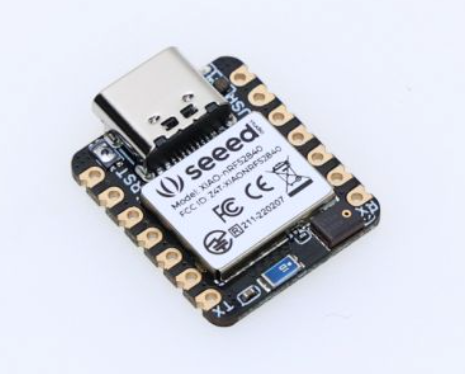
Figure 1. Seeed Studio XIAO nRF52840 Sense

We will do the same thing for the LSM9DS1 IMU code, and release a separate library for obtaining the gyroscope and magnetometer readings. These values will then be able to be fed into the AHRS library to generate accurate roll, pitch and yaw values. The added benefit of this approach is that 3rd party IMUs and other boards which use the nrf52840 processor (e.g., Seeed Studio XIAO nRF52840 Sense) can be used.
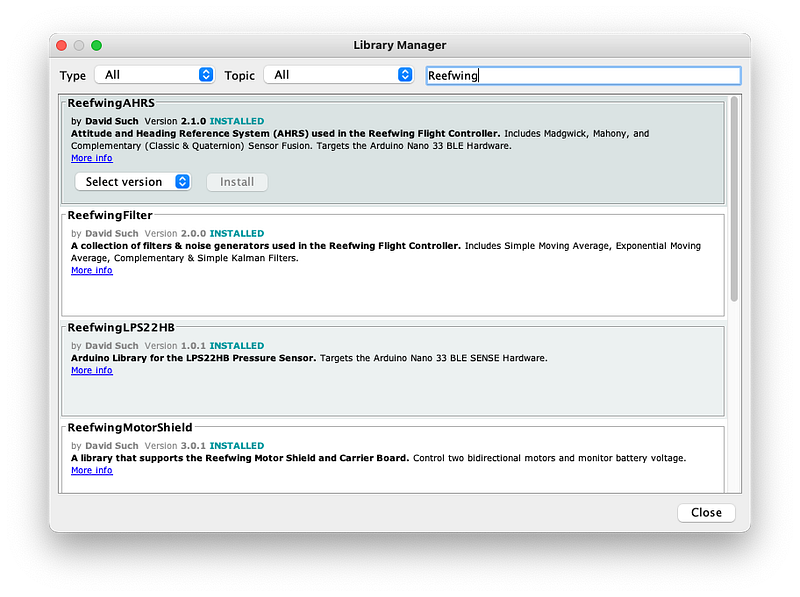
Figure 2. Arduino IDE Library Manager

The Reefwing LPS22HB Library is available for download via the Arduino IDE Library Manager (Figure 2) or directly from our GitHub repository.

The LPS22HB Pressure Sensor

The LPS22HB Pressure Sensor, is found in the Nano 33 BLE Sense Revisions 1 and 2. The LPS22HB is a compact piezoresistive absolute pressure sensor which functions as a digital barometer. The device comprises a sensing element and an interface which communicates using I2C or SPI (Figure 3). The Nano 33 BLE Sense is connected via I2C on Wire 1, and is factory calibrated.
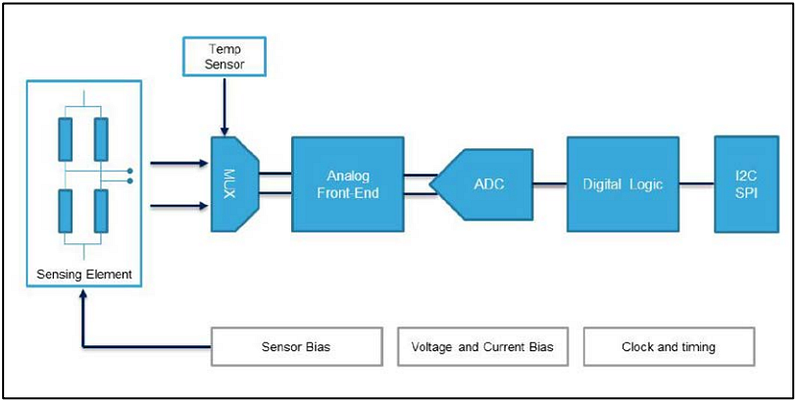
Figure 3. LPS22HB block diagram (credit)

The LPS22HB has a 260 to 1260 hPa absolute pressure range, and can be sampled at between 1 and 75 Hz (Output Data Rate, ODR = 1, 10, 25, 50 or 75). Within the range 800–1100 hPa, the relative pressure accuracy is ±0.1 hPa.

Note that hectopascals (hPa) and millibars (mbar) are equivalent.

1 hPa = 100 Pascals = 1 mbar = 0.1 kPa

Following the adoption of the Pascal as the SI unit of pressure, 
meteorologists chose the hectopascal as the international unit for 
measuring atmospheric pressure. 

The millibar is still often used in weather reports and forecasts.

The temperature sensor operates between -40 to 85°C and has an absolute accuracy of ±1.5°C. ODR for the temperature sensor is the same as for the pressure sensor.

After power is applied, the LPS22HB takes 3 ms to BOOT and load the trimming parameters. The device is then ready to communicate with the Nano 33 BLE for register configuration and pressure measurements.

The LPS22HB features three operating modes: power-down mode, one-shot mode and continuous mode. You can use our library in one-shot mode, which is the default, or set the acquisition data frequency using the setODR(Rate: rate) function.
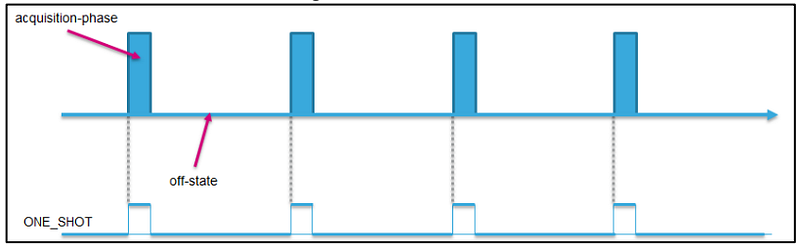
Figure 4. One-shot acquisition mode (credit)

In one-shot mode (Figure 4) the sensor will take one reading when the ONE_SHOT bit is set and will then enter power-down mode. This will turn off everything apart from I²C communications, which saves power but allows you to still control the sensor. In continuous sampling mode (Figure 5), the pressure and temperature output registers will be updated at the frequency set by the three ODR bits.
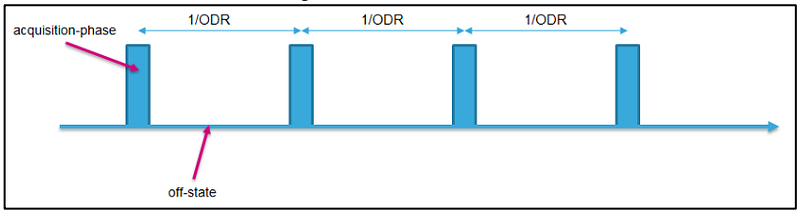
Figure 5. Continuous aquisition mode (credit)

While the LPS22HB is in power-down mode, the contents of the configuration registers are preserved and the output data registers are not updated. Thus the last sampled values remain in memory.

Register Mapping

The device contains a set of 8-bit registers which are used to control its behavior and to retrieve pressure and temperature data. The register address, made up of 7 bits, is used to identify them and to read/write the data through the serial interface.
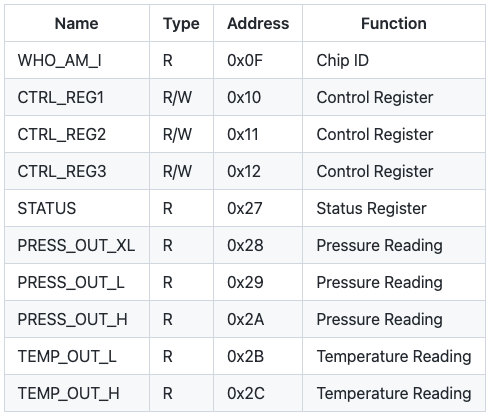
Table 1. Selected LPS22HB Registers

The registers that we use are shown in Table 1, this derived from Table 16 in the data sheet.

Who Am I?

Most chips include a register which we can read to positively identify the device on the I²C bus. For the LPS22HB, this is the WHO_AM_I register at address 0x0F. The value contained in this register (Figure 6) is 0xB1 = 1011 0001.

Figure 6. Contents of WHO_AM_I Register

We have a function which reads the WHO_AM_I register and connected() which confirms that the value in the register = LPS22HB_WHO_AM_I_VALUE = 0xB1.

One-Shot Sampling & Control Register 2 (0x11)

The 8-bit control register 2 (CTRL_REG2- Figure 7), is used to set the data acquisition mode of the barometer.

Figure 7. Control Register 2

To request a new dataset, all bits are set to 0 apart from bit 0 (ONE_SHOT), which is set to 1.

write(LPS22HB_CTRL_REG2, 0x01);

If the ONE_SHOT bit in CTRL_REG2 (0x11) is set to '1', one-shot mode is triggered and a new acquisition starts. Enabling this mode is possible only if the device was previously in power-down mode (ODR bits in CTRL_REG1 set to '000'). Once the acquisition is completed and the output registers updated, the device automatically enters power-down mode and the ONE_SHOT bit clears itself.

Continuous-mode & Control Register 1 (0x10)

Figure 8. Control Register 1

There are four important bits in control register 1 (CTRL_REG1 — Figure 8), which are used for output data rate selection and block data update, these are:

  • ODR2: Bit 6
  • ODR1: Bit 5
  • ODR0: Bit 4
  • BDU : Bit 1

The value of these bits are used to determine the sensor acquisition rate as shown in Table 2.
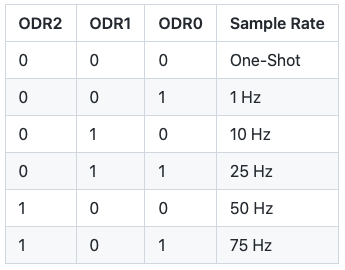
Table 2. ODR Bits and Sample Rate

When the ODR bits are set to ‘000’, the device is in power-down / one-shot mode. When the ODR bits are set to a value different than ‘000’, the device is in continuous-mode and automatically acquires a set of data (pressure and temperature) at the frequency selected through the ODR[2:0] bits (Table 2).

The BDU bit in CTRL_REG1 is used to inhibit the update of the output registers between the reading of upper, middle and lower register parts. In default mode (BDU = ‘0’), the lower and upper register parts are updated continuously. When the BDU is activated (BDU = ‘1’), the content of the output registers is not updated until PRESS_OUT_H (0x2A) is read, avoiding the reading of values related to different samples. This is why we read the PRESS_OUT_H register last.

The LPS22HB has 32 slots of 40-bit FIFO data to store the pressure and temperature output values. The 40-bit FIFO buffer consists of pressure and temperature samples of 24-bit and 16-bit words respectively. We are not using this and have the FIFO mode set to Bypass.

In Bypass mode (FIFO_CTRL(F_MODE2:0) = ‘000’) the FIFO data store is not operational and the buffer remains empty. The pressure and temperature values are sent directly to the PRESS_OUT and TEMP_OUT registers.

Interpreting Pressure Readings

The pressure sensor stores pressure as a 24-bit word. Both values are stored as two’s complement integers as illustrated in Figure 9. The pressure data is stored in 3 registers: PRESS_OUT_H (0x2A), PRESS_OUT_L (0x29), and PRESS_OUT_XL (0x28).
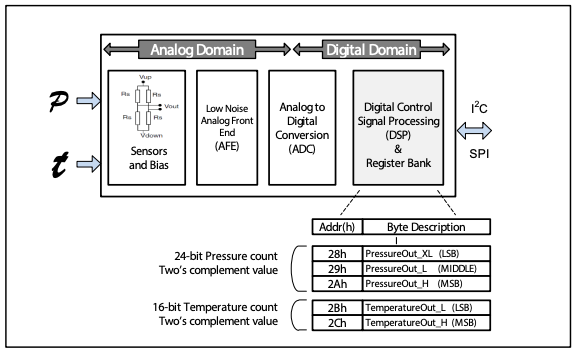
Figure 9. LPS22HB analog-to-digital data flow (credit)

The readings are expressed as a 2’s complement value. If a register is defined as two’s complement, the most significant bit (msb) of the most significant byte (MSB) indicates the sign as shown in Figure 10. If the msb of the register is 1, the number is negative and we use two’s complement. If the bit is 0, the integer is positive and no translation is necessary.
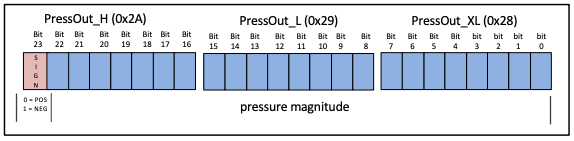
Figure 10. 2’s complement value showing sign bit (credit)

The pressure sensor stores the pressure value in raw counts in 3 registers: PressOut_H, PressOut_L, and PressOut_XL. The most significant bit of the PressOut_H register indicates the sign. If the sign bit is zero, then the value is positive and the pressure in mbar is determined by dividing the decimal count value by the scaling factor of 4096. A sign bit of 1 indicates a negative value, so we first take the two’s complement of the complete word and then divide by 4096.

Two’s Complement

Two’s complement encoding is used to simplify the processing required 
to handle negative numbers and subtractions. To convert a decimal number
to its two's complement:

1. Write the absolute value of the given number in binary form.
2. Take the complement of each bit (invert the bits).
3. Add one to the result.

Converting from binary 2's complement to base 10 is the process above
reversed:

1. Subtract one.
2. Invert the bits.
3. Convert to base 10 and add the negative sign.

Noting that this sensor has a valid pressure range of 260 to 1260 hPa, it should never return a negative number the way that we are using it. Thus there is no need to take the 2’s complement of the concatenated count values. If you use the delta pressure function of the sensor then you could get a negative number and would need to update our library accordingly. We have include a 2’s complement conversion method, twosCompToInteger() in the library for this purpose. It is also used for temperature conversion, where negative numbers are possible.

To obtain the pressure in hPa, take the concatenated value of the complete word and then divide it by the scaling factor = 4096 LSB/hPa (Figure 11).
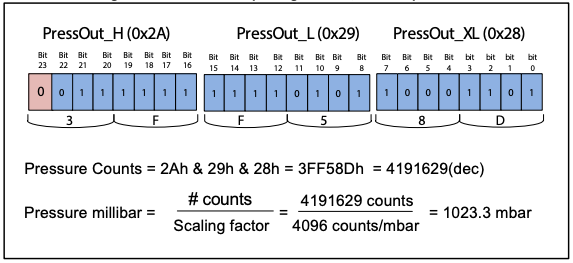
Figure 11. Calculating Pressure from the 3 Registers (credit)

When reading the pressure registers, the byte ordering is important for two reasons:

  1. In auto-increment mode (IF_ADD_INC in CTRL_REG2) the register address is automatically incremented during a multiple byte access via the serial interface (I²C or SPI). This mode is ON by default, however, when I²C is used with BDU = 1, the IF_ADD_INC bit has to be set to ‘0’ in CTRL_REG2 and only a single-byte read of the output registers is allowed.
  2. When Block Data Update (BDU in CTRL_REG1) is enabled the content of the output registers are not updated until the last register (LPS22HB_PRES_OUT_H) is read, avoiding the reading of values related to different samples. This library enables BDU.

The library code for reading the pressure registers, concatenating the count values and dividing by the scaling factor is shown below.

uint8_t pressOutXL = read(LPS22HB_PRES_OUT_XL);
uint8_t pressOutL = read(LPS22HB_PRES_OUT_L);
uint8_t pressOutH = read(LPS22HB_PRES_OUT_H);

long val = ( ((long)pressOutH << 16) | ((long)pressOutL << 8) | (long)pressOutXL );
  
return val/4096.0f;

Interpreting Temperature Readings

The LPS22HB contains a temperature sensor which is used for compensation of the pressure sensor and is also available for reading.

The temperature raw count is stored in registers Temp_Out_H (0x2C) and Temp_Out_L (0x2B). The temperature in °C can be determined by calculating the two’s complement, if necessary, and then scaling the result. The temperature sensor operates between -40 to 85°C, so we definitely need to handle 2’s complement in this function.

Note — Only negative numbers are stored as two’s complement.
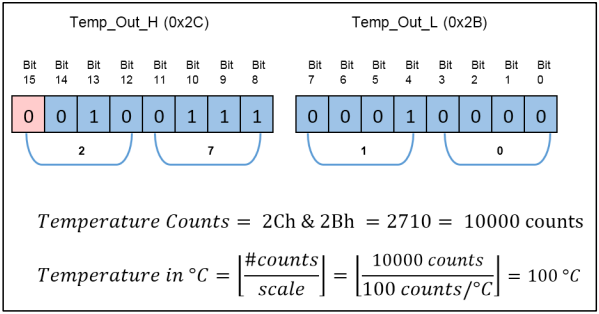
Figure 12. Calculating Temperature from the two Registers (credit)

A negative value is indicated when Bit 15 in the temperature word is equal to 1. In this situation, to obtain the temperature, we first take the two’s complement of the complete word and then perform the scaling.

As with reading the pressure registers, byte order is important. To guarantee the correct behavior of the BDU feature, TEMP_OUT_H (0x2A) must be the last address read.

Our code for reading the temperature registers, concatenating the value to get the count, converting from 2’s complement and scaling the output is shown below.

uint8_t tempOutL = read(LPS22HB_TEMP_OUT_L);
uint8_t tempOutH = read(LPS22HB_TEMP_OUT_H);

uint16_t count = (tempOutH << 8) | (tempOutL & 0xff);
int16_t val = twosCompToInteger(count);

float result = ((float)val)/100.0f; // In Celsius

The Status Register

Figure 8. The Status Register

The LPS22HB 8-bit STATUS Register, located at address 0x27 contains two bits that we are interested in, P_DA (BIT 0) and T_DA (BIT 1). This register is updated every ODR cycle.

  • P_DA: Is the Pressure Data Available bit, it is 1 when new pressure data is available and 0 otherwise.
  • T_DA: Is the Temperature Data Available bit, it is 1 when new temperature data is available and 0 otherwise.

For one-shot readings we can just check that the ONE_SHOT bit in CTRL_REG2 (0x11) has cleared. In continuous mode we don’t bother checking these bits, if the readings haven’t been updated the library will return the previous value.

Determining Altitude from Air Pressure

You can’t obtain an absolute height using air pressure. What you can do is get a relative height based on two different air pressures. At low altitudes, the pressure decreases by about 1.2 kPa (12 hPa) for every 100 metres gained. This decrease in air pressure with increased altitude is due to the reducing air density and weight of air above. The relationship is not linear though and weather conditions, including temperature and humidity, also affect the atmospheric pressure. Pressure is proportional to temperature and inversely proportional to humidity.

The barometric formula is used to model how air pressure changes with altitude. The barometric formula is derived from the ideal gas law. If we assume that the temperature lapse rate is zero (i.e., temperature doesn’t change with altitude, which is a simplification), then the barometric formula for altitudes up to 86 kms is:

P = Pr exp [-gM(h - hr)  / (R * Tr) ]

Where:

- Pr = reference pressure
- Tr = reference temperature (K)
- h  = height at which pressure (P) is calculated (m)
- hr = height of reference level b (m)
- R  = universal gas constant: 8.3144598 J/(mol·K)
- g  = gravitational acceleration: 9.80665 m/s^2
- M  = molar mass of Earth's air: 0.0289644 kg/mol

If we include the standard temperature lapse rate (Lr = -0.0065 [K/m]), 
the barometeric formula becomes:

P = Pr[(Tr + (h - hr)Lr) / Tr] exp [-gM / (R * Lr)]

Which if we rearrange to get height is:

h = hr + Tr/Lr {((P/Pr) ^ [-(R * Lr) / gM]) - 1}

A common simplification in sensor libraries (e.g., the official Arduino LPS22HB Library) is to use the formula:

h = 44330 * [1 - (P/Pr) ^ (1/5.255)]

This formula makes a number of assumptions (Tr = 15°C, Lr = -0.0065 [K/m]) about the parameters in the equation above. Whether these assumptions are appropriate will depend on your application. Also, based on our re-arrangement of the original equation, the correct simplification should be:

h = 44330 * [(P/Pr) ^ (1/5.255) - 1]

Nevertheless, we will include Tr and Pr in our calculations, and use our form of the derived equation. The full barometric formula for height:

h = hr + Tr/Lr [(P/Pr) exp [-(R * Lr) / gM] - 1]

can be simplified by pre-calculating the constant expressions in the formula, in particular,

  • hr = 0 as our height will be relative to hr.
  • The exponent can be simplified to: -(R * Lr) / gM = 0.190266435663732

Then the formula becomes:

h = (Tr/0.0065) * [(P/Pr) ^ (0.190266) - 1]

QNH, QFE, and QNE

Pilots have been concerned about measuring altitude for some time, and it makes sense for us to use the commonly accepted pressure references (Pr in the formulas above).
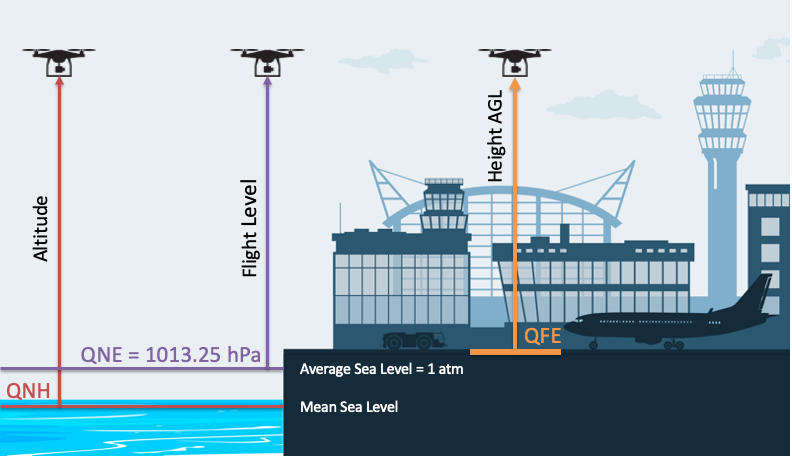
Figure 13. Comparison of Pressure References QNH, QFE and QNE

The reference often used in barometer libararies is QNE = 1013.25 hPa = 1 atm, the standard pressure reference, standard atmosphere, or average sea-level pressure. This reference has the advantage of being a constant, but you need to remember that the altitude derived is the vertical distance between your sensor and the height where atmospheric pressure is 1013.25 hPa. In aviation this distance is referred to as a Flight Level (FL), and these are used to maintain aircraft separation above the Transition Level (which varies by location as indicated on aviation charts).
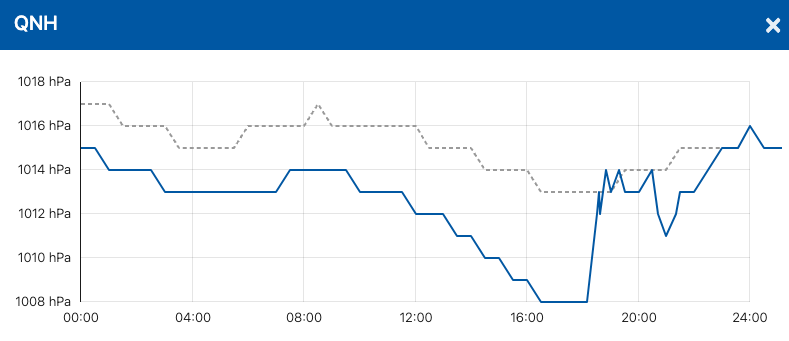
Figure 14. QNH variation over 2 days in our area

Below the Transition Level, aircraft use QNH as the reference pressure. QNH is the Pressure at Mean Sea Level (MSL) and it varies by location and time (Figure 14). The sensor will read the altitude above mean sea level in the vicinity of the airfield from which the QNH is obtained. These standards are defined so that everyone is using the same reference pressure and thus comparable altitudes, thereby avoiding mid air collisions.

The third standard reference pressure is QFE. QFE is the pressure of a location on the ground, normally a runway threshold. If your sensor library sets Pr = QFE, then the altitude will be zero at that location. As your sensor goes up, it will give a height Above Ground Level (AGL). Obviously terrain is not flat, so the height AGL will only be with reference to the defined location.

Our library allows you to use any of these three pressure reference standards. A comparison of the three standard levels is shown in Figure 13.
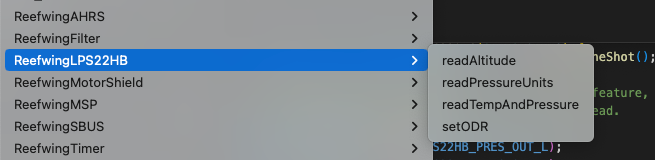
Figure 15. Reefwing LPS22HB Examples

Using the Library

Looking at the examples (Figure 15) is the easiest way to learn how to use this Library. The first thing you need to do is include the library and instantiate the LPS22HB class in your sketch.

#include <ReefwingLPS22HB.h>

ReefwingLPS22HB LPS22HB;

In setup() you need to call LPS22HB.begin() to hook up the I2C connection and initialise the sensor. You can then use LPS22HB.connected() to check whether the sensor is available for pressure and temperature readings.

LPS22HB.begin();
while (!Serial);

if (LPS22HB.connected()) {
    Serial.println("LPS22HB Pressure Sensor found.");
}

In loop() you can obtain data, process it as required and print it out to the serial console.

void loop() {
    // Sensor Reading Loop
    Serial.print("Pressure: "); Serial.print(LPS22HB.readPressure()); Serial.print(" hPa, ");
    Serial.print("Temperature: "); Serial.print(LPS22HB.readTemperature()); Serial.print(" C, ");
    Serial.print("Altitude: "); Serial.print(LPS22HB.readAltitude()); Serial.println(" m");
    delay(1000);
}

Library Public Methods

The ReefwingLPS22HB Library contains the following public methods to control your sensor.

ReefwingLPS22HB();

void begin();
void reset();
bool connected();

uint8_t whoAmI();
void setODR(Rate rate);
void setQNH(float q);
float getQNH();
void clearQNH();
int16_t twosCompToInteger(uint16_t two_compliment_val);
float readTemperature(Scales scales = Scales::CELSIUS);
float readPressure(Units units = Units::HECTOPASCAL);
float readAltitude(PressureReference Pr = PressureReference::QNE);
uint32_t readPressureCount();

If you enjoyed this article and would like to help support my writing, then please subscribe to become a Medium Member. I will get a portion of your subscription fee and you get access to every story on Medium. Alternatively, you can buy me a coffee!

Lps22hb
Arduino
Nano 33 Ble
Pressure Sensor
Arduino Library
Recommended from ReadMedium