
Redux Core Concepts You Need to Know
Redux is simple and very powerful
Introduction
Redux is advertised as “A Predictable State Container for JS Apps.” Notice that nowhere in that previous sentence did I mention React. That’s an important point. Before we get started, keep in mind that Redux has nothing to do with React even though the two are used together often.
Redux is based on Flux. An application architecture for building user interfaces that supports unidirectional data flow. Flux was created by Facebook and Redux is a popular library based on concepts introduced in Flux.
You can use Redux to manage data on a simple JavaScript page. No other libraries are necessary. It’s also nice that there is no setup involved if you just want to explore. Just drop a
We are going to cover the core concepts that you need to know and create a Redux store for managing a Dog Hotel.
Dogs check-in. Dogs check-out.
Dogs need a vacation too you know. 😃
Why should you learn Redux?
Redux makes your life easier by giving you one place to:
- store your application state.
- manage your application state.
- notify interested parties when the application state changes.
These features make the state of your application easier to manage. You can be confident that all the information in your application is coming from the store and is being managed by the store.
Redux is based on 3 primary principles.
- All app data is stored in a single state object called the state or state tree.
- The state is read-only. It can only be changed by dispatching an action to the store.
- To describe state changes you must write a function that takes the current state and the action to perform. The function must return a new updated state, not a modified version of the existing state. These functions are called Reducers.
Parts of Redux
The Store
The Store is where we, well, store application state. The Store is incredibly simple. It only does a handful of things.
- Store the state.
- Provide access to the state.
- Update the state.
- Maintain a list of interested parties (aka listeners). When an event occurs that modifies the state, these parties can be notified of the change.
That’s all the store does.
It’s no more complicated than that.
Actions
Actions are simple JavaScript objects that are used to send information from your application to the store. Actions are the only source of information for the store.
Here is an example of an action:
{
  type: 'CHECK_IN',
  dog: dog
}
Actions must have a type property. Here the type property is set to CHECK_IN. We’ll see how the type property gets used in a bit.
It’s often helpful to have a function that can create an Action object for us. These functions are appropriately called Action Creator functions.
Let’s define a couple of action creator functions that we’ll be using in our dog hotel app.
// Action Creator Functionsconst checkIn = (name, spaTreatment = false) => { return { type: 'CHECK_IN', dog: new Dog(name, spaTreatment)}
}
const checkOut = (dog) => { return { type: 'CHECK_OUT', id: dog.id}
}
These functions return a simple JavaScript object that describes the action to be taken.
Reducers
Reducers are functions. They take the previous state and an action object as arguments and return the next state.
Reducer functions must be Pure Functions.
SIDE BAR: what is a pure function?
A pure function is a function that when given the same input will always return the same result. For example,
const myPureFunc = (a) => ( a * 2 );
This function is pure because given the same input, let’s say 10, it will always return 20. It does not depend on any external state and makes no API calls.
This, however, is not a pure function:
var theNumber = 10; const notPureFunc = (a) => ( theNumber * a );
This function is accessing state that is scoped outside the function. The function has no control over this external state and it can change at any time. The result would be that our function does not return the same value.
Pure functions cannot mutate arguments, make any kind of api call or call non-pure functions.
A pure function should calculate the next state and return it.
If you’ve been working with JavaScript for any length of time, you may be familiar with the Array.prototype.reduce() function. It’s no coincidence that this feature of Redux is called a Reducer. The signature of a reducer function in Redux is the same as Array.prototype.reduce().
Redux reducer signature
(previousState, action) => nextState
Array.prototype.reduce signature
(accumulator, value) => (accumulator + value)
The signatures are the same so we’re working with a well-known concept. It’s also nice to know that if you’ve used Array.prototype.reduce() in the past that this reducer concept in Redux is familiar.
Here is a simple reducer function for our dog hotel app.
What do we have here? The first thing we do on lines 1 through 4 is create a simple JavaScript object that is going to serve as our initial state. We know that the app is going to manage dogs checking into and out of a dog hotel so we need an array to store them.
Starting on line 7 we define a reducer. The reducer takes the state and action as arguments.
Here we see why all action objects need a type property. The type property tells us what this action is supposed to do. Depending on the size and complexity of your application, these type properties can be plain strings as we have here or you can define constants that point to strings. Either way, we use the value in our switch statement to determine what to do next.
If the value of the type property is ‘CHECK_IN’, we create a new object using Object.assign and pass it back as the new state. Notice that we are not modifying the state that was passed in, we are creating a new object. We do use the properties off of the passed object to set up our new object and then append the new dog to the dogs array.
If the type property is ‘CHECK_OUT’, we simply use Array.filter to return all but the matched dog. Note that Array.filter does not modify the dogs[] array in place and return it. Array.filter returns a new array keeping in line with the rule that we cannot modify state within a reducer function.
Finally, on line 21, we create a new store and use it by making some simple calls to test the functionality. Here’s what we get in the console.
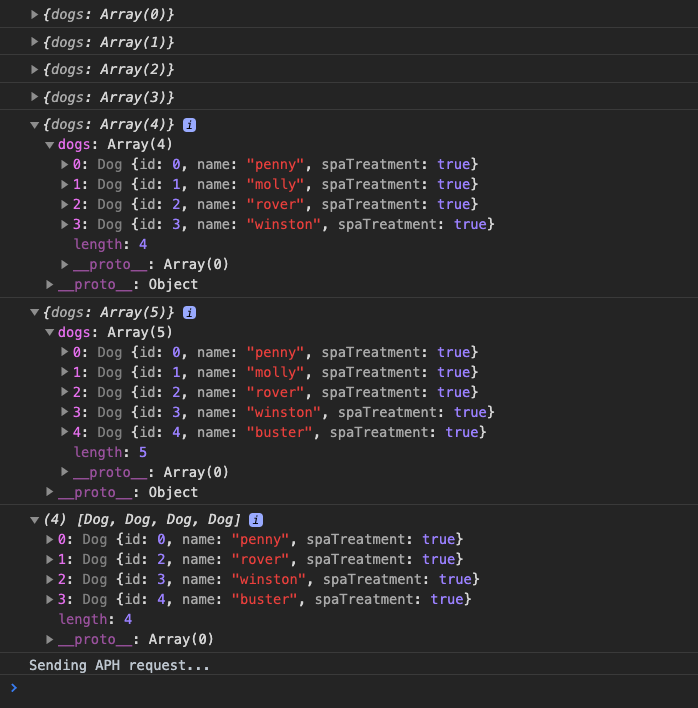
We have five dogs check-in and one dog check out.
If you examine the code, you’ll notice that all of this is done with only a couple of calls to Redux.
Redux.createStore() — create the store
store.dispatch() — send action message to the store
store.getState() — get the current state of the store
store.subscribe() — sign up to get notified when state changes occur
Looking at how simple it is to interact with Redux makes it clear why this is such a popular library to manage state in JavaScript applications.
Believe it or not, that it. Those are the core concepts of Redux. Nice and simple.
Key takeaways
- Redux is a Predictable State Container for JS Apps.
- Redux is based on Flux, an application architecture for building user interfaces. Flux was created by Facebook.
- Redux does not need to be used in conjunction with React.
- Redux is based on 3 primary principles.
- All app data is stored in a single state object called the state or state tree.
- The state is read-only. It can only be changed by dispatching an action to the store.
- To describe state changes you must write a function that takes the current state and the action to perform. The function must return the new updated state, not a modified version of the existing state. These functions are called Reducers.
5. All reducer functions must be pure functions.
Redux makes heavy use of functional programming (FP)concepts like pure functions, immutability, avoiding shared state and function composition. The learning curve for FP is steep but the payoff is well worth the effort. I have a couple of introductory FP posts here on Medium. You can check them out here and here.
Additionally, Eric Elliott has a fantastic series of posts that you should definitely read and save. I suggest you start with this one.
Functional programming concepts can be dense and hard to comprehend when you first get started. Stick with it. It takes time but I assure you the light bulb will come on when you enjoy those ah-ha moments.
The code discussed in this post is available on github at http://github.com/aritzcovan/ReduxCoreConcepts
As always, thanks for reading. If you liked this post, please be sure to check out my other posts here on Medium.
References